
1. Увод
This manual provides detailed instructions for the setup, operation, and maintenance of your KiiBoom Phantom 81 V3 Pink Mechanical Gaming Keyboard. Please read this manual thoroughly before using the product to ensure optimal performance and longevity.
Садржај пакета
- KiiBoom Phantom 81 V3 Pink Mechanical Gaming Keyboard
- USB Type-C Cable (1.5m)
- Кеицап Пуллер
- Свитцх Пуллер
- Шрафцигер
- Резервни прекидачи
- Extra Nails

2. Подешавање
Инитиал Цоннецтион
The KiiBoom Phantom 81 V3 supports three connectivity modes: Type-C Wired, Bluetooth 5.0, and 2.4GHz wireless. Locate the connectivity switches on the back of the keyboard.

Wired Mode (Type-C)
- Повежите приложени USB Type-C кабл са Type-C портом на тастатури.
- Повежите други крај кабла са доступним УСБ портом на рачунару.
- Ensure the connectivity switch on the keyboard is set to the 'USB' position.
Блуетоотх мод
- Set the connectivity switch on the keyboard to the 'BT' position.
- На свом уређају (рачунару, таблету, паметном телефону) омогућите Блутут и потражите нове уређаје.
- Select 'KiiBoom Phantom 81' from the list of available devices to pair.
- The keyboard supports up to three Bluetooth devices. Switch between them using Фн + 1/2/3.
2.4 ГХз бежични режим
- Пронађите УСБ пријемник од 2.4 GHz (обично се налази у одељку на тастатури).
- Укључите УСБ пријемник у слободан УСБ порт на рачунару.
- Set the connectivity switch on the keyboard to the '2.4G' position.
- Тастатура треба аутоматски да се повеже са пријемником.
Компатибилност оперативног система
The KiiBoom Phantom 81 V3 is compatible with both Windows and Mac operating systems. Use the dedicated 'Win/Mac' switch on the back of the keyboard to select your operating system for proper key mapping.

3. Упутство за употребу
Основне функције
- Контрола јачине звука: Use the rotary knob on the top right of the keyboard to adjust volume. Press the knob to mute/unmute.
- NKRO (N-Key Rollover): The keyboard supports N-Key Rollover, allowing all keys to register simultaneously for fast and accurate typing.

RGB контрола позадинског осветљења
The KiiBoom Phantom 81 V3 features 16.8 million RGB backlights with south-facing LEDs for reduced glare and enhanced illumination. Use the following key combinations to control the lighting effects:
- Fn + V: Toggle backlight effects.
- Fn + J: Toggle backlight colors.
- Фн + П: Toggle bottom light mode.
- Фн + Б: Toggle bottom light colors.

Прилагођавање софтвера
The keyboard supports software for advanced customization, including key remapping, light effects, macro programming, and sharing settings. Refer to the official KiiBoom website for software downloads and detailed instructions.

4. Прекидачи са могућношћу брзе замене
The KiiBoom Phantom 81 V3 features a full-key hot-swappable PCB, allowing you to easily change mechanical switches without soldering. This keyboard is compatible with both 3-pin and 5-pin mechanical switches.
Changing Switches
- Пажљиво уклоните капицу тастера помоћу приложене алатке за извлачење капица тастера.
- Use the switch puller to gently grip the top and bottom clips of the switch.
- Повуците прекидач право нагоре да бисте га уклонили са штампане плоче.
- Поравнајте пинове новог прекидача са отворима на штампаној плочи. Уверите се да су пинови прави како бисте избегли савијање.
- Пажљиво притисните нови прекидач на место док не кликне чврсто.
- Замените поклопац тастера.


Спецификације прекидача
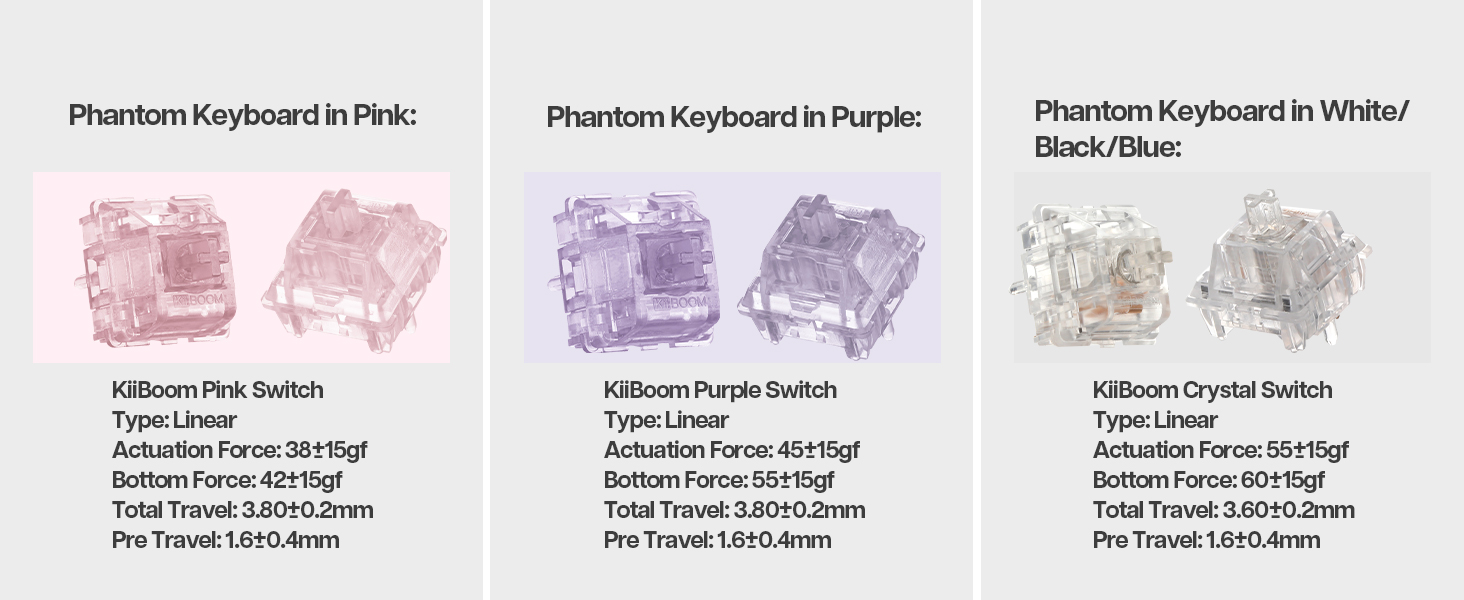
The Phantom 81 V3 Pink model typically comes with KiiBoom Pink Switches. Other KiiBoom switches are also compatible.
| Тип прекидача | Тип | Сила активирања | Bottom Force | Тотал Травел | Пре путовања |
|---|---|---|---|---|---|
| KiiBoom Pink Switch | Линеар | 38±15гф | 42±15гф | 3.80±0.2 мм | 1.6±0.4 мм |
| KiiBoom Purple Switch | Линеар | 45±15гф | 55±15гф | 3.80±0.2 мм | 1.6±0.4 мм |
| KiiBoom Crystal Switch | Линеар | 55±15гф | 60±15гф | 3.60±0.2 мм | 1.6±0.4 мм |


5. Управљање батеријом
The KiiBoom Phantom 81 V3 is equipped with an 8000mAh rechargeable battery, providing extended wireless usage.
Пуњење тастатуре
Connect the keyboard to a power source using the provided USB Type-C cable. The keyboard will indicate charging status through its RGB lighting.
Провера напајања батерије
Да бисте проверили тренутни ниво напуњености батерије, притисните Фн + Бацкспаце. The RGB lights will display the approximate battery percentage.

6. Construction and Design
The KiiBoom Phantom 81 V3 features a unique transparent design and robust internal construction.
Acrylic Frame and Keycaps
The keyboard boasts a crystal-clear acrylic frame and transparent polycarbonate keycaps with UV printing, offering both durability and a distinctive aesthetic.


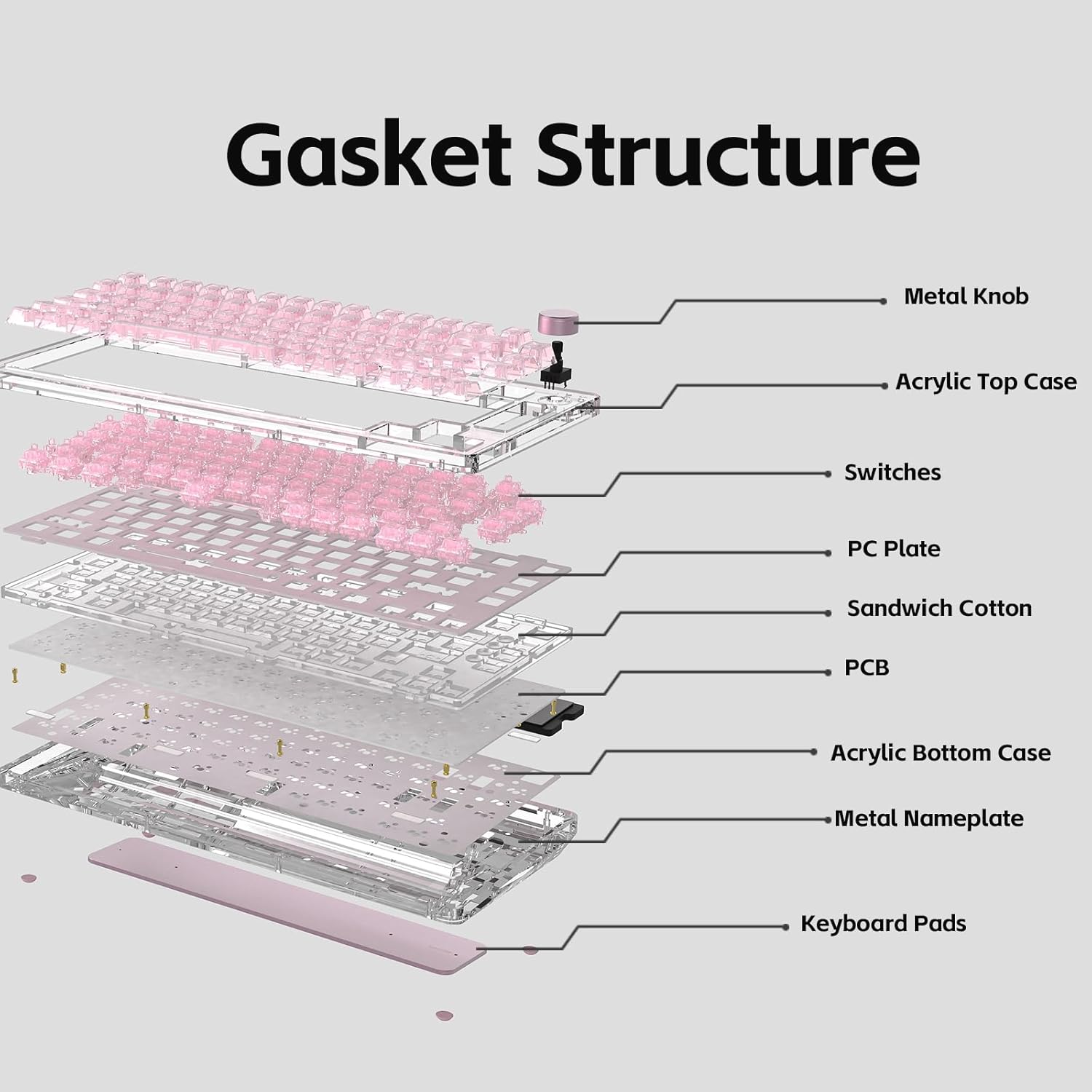
Gasket Mount Structure
The keyboard utilizes an enhanced gasket mount system with a PC (Polycarbonate) plate. This design provides a flexible, cushioned typing feel and contributes to a pleasant acoustic profile.

7. Спецификације
| Феатуре | Детаљ |
|---|---|
| Модел | Phantom 81 V3 Pink |
| Лаиоут | 75% (82 дирки + 1 дугме) |
| Повезивање | Жични Type-C, Bluetooth 5.0, бежични 2.4GHz |
| Прекидачи | Hot-swappable (3-pin/5-pin compatible) |
| Позадинско осветљење | РГБ, ЛЕД диоде окренуте према југу |
| Кеицапс | Transparent Polycarbonate with UV printing, ASA-Like Profile |
| Материјал кућишта | Акрил |
| Плате Материал | ПЦ (поликарбонат) |
| Монтажни стил | Гаскет Моунт |
| Капацитет батерије | 8000мАх |
| Оперативни систем | Виндовс, Мац |
| Димензије | 332 мм к 149 мм к 47 мм (приближно) |
| Тежина | 1.45 кг (приближно) |

8. Одржавање
Чишћење тастатуре
- Искључите тастатуру из свих извора напајања пре чишћења.
- Користите меку крпу која не оставља длачице дampened with a small amount of water or a mild cleaning solution to wipe down the keycaps and case.
- За дубље чишћење, уклоните капице тастера помоћу приложеног алата за извлачење капица тастера и користите компримовани ваздух да бисте очистили остатке између прекидача.
- Avoid using harsh chemicals or abrasive materials, as these can damage the acrylic and keycap surfaces.
Општа нега
- Избегавајте излагање тастатуре екстремним температурама или директној сунчевој светлости.
- Do not spill liquids on the keyboard. In case of a spill, immediately disconnect power and allow it to dry completely before reconnecting.
- Handle switches and keycaps gently during removal and installation to prevent damage.
КСНУМКС. Решавање проблема
Тастатура не реагује
- Ensure the keyboard is properly connected via USB, Bluetooth, or 2.4GHz.
- Check the connectivity switch on the back of the keyboard to ensure it's set to the correct mode.
- Verify the battery level. If low, connect the keyboard to a power source.
- Покушајте да поново покренете рачунар или уређај.
RGB светла не раде
- Уверите се да је тастатура укључена.
- Check the RGB control key combinations (Fn + V/J/P/B) to ensure lights are not turned off or set to a very dim setting.
- If using customization software, ensure settings are correctly applied.
Кључеви се не региструју
- If a specific key is not working, try removing and re-inserting its switch to ensure it's properly seated.
- Test with a spare switch if available to rule out a faulty switch.
- Ensure no debris is obstructing the switch mechanism.
Проблеми са Блуетоотх везом
- Уверите се да је тастатура у режиму Блуетоотх упаривања.
- Уклоните тастатуру са Блутут листе вашег уређаја и покушајте поново да је упарите.
- Уверите се да је Bluetooth на вашем уређају омогућен и да исправно функционише.
- Avoid excessive distance between the keyboard and the connected device.
10. Гаранција и подршка
KiiBoom products are manufactured to high-quality standards. For warranty information, technical support, or service inquiries, please refer to the official KiiBoom webсајт или директно контактирајте њихову корисничку подршку. Сачувајте рачун као доказ о куповини за потребе гаранције.