
1. Увод
This manual provides detailed instructions for the installation, operation, and maintenance of your Skyworth H30P WiFi 3MP Indoor Camera. Please read this manual carefully before using the product to ensure proper and safe operation. Keep this manual for future reference.
2. Безбедносне информације
- Уверите се да је напајање волtage is within the specified range for the camera.
- Do not expose the camera to water, moisture, or extreme temperatures. This product is designed for indoor use only.
- Избегавајте постављање камере у близини извора топлоте или на директној сунчевој светлости.
- Do not attempt to disassemble or modify the camera. This may void the warranty and cause damage.
- Држите камеру и њену додатну опрему ван домашаја деце.
- Use only the power adapter provided with the camera.
3. Садржај пакета
Проверите да ли су све ставке присутне у вашем пакету:
- Skyworth H30P WiFi 3MP Indoor Camera
- Повер Адаптер
- Прибор за монтажу (шрафови, зидни типлови)
- Упутство за употребу
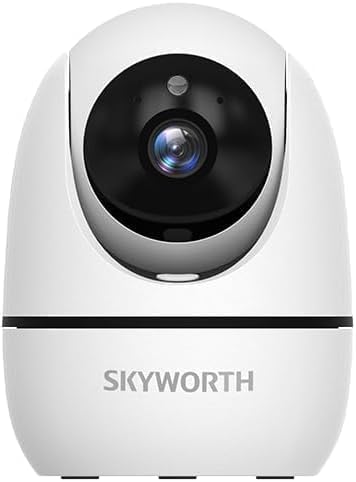
Image: The Skyworth H30P camera shown with its instruction manual and other accessories, indicating typical package contents.
4. Производ је готовview
The Skyworth H30P camera features a compact design with advanced surveillance capabilities. Familiarize yourself with its main components:
- Објектив камере: Снима видео од 3MP.
- микрофон: За аудио улаз и двосмерну комуникацију.
- говорник: За аудио излаз и двосмерну комуникацију.
- Светло индикатора статуса: Shows camera status (e.g., connected, recording).
- Напајање: Повезује се на адаптер за напајање.
- Дугме за ресетовање: Користи се за враћање фабричких подешавања.
- РЈ45 Етхернет порт: За жичану мрежну везу.
- Утор за мицроСД картицу: За локално складиштење видео записа.
Слика: Позади view of the Skyworth H30P camera, highlighting the RJ45 Ethernet port, power input, and other rear components.
5. Подешавање
5.1 Укључивање
- Прикључите адаптер за напајање на прикључак за напајање камере.
- Укључите адаптер за напајање у зидну утичницу.
- The camera will power on, and the status indicator light will illuminate. Wait for the camera to initialize.
5.2 Инсталација апликације
- Download the recommended surveillance app (e.g., 'Skyworth Smart' or similar, check product packaging for specific app name) from your smartphone's app store (App Store for iOS, Google Play Store for Android).
- Региструјте се за налог и пријавите се.
5.3 Повезивање са мрежом
The H30P supports both wireless (WiFi 6) and wired (RJ45) connections.
Wireless Connection (WiFi)
- Open the app and select 'Add Device'.
- Follow the on-screen instructions to connect the camera to your WiFi network. This typically involves scanning a QR code on the camera or entering your WiFi credentials.
- Ensure your WiFi network is 2.4GHz or 5GHz compatible (WiFi 6 for optimal performance).
Wired Connection (RJ45)
- Connect an Ethernet cable from your router to the RJ45 port on the back of the camera.
- Open the app and select 'Add Device'. The app should automatically detect the camera via the wired connection.
- Follow any remaining on-screen prompts to complete the setup.
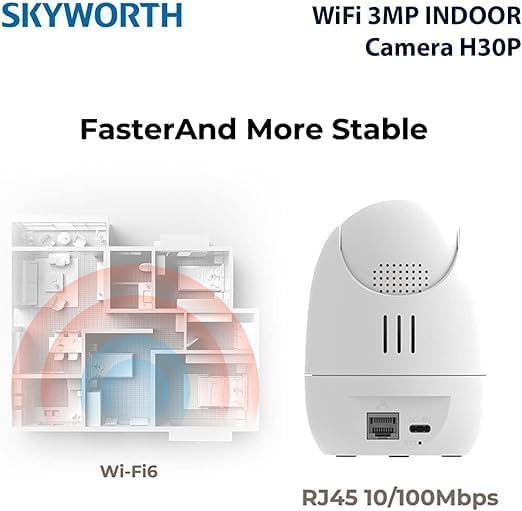
Image: A diagram illustrating the enhanced coverage of Wi-Fi 6 and the physical RJ45 port on the camera for stable network connectivity.
5.4 Монтирање камере
The Skyworth H30P camera can be placed on a flat surface or mounted to a wall.
Валл Моунтинг
- Choose a suitable location on a wall, ensuring it is within range of a power outlet and your network.
- Use the provided mounting template (if included) or mark the screw holes on the wall.
- Drill pilot holes and insert the wall plugs.
- Secure the mounting bracket (if applicable) or the camera directly to the wall using the screws.
- Подесите угао камере по потреби.
6. Упутство за употребу
6.1 Уживо View
Once connected, open the app to view the live feed from your camera. You can select the camera from your device list to access its real-time video stream.
6.2 Контрола панорамирања, нагињања и зумирања (PTZ)
The H30P camera offers 360-degree horizontal rotation and vertical tilt. Use the controls within the app to remotely adjust the camera's viewing angle. This allows for comprehensive coverage without blind spots.
6.3 Двосмерни аудио
The camera features a built-in microphone and speaker. In the app, activate the microphone icon to speak through the camera and the speaker icon to listen to audio from the camera's location. This enables real-time communication.
6.4 Ноћни вид
The H30P camera supports color night vision, providing clear images even in low-light conditions. This feature typically activates automatically when ambient light is insufficient.
6.5 Детекција и праћење покрета
Enable motion detection in the app settings to receive alerts when movement is detected. The camera can also be configured to track detected motion, keeping the subject in view.
6.6 Снимање и складиштење
The camera supports local storage via a MicroSD card (not included) and may offer cloud storage options (subscription may be required). Insert a MicroSD card into the designated slot for continuous or event-triggered recording. Manage recording settings and view репродукција путем апликације.

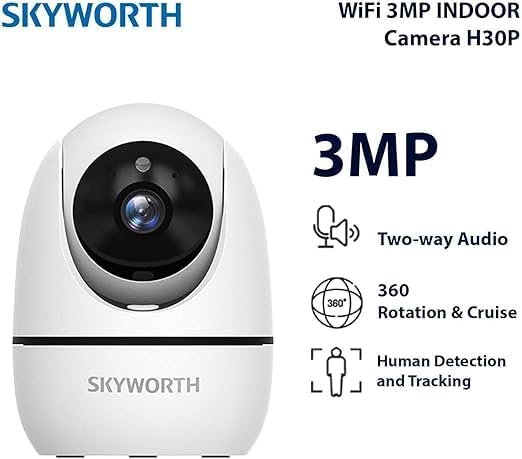
Image: A visual representation of the Skyworth H30P camera's key features, including 3MP resolution, two-way audio, 360-degree rotation, and human detection capabilities.
7. Одржавање
7.1 Чишћење
To clean the camera, gently wipe the lens and body with a soft, dry cloth. Do not use harsh chemicals or abrasive cleaners.
7.2 Ажурирања фирмвера
Periodically check the app for available firmware updates. Keeping your camera's firmware up-to-date ensures optimal performance and security features.
КСНУМКС. Решавање проблема
| Проблем | Могући узрок | Решење |
|---|---|---|
| Камера се не укључује | Нема струје, неисправан адаптер | Check power connection and outlet. Ensure adapter is working. |
| Није могуће повезати се на ВиФи | Incorrect WiFi password, camera too far from router, 5GHz only network (if camera is 2.4GHz only) | Verify password. Move camera closer to router. Ensure router supports 2.4GHz or camera supports 5GHz. Reset camera and try again. |
| Нема видео фида | Network issue, camera offline | Check network connection. Restart camera and router. Verify camera status in app. |
| Двосмерни звук не ради | Microphone/speaker muted in app, volume too low | Check app settings for audio controls. Adjust volume. |
| Motion detection not triggering | Detection sensitivity too low, feature disabled | Adjust motion detection sensitivity in app. Ensure feature is enabled. |
9. Спецификације
| Феатуре | Детаљ |
|---|---|
| Број модела | Х30П |
| Резолуција снимања видео записа | 3 мегапиксела |
| Технологија повезивања | Wireless (WiFi 6), Wired (RJ45) |
| Цоммуницатион Протоцол | ВиФи мрежа |
| Посебне карактеристике | HD Resolution, Two-Way Audio, Color Night Vision, Motion-Activated Recording, Motion Sensor |
| Унутрашња/спољна употреба | Индоор |
| Компатибилни уређаји | Смартпхоне |
| Извор напајања | Цордед Елецтриц |
| Тип монтаже | Валл Моунт |
| Препоручена употреба | Baby Monitoring, Pet Monitoring, Indoor Security, Gaming, Tracking |
| Димензије производа | 4 к 8 к 8 цм; 240 грама |
| Батерије су потребне? | бр |
| Укључене компоненте | Skyworth Body |
| Земља порекла | Кина |
10. Гаранција и подршка
Your Skyworth H30P camera comes with a standard manufacturer's warranty. Please refer to the warranty card included in your package or contact Skyworth customer support for details regarding warranty terms and conditions.
For technical support, troubleshooting assistance, or any inquiries regarding your product, please visit the official Skyworth webсајт или контактирајте њихову службу за кориснике. Контакт информације се обично могу наћи на паковању производа или на произвођачевој webсајту.