
HTC N15
HTC N15 Wireless Clip On Earbuds User Manual
Модел: Н15
Увод
This manual provides detailed instructions for the setup, operation, and maintenance of your HTC N15 Wireless Clip On Earbuds. Please read this manual thoroughly before using the product to ensure proper function and longevity.
Садржај пакета
Проверите да ли су све ставке присутне у паковању вашег производа:
- 1 Pair HTC N15 Clip On Earbuds
- 1 Кућиште за пуњење
- 1 УСБ-Ц кабл за пуњење
- 1 Quick Start Guide (Basic Operations)
Производ је завршенview
The HTC N15 Wireless Clip On Earbuds feature an open-ear design for situational awareness and a lightweight, secure fit. They come with a compact charging case for extended use.
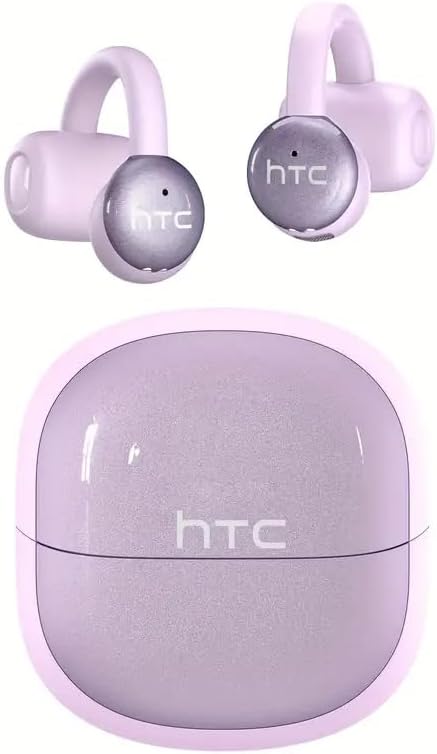
Image: HTC N15 Wireless Clip On Earbuds and Charging Case.

Image: The HTC N15 earbuds and charging case, highlighting battery life features such as 1.5 hours fast charging, 24 hours with the charge case, 8 hours on a single charge, and a Type-C charge port.
Пуњење слушалица и футроле
Before first use, fully charge the earbuds and charging case. The charging case provides additional power for on-the-go charging.
- Пуњење кућишта: Connect the provided USB-C cable to the charging port on the case and a power source. The indicator lights on the case will show the charging status.
- Пуњење слушалица: Place the earbuds into the charging case. Ensure they are correctly seated. The earbuds will begin charging automatically.
A single charge provides approximately 8 hours of playback. The charging case extends total playtime to about 22 hours. Fast charging allows for quick power replenishment.

Image: Visual representation of the HTC N15 earbuds' battery life: 8 hours on a single charge, 24 hours with the charging case, and 1.5 hours for fast charging.
Подешавање и упаривање
The HTC N15 earbuds utilize Bluetooth 6.0 technology for a stable and low-latency connection. They are compatible with iOS and Android devices.
- Укључено: Отворите кућиште за пуњење. Слушалице ће се аутоматски укључити и ући у режим упаривања.
- Активирајте Блуетоотх: На свом уређају (паметном телефону, таблету, лаптопу) омогућите Блутут.
- Изаберите уређај: In your device's Bluetooth settings, search for 'HTC NE15' and select it to pair.
- Потврда: Након упаривања, гласовна порука ће потврдити везу.

Image: A diagram illustrating the 'Upgraded Bluetooth 6.0 Technology' with a comparison to Bluetooth 5.3 and 5.4, emphasizing low latency and fast connection.

Image: The HTC N15 earbuds and charging case shown with various compatible devices including notebooks, TVs, desktops, watches, phones, and iPads, demonstrating flexible connectivity. A phone screen displays 'HTC NE15 Connected'.
Operating Instructions (Touch Control)
The HTC N15 earbuds feature smart touch controls on both earbuds for easy management of calls and music playback.
- Одговори/заврши позив: Click either earbud once.
- Одбиј позив: Притисните и држите било коју слушалицу 2 секунде.
- Пусти/паузирај музику: Двапут кликните на било коју слушалицу.
- Претходна песма: Трипут кликните на леву слушалицу.
- Следећа песма: Трипут кликните на десну слушалицу.
- Појачавање звука: Click the right earbud once.
- Смањивање јачине звука: Click the left earbud once.
- Гласовни асистент: Држите леву слушалицу 2 секунде.
- Режим игре: Држите десну слушалицу 2 секунде.

Image: A diagram illustrating the touch control functions for the HTC N15 earbuds, showing actions for answering/ending calls, rejecting calls, playing/pausing music, skipping tracks, adjusting volume, activating voice assistant, and enabling game mode.
Упутства за ношење
The HTC N15 earbuds feature an ergonomic open-ear clip design for a secure and comfortable fit, allowing you to remain aware of your surroundings.
- Identify L/R: Confirm the left (L) and right (R) earbuds.
- Позиционирање: Confirm the direction of the earbud.
- Причвршћивање: Gently clip the earbud onto the thinnest part of your ear by sliding it down.
- Подеси: Adjust the earbud tip to align with your ear canal for optimal sound and comfort.
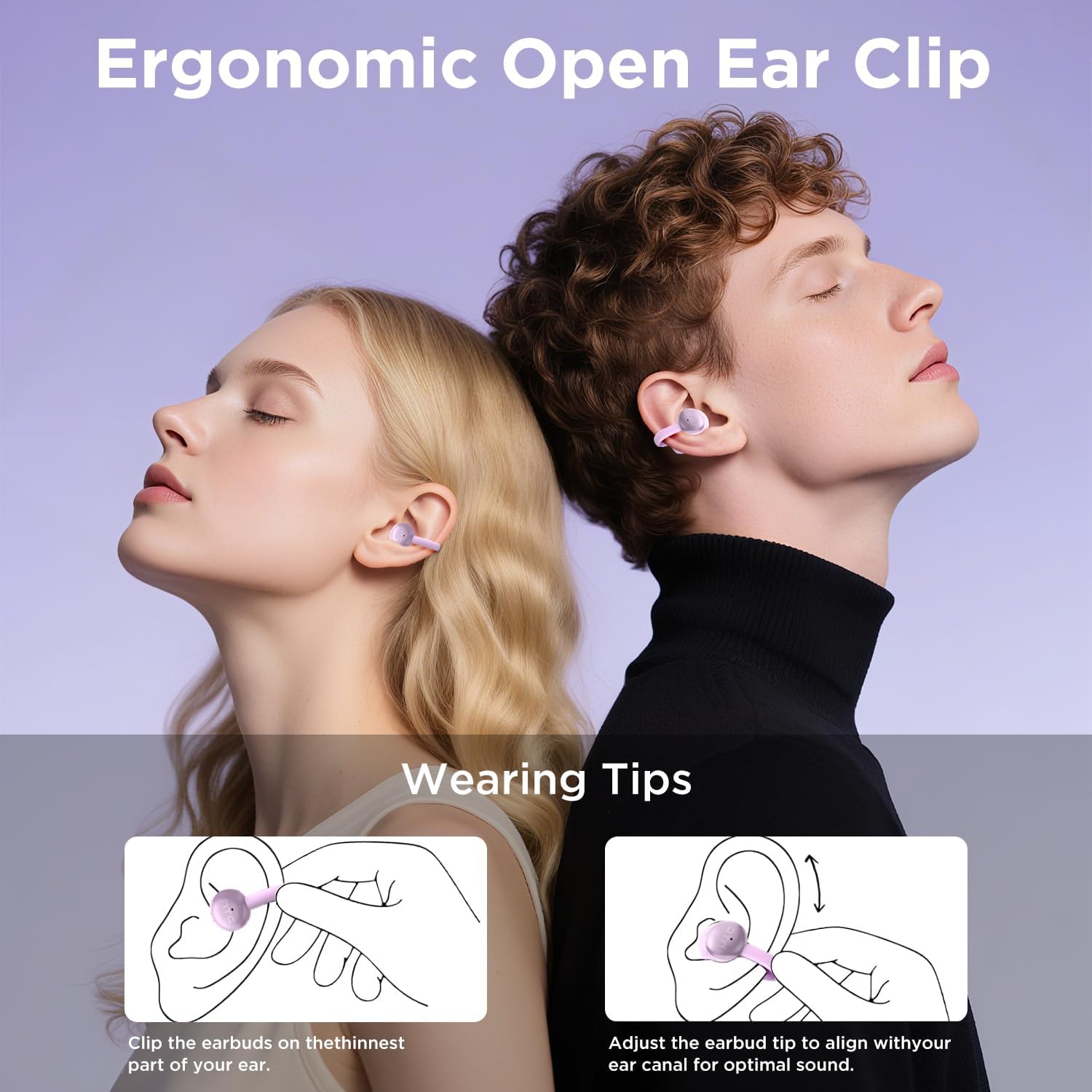
Image: A visual guide demonstrating the ergonomic open-ear clip design and wearing tips for the HTC N15 earbuds, showing how to clip them onto the ear and adjust for optimal sound.

Image: The HTC N15 earbuds emphasizing 'All-Day Comfort' with features like '4.7g Super Light' and a 'Flexible C-Bridge Design' for a secure fit.

Image: A four-step visual guide titled 'HOW TO WEAR?' showing how to correctly position and adjust the HTC N15 earbuds on the ear.
Одржавање
To ensure the longevity and optimal performance of your HTC N15 earbuds, follow these maintenance guidelines:
- Чишћење: Regularly wipe the earbuds and charging case with a soft, dry cloth. Avoid using harsh chemicals or abrasive materials.
- Отпорност на воду: The earbuds are IPX4 sweatproof, meaning they are resistant to splashes and sweat. Do not submerge them in water or expose them to heavy rain.
- Складиштење: Када се не користе, чувајте слушалице у њиховој футроли за пуњење како бисте их заштитили од прашине и оштећења.
- температура: Избегавајте излагање слушалица екстремним температурама (врућим или хладним) или директној сунчевој светлости током дужег периода.
Решавање проблема
If you encounter issues with your HTC N15 earbuds, refer to the following common solutions:
- Слушалице се не упарују: Уверите се да су обе слушалице напуњене и у режиму упаривања. Искључите и укључите Bluetooth на уређају, а затим поново покушајте да их упарите.
- Нема звука или је јачина звука ниска: Check the volume levels on both your device and the earbuds. Ensure the earbuds are correctly positioned in your ears. Due to the open-ear design, you may need to increase the volume slightly in noisy environments.
- Испадање слушалица: Ensure you are wearing the earbuds correctly as per the wearing instructions. Adjust the clip and earbud tip for a snug fit.
- Додирне контроле не реагују: Ensure your fingers are clean and dry. Try restarting the earbuds by placing them back in the case and taking them out again.
- Проблеми са пуњењем: Verify the USB-C cable and power source are working. Ensure the earbuds are properly seated in the charging case.
Спецификације
| Феатуре | Детаљ |
|---|---|
| Назив модела | HTC NE15 |
| Технологија повезивања | Бежично (Bluetooth 6.0) |
| Облик слушалице | Отвореног уха |
| Контролни метод | Додирните |
| Трајање батерије (слушалице) | 8 сати (једно пуњење) |
| Укупно време репродукције (са футролом) | 22 сата |
| Ниво отпорности на воду | IPX4 (отпоран на зној) |
| Материјал | Пластика, силикон |
| Тежина артикла | 4.6 унци |
| Компатибилни уређаји | Cellphones, Tablets |
| УПЦ | 768649989703 |
Видео о производу
Видео: Распакивање и готовоview of the HTC Wireless Clip On Earbuds N15 Bluetooth 6.0. This video demonstrates the product packaging, contents, and the physical appearance of the earbuds and charging case.
Гаранција и подршка
HTC provides customer support for its products. For any questions or assistance, please refer to the contact information provided with your purchase or visit the official HTC support webсајту.
Корисничка подршка: 7*24 Live Chat Support is available for assistance with your HTC N15 earbuds.
Сачувајте доказ о куповини за гаранцијске захтеве.
Ask a question about this manual
Ask about setup, troubleshooting, compatibility, parts, safety, or missing instructions. Manuals+ will review the question and use this page’s manual context to help answer it.