
1. Производ је готовview
The Vormooi V15 is a compact and portable digital voice recorder designed for high-quality audio capture in various environments, including lectures, meetings, and classes. It features a large internal storage capacity and advanced noise reduction technology.
Кључне карактеристике:
- Massive 64GB built-in memory: Stores up to 750 hours of voice recordings in WAV and MP3 formats.
- Компактан и преносив дизајн: Ултра-танак проfile (0.25 x 1.3 x 2.2 inches) and lightweight (0.7 ounces) for maximum portability.
- Дуготрајна пуњива батерија: Provides extended recording sessions.
- АИ смањење шума: Equipped with an intelligent 2155P AI chip for enhanced noise cancellation and pure recording.
- Voice-Activated Recording (VAR): Intelligently skips silent passages to save memory and time.
- Једноставна операција: One-button recording and saving.
- Универзална компатибилност: Connects via USB Type-C to Windows and macOS computers.

Image: Key features of the Vormooi V15 recorder, including its recording capacity, memory, and battery life.
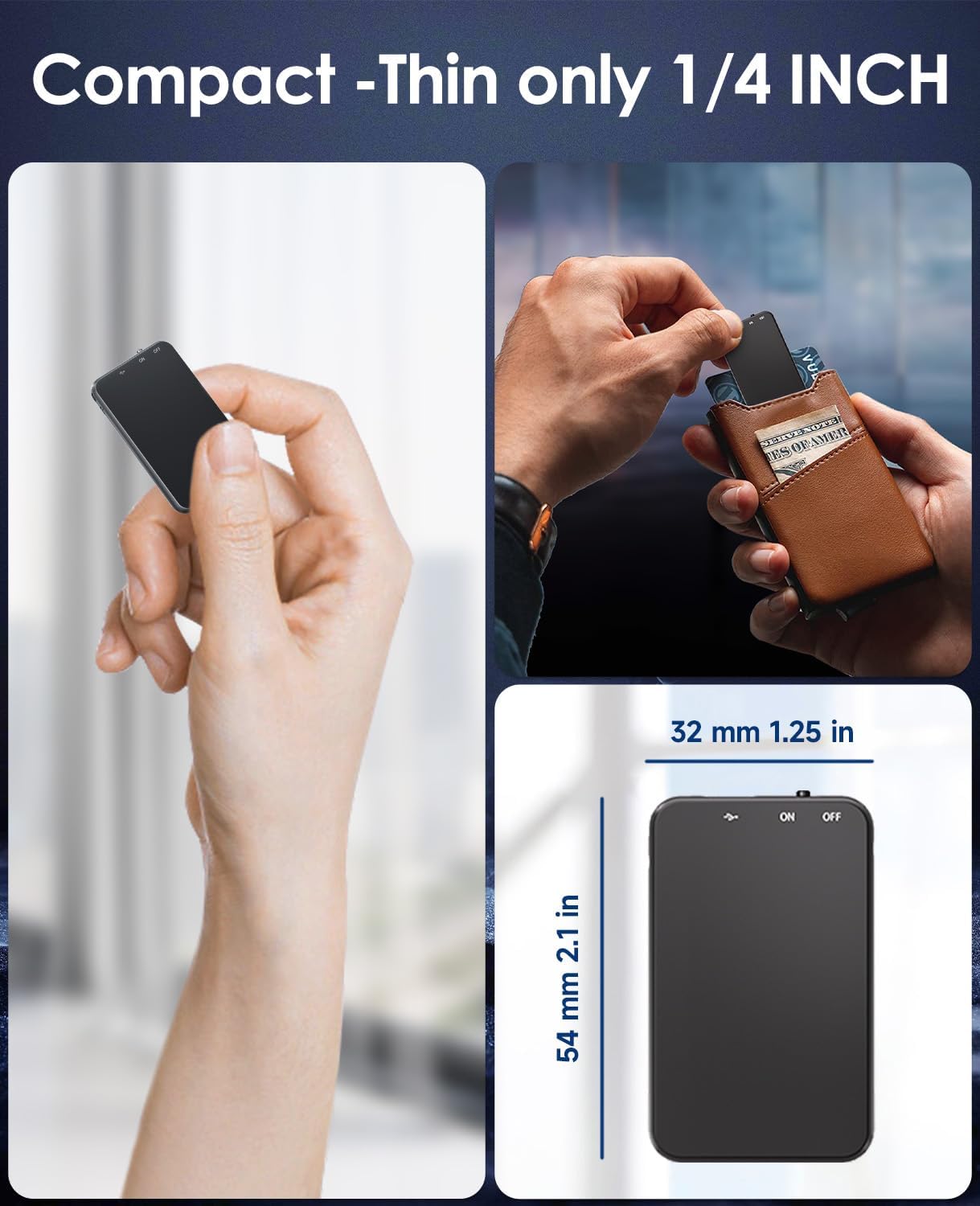
Image: Demonstrates the compact and thin design of the Vormooi V15, showing its small dimensions and portability.

Image: Illustrates the advanced AI noise cancellation technology and supported recording formats (MP3, WAV) of the V15 recorder.
2. Садржај пакета
Након отварања пакета, уверите се да су сви предмети присутни и у добром стању:
- 1 x Vormooi V15 Digital Voice Recorder
- 1 x USB Type-C Cable (for charging and data transfer)
- 1 x Упутство за употребу (овај документ)
3. Подешавање
3.1 Пуњење уређаја
Before first use, fully charge the Vormooi V15 recorder. Connect the included USB Type-C cable to the recorder's Type-C port and the other end to a USB power adapter (not included) or a computer's USB port. The indicator light will show charging status.
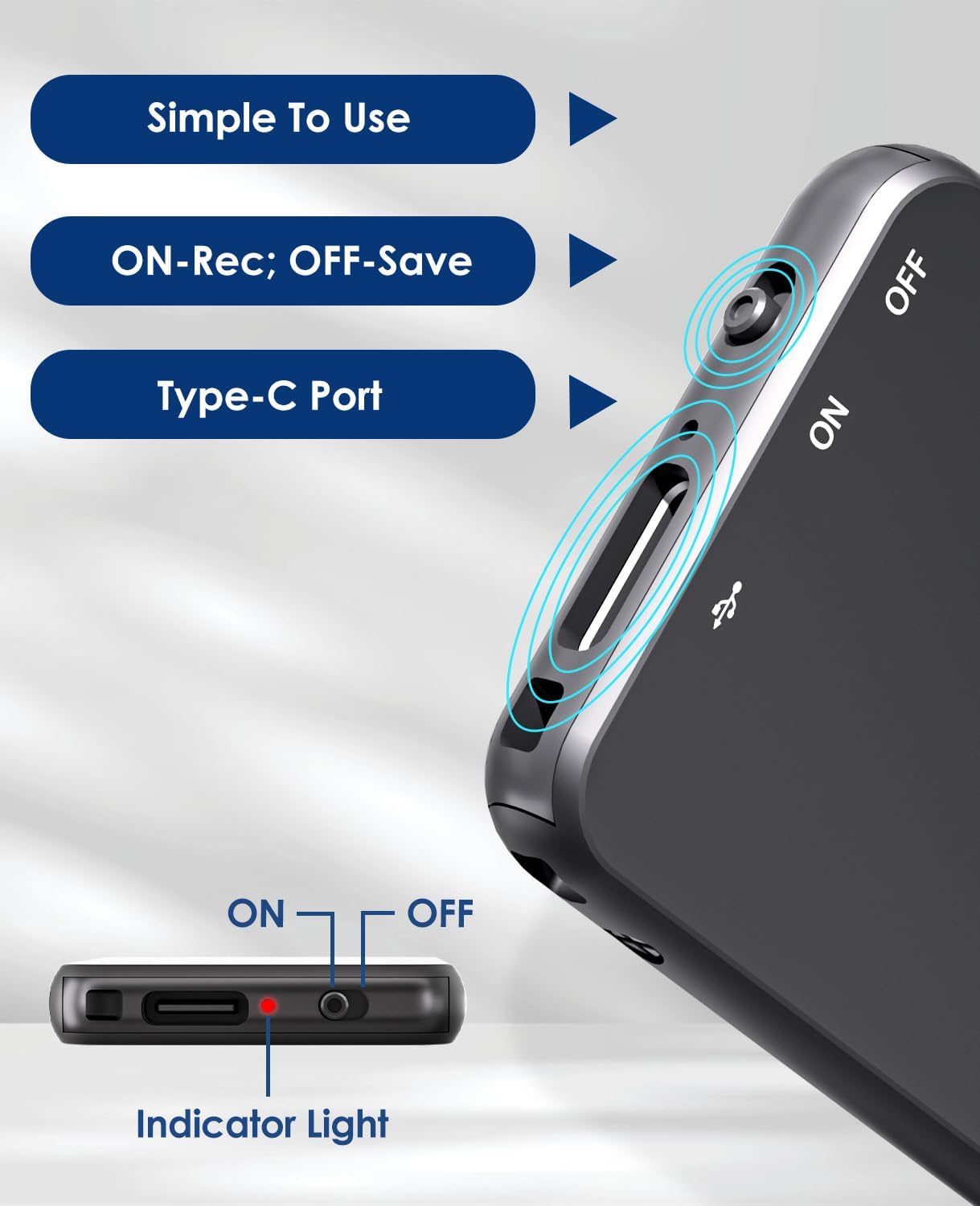
Image: Details of the recorder's side, highlighting the ON/OFF switch, Type-C port, and indicator light for simple operation.
3.2 Укључивање/искључивање
To power on the device, slide the ON/OFF switch to the "ON" position. To power off, slide it to the "OFF" position. The indicator light will briefly illuminate.
4. Упутство за употребу
4.1 Снимање звука
To start recording, simply slide the ON/OFF switch to the "ON" position. The device will automatically begin recording. The indicator light may flash or change color to indicate recording status. To stop recording and save the file, slide the switch to the "OFF" position.
4.2 Voice-Activated Recording (VAR)
The V15 features a voice-activated recording function. When enabled, the recorder will automatically pause recording during periods of silence and resume when sound is detected, optimizing memory usage. The sensitivity of the voice activation can be adjusted (though specific instructions for adjustment are not provided in the product images, it's a common feature).

Image: Depicts the Voice-Activated Recording (VAR) feature, illustrating how it saves memory by skipping silent blanks and showing different sensitivity levels.
4.3 Преношење Fileс на рачунар
Connect the Vormooi V15 to your computer using the provided USB Type-C cable. The device will appear as a removable storage device (like a USB drive). You can then drag and drop your recorded audio files (MP3 or WAV format) to your computer. The device is compatible with Windows and macOS operating systems.

Image: Shows the Type-C connection and compatibility with Windows, Mac, and Linux operating systems for easy file пренос.
4.4 Репродукција
While the device supports playback, specific controls for direct playback (e.g., built-in speaker, headphone jack) are not detailed in the provided information. Typically, playback is done by connecting headphones to the device's headphone jack (if available) or by transferring files to a computer and playing them there.
Note: The product specifications mention "Headphones Jack: 1", confirming the presence of a jack for direct playback.
5. Одржавање
- Чишћење: Use a soft, dry cloth to clean the device. Do not use liquid cleaners or solvents.
- Складиштење: Чувајте рекордер на хладном и сувом месту, даље од директне сунчеве светлости и екстремних температура.
- Одржавање батерије: Да бисте продужили век трајања батерије, избегавајте често потпуно пражњење батерије. Редовно пуните уређај, чак и ако га не користите дуже време.
- Резервна копија података: Regularly back up important recordings to your computer to prevent data loss.
КСНУМКС. Решавање проблема
- Уређај се не укључује: Уверите се да је батерија напуњена. Прикључите се на извор напајања и покушајте поново.
- Не може се снимати: Check if the memory is full. Transfer fileна рачунар да бисте ослободили простор.
- Лош квалитет снимања: Ensure the microphone is not obstructed. Reduce background noise. Check if AI Noise Reduction is functioning.
- Рачунар не препознаје уређај: Try a different USB port or cable. Ensure the device is powered on. Restart your computer.
- Ресетовање уређаја: If the device becomes unresponsive, locate the small "RESET" hole (often requiring a pin or paperclip) and gently press it to restart the device.

Слика: Предња и задња страна views of the V15, indicating the location of the reset button and overall dimensions.
7. Спецификације
| Феатуре | Детаљ |
|---|---|
| Број модела | В15 |
| Капацитет складиштења | 64 ГБ |
| Капацитет снимања | До 750 сати |
| Формати снимања | ВАВ, МП3 |
| Димензије производа | 0.25 x 1.3 x 2.2 инча (0.25"Д x 1.3"Ш x 2.2"В) |
| Тежина артикла | 0.705 унци (20 грама) |
| Тип батерије | Lithium-ion (1 A battery included) |
| Трајање батерије | 40-50 сати (приближно) |
| Порт за пуњење | УСБ Типе-Ц |
| Микрофон | Уграђени |
| Јацк за слушалице | 1 |
| Компатибилни уређаји | Windows/macOS Computer |
| Произвођач | Вормоои |
8. Гаранција и подршка
For warranty information and technical support, please refer to the documentation included with your purchase or visit the official Vormooi webсајт. Сачувајте доказ о куповини за потребе гаранције.
For further assistance, you may contact Vormooi customer service through their official channels. Details are typically found on the product packaging or the brand's official online presence.
9. Наменска употреба
The Vormooi V15 Digital Voice Recorder is intended for personal and professional audio recording purposes, including but not limited to:
- Recording lectures and academic presentations.
- Documenting business meetings and conferences.
- Conducting interviews.
- Capturing personal memos and ideas.

Слика: прamples of typical usage scenarios for the V15 recorder, such as in classes, interviews, meetings, and for personal notes.


