
Oakcastle IR200
Упутство за употребу интернет радија Oakcastle IR200
Модел: ИР200
1. Увод
Thank you for choosing the Oakcastle IR200 Internet Radio. This manual provides essential information for the safe and efficient operation of your device. Please read it thoroughly before use and retain it for future reference.
The Oakcastle IR200 is a versatile audio system offering multiple listening options, including Internet Radio, DAB+, FM, Bluetooth 5.3, and AUX input. It features a color display, remote control, and podcast support for a comprehensive audio experience.
2. Садржај пакета
Пажљиво распакујте кутију и уверите се да су све ставке наведене у наставку присутне и у добром стању:
- Oakcastle IR200 Internet Radio Unit
- Повер Цабле
- Ремоте Цонтрол
- Кориснички приручник (овај документ)
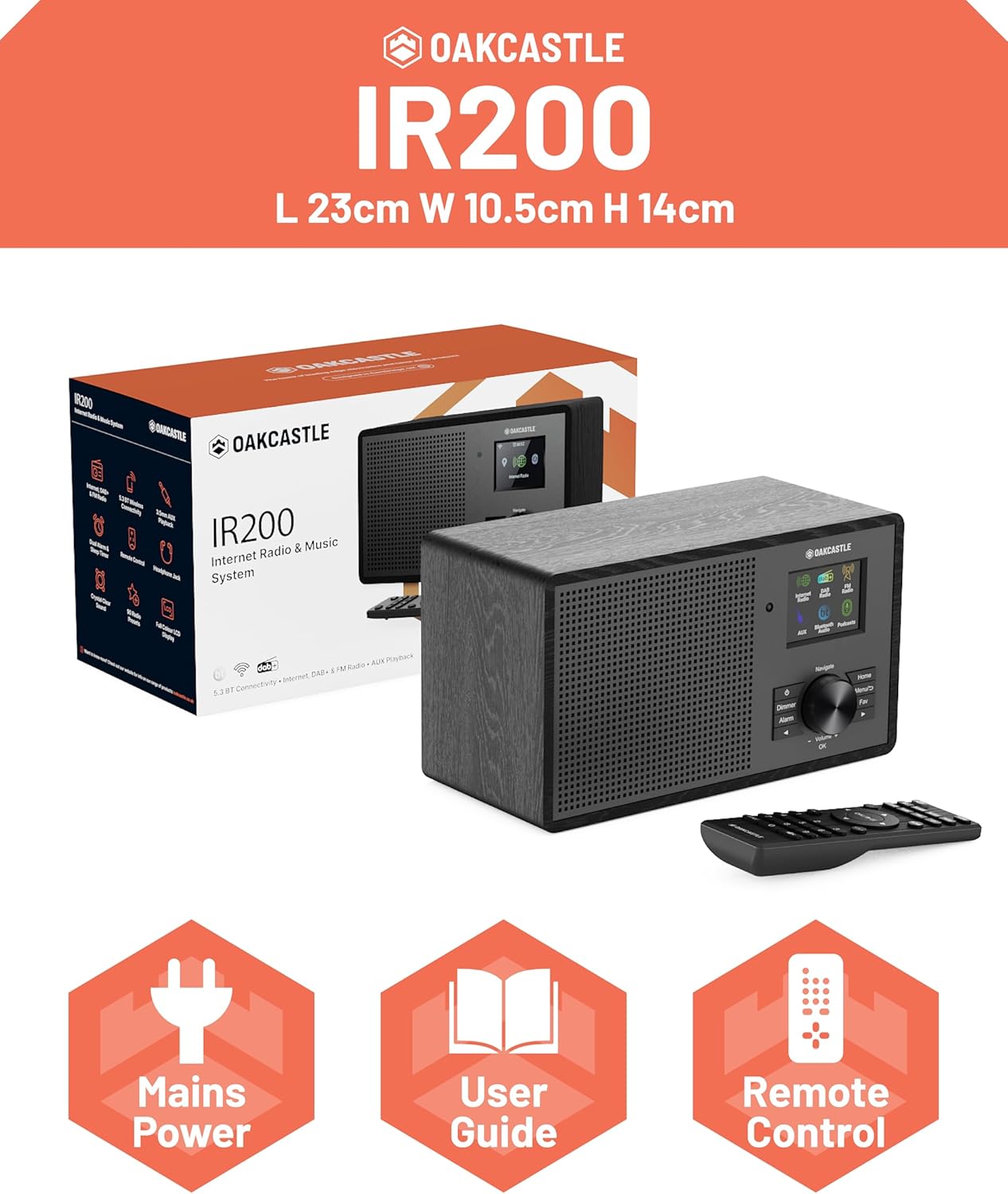
Image 2.1: Contents of the Oakcastle IR200 package, including the radio unit, its box, power cable, remote control, and user manual.
3. Производ је готовview
Familiarize yourself with the main components and controls of your Oakcastle IR200 radio.
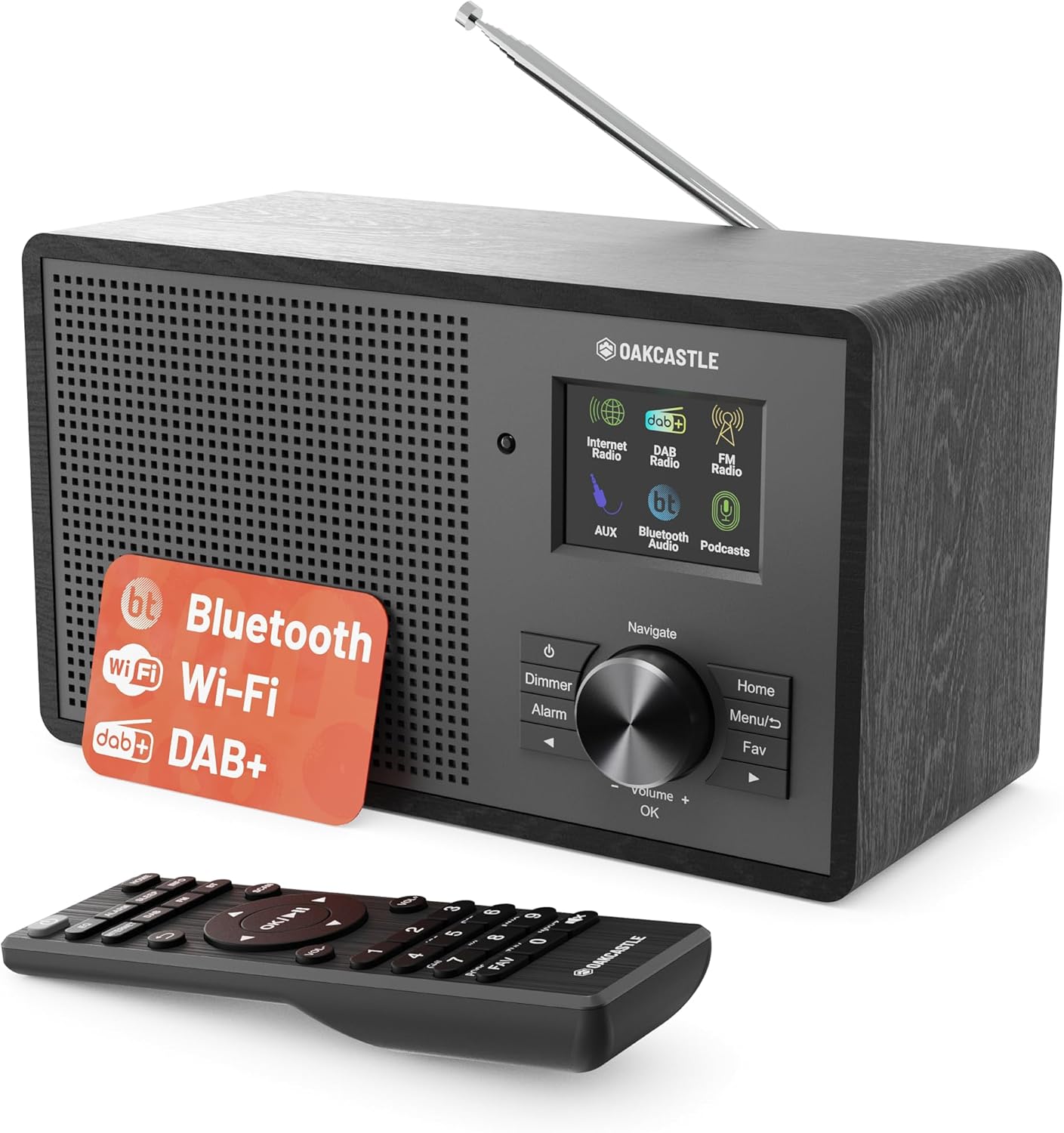
Слика 3.1: Предња страна view of the Oakcastle IR200 radio, showcasing the display, control knob, buttons, and the included remote control.
3.1 Контроле на предњој плочи
- Екран: Приказује информације о станици, време и опције менија.
- Navigate/Volume/OK Knob: Rotate to navigate menus or adjust volume; press to confirm selections.
- Дугме за напајање: Укључује/искључује уређај или га ставља у стање приправности.
- Дугме за затамњивање: Подешава осветљеност екрана.
- Дугме за аларм: Приступа подешавањима аларма.
- Хоме дугме: Враћа се на главни мени.
- Дугме менија: Accesses mode-specific menus.
- Fav Button: Accesses favorite station presets.
3.2 Прикључци задње плоче

Слика 3.2: Позади view of the Oakcastle IR200, highlighting the headphone output and AUX input ports.
- Телескопска антена: For DAB+ and FM reception.
- АУКС улаз: Повежите спољне аудио уређаје.
- Излаз за слушалице: Повежите слушалице за приватно слушање.
- ДЦ ИН: Повезивање адаптера за напајање.
4. Почетно подешавање
4.1 Прикључак за напајање
- Insert the power cable into the DC IN port on the rear of the radio.
- Укључите други крај кабла за напајање у зидну утичницу.
- Press the Power button on the front panel or remote control to turn on the radio.
4.2 Подешавање антене
For optimal DAB+ and FM reception, fully extend the telescopic antenna located at the rear of the unit.
4.3 Network Connection (for Internet Radio)
- Upon first power-on, the radio will guide you through the network setup.
- Select "Network Wizard" or "Wi-Fi Setup" from the menu.
- The radio will scan for available Wi-Fi networks. Select your network from the list.
- Enter your Wi-Fi password using the navigation knob and OK button.
- Once connected, the radio will display a confirmation message.
5. Радни режими
The Oakcastle IR200 offers several listening modes. Press the "Home" button to access the main menu and select your desired mode.
5.1 Интернет радио
Access thousands of global radio stations via your Wi-Fi connection.

Image 5.1: The radio's display screen in Internet Radio mode, showing station information.
- From the main menu, select "Internet Radio".
- You can browse stations by location, genre, or search by name.
- Rotate the Navigate knob to scroll through options and press OK to select.
- To save a station as a favorite, press the "Fav" button during playback.
5.2 DAB+ радио
Enjoy high-quality digital radio broadcasts.

Image 5.2: The radio's display screen in DAB+ Radio mode, showing the current station.
- From the main menu, select "DAB+ Radio".
- The radio will automatically scan for available DAB+ stations.
- Use the Navigate knob to select a station from the list.
- To save a station as a favorite, press the "Fav" button during playback.
5.3 ФМ Радио
Tune into traditional analog FM broadcasts.
- У главном менију изаберите „ФМ радио“.
- To auto-scan for stations, press and hold the OK button or use the scan function via the menu.
- To manually tune, rotate the Navigate knob.
- To save a station as a favorite, press the "Fav" button during playback.
5.4 Bluetooth повезивање
Бежично преносите аудио са уређаја који подржавају Bluetooth.

Image 5.3: The radio's display screen in Bluetooth mode, indicating readiness for pairing.
- From the main menu, select "Bluetooth". The radio will enter pairing mode.
- On your external device (e.g., smartphone), enable Bluetooth and search for "Oakcastle IR200".
- Select "Oakcastle IR200" to pair. Once connected, you can stream audio.
5.5 АУКС улаз
Connect external audio sources using a 3.5mm audio cable.
- Connect one end of a 3.5mm audio cable to the AUX IN port on the rear of the radio.
- Повежите други крај са прикључком за слушалице или аудио излазом вашег екстерног уређаја.
- From the main menu, select "AUX".
- Контролишите репродукцију са свог спољног уређаја.
5.6 Подкасти
Browse and listen to a wide range of podcasts.
- From the main menu, select "Podcasts".
- Browse podcasts by category or search for specific titles.
- Select a podcast to start listening.
6. Подешавања и карактеристике
6.1 Системске поставке
Access general system settings via the main menu to configure time, language, display, and more.
- Време/Датум: Set time format, synchronize time.
- Језик: Select your preferred language for the menu.
- Приказ: Adjust backlight, color scheme.
- Мрежа: Reconfigure Wi-Fi settings.
- Ажурирање софтвера: Check for and install firmware updates.
6.2 Еквилајзер (ЕК)
Customize the audio output to your preference using the equalizer settings, accessible via the remote control or system menu.
6.3 Пресетс
The radio supports over 90 presets for your favorite Internet, DAB+, and FM stations. To recall a preset, press the "Fav" button and select from the list.
6.4 Аларми
Set alarms to wake up to your favorite radio station or a buzzer sound. Access alarm settings via the "Alarm" button on the front panel or remote.
7. Даљински управљач
The included remote control provides convenient access to all radio functions from a distance.
Ensure batteries are correctly inserted. Point the remote control towards the front of the radio for optimal response.
7.1 Функције даљинског управљача
- Снага: On/Off/Standby.
- Волуме +/-: Подесите ниво јачине звука.
- Навигациона дугмад (горе/доле/лево/десно): Кретање кроз меније.
- ОК: Потврдите избор.
- Mode Buttons (Internet, DAB, FM, Bluetooth, AUX): Пребацивање између режима.
- Preset Buttons (1-90+): Directly select saved favorite stations.
- ЕК: Приступите подешавањима еквилајзера.
- Мени: Access mode-specific menus.
- омиљено: Access favorite station list.
8. Одржавање
8.1 Чишћење
To clean the radio, use a soft, dry cloth. Do not use abrasive cleaners, waxes, or solvents as these may damage the finish.
8.2 Општа нега
- Држите уређај даље од директне сунчеве светлости, извора топлоте и влаге.
- Избегавајте испуштање уређаја или његово излагање јаким ударцима.
- Осигурајте одговарајућу вентилацију око јединице.
КСНУМКС. Решавање проблема
| Проблем | Могући узрок | Решење |
|---|---|---|
| Нема струје | Power cable not connected; wall socket not active. | Check power cable connection; try a different wall socket. |
| Нема звука | Јачина звука је прениска; звук је активиран; изабран је погрешан извор. | Increase volume; Check mute status; Select correct input mode. |
| Internet Radio not connecting | Incorrect Wi-Fi password; Weak Wi-Fi signal; Router issue. | Re-enter Wi-Fi password; Move radio closer to router; Restart router. |
| Слаб DAB+/FM пријем | Antenna not extended; Poor signal area. | Fully extend antenna; Reposition radio for better signal. |
| Блуетоотх се не упарује | Radio not in pairing mode; Device too far; Device already paired. | Ensure radio is in Bluetooth mode; Move device closer; Unpair from other devices. |
10. Спецификације
| Феатуре | Детаљ |
|---|---|
| Бранд | Оакцастле |
| Модел | ИР200 |
| Боја | Црно |
| Технологија повезивања | Wi-Fi, Bluetooth 5.3, AUX |
| Технологија подешавања | Интернет радио, DAB+, FM |
| Посебне карактеристике | Bluetooth, EQ, Podcasts, Internet Radio, Remote Control |
| Извор напајања | Electric Cable (Mains) |
| Димензије производа (В к Ш к Д) | 14 цм x 10.5 цм x 23 цм (приближно) |
| Тежина производа | 0.94 кг |
| Компатибилни уређаји | МП3 плејер, паметни телефон, таблет |
11. Гаранција и подршка
11.1 Информације о гаранцији
The Oakcastle IR200 comes with a standard warranty. An extended 3-year warranty is available upon product registration on the manufacturer's website. Please refer to the warranty card included in your package or visit the official Oakcastle webсајт за детаље.
11.2 Корисничка подршка
For technical assistance, troubleshooting, or further inquiries, please contact Oakcastle customer support. Contact details can typically be found on the official Oakcastle webсајту или на гарантном листу.
Повезани документи - ИР200
 |
Oakcastle IR200 User Manual: Your Guide to Internet Radio, DAB/FM & Bluetooth Explore the Oakcastle IR200 Internet Radio, DAB/FM, and Bluetooth speaker with this comprehensive user manual. Learn setup, features, and troubleshooting for your audio experience. |
 |
Oakcastle IR200 Упутство за употребу: Упутство за подешавање, функције и употребу Ово корисничко упутство пружа свеобухватне смернице за Oakcastle IR200 радио. Откријте како да подесите, користите и решите проблеме са уређајем, обухватајући функције као што су интернет радио, DAB/FM, Bluetooth повезивање и системска подешавања. Искористите свој Oakcastle IR200 на најбољи начин. |
 |
Упутство за употребу интернет радија Oakcastle IR100 Свеобухватно упутство за интернет радио Oakcastle IR100, које обухвата подешавање, функције, решавање проблема и спецификације. Сазнајте како да се повежете, стримујете и прилагодите своје искуство интернет радија. |
 |
Extech IR200 Non-contact Forehead IR Thermometer User Manual User manual for the Extech IR200 Non-contact Forehead IR Thermometer. Includes operating instructions, safety warnings, maintenance, cleaning procedures, and technical specifications. |
Ask a question about this manual
Ask about setup, troubleshooting, compatibility, parts, safety, or missing instructions. Manuals+ will review the question and use this page’s manual context to help answer it.