
Увод
Thank you for choosing the Greadio CD03P Portable Bluetooth CD Player. This manual provides essential information for the safe and efficient operation of your device. Please read it thoroughly before use and retain it for future reference.
The Greadio CD03P is a versatile audio device featuring CD playback, Bluetooth 5.3 connectivity, dual wireless karaoke microphones, dynamic LED lights, and multiple input options including USB, TF card, and AUX. It is powered by a 4000mAh rechargeable battery, offering portability for various environments.
Производ је завршенview
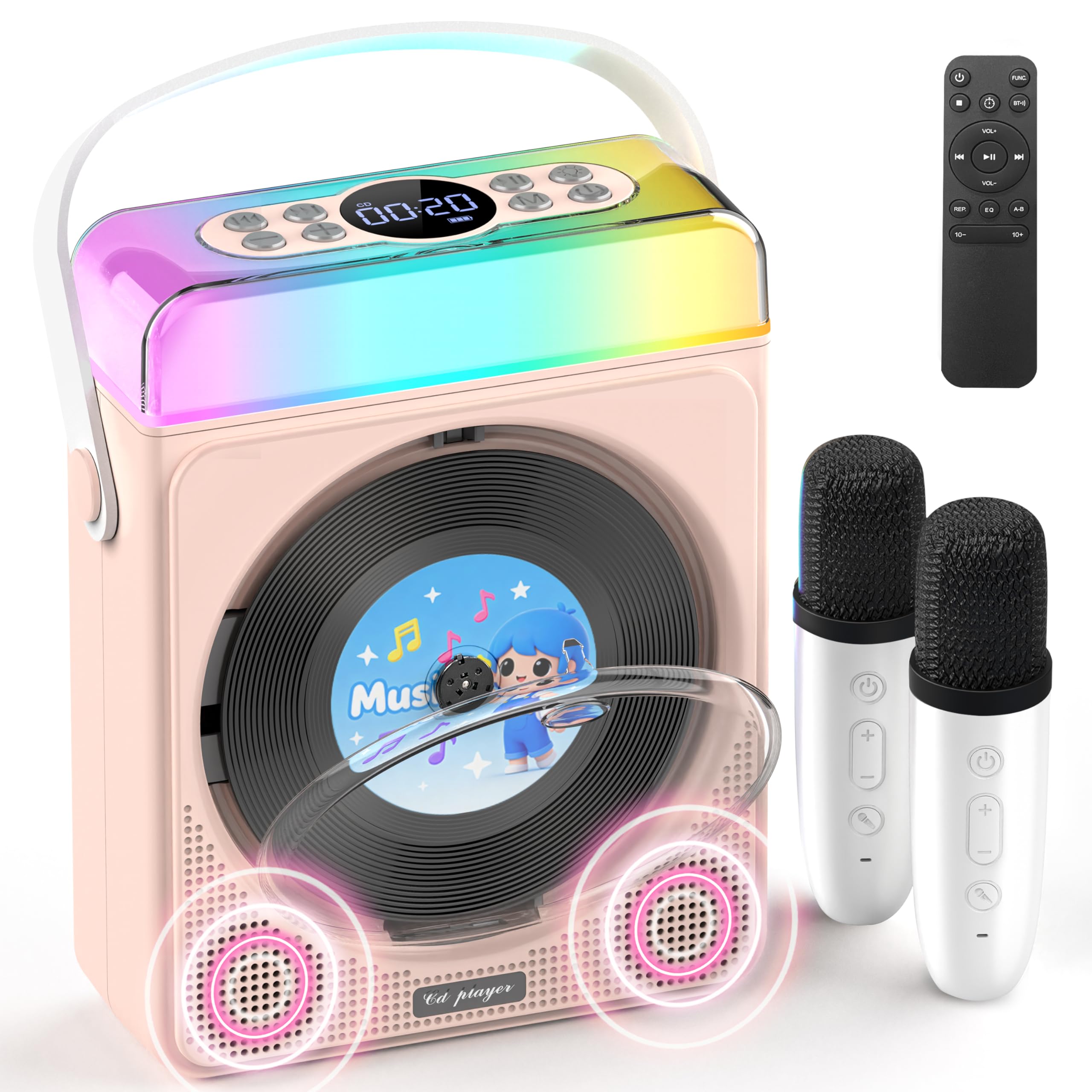
Слика 1: Greadio CD03P Portable Bluetooth CD Player with two microphones and LED lights.

Слика 2: Врх view of the CD03P showing control buttons and LED light bar.
Садржај пакета:
- Portable CD Player x 1
- Караоке микрофон к 2
- Тип-Ц кабл за пуњење к 1
- Даљински управљач к 1
- АУКС кабл к 1
Сетуп
Пуњење уређаја:
Before first use, fully charge the CD player using the provided Type-C charging cable. Connect the cable to the Type-C port on the device and a compatible 5V/2A power adapter (not included). The battery indicator on the display will show charging status.
Charging the Microphones:
The two wireless microphones are rechargeable. Connect them to a power source using their respective charging cables (if provided, or compatible USB cables). Each microphone offers over 30 hours of playtime on a full charge.
Упутство за употребу
1. Укључивање/искључивање:
Long press the Power button (⏻) on the device or remote control to turn the unit on or off.
2. Избор режима:
Притисните тастер M (Mode) button on the device or the ФУНЦ. button on the remote control to cycle through available modes: CD, Bluetooth, USB, TF Card, and AUX.
3. ЦД репродукција:
- Press the release button to open the CD compartment cover.
- Carefully insert a CD (compatible with CD/CD-R/CD-RW/MP3/WMA formats) with the label side facing up.
- Чврсто затворите поклопац одељка за ЦД.
- Select "CD" mode using the Mode/FUNC. button. The device will begin loading and playing the CD.
- Користите |< и >| buttons for track navigation (short press) or fast forward/rewind (long press).
- Притисните тастер ▶|| дугме за репродукцију или паузирање.
Опис видеа: This video demonstrates how to play CDs, USB, and TF cards on the Greadio CD03P. It shows inserting a CD, selecting the CD mode, and using playback controls.
4. Bluetooth Connectivity (Receiving Mode):
- Притисните тастер M (Mode) button until "Bluetooth" mode is selected. The display will show "BLUE" and a blinking Bluetooth icon.
- On your mobile device, enable Bluetooth and search for "CD03P".
- Select "CD03P" to pair. A confirmation tone will sound upon successful connection.
- Play audio from your mobile device, and it will stream through the Greadio CD03P speakers.
Опис видеа: This video illustrates the Bluetooth receiving mode, showing how to connect a mobile phone to the Greadio CD03P for audio playback.
5. Bluetooth Connectivity (Transmitting Mode):
The CD03P can transmit audio to external Bluetooth speakers or headphones when in CD, USB, TF, or AUX mode (not in Bluetooth receiving mode).
- Ensure the CD03P is in CD, USB, TF, or AUX mode.
- Кратко притисните на BT button on the remote control. The Bluetooth icon on the display will blink.
- Пребаците екстерни Bluetooth звучник или слушалице у режим упаривања.
- Once connected, the Bluetooth icon on the CD03P will stop blinking. Audio will now play through the external Bluetooth device.
- To disconnect, short press the BT дугме поново.
Опис видеа: This video demonstrates the Bluetooth transmitting mode, showing how to connect the Greadio CD03P to external Bluetooth speakers or headphones.
6. Репродукција са УСБ/ТФ картице:
- Insert a USB flash drive into the USB port or a TF card into the TF card slot on the back of the device.
- Притисните тастер M (Моде) дугме или ФУНЦ. button on the remote to select "USB" or "TF" mode.
- The device will automatically detect and play compatible audio files (MP3/WMA/WAV/APE/FLAC).
- Користите |< и >| buttons for track navigation (short press) or fast forward/rewind (long press).
- Притисните тастер ▶|| дугме за репродукцију или паузирање.
Note: For best performance with USB/TF cards, use 64GB or less. Reformat 128GB cards to FAT32 if needed.
7. АУКС улаз:
- Connect an external audio device (e.g., smartphone, MP3 player) to the AUX port on the back of the CD03P using the provided AUX cable.
- Притисните тастер M (Моде) дугме или ФУНЦ. button on the remote to select "AUX" mode.
- Play audio from your external device. The sound will be output through the CD03P speakers.
8. Karaoke Microphones:
- Turn on the microphones by pressing their power buttons. They will automatically connect to the CD03P.
- Користите +/- buttons on the microphone to adjust microphone volume.
- Притисните тастер МИЦ button on the microphone to cycle through five voice effects: Female, Monster, Baby, Original, and KTV mode.
- Притисните тастер Повер button on the microphone to switch between microphone modes (e.g., adjust background music, microphone volume, reverb).
Опис видеа: This video demonstrates how to connect and use the wireless microphones with the Greadio CD03P, including switching voice effects and adjusting settings.
9. ЛЕД светла:
- The RGB light (LED1) turns on automatically when the device is powered on.
- Кратко притисните на Светлост button on the device or remote to cycle through various light effects: breathing light (red, purple, blue, cyan, green, yellow, orange) and solid colors.
- Дуго притисните Светлост button to turn the LED lights off.
Опис видеа: This video showcases the dynamic LED light features of the Greadio CD03P, demonstrating how to cycle through different light modes and colors.
10. Контрола јачине звука:
Користите ВОЛ+ и ВОЛ- buttons on the device or remote control to adjust the main speaker volume.
11. EQ Modes:
Кратко притисните на EQ button on the remote control to switch between different equalizer modes (e.g., Pop, Jazz, Classic, Bass, Flat, Rock).
12. Тајмер за спавање:
The CD03P can function as a night light with a sleep timer. Refer to the full user manual for detailed instructions on setting the sleep timer.
Одржавање
- Држите уређај даље од воде и влаге.
- Очистите уређај меком, сувом крпом. Не користите абразивна средства за чишћење или раствараче.
- Избегавајте излагање уређаја екстремним температурама или директној сунчевој светлости.
- Do not press the CD base directly.
- Када се уређај не користи дуже време, чувајте га на хладном и сувом месту.
Решавање проблема
| Проблем | Могући узрок | Решење |
|---|---|---|
| Уређај се не укључује. | Проблем са слабом батеријом или напајањем. | Потпуно напуните уређај. Уверите се да је кабл за пуњење правилно повезан. |
| CD се не репродукује или прескаче. | CD је прљав, изгребан или је погрешно уметнут. | Clean the CD with a soft cloth. Ensure the CD is inserted correctly with the label side up. Try a different CD. |
| Блуетоотх упаривање није успело. | Device is not in Bluetooth mode or too far from the paired device. | Ensure the CD03P is in Bluetooth receiving mode. Move devices closer. Disconnect from other Bluetooth devices. |
| Микрофон не ради. | Microphone is off, uncharged, or out of range. | Turn on the microphone. Charge the microphone. Ensure it is within range of the CD03P. |
| Нема звука. | Volume is too low or muted. Incorrect mode selected. | Increase volume. Check if the device is muted. Ensure the correct input mode (CD, Bluetooth, USB, TF, AUX) is selected. |
| Уређај не реагује. | Привремени софтверски квар. | Use a thin object to press the РЕСЕТ button on the back of the device. |
Спецификације
| Феатуре | Детаљ |
|---|---|
| Број модела | ЦД03П |
| Димензије производа | 6.81 к 2.52 к 8.15 инча |
| Тежина артикла | 1.97 фунти |
| Капацитет батерије | 4000mAh (пуњива) |
| Повезивање | Bluetooth 5.3, USB, TF Card, AUX |
| ЦД компатибилност | ЦД/ЦД-Р/ЦД-РВ/МП3/ВМА |
| Укључене компоненте | Portable CD Player, 2 Karaoke Microphones, Type-C Charging Cable, Remote Control, AUX Cable |
Гаранција и подршка
Greadio products come with a full year of coverage. For any issues or support needs, please contact Greadio customer service. Refer to the official Greadio webсајт или вашу документацију о куповини за контакт податке.
Note: This device is designed for personal and recreational use. Any unauthorized modifications or misuse may void the warranty.