
1. Увод
Thank you for choosing the MONODEAL CD401 Portable HiFi Stereo CD Player. This versatile device combines classic CD playback with modern connectivity options, including Bluetooth, FM radio, USB, and AUX input. Enjoy high-fidelity audio with built-in speakers, dynamic RGB lighting, and convenient remote control. This manual provides essential information for setup, operation, and maintenance to ensure optimal performance.
2. Шта је у кутији
- 1x MONODEAL CD401 CD Player
- 1к упутство за употребу
- 1к даљински управљач
- КСНУМКСк КСНУМКСмм аудио кабл
- 1x Charging Cable and Plug
3. Производ је готовview
The MONODEAL CD401 is designed for both portability and desktop use, offering a blend of classic and contemporary audio features. Its compact design includes integrated speakers and a clear display for easy navigation.
Слика 1: Предња страна view of the MONODEAL CD401 Portable CD Player, showcasing its compact design and central display.
Кључне карактеристике:
- Multi-Color RGB Lighting: Dynamic lighting effects that change color to the beat of the music, enhancing visual and auditory experience.
- Блуетоотх КСНУМКС: Functions as both a Bluetooth transmitter (to headphones/speakers) and receiver (from phones/tablets).
- Integrated 4*HIFI Speakers: Provides surround sound for an immersive listening experience.
- Вишеструки режими репродукције: Easily switch between CD, Bluetooth, FM Radio, AUX, and USB modes via a large LCD screen.
- Wide CD Compatibility: Supports CD, CD-R, CD-RW, MP3, and WMA formats.
- Звучни ефекти: Choose from five equalizer presets: Flat, Rock, Pop, Jazz, and Classic.
- ФМ радио: Access FM frequencies from 76MHz to 108MHz.
- USB & AUX Connectivity: Play music from a USB flash drive or connect external devices via the 3.5mm AUX cable.
- Пуњива батерија: Built-in 3000mAh battery offers up to 8 hours of continuous playback.
- Мерач спавања: Customizable sleep timer from 10 to 90 minutes.

Figure 2: The MONODEAL CD401 displaying its multi-color RGB lighting effects, which synchronize with the music.
Контроле и портови:
The device features intuitive controls on its top panel and essential ports on the side for easy access.

Figure 3: Top panel of the CD player showing playback controls, mode selection, and display.

Figure 4: The side panel of the CD player, illustrating the AUX input, USB port, and charging port.
Званични видео производа:
Video 1: Official product video from MonoDeals showcasing the Desktop CD Player with Bluetooth and RGB Light features.
Video 2: Official product video from MonoDeals demonstrating the Desktop Player's Bluetooth functionality and colorful lighting effects.
4. Подешавање
4.1 Пуњење уређаја
- Connect the provided USB charging cable to the charging port on the side of the CD player.
- Plug the other end of the USB cable into a compatible USB power adapter (included) or a computer's USB port.
- The battery indicator on the LCD screen will show charging status. A full charge provides up to 8 hours of playback.
4.2 Убацивање CD-a
- Gently open the CD compartment cover.
- Place the CD with the label side facing up onto the spindle. Ensure it clicks into place.
- Close the CD compartment cover firmly until it latches.
4.3 Укључивање/искључивање
- To power on, slide the ON/OFF switch to the 'ON' position. The LCD screen will light up.
- To power off, slide the ON/OFF switch to the 'OFF' position.
5. Упутство за употребу
5.1 Избор режима
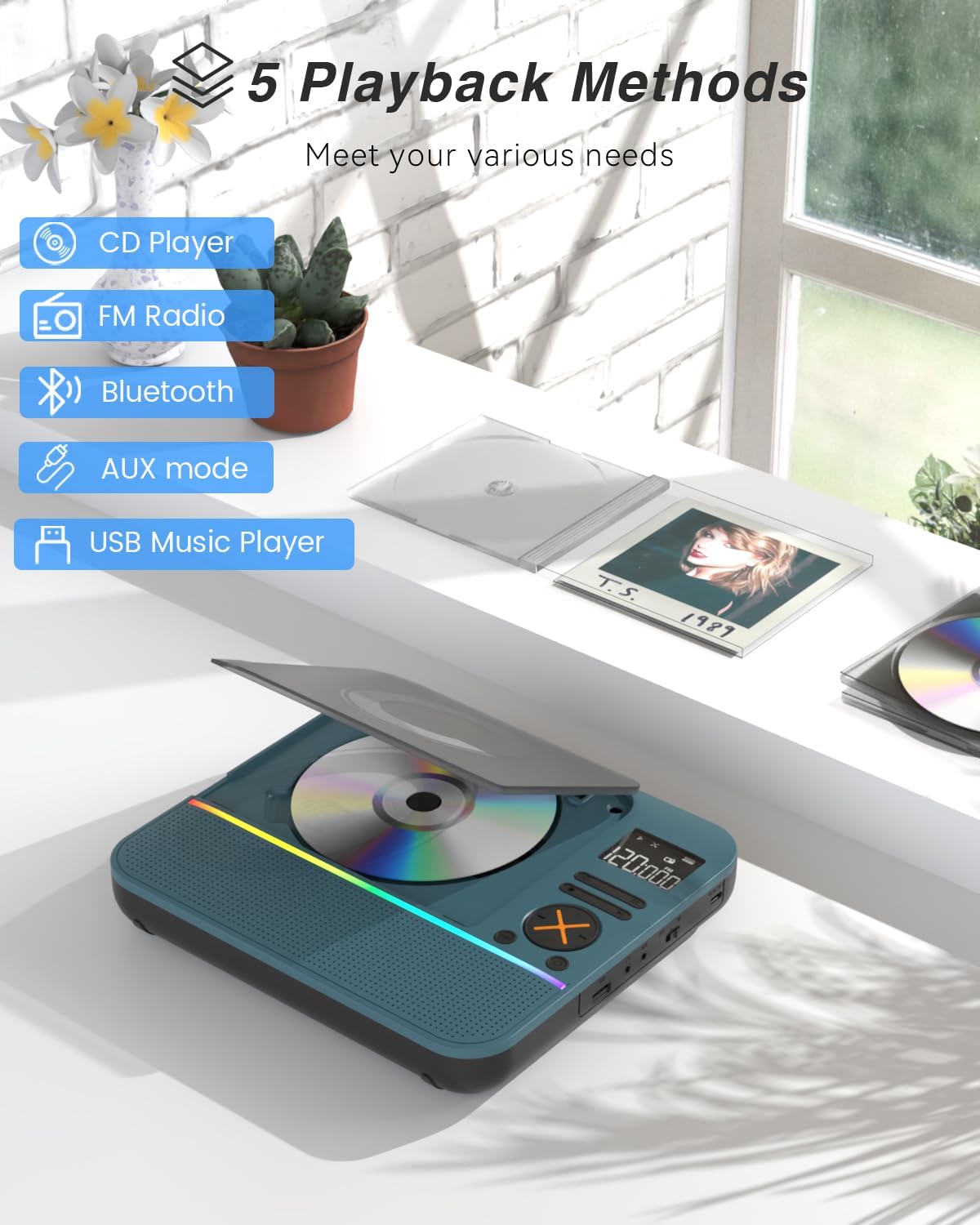
Притисните тастер МОДЕ button on the device or remote control to cycle through the available modes: CD, Bluetooth, FM, AUX, and USB.

Figure 5: The CD player's display indicating the five available playback methods: CD, FM Radio, Bluetooth, AUX mode, and USB Music Player.
5.2 Репродукција ЦД-а
- Insert a compatible CD (CD, CD-R, CD-RW, MP3, WMA).
- Select 'CD' mode. The player will automatically start reading the disc.
- Користите Пусти/Паузирај, Нект Трацк, и Превиоус Трацк дугмад за контролу репродукције.
- Притисните тастер РЕПЕАТ button to cycle through repeat options (e.g., repeat one, repeat all).
- Притисните тастер EQ button to select desired sound effects (Flat, Rock, Pop, Jazz, Classic).
5.3 Блуетоотх режим
The CD401 supports both Bluetooth transmission (BT TX) and reception (BT RX).
- Bluetooth Receiver (BT RX): Select 'Bluetooth' mode. The device will enter pairing mode. On your phone/tablet, search for 'CD401' and connect. Audio from your device will play through the CD player's speakers.
- Bluetooth Transmitter (BT TX): Select 'Bluetooth' mode. Press and hold the БТ ТКС button. The CD player will search for nearby Bluetooth headphones or speakers. Once connected, CD audio will transmit to the external Bluetooth device.

Figure 6: Illustration of the CD player's dual Bluetooth functionality, allowing it to receive audio from a phone (RX) or transmit to headphones (TX).
5.4 ФМ Радио
- Select 'FM' mode.
- Користите Нект Трацк и Превиоус Трацк buttons to scan for radio stations.
- The FM frequency range is 76MHz to 108MHz.
5.5 АУКС улаз
- Select 'AUX' mode.
- Connect an external audio device (e.g., smartphone, computer) to the AUX IN port using the provided 3.5mm audio cable.
- The CD player will now act as a wired speaker for the connected device.
- Note: Bluetooth connectivity is not supported in cars; use the 3.5mm AUX cable for car audio.
5.6 Репродукција са УСБ-а
- Select 'USB' mode.
- Убаците УСБ флеш диск који садржи МП3 или ВМА аудио fileс у УСБ порт.
- The player will automatically detect and begin playing the audio files.
5.7 Контрола јачине звука
Adjust the volume using the dedicated volume buttons on the device or the remote control.
5.8 Тајмер за спавање
- Притисните тастер СЛЕЕП дугме на даљинском управљачу.
- Cycle through the available sleep timer durations (10, 20, 30, 40, 50, 60, 70, 80, 90 minutes).
- The device will automatically power off after the selected time.

Figure 7: The CD player featuring its sleep timer function, allowing users to set automatic shutdown after a specified duration.
6. Одржавање
6.1 Чишћење
- Обришите уређај меком, сувом крпом. Не користите течна средства за чишћење или абразивне материјале.
- Keep the CD compartment clean and free of dust.
6.2 Складиштење
- Store the CD player in a cool, dry place away from direct sunlight and extreme temperatures.
- Remove any CDs or USB drives before storing for extended periods.
КСНУМКС. Решавање проблема
| Проблем | Могући узрок | Решење |
|---|---|---|
| Уређај се не укључује | Слаба батерија или је прекидач за напајање искључен. | Charge the device fully. Ensure the ON/OFF switch is in the 'ON' position. |
| Нема звука из звучника | Volume is too low or incorrect mode selected. | Increase volume. Verify correct playback mode (CD, Bluetooth, FM, AUX, USB). |
| CD се не репродукује | CD је прљав, изгребан или је погрешно уметнут. | Clean the CD. Check for scratches. Reinsert the CD correctly with the label side up. |
| Блуетоотх упаривање није успело | Device is not in pairing mode or too far from the source. | Ensure the CD player is in Bluetooth pairing mode. Move devices closer. Disconnect from other Bluetooth devices. |
8. Спецификације
| Феатуре | Детаљ |
|---|---|
| Број модела | ЦД401 |
| Бранд | МОНОДЕАЛ |
| Технологија повезивања | Блуетоотх 5.3 |
| Спеакер Типе | 4*HIFI Stereo |
| Капацитет батерије | 3000mAh (уграђена) |
| Време репродукције | До 8 сати (са пуним пуњењем) |
| Подржани формати дискова | ЦД, ЦД-Р, ЦД-РВ |
| Подржани аудио формати | МП3, ВМА |
| ФМ Фреквенцијски опсег | 76МХз до 108МХз |
| Димензије пакета | 10.83 к 9.13 к 1.93 инча |
| Тежина артикла | 2.48 фунти |
9. Гаранција и подршка
For warranty information, technical support, or customer service inquiries, please refer to the contact details provided in your product packaging or visit the official MONODEAL webсајту. Сачувајте рачун о куповини за гаранције.