
1. Увод
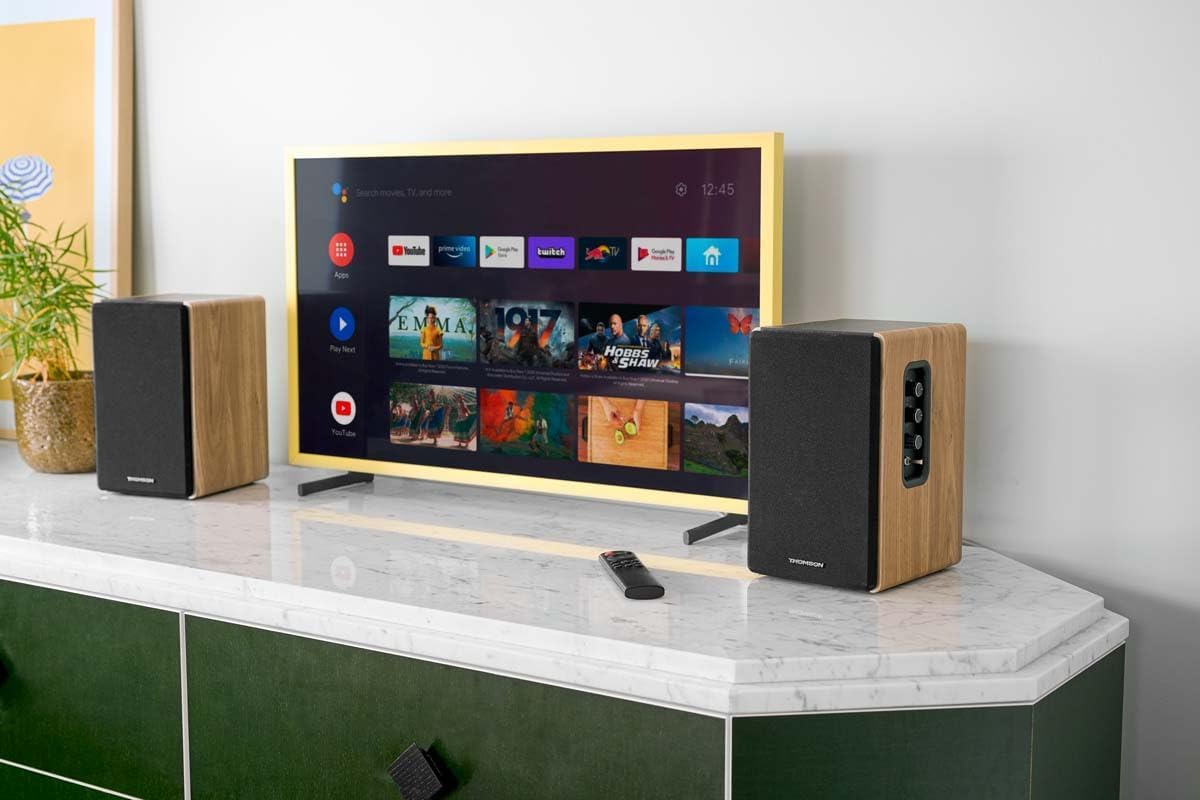
Thank you for choosing the THOMSON WS902DUO Cosy Bookshelf Speakers. These active stereo speakers deliver a powerful 150W audio experience with deep bass from two 10 cm woofers. They offer versatile connectivity options including Bluetooth 5.3, Optical, HDMI (ARC), RCA, and USB playback. The included remote control and side panel adjustments provide precise control over your audio. Please read this manual carefully before use to ensure proper operation and to maximize your listening experience.

Image 1.1: THOMSON WS902DUO Bookshelf Speakers in a living space, showcasing their elegant wood finish.
2. Важна безбедносна упутства
- Read these instructions thoroughly before operating the product.
- Сачувајте ова упутства за будућу употребу.
- Обратите пажњу на сва упозорења на производу и у упутству за употребу.
- Пратите сва упутства.
- Не користите овај апарат у близини воде.
- Чистите само сувом крпом.
- Не блокирајте отворе за вентилацију. Инсталирајте у складу са упутствима произвођача.
- Не постављајте у близини извора топлоте као што су радијатори, грејни регистри, пећи или други уређаји (укључујући ampлифиерс) који производе топлоту.
- Немојте умањити безбедносну сврху поларизованог или уземљеног утикача. Поларизовани утикач има две оштрице од којих је једна шира од друге. Утикач типа са уземљењем има два ножа и трећи уземљени утикач. Широко сечиво или трећи зуб су обезбеђени за вашу безбедност. Ако испоручени утикач не стане у вашу утичницу, обратите се електричару за замену застареле утичнице.
- Заштитите кабл за напајање од гажења или прикљештења, посебно на утикачима, утичницама и на месту где излазе из уређаја.
- Користите само додатке/прибор које је навео произвођач.
- Користите само са колицима, постољем, троношцем, држачем или столом које је одредио произвођач или који се продају уз уређај. Када користите колица, будите опрезни када померате комбинацију колица/апарата да бисте избегли повреде од превртања.
- Искључите овај апарат из струје током олуја са грмљавином или када га не користите дуже време.
- Све сервисирање препустите квалификованом сервисном особљу. Сервисирање је потребно када је уређај оштећен на било који начин, као што је оштећен кабл за напајање или утикач, ако је течност проливена или су предмети упали у апарат, ако је апарат био изложен киши или влази, не ради нормално , или је одбачено.
3. Садржај пакета
Молимо вас да проверите да ли су све ставке наведене у наставку укључене у ваш пакет:
- THOMSON WS902DUO Bookshelf Speakers (2 units)
- Ремоте Цонтрол
- Повер Цабле
- Кабл за повезивање звучника
- 3.5mm Jack to RCA Adapter Cable
- Кориснички приручник (овај документ)

Image 3.1: Packaging of the THOMSON WS902DUO Bookshelf Speakers.
4. Производ је готовview
4.1. Side Control Panel (Active Speaker)
The active speaker features a side control panel for easy access to essential functions.

Image 4.1: Side control panel.
- Контрола баса: Подешава нискофреквентни излаз.
- Контрола високих тонова: Подешава високофреквентни излаз.
- Контрола јачине звука: Adjusts the overall sound volume.
- Прекидач: Укључује или искључује звучнике.
- ЛЕД индикатор: Shows the current status or selected input.
4.2. Rear Panel (Active Speaker)
The rear panel of the active speaker provides all necessary input and output connections.
Слика 4.2: Прикључци на задњој плочи.
- Оптички улаз: For connecting digital audio sources like TVs, game consoles, or Blu-ray players.
- Помоћни улаз (RCA): For connecting analog audio sources such as turntables, CD players, or PCs. A 3.5mm jack adapter is provided.
- TV Audio (HDMI ARC): For connecting to a TV's HDMI ARC port, allowing TV remote control of the speaker volume.
- УСБ репродукција: За репродукцију МП3 fileс директно са УСБ флеш диска.
- Суб Оут: For connecting an external active subwoofer for enhanced bass.
- Излаз звучника: Connects to the passive speaker.
- Улазна снага: Connects to the main power supply.
4.3. Даљински управљач
The remote control provides convenient access to all speaker functions from a distance.

Image 4.3: Remote control.
- Дугме за напајање: Укључује/искључује звучнике.
- Дугме за утишавање: Искључује/укључује звук.
- Волуме +/-: Подешава ниво јачине звука.
- Playback Controls (Play/Pause, Skip): За репродукцију са УСБ-а.
- Source Selection Buttons (OPT, BT, ARC, USB, LINE): Бира извор аудио улаза.
- EQ Mode Buttons (MOVIE, MUSIC, DIALOG): Selects preset equalization modes.
5. Подешавање
5.1. Постављање звучника
Place the speakers on a stable, flat surface such as a bookshelf, desk, or speaker stands. For optimal stereo imaging, position the speakers equidistant from your listening position and at ear level. Ensure there is adequate space around the speakers for ventilation.
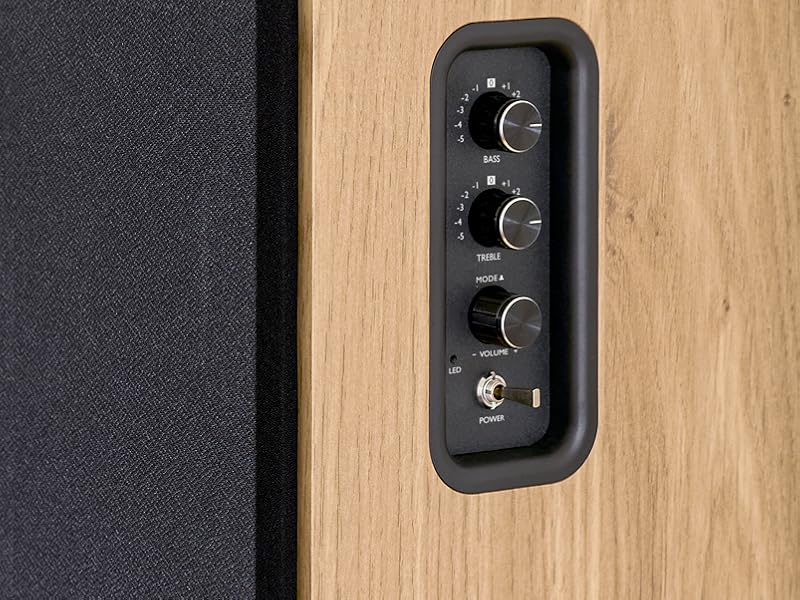
Image 5.1: Recommended speaker placement on a desk.
5.2. Повезивање звучника
- Identify the active speaker (with controls and inputs) and the passive speaker.
- Connect the included speaker cable from the speaker output terminals on the active speaker to the input terminals on the passive speaker. Ensure correct polarity (+ to + and - to -).
5.3. Повезивање аудио извора
Connect your desired audio sources to the active speaker using the appropriate cables.
- Оптички улаз: Use an optical cable to connect your TV, game console, or Blu-ray player to the OPTICAL IN port.
- HDMI (ARC) Input: Use an HDMI cable to connect your TV's HDMI ARC port to the TV AUDIO (HDMI) port on the speaker. This allows your TV remote to control the speaker volume.
- RCA (AUX) улаз: Use an RCA cable (or the provided 3.5mm jack to RCA adapter) to connect devices like a turntable, CD player, or PC to the AUX IN (RCA) ports.
- УСБ улаз: Убаците УСБ флеш диск који садржи МП3 files into the USB PLAY port.

Image 5.2: Speakers connected to a television via HDMI ARC.
5.4. Блуетоотх упаривање
- Уверите се да су звучници укључени.
- Press the 'BT' button on the remote control or the side panel to select Bluetooth input. The LED indicator will flash, indicating pairing mode.
- На паметном телефону, таблету или рачунару омогућите Блутут и потражите доступне уређаје.
- Select "THOMSON WS902DUO" from the list of devices.
- Након упаривања, ЛЕД индикатор ће престати да трепери и остати непрекидно светлећи. Сада можете бежично стримовати аудио.
5.5. Прикључак за сабвуфер (опционо)
If you wish to enhance bass further, connect an active subwoofer to the 'Sub Out' port on the rear panel of the active speaker using an RCA cable.
6. Упутство за употребу
6.1. Укључивање/искључивање
Use the power switch on the side control panel or the power button on the remote control to turn the speakers on or off.
6.2. Избор извора
Press the corresponding source button on the remote control (OPT, BT, ARC, USB, LINE) to switch between connected audio inputs. The LED indicator will change to reflect the selected source.
6.3. Контрола јачине звука
Adjust the volume using the 'Volume' knob on the side control panel or the 'VOL+/-' buttons on the remote control.
6.4. Аудио подешавања
Fine-tune the sound to your preference:
- бас/високи тонови: Use the 'Bass' and 'Treble' knobs on the side control panel to adjust the low and high frequencies.
- ЕК режими: Press the 'MOVIE', 'MUSIC', or 'DIALOG' buttons on the remote control to select preset equalization settings optimized for different content types.
6.5. УСБ репродукција
When a USB flash drive with MP3 files is inserted and USB source is selected, the speakers will automatically begin playing. Use the playback control buttons on the remote control (Play/Pause, Skip) to manage your music.
6.6. Блуетоотх рад
After successful pairing (see Section 5.4), you can stream audio from your Bluetooth device. Use your device's controls or the speaker's remote control for playback and volume adjustments.
7. Одржавање
Proper maintenance ensures the longevity and performance of your speakers.
- Чишћење: Wipe the speaker surfaces with a soft, dry cloth. Do not use liquid cleaners or abrasive materials.
- вентилација: Уверите се да отвори за вентилацију нису блокирани како бисте спречили прегревање.
- Складиштење: If storing the speakers for an extended period, unplug them from the power outlet and store them in a cool, dry place.
- Избегавајте влагу: Keep the speakers away from water and high humidity.
КСНУМКС. Решавање проблема
Ако наиђете на било какве проблеме, погледајте следећи водич за решавање проблема:
| Проблем | Могући узрок | Решење |
|---|---|---|
| Нема струје | Power cable not connected; Power switch off; Wall outlet not working. | Ensure power cable is securely connected. Turn on the power switch. Test the wall outlet with another device. |
| Нема звука | Incorrect input source selected; Volume too low; Mute function active; Audio cable not connected properly. | Select the correct input source. Increase volume. Press Mute button on remote. Check all audio cable connections. |
| Блуетоотх упаривање није успело | Speakers not in pairing mode; Device too far; Bluetooth disabled on source device. | Ensure speakers are in Bluetooth pairing mode (flashing LED). Move device closer to speakers. Enable Bluetooth on your source device. |
| УСБ репродукција не ради | USB drive not formatted correctly; Files not MP3; USB drive not inserted properly. | Ensure USB drive is FAT32 formatted. Verify files are in MP3 format. Re-insert USB drive firmly. |
| Изобличење звука | Volume too high; Source audio quality poor; Bass/Treble settings too extreme. | Lower the volume. Test with a different audio source. Adjust Bass and Treble controls. |
9. Спецификације
| Феатуре | Спецификација |
|---|---|
| Бранд | ТХОМСОН |
| Број модела | ВС902ДУО |
| Максимална излазна снага звучника | 150 Ваттс |
| Фреквенцијски одзив | 60 Хз |
| Технологија повезивања | Bluetooth, HDMI (ARC), Optical, RCA, USB |
| Блуетоотх верзија | 5.3 |
| Режим аудио излаза | Стерео (2.0 канала) |
| Улазни волtage | 230 волти (АЦ) |
| Тип монтаже | Носач полица |
| Спеакер Типе | Multimedia Bookshelf |
| Посебне карактеристике | Stereo Pairing, USB Port, Sub-Out, Remote Control, EQ Modes |
| Препоручена употреба | Smartphone, Tablet, PC, TV, Game Console, DVD Player, Turntable |
| Боја | Завршна обрада природног дрвета |
| Контролни метод | Remote Control, Side Panel Knobs |
| Величина вуфера | 10 центиметара |
| Димензије (В к Ш к Д) | 28 cm x 24 cm x 47 cm (approximate, per speaker) |
| Тежина | 5048 Grams (total for pair) |
| Број ставки | 2 |
| Земља порекла | Кина |
10. Информације о гаранцији
This THOMSON WS902DUO product comes with a 1-годишња ограничена гаранција од датума куповине. Ова гаранција покрива производне недостатке и недостатке у изради при нормалној употреби. Не покрива штету насталу услед злоупотребе, несрећа, неовлашћених модификација или нормалног хабања. Молимо вас да сачувате доказ о куповини за потребе подношења захтева за гаранцију.
11. Корисничка подршка
For technical assistance, warranty claims, or any questions regarding your THOMSON WS902DUO speakers, please contact your retailer or visit the official THOMSON support website. Please have your model number (WS902DUO) and proof of purchase ready when contacting support.
Подршка на мрежи: www.thomsonconsumer.com (Please check for regional support contacts)