
1. Увод
Thank you for choosing the RUIZU 64GB HiFi Lossless MP3 Player. This device is engineered to deliver a pure, high-resolution audio experience, supporting a wide range of lossless formats. Its compact design and intuitive touchscreen interface make it ideal for enjoying your music without distractions. This manual provides essential information for setting up, operating, and maintaining your player.
2. Производ је готовview
The RUIZU HiFi Lossless MP3 Player features a durable CNC-milled aluminum alloy body, ensuring both elegance and resilience. Designed for a dedicated audio experience, it operates exclusively with wired headphones, eliminating latency and interference associated with wireless connections. The 2-inch HD IPS touchscreen provides clear visuals and easy navigation.
2.1. Физичке карактеристике и димензије
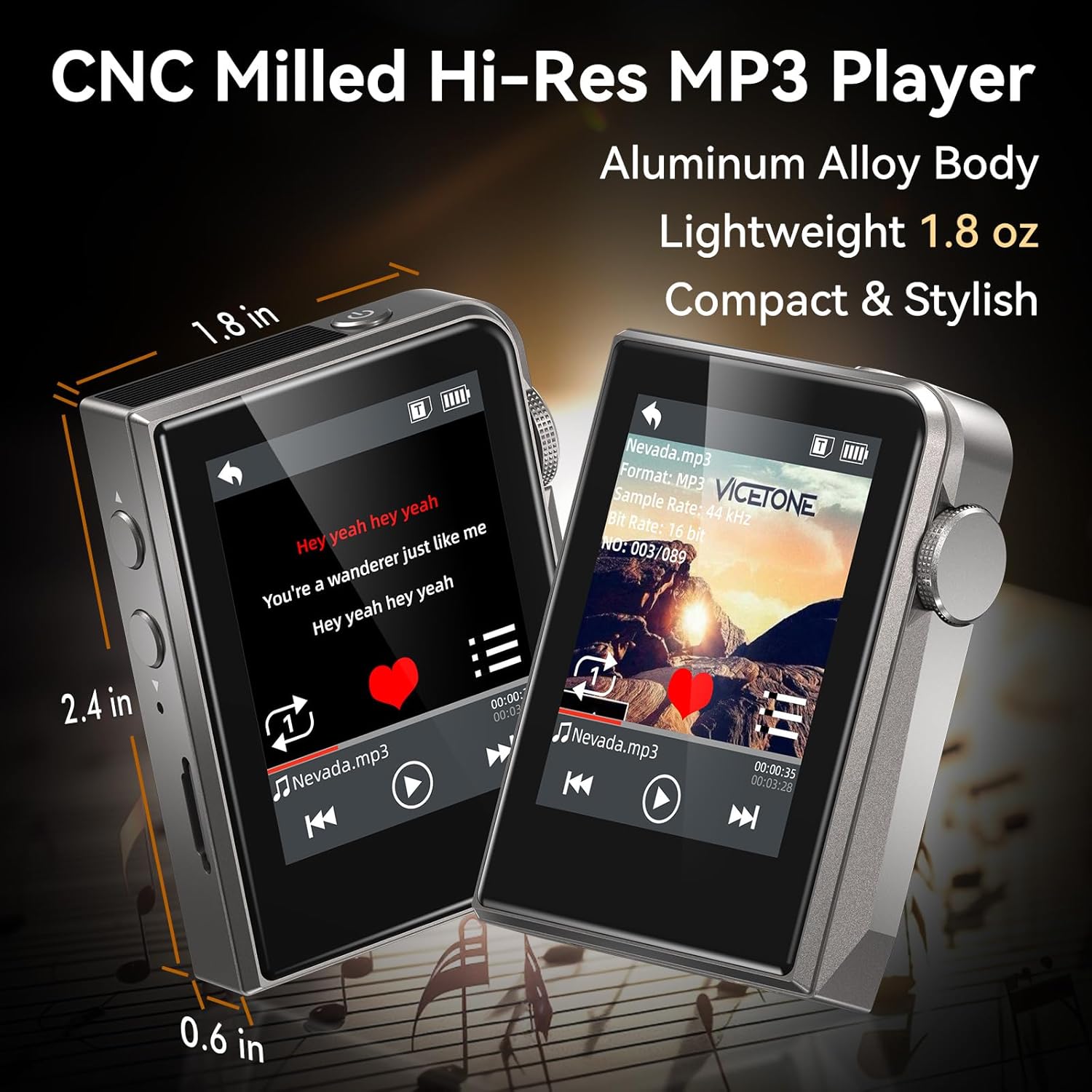
The RUIZU MP3 Player is compact and lightweight, measuring approximately 2.36 x 1.81 x 0.55 inches and weighing 1.76 ounces.
2.2. Wired Audio Design

The player supports advanced DAC decoding for high-resolution audio formats such as MP3, WMA, WAV, APE, FLAC, AAC, M4A, OGG, ALAC, DSF, and DFF, ensuring pure sound quality.
2.3. Садржај пакета

The package includes the RUIZU 64GB Hi-res MP3 Player, 3.5mm wired headphones, a USB-C cable for charging and file transfer, a protective pouch, and this user manual.
3. Подешавање
3.1. Пуњење уређаја
Before first use, fully charge the MP3 player. Connect the provided USB-C cable to the player's USB-C port and the other end to a USB power adapter (not included) or a computer's USB port. The battery indicator on the screen will show charging status.
3.2. Пренос музике Files
- Connect the MP3 player to your computer using the supplied USB-C cable.
- Плејер ће се појавити као преносиви диск на вашем рачунару.
- Превуците и испустите жељени аудио files (MP3, WAV, FLAC, APE, OGG, DSD256, etc.) into the player's internal storage or a connected microSD card folder.
- Safely eject the device from your computer before disconnecting the USB-C cable.
3.3. Уметање MicroSD картице

The player supports microSD cards up to 128GB for expanded storage. Gently insert the card into the designated slot until it clicks into place.
4. Упутство за употребу
4.1. Укључивање/искључивање
Press and hold the power button (usually on the side) to turn the player on or off.
4.2. Основна навигација
The player features a 2-inch HD IPS touchscreen for navigation. Swipe to browse menus and tap to select options. The dedicated Home button allows for quick return to the main menu.
4.3. Репродукција музике

Access your music library through the 'Music' or 'Folder' options on the main screen. Select a song to begin playback. Use the on-screen controls for play/pause, skip forward/backward.
4.3.1. Режими репродукције
The player offers various playback modes:
- насумично: Репродукује нумере насумичним редоследом.
- Поновите једно: Понавља тренутну нумеру.
- Folder Loop: Repeats all tracks within the current folder.
- секвенцијално: Plays tracks in order.
- All Loop: Repeats all tracks in the current playlist/library.
4.3.2. Еквилајзер (EQ)
Customize your sound experience using the built-in equalizer. Navigate to the 'Equalizer' setting to adjust frequency bands or select from preset options.
4.3.3. Playlists and Favorites
Create up to 4 favorite lists or organize your music into folders for easy access.
4.3.4. Skip Tracks with Screen Off
For convenience during activities like jogging, the player allows you to skip tracks using physical buttons even when the screen is off.
4.4. Додатне функције
The player includes several utility functions:
- Штоперица: За активности мерења времена.
- Календар: Keep track of dates.
- Ограничење јачине звука: Set a maximum volume level for hearing protection.
- Date & Time Display: View тренутни датум и време.
- Мерач спавања: Automatically turn off the player after a set period.
- Искључивање ради уштеде енергије: Configure automatic shutdown to conserve battery.
- Језици: Supports 21 languages for the user interface.
5. Одржавање
- Држите уређај сувим. Избегавајте излагање влази или течностима.
- Очистите екран и кућиште меком, сувом крпом. Не користите абразивна средства за чишћење.
- Избегавајте екстремне температуре.
- Не покушавајте сами да растављате или поправљате уређај. То ће поништити гаранцију.
КСНУМКС. Решавање проблема
6.1. Device Does Not Turn On
- Ensure the battery is charged. Connect the player to a power source and allow it to charge for at least 30 minutes before attempting to power on again.
- If the device is unresponsive, try performing a soft reset by pressing and holding the power button for 10-15 seconds.
6.2. Нема звучног излаза
- Check if headphones are properly connected to the 3.5mm audio jack.
- Verify the volume level is not set to zero or muted.
- Test with a different pair of wired headphones to rule out headphone malfunction.
- Осигурајте звук files are not corrupted and are in a supported format.
6.3. Cannot Transfer Files
- Ensure the USB-C cable is securely connected to both the player and the computer.
- Try a different USB port on your computer or a different USB-C cable.
- Restart your computer and the MP3 player.
- Check if your computer's operating system recognizes the device as a removable disk.
6.4. MicroSD Card Not Detected
- Ensure the microSD card is inserted correctly and fully seated in its slot.
- Try removing and reinserting the card.
- Test with a different microSD card to determine if the card itself is faulty.
- Ensure the card is formatted to a compatible file систем (нпр. FAT32).
7. Спецификације
| Феатуре | Спецификација |
|---|---|
| Бранд | РУИЗУ |
| Модел | 64GB HiFi Lossless MP3 Player |
| Капацитет меморије | 64 GB (Internal), expandable up to 128GB via Micro SD card |
| Величина екрана | 2 инча |
| Дисплаи Тецхнологи | ЛЦД |
| Технологија повезивања | Aux, USB (Wired only, No Bluetooth) |
| Посебне карактеристике | Equalizer, Hi-Res Audio, Touch Screen |
| Компатибилни уређаји | Headphones, Personal Computer |
| Медиа Типе | Мицро СД |
| Тежина артикла | 4.9 унци |
| Батерије | 1 нестандардна батерија (укључена) |
8. Гаранција и подршка
For warranty information and technical support, please refer to the official RUIZU webсајт или контактирајте продавца. Сачувајте рачун као доказ о куповини за евентуалне рекламације по гаранцији.