
ПГСТ П92Р
PGST P92R Motion Sensor Instruction Manual
Модел: ПКСНУМКСР
1. Производ је готовview
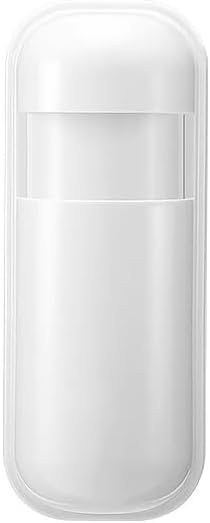
Image 1.1: The PGST P92R Motion Sensor, a compact white device.
The PGST P92R Motion Sensor is an expandable component designed for integration with the PGST Home Security System Host. This sensor utilizes infrared technology to detect movement within a specified area, enhancing the security of your premises. It is designed to distinguish between human movement and other disturbances, making it suitable for various indoor environments such as hallways and living rooms.

Image 1.2: PGST P92R Motion Sensor (right) alongside a door sensor (left), illustrating typical components of the security system.
Кључне карактеристике:
- Infrared sensing technology for motion detection.
- Designed for integration with PGST Home Security System Host.
- Expandable part for DIY security system customization.
- Battery-powered operation.
2. Подешавање и инсталација
2.1. Садржај пакета
Уверите се да су све компоненте присутне:
- 1 x PGST P92R сензор покрета
- 1 x Lithium Polymer battery (pre-installed or included separately)
- Mounting accessories (if applicable)
2.2. Инсталација батерије
The P92R Motion Sensor requires one Lithium Polymer battery for operation. If not pre-installed, open the sensor casing carefully and insert the battery, observing correct polarity. Close the casinг безбедно.
2.3. Физичко смештање
Mount the motion sensor in an area where it can effectively detect movement, such as hallways, living rooms, or entry points. Avoid placing it near heat sources, direct sunlight, or areas with strong air currents, as these can cause false alarms. Ensure the sensor has a clear line of sight to the detection area.
2.4. Connecting to the PGST Home Security System Host
The P92R Motion Sensor must be paired with your PGST Home Security System Host. Follow these steps to add the sensor:
- On the Host keypad, press СЕТ.
- Enter the system password (default is typically 6666), then press #.
- Enter the accessory code for adding sensors, which is 23, а затим притисните #.
- Enter the desired zone number for the sensor (e.g., 1-240), then press #.
- Trigger the motion sensor (e.g., by waving your hand in front of it) to send a signal to the host. The host should confirm successful pairing.

Image 2.1: Instructions for adding accessories, including motion sensors, to the PGST system.
2.5. WiFi and Alarm Number Setup (Host System)
To enable app control and receive alerts, ensure your PGST Host System is connected to WiFi and alarm numbers are set up.
2.5.1. How to Set Up WiFi:
- Операција хоста: Притисните СЕТ → 6666 → # → 00 → #.
- Phone Operation (using Smart Life or Tuya Smart App): Open the app → Navigate to ВиФи (2.4 ГХз) → Смарт лифе АПП → Додајте уређаје → Сензори → Аларм → ВиФи → Блинк Куицкли. Follow the on-screen prompts to connect to your 2.4GHz WiFi network.
2.5.2. How to Set the Alarm Number:
This allows the system to call designated numbers during an alarm event.
- On the Host keypad, press СЕТ → 6666 → # → 51-56 (for different alarm numbers) → Број → #.

Image 2.2: Detailed steps for configuring WiFi and alarm contact numbers on the PGST Host System.
3. Операција
3.1. Укључивање и искључивање система
The PGST Home Security System, to which the P92R Motion Sensor is connected, can be armed or disarmed via the keypad, remote control, or the mobile application.
- Arm (Away): Activates all sensors, including motion sensors. Use when leaving the premises.
- Stay Arm (Home): Activates perimeter sensors (e.g., door/window sensors) but typically bypasses interior motion sensors, allowing free movement inside.
- деактивирај: Деактивира све сензоре.

Image 3.1: Main button functions on the PGST keypad for arming, disarming, and other controls.
3.2. Заказано активирање/деактивирање
You can customize specific time periods for automatic arming or disarming of your security system to align with your daily routine and security requirements.

Image 3.2: Illustration of setting custom arm and disarm schedules for the security system.
3.3. Контрола мобилних апликација
Manage your security system, including the P92R Motion Sensor, through the Smart Life or Tuya Smart application on your smartphone or tablet. The app provides real-time alerts and system status updates.

Image 3.3: The mobile app interface for monitoring and controlling the PGST security system.
3.4. Интеграција гласовне контроле
The PGST Home Security System supports voice control via Amazon Alexa and Google Assistant. This allows for convenient arming and disarming of your system using voice commands.

Image 3.4: Voice control functionality with Amazon Alexa and Google Assistant for the security system.
3.5. Функције за хитне случајеве
The system includes features for emergency situations:
- Унапред подешени алармни позиви: The system can be configured to call up to five family numbers when an alarm is triggered, ensuring alerts are not missed.
- SOS Button Support: For elderly users or in emergencies, an optional SOS button can be integrated. Pressing this button will send a reminder or alert to designated contacts.

Image 3.5: The system's capability to make alarm calls to pre-set family numbers.

Image 3.6: The SOS button feature for emergency alerts, beneficial for elderly users.
4. Одржавање
4.1. Замена батерије
The P92R Motion Sensor is powered by a Lithium Polymer battery. When the battery level is low, the system will provide a low battery alert. To replace the battery:
- Пажљиво отворите сензор цasing.
- Remove the old Lithium Polymer battery.
- Insert a new Lithium Polymer battery, ensuring correct polarity.
- Затворите сензор цasinг безбедно.

Image 4.1: The system indicates a low battery alert, prompting replacement.
4.2. Чишћење
To ensure optimal performance, periodically clean the exterior of the motion sensor with a soft, dry cloth. Do not use liquid cleaners or abrasive materials, as these can damage the sensor components.
КСНУМКС. Решавање проблема
| Проблем | Могући узрок | Решење |
|---|---|---|
| Сензор покрета не детектује кретање. |
|
|
| False alarms from motion sensor. |
|
|
| Sensor disappears from the app or host system. |
|
|
| No app alerts or calls during an alarm. |
|
|
6. Спецификације
| Феатуре | Детаљ |
|---|---|
| Број модела | П92Р |
| Бранд | ПГСТ |
| Технологија детекције | инфрацрвени (ПИР) |
| Извор напајања | Баттери Поверед |
| Тип батерије | 1 x литијум-полимер (укључена) |
| Тежина артикла | 0.16 унци |
| Димензије производа | 1 к 1 к 1 инча (приближно) |
| Укључене компоненте | 1 x P92R Motion Sensor |
| Компатибилни уређаји | PGST Home Security System Host, Smartphone, Tablet |
7. Гаранција и подршка
7.1. Информације о гаранцији
Specific warranty details for the PGST P92R Motion Sensor may vary. Please refer to the warranty card included with your product or visit the official PGST webсајт за најактуелније услове гаранције.
7.2. Корисничка подршка
For technical assistance, troubleshooting, or any inquiries regarding your PGST P92R Motion Sensor or the PGST Home Security System, please contact PGST customer support. Contact information can typically be found on the PGST official webсајту или унутар паковања производа.
Такође можете посетити PGST продавница на Амазону за додатне информације о производу и ресурсе за подршку.
Ask a question about this manual
Ask about setup, troubleshooting, compatibility, parts, safety, or missing instructions. Manuals+ will review the question and use this page’s manual context to help answer it.