
1. Производ је готовview
The ICARZONE MA200 V6 is an advanced OBD2 diagnostic scanner designed for comprehensive vehicle analysis. It provides access to professional-level diagnostics, allowing users to read and clear fault codes across various vehicle systems, perform essential maintenance services, and monitor live data. This tool is suitable for home mechanics, DIY enthusiasts, and professionals seeking detailed vehicle insights.
Кључне карактеристике:
- Full System Diagnostics (Engine, ABS, SRS, Transmission, etc.)
- 6 Essential Maintenance Services (Oil Reset, EPB, SAS, TPMS, DPF, BMS)
- Full OBDII Functions (Read/Clear Codes, Live Data, I/M Readiness, etc.)
- Battery Test Functionality
- Доживотна бесплатна ажурирања софтвера
Компатибилност: The MA200 V6 is designed for most car models from the following manufacturing groups: BMW, BENZ, PORSCHE, VAG (Audi, Volkswagen, Bentley, Bugatti, Lamborghini, Seat, Skoda), JLR (Land Rover, Jaguar), and VOLVO (Volvo, Saab). Specific compatible brands include Porsche, Benz, Sprinter, Smart, Maybach, Land Rover, Jaguar, BMW, MINI, Rolls Royce, Volvo, Saab, Audi, Volkswagen, Bentley, Bugatti, Lamborghini, Seat, Skoda, MAN LD, Volkswagen CV, and Volkswagen LT3.
Напомена: Compatibility varies by vehicle make, model, and year. Please provide your car's VIN number for a precise compatibility check before use.

Image 1.1: The MA200 V6 scanner is compatible with a wide range of vehicles from major manufacturing groups.
2. Шта је у кутији
Након отварања пакета, уверите се да су присутни сви следећи елементи:
- MA200 V6 Main Device
- Пацкагинг Бок
- Преносива торба за складиштење
- PC Connecting Cable (USB)
- TF Card (contained within the device)
- Читач ТФ картица
- Упутство за употребу (овај документ)
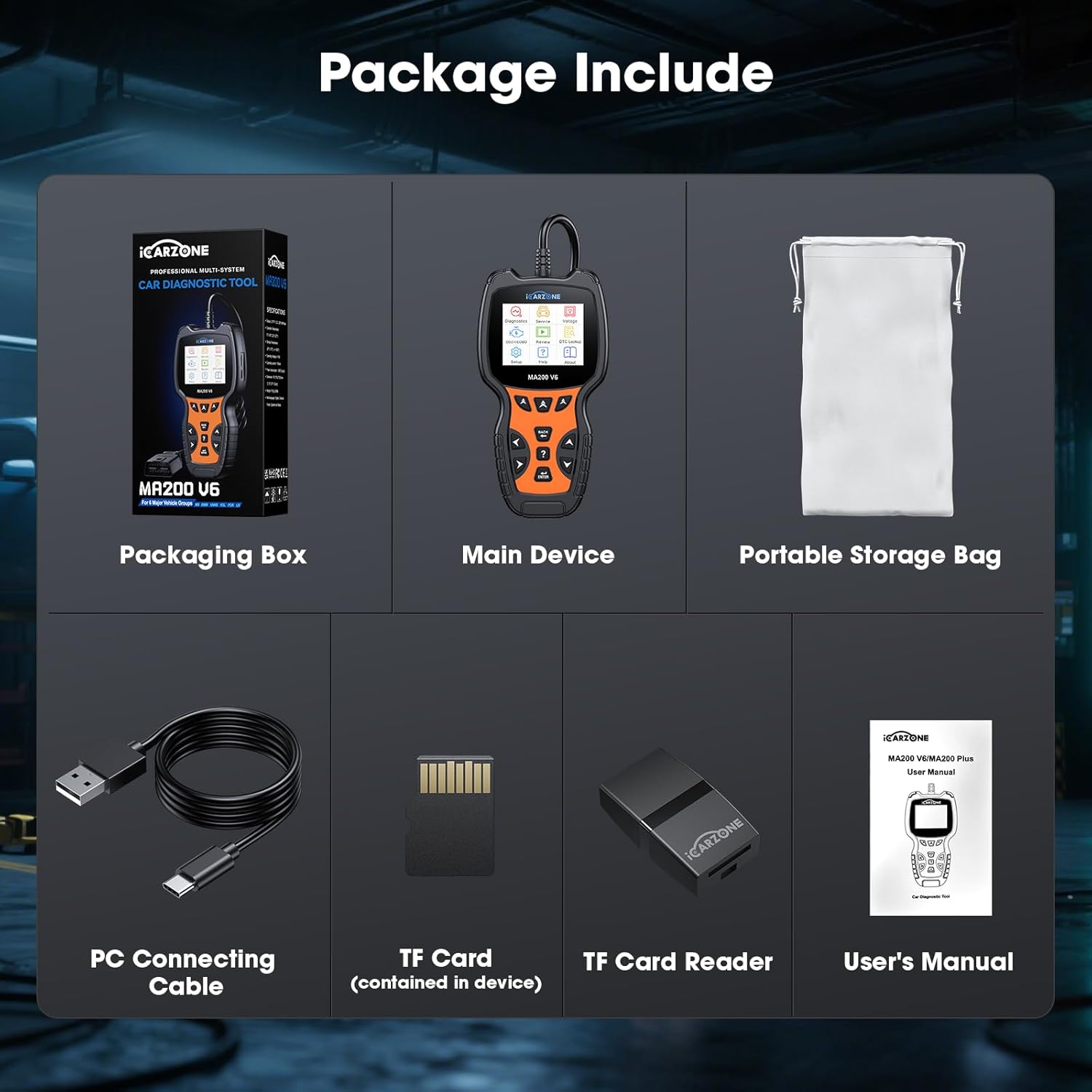
Image 2.1: All components included in the MA200 V6 product package.
3. Упутства за подешавање
Follow these steps to set up and begin using your MA200 V6 OBD2 Scanner:
- Пронађите OBD2 порт: OBD2 порт се обично налази испод контролне табле на страни возача. Погледајте упутство за употребу вашег возила ако га не можете пронаћи.
- Повежите скенер: Plug the MA200 V6's diagnostic cable connector firmly into the vehicle's OBD2 port. The scanner receives power directly from the vehicle's port, so no external batteries are required.
- Укључено: Once connected, the scanner will automatically power on. If it does not, ensure the vehicle's ignition is in the 'ON' position (engine can be off).
- Почетно подешавање: Follow any on-screen prompts for initial language selection or system configuration.
4. Упутство за употребу
This section details the primary functions and how to operate your MA200 V6 scanner.
4.1. Full System Diagnostic
The MA200 V6 can access and diagnose various electronic control units (ECUs) within your vehicle, including Engine, Anti-lock Braking System (ABS), Supplemental Restraint System (SRS/Airbag), Transmission, and more. This allows for a comprehensive fault code detection beyond basic engine codes.
- From the main menu, select "Diagnostics."
- Choose "Auto Scan" to automatically identify your vehicle and scan all available systems, or select "Control Unit" to manually choose a specific system (e.g., Engine, ABS, SRS).
- The scanner will display any detected fault codes (DTCs) and their descriptions.
- You can generate a diagnostic report for review or to share with a repair shop.

Image 4.1: The MA200 V6 provides full system diagnostic capabilities, covering various vehicle modules.
4.2. 6 Maintenance Services
The MA200 V6 offers six commonly used maintenance and reset functions:
- Ресетовање уља: Resets the engine oil life system after an oil change.
- Ресетовање електронске паркирне кочнице (EPB): Essential for safely replacing brake pads on vehicles with electronic parking brakes.
- SAS Reset (Steering Angle Sensor): Calibrates the steering angle sensor, crucial for vehicle stability control systems.
- TPMS Reset (Tire Pressure Monitoring System): Resets the TPMS system after tire rotation, sensor replacement, or tire pressure adjustment.
- DPF Reset (Diesel Particulate Filter): Initiates the DPF regeneration process to clear blockages in diesel vehicles.
- Ресетовање BMS-а (систем за управљање батеријом): Registers a new battery with the vehicle's ECU to ensure proper charging and system function.
Напомена: The availability and specific procedures for these services vary by vehicle model. Please check compatibility for your specific car's VIN.

Image 4.2: The MA200 V6 provides 6 essential maintenance services for routine vehicle care.
4.3. OBDII Full Functions
The MA200 V6 supports all standard OBDII protocols, enabling comprehensive diagnostics for all OBDII-compliant vehicles (typically 1996 and newer in the US).
- Прочитајте кодове: Преузима генеричке (P0, P2, P3 и U0) и кодове специфичне за произвођача (P1, P3 и U1).
- Обриши кодове: Erases Diagnostic Trouble Codes (DTCs) and turns off the Check Engine Light (MIL). Note: Codes can only be permanently cleared after the underlying problem is fixed.
- Стримовање података уживо: Displays real-time data from the vehicle's sensors in text or graph format.
- И/М спремност: Checks the readiness of emission-related monitors, indicating if the vehicle is ready for an emissions test.
- Подаци замрзнутог кадра: Shows a snapshot of vehicle operating conditions at the time an emission-related fault occurred.
- Тест О2 сензора: Преузима резултате теста монитора О2 сензора.
- Тест уграђеног монитора: Retrieves test results for emission-related powertrain components and systems.
- Подаци о возилу: Displays the Vehicle Identification Number (VIN), Calibration ID (CALID), and Calibration Verification Number (CVN).
- Тест батерије: Evaluates the vehicle's battery health.
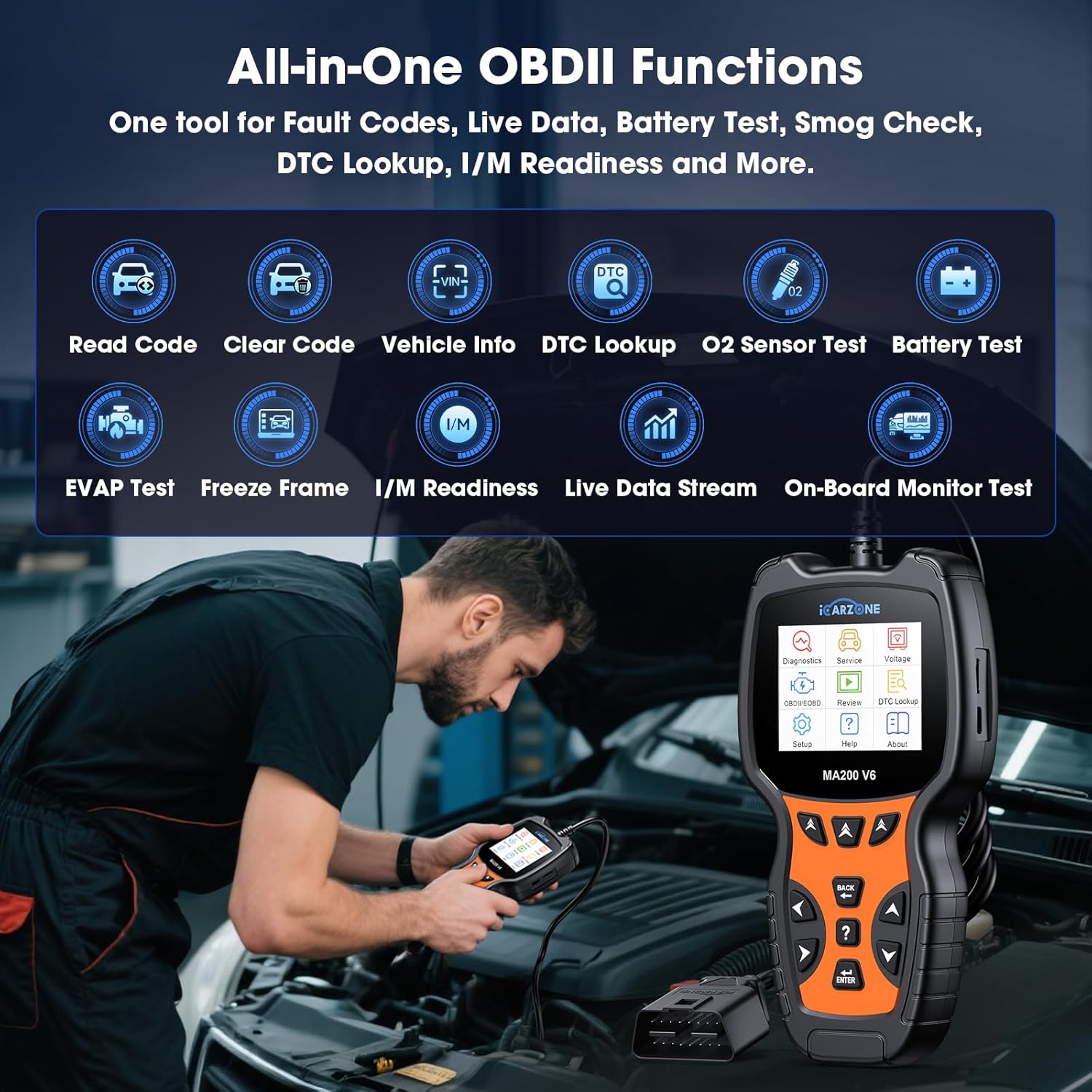
Image 4.3: The MA200 V6 provides a comprehensive suite of OBDII functions for standard diagnostics.
4.4. ДТЦ Лоокуп
The MA200 V6 includes a built-in DTC library to help you understand the meaning of diagnostic trouble codes.
- From the main menu, select "DTC Lookup."
- Enter the specific DTC code you wish to look up.
- The scanner will display a detailed description of the code, helping you identify potential issues.

Image 4.4: The MA200 V6's DTC library assists in understanding and addressing fault codes.
4.5. Auto VIN Function
The Auto VIN feature automatically identifies your vehicle's VIN for quicker diagnostics setup.
- When prompted during a diagnostic session, select "Auto VIN."
- The scanner will attempt to read the VIN from the vehicle's ECU.
Напомена: Auto VIN may not be applicable to all vehicles. For some cars, you may need to manually enter the VIN to proceed with diagnostics.
5. Одржавање
To ensure optimal performance and longevity of your MA200 V6 scanner:
- Ажурирања софтвера: The MA200 V6 offers lifetime free software updates. Regularly connect your device to a computer using the provided USB cable and visit the official ICARZONE website to download and install the latest software. This ensures compatibility with newer vehicle models and access to updated features.
- Чишћење: Обришите уређај меком, сувом крпом. Избегавајте употребу абразивних средстава за чишћење или растварача.
- Складиштење: Store the scanner in its portable storage bag when not in use to protect it from dust and physical damage.
КСНУМКС. Решавање проблема
If you encounter issues while using your MA200 V6 scanner, refer to the following common problems and solutions:
- Scanner does not power on:
- Ensure the scanner is securely connected to the vehicle's OBD2 port.
- Проверите да ли је паљење возила у положају „УКЉУЧЕНО“.
- Check the vehicle's fuse for the OBD2 port (refer to your vehicle's manual).
- Cannot clear fault codes:
- Fault codes can only be successfully erased after the underlying mechanical or electrical problem has been fixed. If the issue persists, the code will reappear.
- Auto VIN fails to identify vehicle:
- Auto VIN is not universally compatible with all vehicles. Try manually entering the VIN when prompted.
- Specific diagnostic or service function not working:
- The compatibility of advanced functions (like maintenance services) varies significantly by vehicle make, model, and year. Contact ICARZONE support with your vehicle's VIN for a compatibility check.
- Ensure your scanner's software is up to date.
- "Link Error" or "Communication Error":
- Verify the OBD2 cable connection is secure.
- Уверите се да је паљење возила укључено.
- Try the scanner on a different OBDII-compliant vehicle to rule out a vehicle-specific issue.
7. Спецификације
| Феатуре | Спецификација |
|---|---|
| Модел | MA200 V6 |
| Бранд | ICARZONE |
| Извор напајања | Електрични са каблом (преко OBD2 порта) |
| Оперативни систем | Professional Automotive Inspection OS |
| Величина екрана | 2.8 инча |
| Тежина артикла | 1.15 фунти |
| Димензије пакета | 8.35 к 4.02 к 2.44 инча |
| Аутомотиве Фит Типе | Специфично уклапање у возило |
8. Гаранција и подршка
ICARZONE is committed to providing reliable products and excellent customer service.
- гаранција: The MA200 V6 OBD2 Scanner comes with a 1-year brand warranty from the date of purchase. Please retain your proof of purchase for warranty claims.
- Доживотна бесплатна ажурирања: Enjoy lifetime free software upgrades for your device. Regularly check the official ICARZONE website for the latest updates to ensure your scanner remains current with new vehicle models and features.
- техничка подршка: Lifetime technical support is available for all MA200 V6 users. If you have any questions, encounter issues, or require assistance with specific vehicle compatibility, please do not hesitate to contact our support team.
For support, please visit the official ICARZONE webсајт или погледајте контакт информације које се налазе на паковању производа.