
1. Производ је готовview
The Inwa MZ-631M is a versatile USB-powered speaker bar designed for desktop PCs and laptops. It features stereo sound with enhanced bass, a detachable microphone with Acoustic Echo Cancellation (AEC) technology, and flexible mounting options including a monitor clip. It connects via a single USB cable for both audio and power, supporting USB-A and USB-C connections.

Figure 1: Inwa MZ-631M USB Computer Speaker Bar
2. Шта је у кутији
- 1 x Inwa Computer Speaker Bar
- 1 к одвојиви микрофон
- 1 к Упутство за употребу
3. Упутства за подешавање
3.1 Mounting the Speaker Bar
The speaker bar offers flexible mounting options:
- Monitor Clip Installation: The speaker features an upgraded spring clip on the bottom, allowing it to easily clip to the top, sides, or bottom of your monitor. It securely clamps to most monitors up to 1 inch thick. The silicone pads on the clip protect the monitor surface.
- Положај на радној површини: The speaker can also be placed independently on your desktop if preferred.

Figure 2: Speaker bar clipped to a monitor, showing the clip mechanism.
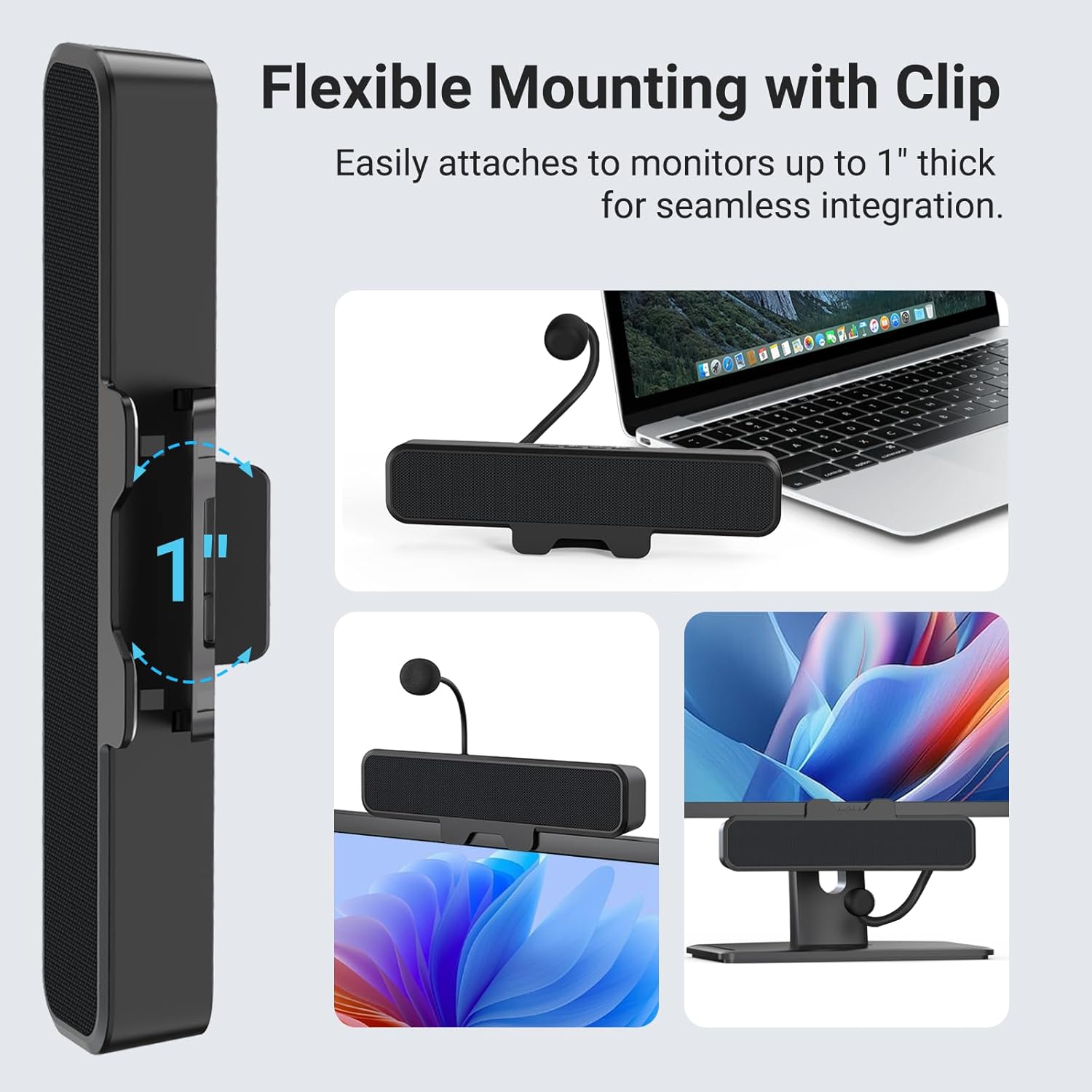
Слика 3: Страна view illustrating the monitor clip's compatibility with monitors up to 1 inch thick.
3.2 Connecting to Your Computer (Plug and Play)
The Inwa MZ-631M speaker bar is designed for simple plug-and-play operation. No additional software or drivers are required.
- Повежите УСБ кабл: Use the integrated USB cable to connect the speaker bar to an available USB-A or USB-C port on your PC or Mac. An included USB-C to USB-A adapter ensures broad compatibility.
- Прикључите микрофон: Insert the detachable gooseneck microphone into the designated port on the speaker bar.
- Select Output Device: After connecting, your computer should automatically detect the speaker bar. You may need to manually select the "Inwa MZ-631M USB Speaker Bar" as your audio output and input device in your operating system's sound settings.

Figure 4: The included USB-A to USB-C adapter for versatile connectivity.
4. Упутство за употребу
4.1 Аудио репродукција
The speaker bar features dual 10W high-sensitive drivers and a passive radiator for rich stereo sound and enhanced bass. Once connected and selected as the output device, audio from your computer will play through the speaker bar.

Слика 5: Унутрашњи view highlighting dual speakers and 10W audio output.
4.2 Употреба микрофона
The detachable gooseneck microphone utilizes Acoustic Echo Cancellation (AEC) technology to capture your voice clearly while minimizing background noise and echoes. This is ideal for online meetings, gaming, and educational purposes.

Figure 6: Speaker bar with its unidirectional microphone, compatible with various platforms.
4.3 One-Touch Mute Function
The speaker bar includes a dedicated button for instant microphone muting. This allows for quick and convenient control during calls or recordings.

Figure 7: The one-touch mute button on the speaker bar for easy control.
5. Одржавање
To ensure the longevity and optimal performance of your Inwa MZ-631M speaker bar, follow these simple maintenance guidelines:
- Чишћење: Use a soft, dry cloth to wipe the exterior of the speaker bar. Avoid using abrasive cleaners or solvents.
- Складиштење: When not in use for extended periods, store the speaker bar in a cool, dry place away from direct sunlight and extreme temperatures.
- Нега каблова: Избегавајте прекомерно савијање или кримповање USB кабла како бисте спречили унутрашња оштећења.
КСНУМКС. Решавање проблема
If you encounter issues with your Inwa MZ-631M speaker bar, please refer to the following common solutions:
- Нема излаза звука:
- Ensure the USB cable is securely connected to both the speaker bar and your computer.
- Verify that the Inwa MZ-631M is selected as the default audio output device in your computer's sound settings.
- Check the volume levels on both the speaker bar and your computer.
- Try connecting the speaker to a different USB port on your computer.
- Микрофон не ради:
- Ensure the detachable microphone is firmly inserted into its port on the speaker bar.
- Verify that the microphone is not muted using the one-touch mute button.
- Confirm that the Inwa MZ-631M is selected as the default audio input device in your computer's sound settings.
- Check privacy settings on your operating system to ensure applications have permission to access the microphone.
- Искривљени звук:
- Reduce the volume on both the speaker bar and your computer.
- Ensure there are no obstructions blocking the speaker grilles.
- Покушајте да се повежете на други УСБ порт.
7. Спецификације
| Феатуре | Детаљ |
|---|---|
| Назив модела | MZ-631M |
| Бранд | Инва |
| Тип монтаже | Цлип |
| Материјал | Пластика |
| Спеакер Типе | Монитор |
| Посебне карактеристике | Bass Boost, Clamp installation, Detachable Microphone, Portable, USB Port |
| Технологија повезивања | УСБ |
| Режим аудио излаза | Стерео |
| Максимална излазна снага звучника | 10 Ваттс |
| Улазни волtage | 5 волти (ДЦ) |
| Димензије производа | 9"Д к 1.85"Ш к 1.26"В |
| Тежина артикла | 13.4 унци (0.38 килограма) |
| Компатибилни уређаји | Лаптоп, паметни телефон, таблет |
| Контролни метод | Притисните дугме |
| Специфичне употребе | Business, Gaming, Music |
8. Информације о гаранцији
The Inwa MZ-631M USB Computer Speaker Bar comes with a Limited Warranty. Please refer to the product packaging or contact Inwa customer support for specific details regarding warranty terms and conditions.
9. Корисничка подршка
For further assistance, technical support, or inquiries regarding your Inwa MZ-631M speaker bar, please contact Inwa customer service. Contact information can typically be found on the product packaging or the official Inwa webсајту.