
1. Увод
This manual provides essential information for the safe and efficient operation of your TOPTRO Quadra Projector. Please read this manual thoroughly before using the projector and retain it for future reference. The TOPTRO Quadra Projector is designed to deliver a high-quality visual and audio experience with its advanced features and smart capabilities.
2. Безбедносне информације
- Do not block the ventilation openings. Ensure adequate airflow around the projector to prevent overheating.
- Не излажите пројектор киши или влази да бисте избегли струјни удар или пожар.
- Користите само адаптер за напајање који се испоручује са пројектором.
- Избегавајте да гледате директно у сочиво пројектора када је лamp је укључено, јер јако светло може изазвати оштећење ока.
- Поставите пројектор на стабилну, равну површину како бисте спречили његов пад.
- Не покушавајте сами да растављате или поправљате пројектор. Сва сервисирања препустите квалификованом особљу.
3. Садржај пакета
Проверите да ли су све ставке присутне у пакету:
- 1 x TOPTRO Quadra Projector
- 1 к ХДМИ кабл
- 1 к Упутство за употребу
- 1 к даљински управљач
4. Производ је готовview
Familiarize yourself with the main components and interfaces of your TOPTRO Quadra Projector.
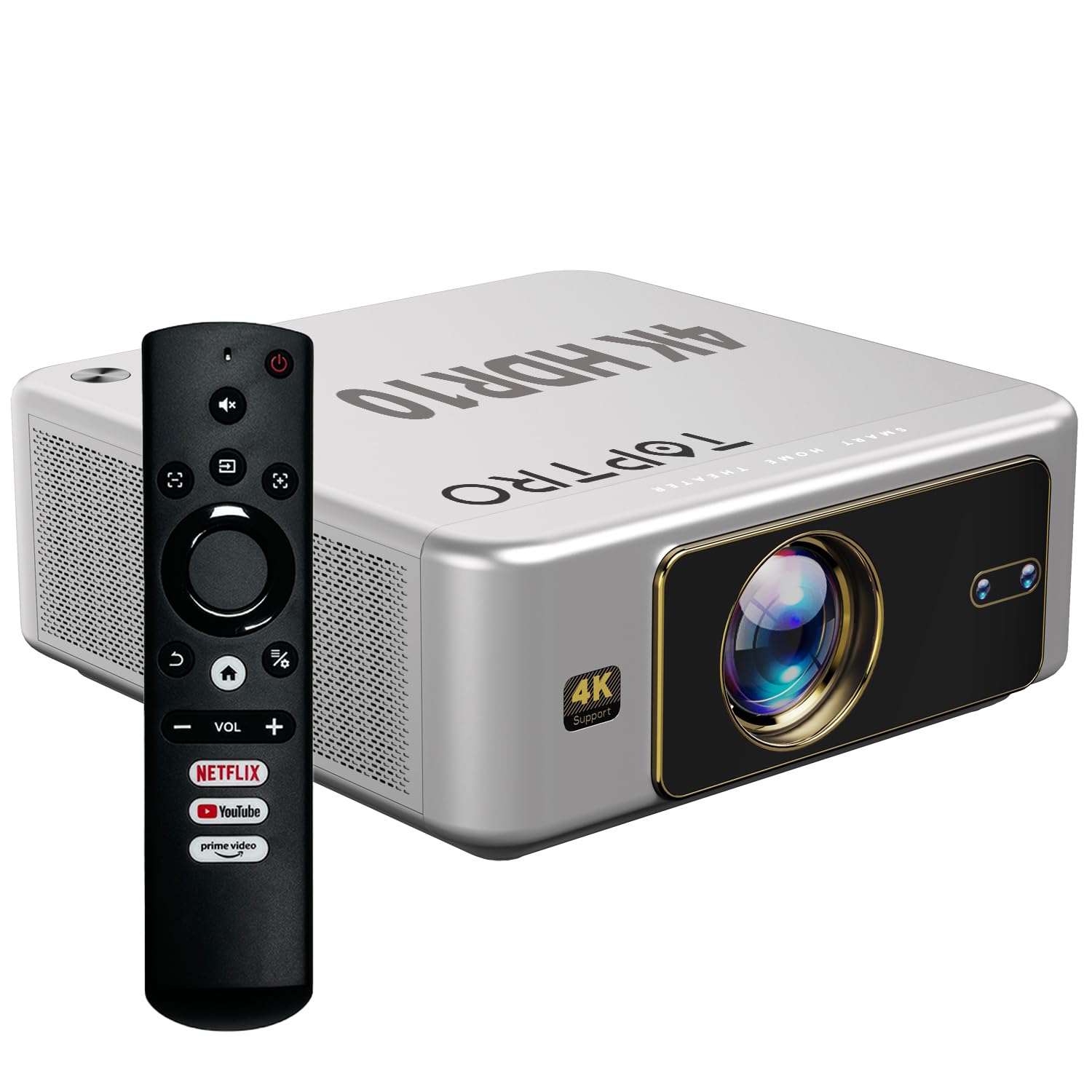
Слика 4.1: Предња страна view of the TOPTRO Quadra Projector with included remote control.

Figure 4.2: Rear panel of the projector displaying the power input, audio jack, HDMI ports, and USB ports.
5. Подешавање
5.1 Placement and Projection Size
Position the projector on a stable surface. The TOPTRO Quadra Projector supports a maximum screen size of 300 inches. Adjust the distance from the wall or screen to achieve your desired image size.

Figure 5.1: Recommended projection distances for different screen sizes.
5.2 Прикључак за напајање
- Прикључите кабл за напајање на улазни порт за напајање пројектора.
- Укључите други крај кабла за напајање у одговарајућу електричну утичницу.
5.3 Почетно укључивање и основна подешавања
- Притисните дугме за напајање на пројектору или даљинском управљачу да бисте га укључили.
- Upon first use, the projector may guide you through initial setup steps, including language selection and network connection.
5.4 Фокус и корекција трапезоидног изобличења
The TOPTRO Quadra Projector features AI-powered automatic focus and keystone correction. This system automatically adjusts the image for optimal clarity and shape.
- Ауто фокус: The projector will automatically adjust the image sharpness.
- Ауто Кеистоне: The projector will automatically correct trapezoidal distortion to ensure a rectangular image.
- Auto Obstacle Avoidance & Screen Fit: The projector can detect obstacles and adjust the image to fit the screen area.
If automatic adjustments are not satisfactory, manual adjustments can be made through the settings menu. Navigate to the 'Display & Sound' settings to access these options.

Figure 5.2: Automatic image correction features.
6. Операција
6.1 Кориснички интерфејс и навигација
The TOPTRO Quadra Projector runs on a Net-Flix Certified Linux OS, providing a user-friendly interface. Use the remote control to navigate through menus and select applications.

Figure 6.1: Home screen with pre-installed streaming applications.
6.2 Повезивање
The projector offers various connectivity options for external devices.
- ДВИ: Connect your laptop, MacBook, Blu-ray player, TV sticks, TV boxes, or gaming consoles (e.g., PS4) using the dual HDMI ports. The projector supports HDMI CEC and HDMI EARC for enhanced audio return channel functionality.
- УСБ: Two USB ports are available for connecting pendrives or hard disks to play media fileс директно.
- 3.5 мм аудио излаз: Connect external headphones or speakers for a personalized audio experience.
- Ви-Фи: Utilize the 6th Gen Dual Band Wi-Fi (2.4 GHz + 5 GHz) for internet access and streaming.
- Блуетоотх КСНУМКС: Connect Bluetooth speakers, headphones, or other compatible audio devices. The projector also supports two-way Bluetooth, allowing it to function as a Bluetooth speaker.
- Мирацаст: Wirelessly mirror your screen from compatible devices.

Слика 6.2: Опције повезивања за екстерне уређаје.
6.3 Подешавања екрана
Adjust image quality and display features through the 'Display & Sound' menu.
- Режим слике: Select from various preset picture modes (e.g., Vivid) or customize settings like brightness, contrast, and color.
- 4K HDR10+ Support: The projector plays true 4K resolution HDR10+ videos, offering enhanced contrast and color depth.
- MEMC (Процена покрета, Компензација покрета): This technology improves video smoothness and clarity, especially for fast-moving scenes, by interpolating frames.

Figure 6.3: MEMC technology for smoother visuals.
6.4 Аудио подешавања
Manage audio output and formats via the 'Display & Sound' menu.
- Dolby Atmos & Dolby Digital Plus: The projector supports these advanced audio technologies for immersive sound.
- еАРЦ режим: Enable eARC for high-quality audio return from compatible devices.
- Излазни формат: Select the appropriate audio output format (e.g., Auto, PCM, Passthrough, Dolby Digital, Dolby Digital Plus) based on your connected audio system.

Figure 6.4: Immersive audio with Dolby Atmos support.
7. Одржавање
Правилно одржавање осигурава дуготрајност и оптималне перформансе вашег пројектора.
- Чишћење сочива: Gently wipe the projector lens with a soft, lint-free cloth specifically designed for optical surfaces. Avoid abrasive materials or harsh chemicals.
- Спољно чишћење: Користите меку, суву крпу за чишћење спољашњости пројектора.
- Превенција прашине: The TOPTRO Quadra Projector features a fully sealed optical engine, which helps prevent dust, dirt, and moisture from entering the light path. This design reduces the need for frequent internal cleaning and maintains consistent image quality.
КСНУМКС. Решавање проблема
Ако наиђете на проблеме са пројектором, погледајте следеће уобичајене проблеме и решења:
| Проблем | Могући узрок | Решење |
|---|---|---|
| Нема приказане слике | Incorrect input source selected; loose HDMI/USB connection; power issue. | Verify input source in settings; check cable connections; ensure projector is powered on. |
| Нема звука | Volume too low or muted; incorrect audio output setting; external audio device not connected properly. | Adjust volume; check 'Sound output' settings; ensure external speakers are connected and powered. |
| Слика је мутна или искривљена | Focus or keystone correction issues; projector not placed correctly. | Allow auto-focus/keystone to complete. If issues persist, manually adjust focus and keystone in 'Display & Sound' settings. Ensure the projector is perpendicular to the screen. |
| Даљински управљач не ради | Batteries are low or depleted; remote not pointed at IR receiver; obstruction. | Replace batteries; ensure clear line of sight to the projector's IR receiver. |
| Fan noise is noticeable | Normal operation; projector is working hard; ventilation blocked. | Ensure adequate ventilation around the projector. Fan noise is a normal part of projector operation, especially during high-performance tasks. |
9. Спецификације
Key technical specifications of the TOPTRO Quadra Projector:
| Феатуре | Детаљ |
|---|---|
| Бранд | ТОПТРО |
| Назив модела | TOPTRO Quadra Projector 4K HDR10+ Dolby |
| Димензије производа | 24 к 20 к 10 цм |
| Тежина артикла | 2 кг |
| Хардверски интерфејс | 3.5mm Audio, Bluetooth 5.2, Dual HDMI (CEC, EARC), Dual USB |
| Компатибилни уређаји | Gaming Console, Laptop, Smartphone, Speaker, Television |
| Посебне карактеристике | Dolby Atmos - Dolby Digital Plus, 4K HDR 10+/HLG, Net-Flix Certified Linux OS, 2GB RAM, 32GB ROM, Auto Focus & Keystone, Native 1080p Full HD & True 4K Support, 32000 Lumens Brightness (2600 ANSI), 15W Big Speakers, HDMI ARC, Dual HDMI, Built-in Apps, Dual 5G & 2.4G WiFi 6, Bluetooth, WiFi Display, Electronic Focus & 6D Electronic correction, Fully Sealed Optical Engine, MEMC |
| Дисплаи Тецхнологи | ЛЦД |
| Осветљеност слике | 32000 лумена (2600 АНСИ) |
| Однос контраста слике | 22000:1 |
| Аспецт Ратио | 16:9 |
| Native Screen Resolution | 1920 к 1080 (Фулл ХД) |
| Подржана резолуција | Up to 3840 x 2160 Pixels (4K) |
| Рефресх Рате | 60 Хз |
| Lamp Живот | 50000 сата |
| Форм Фацтор | Портабле |
| Тип монтаже | Плафонски носач |
| Земља порекла | Кина |
10. Гаранција и подршка
For warranty information, technical support, or service inquiries, please contact TOPTRO Projectors India using the details below:
- Емаил: support@toptro.in or среепројецторс@гмаил.цом
- ВхатсАпп: 8341888860
- Webсајт: toptro.in
Please have your product model number (Quadra 4K HDR10+ Dolby) and purchase details ready when contacting support.