
Увод
Welcome to the Miroir Mini Projector M416 user manual. This guide provides essential information for setting up, operating, and maintaining your new projector. The Miroir M416 is a portable HD projector designed for versatile use, featuring auto-focus, keystone correction, and a built-in speaker for an immersive viewинг искуство.
Молимо вас да пажљиво прочитате ово упутство пре употребе пројектора како бисте осигурали правилан рад и максимизирали његове перформансе и век трајања.
Шта је у кутији
- Пројектор
- Повер Адаптер
- Упутство за употребу
- Ремоте Цонтрол

Image: Miroir Mini Projector M416 with its remote control, power cord, HDMI cable, and user manual.
Производ је завршенview
Фронт View

Слика: Фронт view of the Miroir Mini Projector M416, highlighting the projection lens and integrated speaker grille.
Портови и везе
The Miroir M416 projector offers various ports for connecting external devices:
- ХДМИ 1.4 (к2): For connecting laptops, gaming consoles, TV sticks, and other HDMI-enabled devices.
- УСБ 2.0: For connecting USB storage devices or for wired smartphone mirroring (with appropriate adapter).
- Мицро СД: For playing media directly from a Micro SD card.
- КСНУМКСмм Аудио Јацк: For connecting external speakers or headphones.
- ДЦ 24В: Улазни прикључак за напајање.
Слика: Позади view of the Miroir Mini Projector M416, illustrating the Micro SD slot, HDMI ports, USB port, 3.5mm audio jack, and DC power input.
Сетуп
Повер Цоннецтион
- Connect the power adapter to the DC 24V port on the projector.
- Укључите адаптер за напајање у зидну утичницу.
Положај и величина екрана
The projector can display screen sizes from 45 inches to 200 inches, depending on the projection distance. For optimal viewing, ensure the projector is placed on a stable, flat surface or mounted on a tripod.
- 45-инчни екран: Approximately 1.25 meters (4 feet) distance.
- 100-инчни екран: Approximately 2.7 meters (8.8 feet) distance.
- 200-инчни екран: Approximately 4 meters (13 feet) distance.
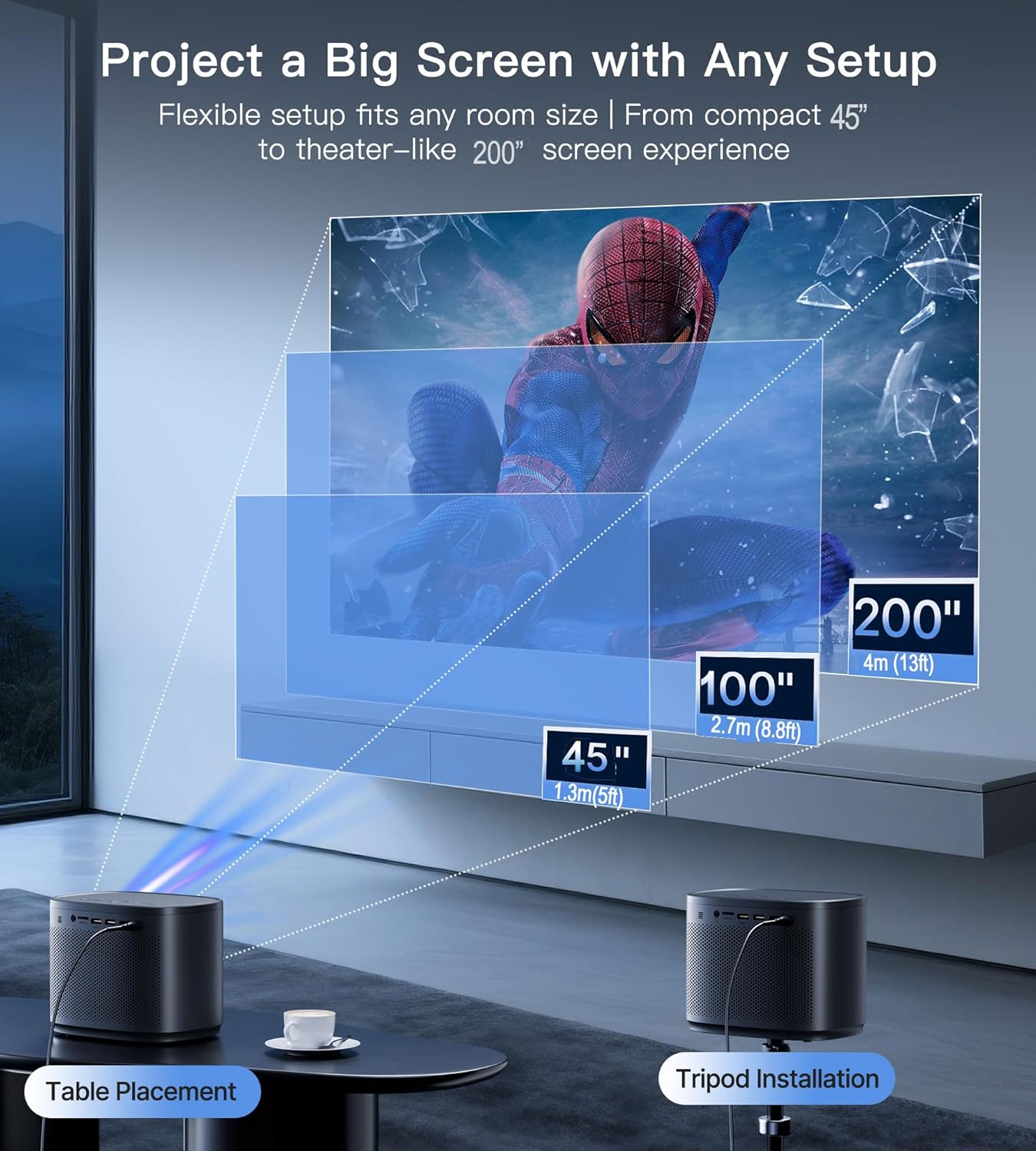
Image: Illustration of recommended projection distances for screen sizes ranging from 45 to 200 inches, demonstrating both table and tripod setup options.
Упутство за употребу
Укључивање/искључивање
Притисните дугме за напајање на пројектору или даљинском управљачу да бисте укључили или искључили уређај.
Повезивање уређаја
The Miroir M416 supports various connection methods:
1. Connecting Your Smartphone (Wired)
To mirror your smartphone screen, you will need a compatible adapter (not included):
- иОС уређаји: Connect your iPhone using a Lightning to HDMI cable/adapter.
- Андроид уређаји: Connect your Android phone using a Micro USB or Type-C to HDMI cable/adapter.
Note: Due to copyright protection (HDCP), streaming apps like Netflix, Prime Video, and Hulu cannot be directly mirrored from smartphones. For these services, use a TV stick or streaming device.

Image: Instructions for connecting iOS and Android smartphones to the projector using appropriate HDMI adapters.
2. Connecting a TV Stick or Streaming Device
For streaming apps, plug your Fire Stick, Roku, Chromecast, or similar device into one of the projector's HDMI ports. Ensure the streaming device is also connected to a power source.
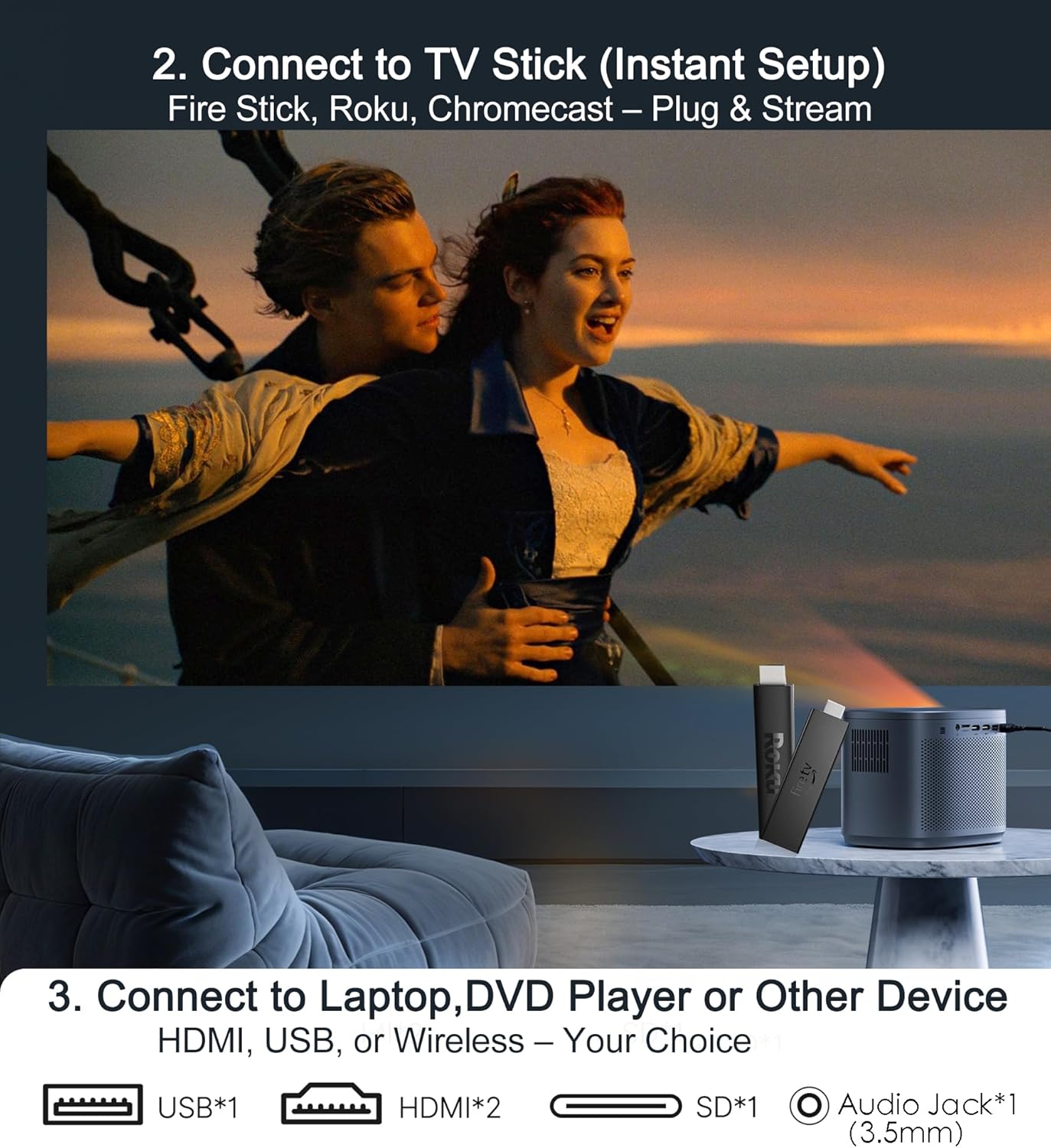
Image: A TV stick connected to the projector, demonstrating instant setup for streaming content.
3. Connecting Laptops, Gaming Consoles, or Other Devices
Connect devices such as laptops, PS5/Xbox consoles, or Blu-ray players directly via an HDMI cable. The projector also supports USB for media playback.

Image: A laptop connected to the projector via HDMI, displaying content on a large screen.
Image Adjustment: Auto Focus & Keystone Correction
The Miroir M416 features smart self-adjusting technology to ensure a clear, rectangular image:
- Ауто Фоцус: Built-in sensors automatically adjust the focus for a sharp image, even if the projector is moved.
- Аутоматска вертикална корекција Кеистоне: Automatically corrects vertical image distortion to create a perfectly rectangular projection.
- Manual 4-Corner Keystone Correction: For complex angles or specific adjustments, you can manually fine-tune each corner of the image.
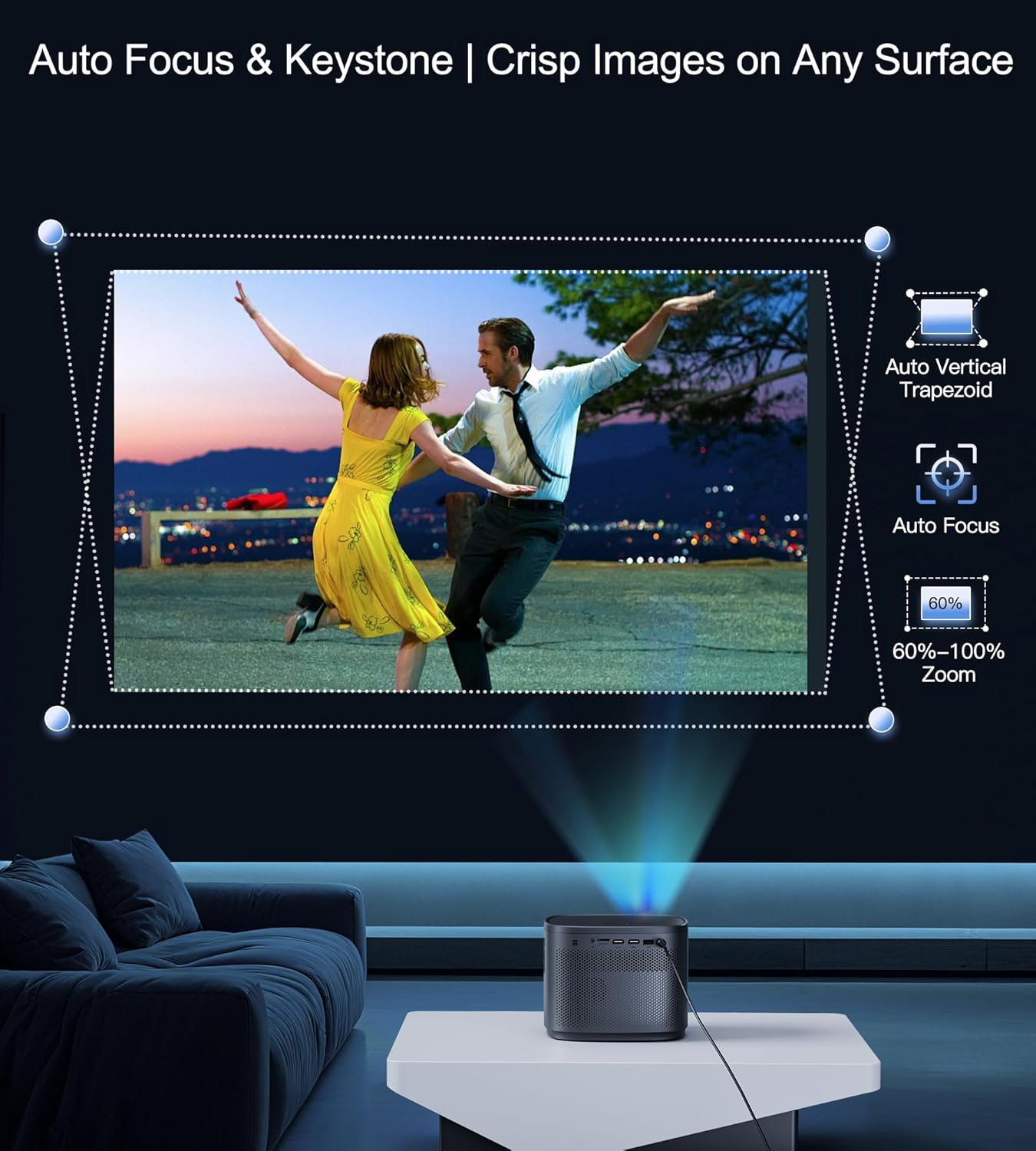
Image: Visual representation of the auto-focus and auto vertical keystone correction capabilities, ensuring a crisp and square image.
Optical Zoom Function
The projector offers an optical zoom function (100%-60%) to resize the screen without losing image quality or needing to move the projector.

Image: Illustration of the optical zoom feature, demonstrating how the screen size can be adjusted from 100% down to 60% while maintaining image clarity.
Аудио излаз
The Miroir M416 features a built-in 5W speaker for clear audio. For enhanced sound, you can connect external speakers or headphones via the 3.5mm audio jack.
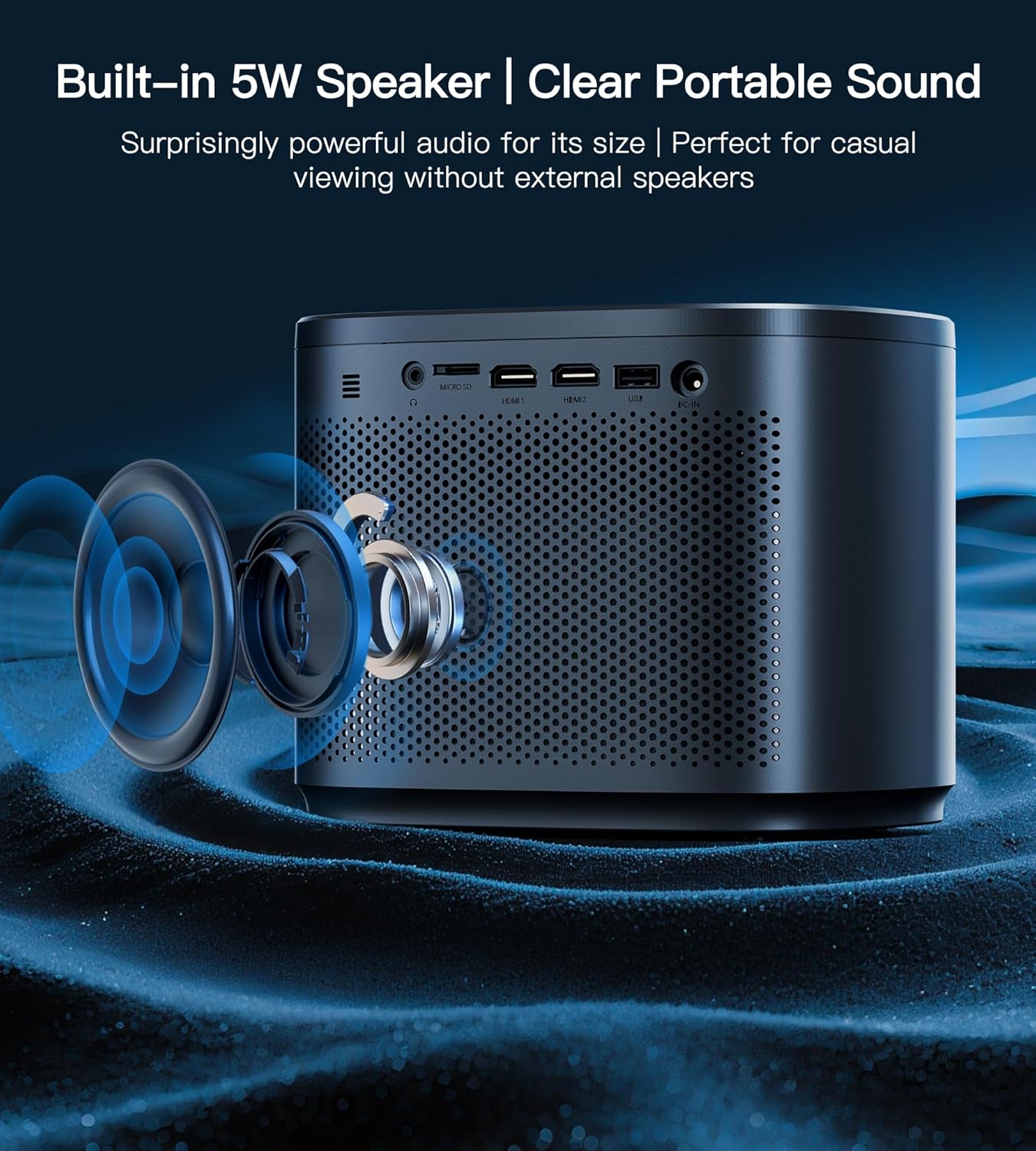
Слика: Пресек view of the Miroir Mini Projector M416, highlighting the integrated 5W speaker for immersive sound.
Одржавање
Чишћење сочива
To maintain optimal image quality, regularly clean the projector lens using a soft, lint-free cloth specifically designed for optical lenses. Avoid using abrasive materials or harsh chemicals.
Вентилација
Ensure the projector's ventilation openings are clear and unobstructed to prevent overheating. Do not place the projector on soft surfaces that may block airflow. The projector features a smart cooling system designed for quiet operation (36dB).

Image: Diagram showing the smart cooling system of the Miroir Mini Projector M416, designed for efficient heat dissipation and quiet operation.
Складиштење
When not in use, store the projector in a cool, dry place, away from direct sunlight and extreme temperatures. Use the original packaging or a protective case to prevent dust accumulation and damage.
Решавање проблема
Refer to the following common questions and answers for quick troubleshooting:

Image: Frequently Asked Questions (FAQ) for the Miroir Mini Projector M416, providing solutions to common user inquiries.
- Q1: Does this projector have WiFi/Bluetooth?
A: No. Wireless connectivity requires an external streaming stick (e.g., Fire Stick). - Q2: How to connect my iPhone/Android phone?
A: Use an HDMI cable (iPhone requires a Lightning-to-HDMI adapter). - Q3: Can I mirror Disney+/Netflix from my phone?
A: No. Due to DRM restrictions, use official apps via streaming devices. - Q4: Is it bright enough for daytime use?
A: Yes, 200 ANSI lumens works with curtains; optimal at night. - Q5: Is auto-correction accurate?
A: Yes. <15° auto keystone (<1cm error) with +/-45° manual fine-tuning. - Q6: Does it support PS5/Switch? Any lag?
A: Yes. <30ms latency via HDMI (ideal for gaming). - Q7: How big is the screen?
A: 45-200 inches, adjustable by distance. - П8: Могу ли га користити напољу?
A: Yes, but avoid direct sunlight for best results.
Спецификације
| Феатуре | Детаљ |
|---|---|
| Бранд | Мироир |
| Број модела | М416 |
| Тежина артикла | 1.89 фунте (0.86 кг) |
| Димензије производа | 5.5 к 6.3 к 7.8 инча |
| Резолуција екрана | HD |
| Осветљеност | КСНУМКС АНСИ Луменс |
| Однос контраста | 5000:1 |
| Технологија повезивања | HDMI (x2), USB, Micro SD, 3.5mm Jack |
| Посебне карактеристике | Auto Focus, Built-In Speaker, Digital Keystone Correction, Portable |
| Уграђени звучник | 5W |
| ЛЕД Лamp Живот | 30,000 сата |
Гаранција и подршка
The Miroir Mini Projector M416 comes with a 3-Year 'No Worry' Service, ensuring peace of mind with your purchase. Miroir also provides доживотна техничка подршка with quick replies within 24 hours for any assistance you may need.
For technical support or warranty claims, please refer to the contact information provided on the official Miroir webсајт или вашу документацију о куповини.