
Увод
This manual provides essential information for setting up, operating, maintaining, and troubleshooting your NIMO 17.3 Gaming Laptop. Designed for high performance with an AMD Ryzen 9 8945HS processor and Radeon 780M graphics, this laptop offers a powerful computing experience for gaming, creative work, and everyday tasks. Please read this manual thoroughly to ensure optimal use and longevity of your device.
1. Почетно подешавање
1.1 Распакивање и прво укључивање
Carefully remove your NIMO laptop and all accessories from the packaging. Place the laptop on a stable, flat surface. Before first use, it is recommended to fully charge the battery.

The NIMO 17.3 Gaming Laptop, ready for initial setup.
1.2 Пуњење батерије
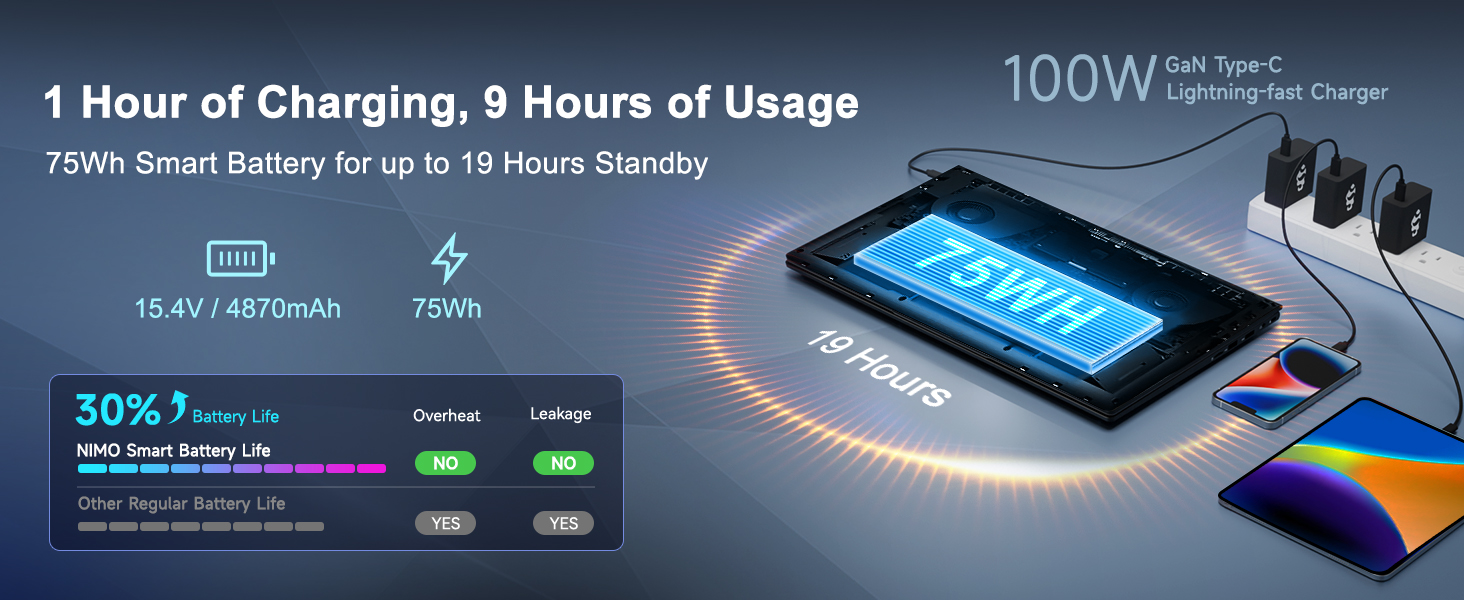
Connect the provided 100W PD Type-C fast charger to the USB-C port on your laptop and then to a power outlet. The charging indicator light will illuminate. Allow the laptop to charge fully before its first use for optimal battery calibration.

The 100W GaN Type-C charger connected to the laptop, illustrating fast charging capability.
1.3 Конфигурација оперативног система
Upon first power-on, you will be guided through the Windows 11 setup process. Follow the on-screen instructions to configure language, region, network settings, and user accounts.
1.4 Подешавање читача отиска прста
For enhanced security and quick login, set up the integrated fingerprint reader during the Windows 11 setup or later via Windows Settings > Accounts > Sign-in options. Follow the prompts to register your fingerprints.

Close-up of the backlit keyboard and integrated fingerprint reader for secure access.
1.5 Повезивање периферних уређаја
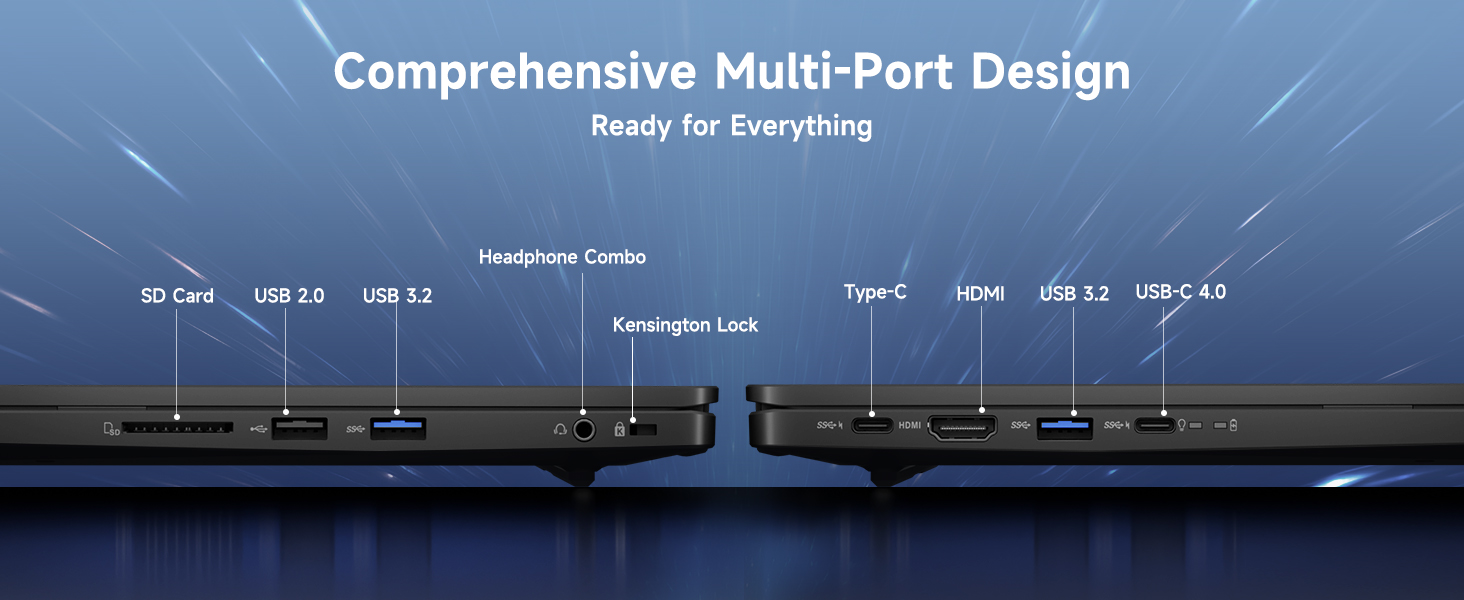
Your NIMO laptop features a comprehensive multi-port design for various peripherals:
- УСБ-Ц 4.0: For ultra-fast data transfer, external displays, and eGPU support.
- УСБ 3.2: Брзи пренос података за компатибилне уређаје.
- УСБ 2.0: За стандардне УСБ уређаје.
- ДВИ: Повежите се са екстерним мониторима или телевизорима.
- Слот за СД картицу: За меморијске картице.
- Headphone Combo Jack: За аудио излаз и улаз за микрофон.
- Utor za Kensington Lock: За физичко обезбеђење.
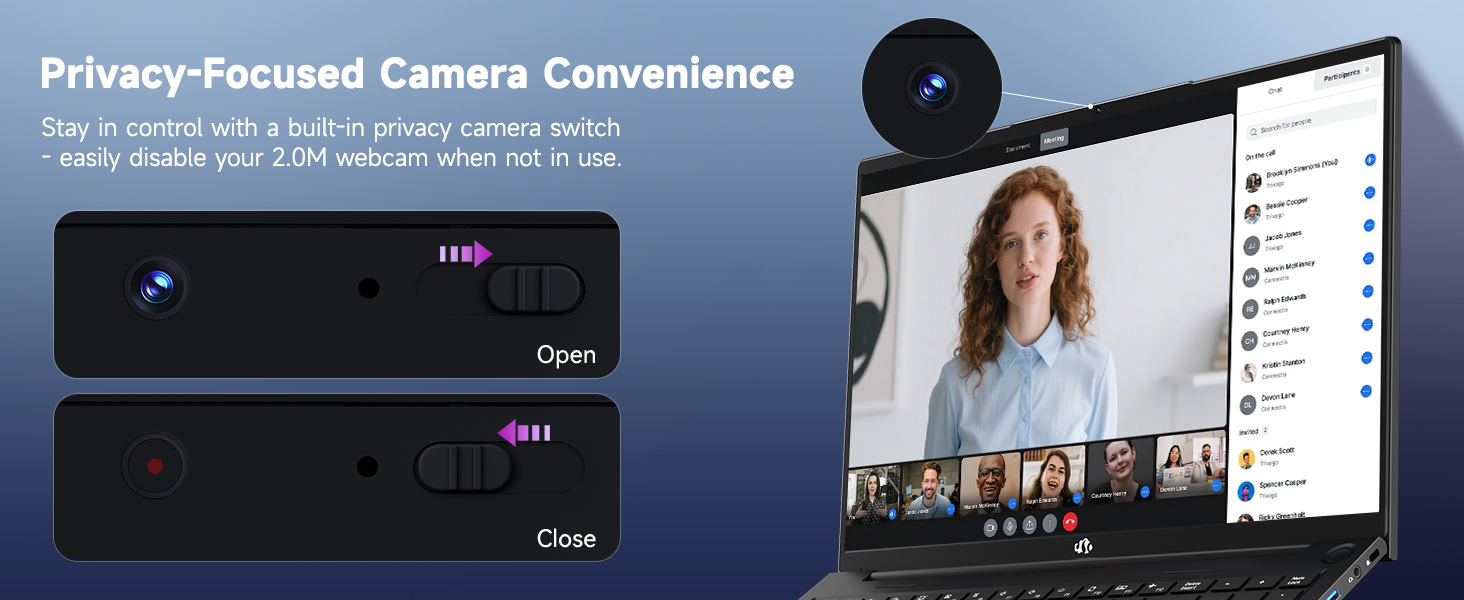
Diagram illustrating the comprehensive multi-port design of the NIMO laptop, including USB-C 4.0, HDMI, USB 3.2, USB 2.0, SD Card slot, Headphone Combo, and Kensington Lock.
2. Упутство за употребу
2.1 Укључивање/искључивање и режим спавања
- Укључено: Притисните дугме за напајање које се налази на тастатури.
- Искључивање: Кликните на дугме Старт, затим на Напајање > Искључи.
- Режим спавања: Кликните на дугме Старт, затим на Напајање > Спавање или затворите поклопац лаптопа.
2.2 Коришћење тастатуре и тачпеда
The NIMO laptop features a full-size keyboard with a numeric keypad and adjustable backlighting. Press Фн + Ф10 (or similar function key depending on model) to cycle through backlight brightness levels. The large touchpad supports multi-touch gestures for navigation.
2.3 Карактеристике екрана
Experience clear visuals on the 17.3-inch Full HD (1920x1080) IPS display. This screen provides vibrant colors and wide viewing angles, suitable for various applications from productivity to entertainment.

The NIMO laptop displaying a vibrant image, highlighting its 17.3-inch Full HD IPS screen.
2.4 WebПрекидач за приватност камере
For privacy, your laptop includes a physical webcam privacy switch. Slide the switch to the left to cover the camera lens and disable the webcam, or to the right to uncover and enable it.
Илустрација webcam privacy switch in both open and closed positions, demonstrating how to control camera access.
2.5 Перформансе прекоview
The NIMO laptop is powered by an AMD Ryzen 9 8945HS processor, offering 8 cores and 16 threads with a max boost clock of 5.2GHz. Integrated AMD Radeon 780M graphics provide capable performance for gaming and demanding creative applications.

Дијаграм приказанasing the AMD Ryzen 9 8945HS processor with its 8 cores/16 threads and integrated Ryzen AI NPU.

Visual representation of the AMD Radeon 780M graphics, emphasizing its capabilities for gaming and creative work.
3. Нега и одржавање
3.1 Чишћење лаптопа
- Екран: Лагано користите меку крпу која не оставља длачице дampводом или средством за чишћење екрана. Не прскајте течност директно на екран.
- Тастатура и кућиште: Користите меку, суву крпу. За тврдокорну прљавштину, благоamp Може се користити тканина. Избегавајте јаке хемикалије.
- Портови: Користите компримовани ваздух да нежно очистите прашину из отвора.
3.2 Управљање батеријом
The laptop is equipped with a 75Wh battery. To prolong battery life:
- Избегавајте често потпуно пражњење батерије.
- Чувајте лаптоп на хладном и сувом месту ако га не користите дуже време.
- Utilize power-saving settings in Windows 11.

Graphic illustrating smart battery optimization features, including extended battery life, smart power control, safe fast charging, and battery health protection.
3.3 Расипање топлоте
The NIMO laptop features an efficient cooling system with dual fans and double copper pipes to manage heat. Ensure that the ventilation openings are not blocked during use to maintain optimal performance and prevent overheating.
Унутрашње view of the laptop's efficient heat dissipation system, featuring dual fans and double copper pipes.
3.4 Ажурирања софтвера
Regularly update your Windows 11 operating system and device drivers to ensure system stability, security, and optimal performance. You can check for updates via Windows Settings > Windows Update.
КСНУМКС. Решавање проблема
This section addresses common issues you might encounter with your NIMO laptop.
4.1 Проблеми са напајањем
- Лаптоп се не укључује: Ensure the charger is securely connected and the power outlet is functional. Try holding the power button for 15-20 seconds to perform a hard reset.
- Батерија се не пуни: Verify the charger is correctly plugged into both the laptop and the wall. Check for any damage to the charger cable or port.
4.2 Проблеми са екраном
- Нема приказа на екрану: Повежите екстерни монитор преко HDMI кабла да бисте проверили да ли је проблем са интерним екраном лаптопа. Ако екстерни монитор ради, интерни екран или његова веза могу бити неисправни.
- Треперећи екран: Update your graphics drivers. Adjust display refresh rate in Windows settings.
4.3 Проблеми са повезивањем
- Ви-Фи се не повезује: Уверите се да је Wi-Fi омогућен у подешавањима система Windows. Рестартујте рутер и лаптоп. Ажурирајте бежичне драјвере.
- Блутут уређај се не упарује: Уверите се да је Bluetooth омогућен на оба уређаја. Уклоните и поново додајте уређај у подешавањима Bluetooth-а у систему Windows.
4.4 Смањење перформанси
- Споре перформансе: Затворите непотребне апликације. Проверите Менаџер задатака да ли постоји велика потрошња процесора/RAM-а. Уверите се да је на SSD-у довољно слободног простора. Покрените скенирање на вирусе.
- прегревање: Ensure ventilation vents are clear. Use the laptop on a hard, flat surface. Consider reducing demanding workloads.
5. Техничке спецификације
| Феатуре | Спецификација |
|---|---|
| Бранд | NIMO |
| Назив модела | NIMO N175L |
| Величина екрана | 17.3 инча |
| Резолуција екрана | 1920 к 1080 пиксела (Фулл ХД) |
| Процесор | AMD Ryzen 9 8945HS (Up to 5.2 GHz) |
| РАМ | 32 ГБ ДДР5 |
| Хард Дриве | 1024 GB SSD (Solid State) |
| Грапхицс Цопроцессор | AMD Radeon 780M (интегрисана) |
| Оперативни систем | Виндовс 11 |
| Вирелесс Типе | 802.11а/б/г/н/ац |
| УСБ портови | 1x USB 2.0, 3x USB 3.0, 1x USB-C 4.0 |
| Просечно трајање батерије | 12.8 сата |
| Тежина артикла | 3.84 фунти |
| Димензије производа | 15.66 к 9.99 к 0.74 инча |
| Боја | Црно |
| Посебне карактеристике | Позадинско осветљење тастатуре, читач отиска прста, HD аудио, нумеричка тастатура |
6. Гаранција и корисничка подршка
6.1 Информације о гаранцији
Your NIMO laptop comes with a 2 година гаранције for support and service. Additionally, NIMO offers a Политика поврата од 90 дана from the date of purchase for any reason.
Image depicting a technician working on a laptop, symbolizing the 2-year support provided for NIMO products.
Image of a customer receiving a package, representing the 90-day return policy for NIMO products.
6.2 Контактирање подршке
For any product-related questions, technical assistance, or warranty claims, please contact NIMO customer support:
- Емаил: сервице@нимопц.цом
- Professional customer assistance is available to help resolve your issues.
Image of customer service representatives, indicating professional customer assistance is available.