
Увод
Thank you for choosing the Bigben Karaoke Microphone. This all-in-one portable karaoke system combines a stereo microphone with a powerful 15W Bluetooth speaker and dynamic light effects, designed to enhance your singing and music listening experience. This manual provides essential information for safe and optimal use of your device.
Безбедносне информације
- Прочитајте сва упутства пре употребе уређаја.
- Држите уређај даље од воде и влаге.
- Не излажите екстремним температурама или директној сунчевој светлости.
- Не покушавајте сами да растављате или поправљате уређај. Обратите се квалификованом сервисеру.
- Користите само наведену додатну опрему за пуњење.
- Чувати ван домашаја деце.
Садржај пакета
Молимо вас да проверите да ли су све ставке присутне у пакету:
- Bigben Karaoke Microphone (Model PARTYBTMIC2WH)
- Кабл за пуњење (USB)
- Кориснички приручник (овај документ)
- Front Glass (as an included component, likely pre-installed or a protective cover)

Слика 1: The Bigben Karaoke Microphone shown in its retail packaging. The packaging highlights features such as Bluetooth connectivity, 4 vocal effects, and wireless speaker functionality.
Производ је завршенview
The Bigben Karaoke Microphone features an integrated speaker and various controls for an interactive experience.
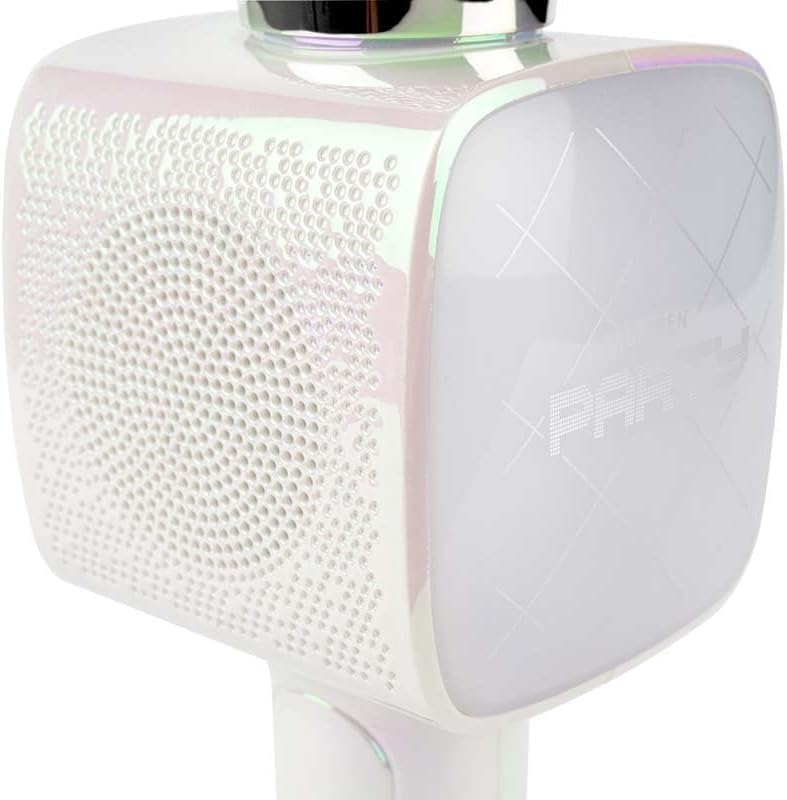
Слика 2: Крупни план view of the Bigben Karaoke Microphone, focusing on the speaker grille and the light-up panel. The panel displays "PARTY" and shows dynamic light effects.
Кључне карактеристике:
- Блуетоотх КСНУМКС: For stable wireless connection to your devices.
- Интегрисани звучник: 15W output for clear and powerful sound.
- Светлосни ефекти: Dynamic lighting to enhance the karaoke experience.
- Звучни ефекти: 4 different vocal effects and an echo effect.
- Вишеструки улази: USB, Micro SD, and 3.5mm headphone jack.
Сетуп
1. Пуњење микрофона
- Connect the provided USB charging cable to the microphone's charging port.
- Повежите други крај USB кабла са компатибилним USB адаптером за напајање (није укључен) или USB портом рачунара.
- Индикаторска лампица пуњења ће се упалити. Када се потпуно напуни, лампица може променити боју или се угасити.
2. Укључивање/искључивање
- To power on, press and hold the Power button for a few seconds until the indicator light illuminates and you hear an audible prompt.
- Да бисте искључили напајање, поново притисните и држите дугме за напајање док се индикаторска лампица не угаси.
3. Блуетоотх упаривање
- Ensure the microphone is powered on and in Bluetooth pairing mode (usually indicated by a flashing light).
- На паметном телефону, таблету или другом уређају који подржава Bluetooth, идите на подешавања Bluetooth-а.
- Тражи available devices and select "Bigben Karaoke Mic" (or similar name) from the list.
- Once paired, you will hear a confirmation sound, and the indicator light will stop flashing.
Упутство за употребу
1. Puštanje muzike
- Преко Блуетоотх-а: After successful pairing, play music from your connected device. The sound will output through the microphone's speaker.
- Via USB/Micro SD: Insert a USB drive or Micro SD card (with music files) into the respective port. The microphone will automatically detect and play music.
- Via 3.5mm Audio Cable: Connect an external audio source using a 3.5mm audio cable (not included) to the headphone input.
2. Коришћење микрофона
- Speak or sing directly into the microphone grille.
- Adjust the microphone volume using the dedicated controls on the device.
3. Sound Effects
- Вокални ефекти: The microphone offers 4 different vocal effects. Press the "Effect" button (or similar labeled button) to cycle through these effects.
- Ехо ефекат: Activate or adjust the echo effect using its dedicated control.
4. Светлосни ефекти
The microphone features dynamic light effects. These lights typically activate automatically when the device is on and can often be toggled or changed using a dedicated light button, if available.
Одржавање
- Чишћење: Обришите микрофон меком, сувом крпом. Не користите абразивна средства за чишћење или раствараче.
- Складиштење: Чувајте уређај на хладном и сувом месту даље од директне сунчеве светлости када се не користи.
- Одржавање батерије: За оптимално трајање батерије, редовно пуните уређај, чак и ако се не користи често.
Решавање проблема
| Проблем | Могући узрок | Решење |
|---|---|---|
| Нема струје | Батерија је празна. | Charge the microphone fully. |
| Нема звука из звучника | Volume is too low; device not connected; incorrect input mode. | Increase volume; ensure Bluetooth is paired or cable is connected; check USB/Micro SD insertion. |
| Микрофон не ради | Microphone volume is too low; microphone function is off. | Increase microphone volume; ensure microphone is active. |
| Блуетоотх веза је нестабилна | Device is too far from the microphone; interference. | Move devices closer; avoid obstacles; disconnect and re-pair. |
Спецификације
| Феатуре | Детаљ |
|---|---|
| Бранд | Бигбен |
| Број модела | PARTYBTMIC2WH |
| Повезивање | Bluetooth 5.0, USB, Micro SD, 3.5mm Headphone Jack |
| Излаз звучника | 15В |
| Звучни ефекти | 4 Vocal Effects, Echo Effect |
| Димензије производа (ДкШкВ) | 20 к 15 к 10 цм |
| Тежина артикла | 300 грама |
| Боја | Бела |
| Број канала | 2 |
| Батерије су потребне | Yes (type unknown, likely integrated rechargeable) |
Гаранција и подршка
For warranty information and customer support, please refer to the documentation provided with your purchase or visit the official Bigben webсајт. Сачувајте доказ о куповини за потребе гаранције.
For technical assistance or further inquiries, please contact Bigben customer service through their official channels.