
1. Увод
The Unihertz Jelly Star is a compact 3-inch mini smartphone designed for portability and functionality. It operates on Android 13 and features a MediaTek Helio G99 processor, 8GB RAM, and 256GB ROM. This manual provides essential information for the safe and efficient use of your device.

Слика 1.1: Предња и бочна view of the Unihertz Jelly Star Mini Smartphone. This image displays the compact size and design of the device, highlighting its screen and side buttons.
2. Шта је у кутији
Upon unpacking your Unihertz Jelly Star, please verify that all the following items are included:
- Unihertz Jelly Star Smartphone
- Навлака за телефон
- Повер Адаптер
- Избацивач СИМ лежишта
- Screen Protector (one pre-applied, one extra)
- УСБ кабл (тип-Ц)
- Упутство за употребу (овај документ)
- Гарантни лист
- Привезак за телефон

Слика 2.1: Diagram illustrating the contents of the Unihertz Jelly Star retail box, including the phone, case, charger, cables, and documentation.
3. Подешавање
3.1 Уметање СИМ картице
- Locate the SIM tray on the side of your Jelly Star.
- Уметните алат за избацивање лежишта СИМ картице у мали отвор поред лежишта и лагано гурајте док лежиште не искочи.
- Place your Nano SIM card(s) into the tray, ensuring proper orientation. The Jelly Star supports dual Nano SIMs.
- Пажљиво поново уметните лежиште СИМ картице у телефон.
3.2 Прво укључивање и подешавање
- Press and hold the power button (located on the right side) until the Unihertz logo appears.
- Пратите упутства на екрану да бисте изабрали језик, повезали се на Wi-Fi и подесили свој Google налог.
- Configure security settings, including fingerprint unlock, for enhanced device protection.
3.3 Verizon Network Activation (Important)
For Verizon users, please note the following specific activation procedure:
- Unihertz phones are unlocked.
- Local Verizon stores may not be able to assist with activation as these phones are not in Verizon's local database.
- Activate your SIM card with another Verizon-certified phone first, then transfer the activated SIM card to your Jelly Star.

Слика 3.1: Important instructions for Verizon users regarding SIM card activation with the Unihertz Jelly Star.
4. Упутство за употребу
4.1 Основна навигација
The Jelly Star runs on Android 13. Navigate the interface using touch gestures on the 3-inch display. Swipe up from the bottom for the app drawer, swipe down from the top for notifications and quick settings.
4.2 Програмабилно дугме
The device features a customizable programmable button. You can assign various functions to this button through the phone's settings, such as launching an app, activating the flashlight, or taking a screenshot.
4.3 LED Notification Light
The transparent back design incorporates a dynamic LED notification light. This light provides visual alerts for incoming calls, messages, and other notifications. Settings for the LED light can be adjusted in the phone's display or notification settings.

Слика 4.1: Назад и на страну view of the Unihertz Jelly Star, showcasing its transparent design and LED notification light.
4.4 Употреба камере
The Jelly Star is equipped with a 48MP camera. Open the camera application from the home screen or app drawer. Tap to focus, and press the shutter button to capture photos or videos. Explore the camera settings for various modes and adjustments.
4.5 Откључавање отиском прста
To set up fingerprint unlock, go to Settings > Security & privacy > Device unlock > Fingerprint. Follow the on-screen instructions to register your fingerprint(s). Once set up, you can unlock your phone by placing your registered finger on the fingerprint sensor.
4.6 Audio Jack and FM Radio
The device includes a 3.5mm audio jack for connecting headphones or external speakers. To use the FM radio, plug in wired headphones (which act as an antenna) and open the FM Radio application.
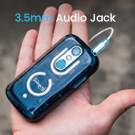
Слика 4.2: Close-up of the Unihertz Jelly Star highlighting the 3.5mm audio jack.
4.7 USB On-The-Go (OTG)
The Jelly Star supports USB OTG, allowing you to connect USB devices such as flash drives, keyboards, or mice directly to your phone using a compatible OTG adapter (sold separately).
5. Connectivity & Compatibility
The Unihertz Jelly Star offers versatile connectivity options and broad network compatibility.
- Мрежна компатибилност: Compatible with T-Mobile and Verizon networks only. (Refer to Section 3.3 for Verizon activation details). Note: Not compatible with AT&T.
- Бежична повезаност: Supports Wi-Fi, Bluetooth, NFC, and Infrared.
- Навигација: Интегрисани ГПС за услуге локације.
- СИМ слотови: Dual Nano SIM slots for managing two phone numbers or different carriers.
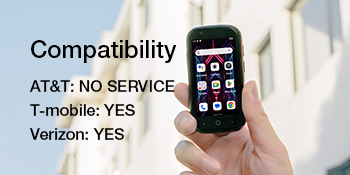
Слика 5.1: Visual representation of the Unihertz Jelly Star's network compatibility, indicating support for T-Mobile and Verizon.
Видео 5.1: An official product video demonstrating the compact size and various features of the Unihertz Jelly Star Mini Phone. This video highlights the phone's design and portability.
6. Одржавање
6.1 Одржавање батерије
The Jelly Star is equipped with a 2000mAh battery. To maximize battery life:
- Избегавајте екстремне температуре.
- За пуњење користите приложени адаптер за напајање и УСБ кабл.
- Избегавајте често потпуно пражњење батерије.
- Optimize screen brightness and close unused background applications.
6.2 Чишћење уређаја
Користите меку крпу која не оставља влакна да бисте очистили екран и кућиште телефона. Избегавајте употребу јаких хемикалија или абразивних материјала, који могу оштетити уређај.
6.3 Ажурирања софтвера
Редовно проверавајте и инсталирајте ажурирања софтвера како бисте били сигурни да ваш уређај има најновије функције, безбедносне закрпе и побољшања перформанси. Ову опцију обично можете пронаћи у Подешавања > Систем > Ажурирање система.
КСНУМКС. Решавање проблема
If you encounter issues with your Unihertz Jelly Star, refer to the following common troubleshooting steps:
- Уређај се не укључује: Уверите се да је батерија напуњена. Прикључите телефон на пуњач и сачекајте неколико минута пре него што покушате да га поново укључите.
- Проблеми са мрежним повезивањем:
- Check if your SIM card is properly inserted (refer to Section 3.1).
- Verify that your mobile data or Wi-Fi is enabled.
- Поново покрените уређај.
- For Verizon users, confirm SIM activation as per Section 3.3.
- Апликације се руше или замрзавају:
- Close and restart the problematic app.
- Обришите кеш меморију и податке апликације у Подешавања > Апликације > [Назив апликације] > Меморија и кеш.
- Уверите се да је апликација ажурирана на најновију верзију.
- Kratko trajanje baterije:
- Смањите осветљеност екрана.
- Disable unused features like Bluetooth, GPS, or Wi-Fi when not needed.
- Identify and close power-consuming background apps.
If these steps do not resolve your issue, please contact Unihertz customer support for further assistance.
8. Спецификације
Below are the key technical specifications for the Unihertz Jelly Star Mini Smartphone:
| Назив модела | Jelly Star |
| Оперативни систем | Андроид 13.0 |
| ЦПУ модел | МедиаТек Хелио Г99 |
| Брзина процесора | 2200 МХз |
| Величина инсталиране РАМ меморије | 8 ГБ |
| Капацитет меморије | 256 ГБ |
| Величина екрана на стојећем екрану | 3 инча |
| Резолуција | 480 к 854 |
| Рефресх Рате | 60 Хз |
| Капацитет батерије | 2000 Милиamp Сати |
| Димензије производа | 3.75 к 1.95 к 0.74 инча |
| Тежина артикла | 4.3 унци |
| Цоннецтивити Тецхнологиес | Блутут, инфрацрвени порт, НФЦ, УСБ, Ви-Фи |
| Аудио Јацк | 3.5 мм |
| ГПС | Истина |
9. Гаранција и подршка
9.1 Гаранција на производ
The Unihertz Jelly Star comes with a one-year warranty from the date of purchase. This warranty covers manufacturing defects and malfunctions under normal use. Please retain your proof of purchase for warranty claims.
9.2 Техничка подршка
Unihertz provides long-term technical support and efficient online customer service. For any technical issues, questions, or support needs not covered in this manual, please visit the official Unihertz webсајту или контактирајте њихов тим за корисничку подршку.
Више информација и ресурса за подршку можете пронаћи на Unihertz Store on Amazon.