
Bikevee Bikevee Cycling GPS Computer & Bikevee Out Front Mount
Упутство за употребу
Bikevee Wireless Cycling GPS Computer
Model: Bikevee Cycling GPS Computer & Out Front Mount
1. Увод
This manual provides detailed instructions for the Bikevee Wireless Cycling GPS Computer, a device designed to track and display various cycling data. It features a 2.4-inch LCD display with auto backlight, IPX7 waterproofing, and multi-satellite GPS tracking for accurate data collection.
1.1 Кључне карактеристике
- Продужено трајање батерије: Equipped with a 650mAh rechargeable battery, providing up to 28 hours of continuous use.
- Precision GPS Tracking: Utilizes 5-satellite systems (GPS, BDS, GLONASS, Galileo, QZSS) for stable and accurate signal reception.
- Издржљив и водоотпоран: IPX7 waterproof rating ensures resistance to rain and splashes.
- Очисти екран: 2.4-inch LCD screen with automatic backlight for visibility in various lighting conditions.
- Comprehensive Data: Tracks speed (MPH/KM/H), distance, time, temperature, altitude, gradient, and more.
1.2 Шта је у кутији
Проверите да ли су све компоненте присутне у пакету:
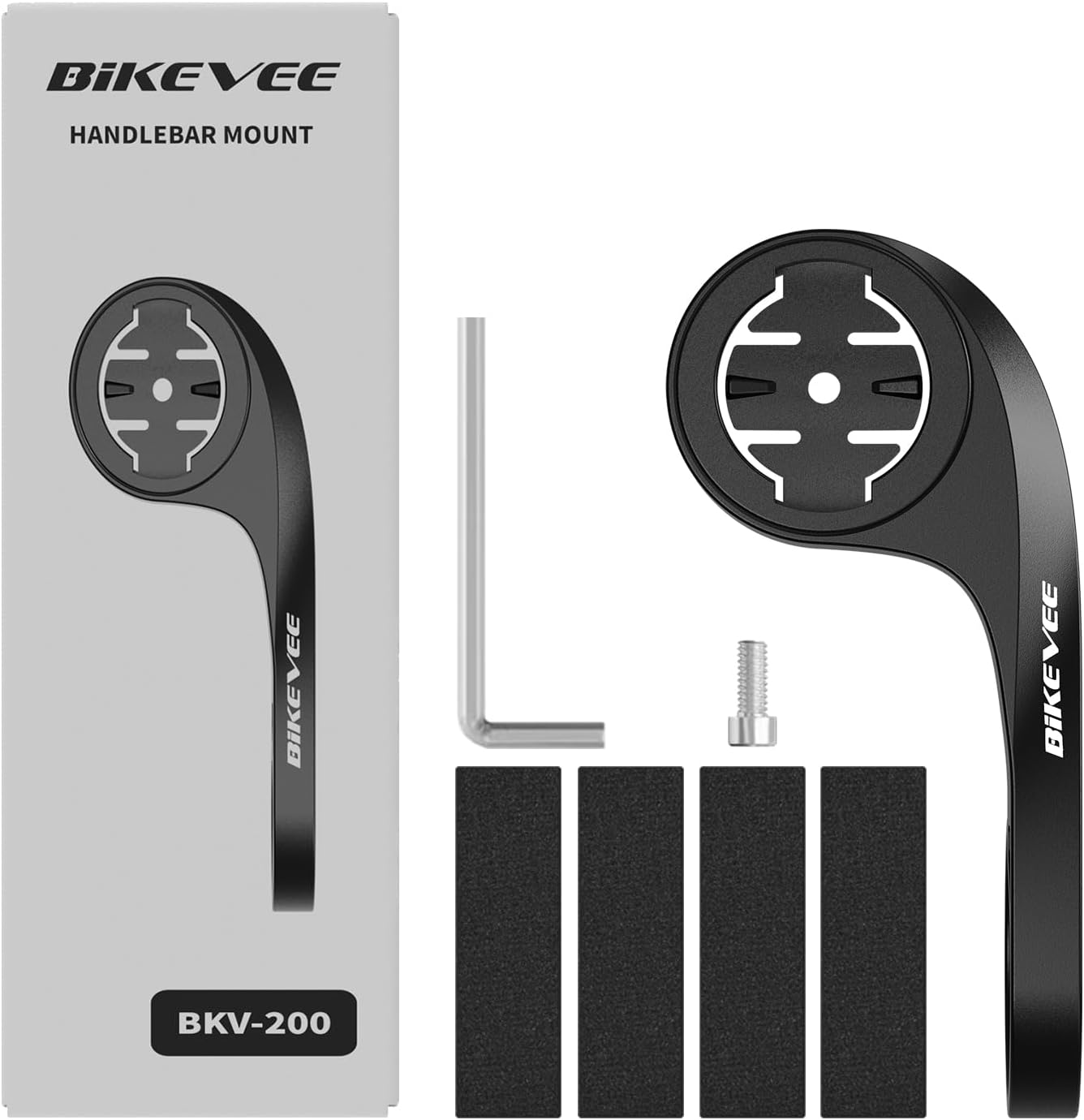
Figure 1.1: Package Contents. Includes Bike Computer, Charging Cable, Rubber Rings, Mount, Rubber Pad, and User Manual.
- Bikevee GPS Cycling Computer
- Стандардни носач за бицикл
- Out Front Mount
- Руббер Падс
- Кабл за пуњење (Тип-Ц)
- Rubber Rings for Mount Installation
- Упутство за употребу
2. Подешавање и инсталација
2.1 Пуњење уређаја
Before first use, fully charge the Bikevee GPS Computer. Connect the provided Type-C charging cable to the device's charging port and a USB power source. The battery indicator on the screen will show charging status.
2.2 Монтажа уређаја
The Bikevee GPS Computer comes with both a standard bike mount and an out front mount. Choose the mount that best suits your preference and bicycle setup.
2.2.1 Standard Bike Mount Installation
- Place the rubber pad on your bicycle's handlebar or stem.
- Position the standard bike mount on top of the rubber pad.
- Secure the mount using the provided rubber rings, wrapping them around the handlebar/stem and hooking them onto the mount.
- Align the Bikevee GPS Computer with the mount's grooves and twist clockwise until it locks into place.
2.2.2 Out Front Mount Installation

Figure 2.1: Bikevee Out Front Mount.
- Place the rubber pad around your bicycle's handlebar where you intend to install the mount.
- Position the out front mount over the rubber pad.
- Use the provided Allen key to tighten the screw on the mount's clamp around the handlebar until it is secure.
- Align the Bikevee GPS Computer with the mount's grooves and twist clockwise until it locks into place.
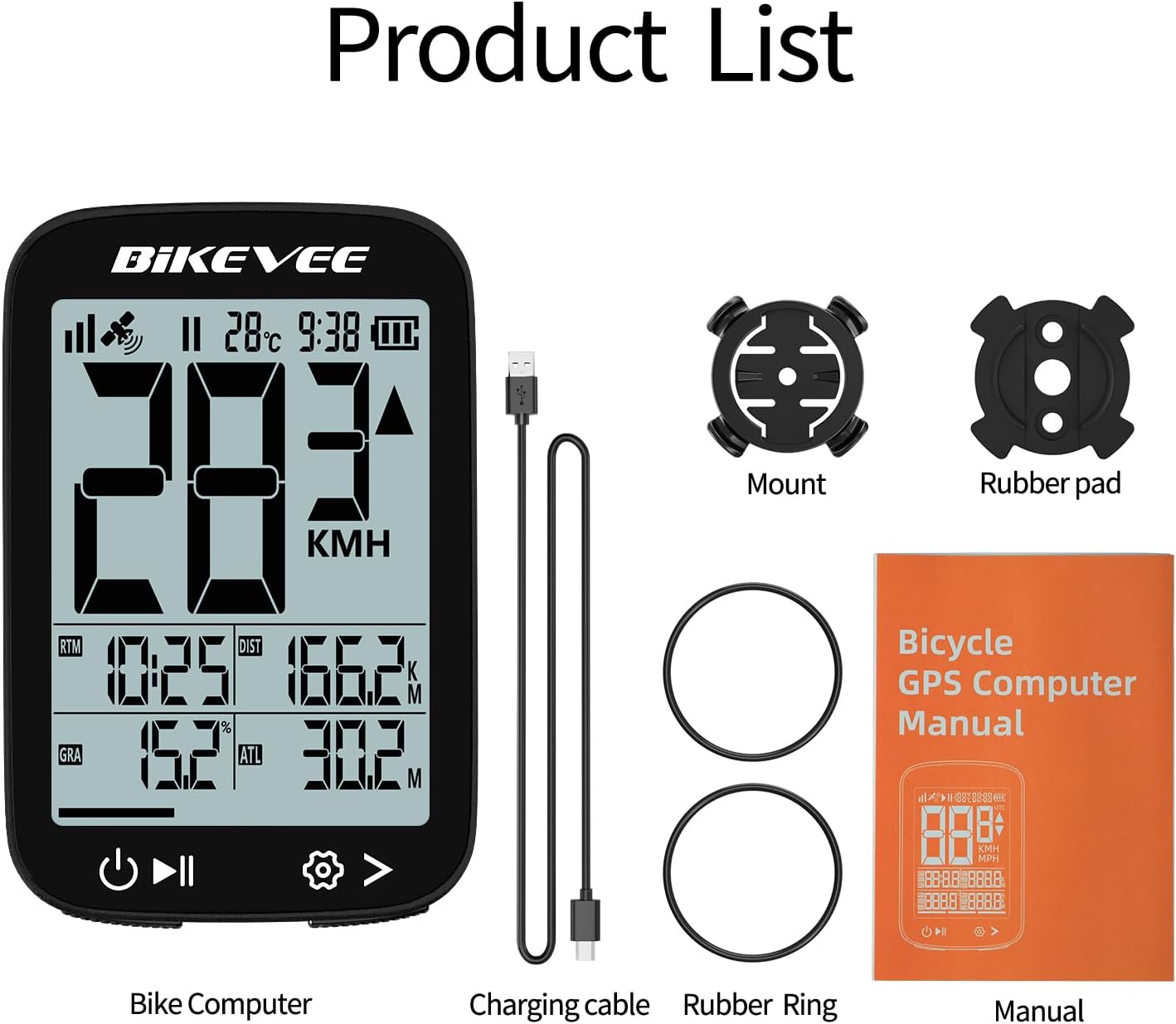
Figure 2.2: Handlebar Mount Components.
2.3 Прво укључивање и подешавања
- Укључено: Press and hold the power button (usually located at the bottom left) until the screen illuminates.
- Избор јединице: Upon first power-on or after a reset, you may be prompted to select your preferred unit of measurement (MPH or KM/H). Use the navigation buttons to select and confirm.
- GPS аквизиција: Take the device outdoors to an open area to allow it to acquire GPS satellite signals. This may take a few moments. A stable GPS signal icon will appear once connected.
3. Упутство за употребу
3.1 Основни рад
- Укључивање/искључивање: Притисните и држите лево дугме да бисте укључили или искључили напајање.
- Start/Pause/Stop Ride: Press the middle button to start recording a ride. Press again to pause. Press and hold to stop and save the ride data.
- Пребацивање страница: Use the right button to cycle through different data display pages.
- Позадинско осветљење: The device features an automatic backlight that adjusts based on ambient light conditions.
3.2 Data Display and Interpretation
The Bikevee GPS Computer displays up to 14 types of cycling data, providing comprehensive insights into your ride.
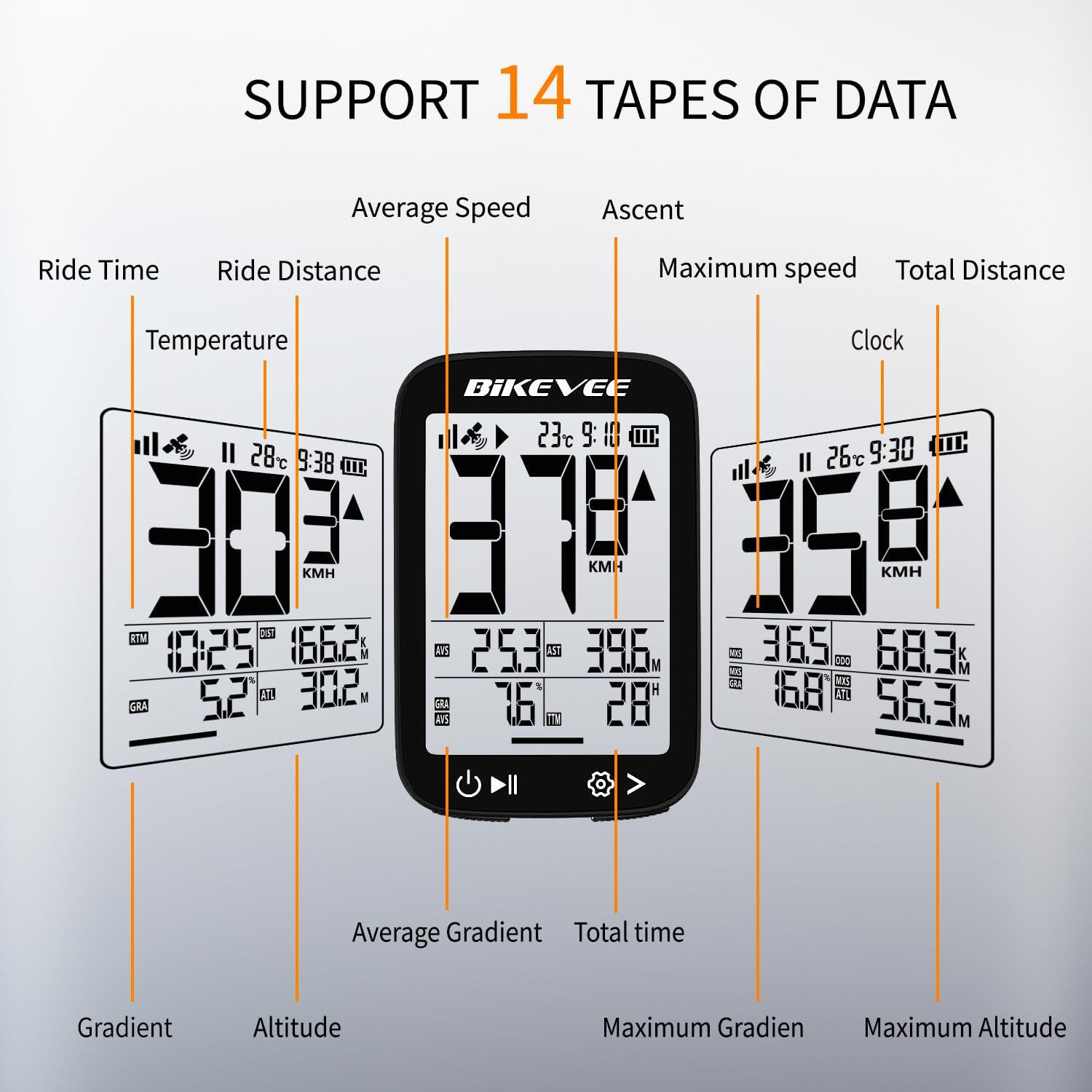
Figure 3.1: Supported Data Types Display.
- Тренутна брзина: Displays your real-time speed (MPH or KM/H).
- Просечна брзина: The average speed for the current ride.
- Максимална брзина: The highest speed recorded during the current ride.
- Време вожње: Duration of the current active ride.
- Ride Distance: Пређена удаљеност током тренутне вожње.
- Total Distance (Odometer): Cumulative distance recorded by the device.
- температура: Температура околине.
- Сат: Тренутно време.
- успон: Total elevation gained during the ride.
- Градијент: Current incline or decline percentage.
- Надморска висина: Current elevation above sea level.

Figure 3.2: Display Icons and Their Meanings.
- Сателитски сигнал: Означава јачину GPS сигнала.
- ИПКС7: Confirms waterproof rating.
- Ниво батерије: Приказује преостали ниво напуњености батерије.
- Аутоматско позадинско осветљење: Indicates auto backlight feature is active.
- Тип-Ц: Denotes the charging port type.
- Speed Comparison: Arrow indicates if current speed is higher or lower than average speed.
4. Одржавање и њега
4.1 Чишћење уређаја
Да бисте одржали оптималне перформансе и изглед, редовно чистите уређај:
- Обришите екран и кућиште меком крпомamp тканина.
- Avoid using abrasive cleaners, solvents, or chemical sprays, as these can damage the device's surface or internal components.
- Ensure the charging port cover is securely closed to prevent dust and water ingress.
4.2 Отпорност на воду (IPX7)

Figure 4.1: IPX7 Waterproof Feature.
The Bikevee GPS Computer has an IPX7 waterproof rating, meaning it is protected against temporary immersion in water (up to 1 meter for 30 minutes). However, it is important to note:
- Не урањајте уређај дуго у воду.
- Избегавајте млаз воде под високим притиском.
- Ensure the charging port cover is sealed before exposure to water.
4.3 Нега и складиштење батерије
- Чувајте уређај на хладном и сувом месту када се не користи.
- Avoid exposing the device to extreme temperatures (hot or cold) for prolonged periods.
- За дуготрајно складиштење, напуните батерију до приближно 50% како бисте сачували њено здравље.
КСНУМКС. Решавање проблема
If you encounter issues with your Bikevee GPS Computer, refer to the following common problems and solutions:
| Проблем | Могући узрок | Решење |
|---|---|---|
| Уређај се не укључује. | Ниска батерија. | Напуните уређај у потпуности користећи приложени Type-C кабл. |
| No GPS signal or inaccurate readings. | Ометано view of sky; initial signal acquisition. | Move to an open outdoor area. Wait a few minutes for signal acquisition. Avoid dense forests or tunnels. |
| Екран је замагљен или нечитљив. | Auto backlight setting; low battery. | Ensure sufficient battery charge. The backlight adjusts automatically; try moving to a different lighting condition. |
| Уређај се замрзава или престаје да реагује. | Софтверски квар. | Perform a soft reset by pressing and holding the power button for 10-15 seconds until the device restarts. |
6. Спецификације
Detailed technical specifications for the Bikevee Wireless Cycling GPS Computer:

Figure 6.1: Device Dimensions and Weight.
- Модел: Bikevee Cycling GPS Computer
- Приказ: 2.4-inch LCD, Automatic Backlight
- батерија: 650mAh Rechargeable Lithium-ion
- Трајање батерије: До 28 сати (континуирана употреба)
- GPS Systems: GPS, BDS, GLONASS, Galileo, QZSS (5-satellite tracking)
- Водоотпорна оцена: ИПКС7
- Димензије: Approximately 70mm (Height) x 45mm (Width) / 2.76in x 1.77in
- Тежина: Approximately 50g / 0.11lb
- Порт за пуњење: Тип-Ц УСБ
- Data Types Supported: 14 types (e.g., Speed, Distance, Time, Temperature, Altitude, Gradient)
7. Информације о гаранцији
The Bikevee Wireless Cycling GPS Computer is covered by a limited manufacturer's warranty. This warranty typically covers defects in materials and workmanship under normal use. Please retain your proof of purchase for warranty claims.
For specific warranty terms and conditions, including duration and coverage details, please refer to the warranty card included with your product or contact Bikevee customer support directly.
8. Корисничка подршка
If you have any questions, require technical assistance, or need to report an issue with your Bikevee Wireless Cycling GPS Computer, please contact our customer support team.
- Подршка на мрежи: Visit the official Bikevee webсајт за често постављана питања, водиче за решавање проблема и контакт форме.
- Подршка путем е-поште: Погледајте паковање производа или званична упутства webсајт за адресу е-поште за корисничку подршку.
When contacting support, please be prepared to provide your product model number (Bikevee Cycling GPS Computer) and a detailed description of the issue.
Ask a question about this manual
Ask about setup, troubleshooting, compatibility, parts, safety, or missing instructions. Manuals+ will review the question and use this page’s manual context to help answer it.