
1. Увод
This manual provides essential information for setting up, operating, and maintaining your NIMO 17.3" IPS FHD Gaming Laptop. Designed for both productivity and entertainment, this laptop features an AMD Ryzen 7 8745HS processor, 64GB DDR5 RAM, and a 2TB PCIe 4.0 SSD, ensuring a responsive and powerful user experience.
Image 1.1: NIMO 17.3" FHD Gaming Laptop overview, истичући кључне карактеристике.
2. Шта је у кутији
Please verify that all items are present upon unboxing:
- 1 x NIMO N177 Laptop
- 1 x Type-C 100W PD Fast Charger
- 1 к Упутство за употребу
- Windows 11 Home (Pre-installed)
3. Почетно подешавање
3.1 Укључивање и пуњење
- Connect the provided 100W Type-C PD Fast Charger to the laptop's USB-C port and a power outlet.
- Отворите поклопац лаптопа. Лаптоп се може аутоматски укључити или ћете можда морати да притиснете дугме за напајање.
- Allow the battery to charge fully before initial use. A 15-minute charge can provide approximately 2 hours of use.

Image 3.1: Illustration of the laptop charging process and battery life.
3.2 Windows 11 Configuration
Follow the on-screen prompts to complete the Windows 11 setup process. This includes selecting your region, connecting to a Wi-Fi network, and creating a user account.
3.3 Подешавање читача отиска прста
For enhanced security and quick login, set up the integrated fingerprint reader:
- Идите на Подешавања система Windows > Налози > Опције пријављивања.
- Select 'Fingerprint recognition (Windows Hello)' and follow the instructions to register your fingerprint.

Image 3.2: The backlit keyboard and fingerprint sensor for secure login.
4. Управљање лаптопом
4.1 Перформансе и обављање више задатака истовремено
Your NIMO laptop is equipped with an AMD Ryzen 7 8745HS processor (8-core/16-thread, up to 4.9GHz) and 64GB DDR5 RAM, providing robust performance for demanding applications, gaming, and seamless multitasking. The 2TB PCIe 4.0 SSD ensures fast boot times and rapid data access.

Image 4.1: Details of the AMD Ryzen 7 8745HS processor.

Image 4.2: Laptop demonstrating seamless multitasking with ample storage and RAM.
4.2 Дисплеј
The 17.3" FHD (1920x1080) IPS anti-glare display offers immersive visuals with vibrant colors and wide viewing angles. The ultra-thin bezel design provides an 85% screen-to-body ratio for an expansive viewинг искуство.

Image 4.3: The 17.3" FHD IPS display for visual clarity.
4.3 Тастатура и тачпед
The full-size keyboard includes a numeric keypad and features backlighting for comfortable typing in various lighting conditions. The precision gesture touchpad allows for intuitive navigation and supports multi-touch gestures.
4.4 Webцам
The integrated 2MP webcam is suitable for video calls and online meetings. For privacy, the laptop includes a physical privacy switch to disable the webкамера када се не користи.

Image 4.4: Privacy-focused camera convenience with a built-in switch.
5. Повезивање
5.1 Портови и интерфејси
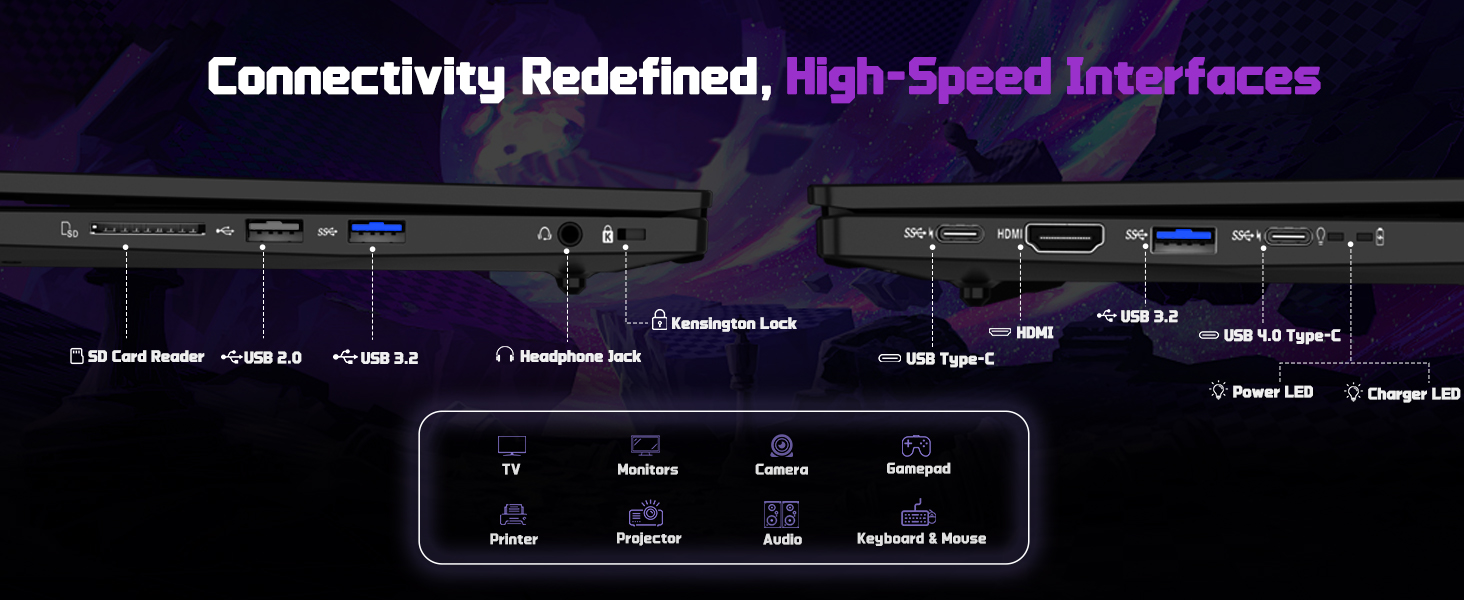
The NIMO N177 laptop offers a variety of ports for connecting peripherals and external displays:
- 1 к УСБ 2.0 порт
- 3 к УСБ 3.0 порта
- 1 x USB 4.0 Type-C Port (supports 100W PD charging, data transfer, and display output)
- 1 к ХДМИ порт
- 1 к прикључак за слушалице
- 1 к читач СД картица
- 1 к отвор за Кенсингтон браву

Image 5.1: Detailed diagram of the laptop's high-speed interfaces.
5.2 Бежично повезивање
The laptop supports 802.11a/b/g/n/ac Wi-Fi for reliable wireless internet access and Bluetooth for connecting wireless accessories.
6. Одржавање
6.1 Чишћење
- Користите меку крпу која не оставља влакна за чишћење екрана и спољашњих површина.
- Избегавајте употребу јаких хемикалија или абразивних материјала.
- For the screen, use a specialized screen cleaner and a microfiber cloth.
6.2 Ажурирања софтвера
Regularly check for and install Windows updates and driver updates to ensure optimal performance and security. You can find driver updates on the NIMO official webсајту.
6.3 Складиштење и руковање
Store the laptop in a cool, dry place. Avoid exposing it to extreme temperatures, direct sunlight, or excessive moisture. Handle the laptop with care to prevent physical damage.
КСНУМКС. Решавање проблема
If you encounter issues with your NIMO laptop, try the following common troubleshooting steps:
- Нема напајања: Ensure the charger is securely connected to both the laptop and a working power outlet. Check if the power adapter's LED indicator is on.
- Проблеми са приказом: If the screen is blank, try connecting an external monitor to verify if the laptop is functioning. Adjust display settings in Windows.
- Споре перформансе: Затворите непотребне апликације, проверите позадинске процесе и обезбедите довољно слободног простора за складиштење.
- Проблеми са повезивањем: For Wi-Fi issues, restart your router and the laptop. For peripheral issues, ensure drivers are updated and connections are secure.
- Систем не реагује: Притисните и држите дугме за напајање 10-15 секунди да бисте присилно искључили лаптоп, а затим га поново покрените.
For persistent issues, refer to the support section or contact NIMO customer service.
8. Спецификације
| Феатуре | Спецификација |
|---|---|
| Бранд | NIMO |
| Назив модела | NIMO N177L |
| Величина екрана | 17.3 инча |
| Резолуција екрана | 1920 x 1080 пиксела (FHD IPS) |
| Процесор | AMD Ryzen 7 8745HS (8 Cores, up to 4.9 GHz) |
| РАМ | 64 GB DDR5 (4800 MHz) |
| Хард Дриве | 2 TB SSD (PCIe 4.0) |
| Грапхицс Цопроцессор | AMD Radeon 780M (интегрисана) |
| Оперативни систем | Виндовс 11 Хоме |
| Вирелесс Типе | 802.11а/б/г/н/ац |
| УСБ портови | 1 x USB 2.0, 3 x USB 3.0, 1 x USB 4.0 Type-C |
| Посебне карактеристике | Позадинско осветљење тастатуре, читач отиска прста, HD аудио, нумеричка тастатура |
| Просечно трајање батерије | 15.5 Hours (75Wh) |
| Тежина артикла | 3.84 фунти |
| Димензије производа | 15.66 к 9.99 к 0.74 инча |
| Боја | Црно |
9. Гаранција и подршка
9.1 Информације о гаранцији
Your NIMO laptop is backed by a 2 година гаранције. This warranty covers manufacturing defects and ensures your satisfaction. The product also includes partial U.S. assembly.
9.2 Политика враћања робе
NIMO offers hassle-free Повратак од 90 дана from the date of purchase. Please refer to your purchase documentation for detailed return instructions.
9.3 Корисничка подршка
Our dedicated support team is available to assist you with any questions or issues. You can contact us via:
- Емаил: сервице@нимопц.цом
- Наш званичник website or product page (for contact details).
We aim to provide quick solutions and a worry-free experience.
Слика 9.1: Готовоview of NIMO's customer commitment and support.