
1. Увод
Хвала вам на куповиниasing the Surge Wireless Pro Controller. This controller is designed for multi-platform compatibility, offering an enhanced gaming experience across various devices. Please read this manual carefully before use to ensure proper operation and to maximize your gaming enjoyment.
Кључне карактеристике:
- Multi-Platform Compatibility: Nintendo Switch/Switch 2 (Note: No C Button/Audio Port support for Switch 2), Windows PC, Steam Deck, Android, and iOS devices.
- Hall Effect Thumb Sticks & Triggers: Provides precise control and reduces the likelihood of stick drift.
- Turbo Functionality: Offers three adjustable turbo levels for rapid-fire control.
- Vibration Feedback: Four adjustable vibration levels for customizable haptic feedback.
- Motion Controls: Supports motion sensing in compatible games.
- Console Wake Up: Ability to wake the Nintendo Switch console from sleep mode (Nintendo Switch only).
- Rechargeable Battery: Built-in 600mAh Li-polymer battery provides up to 10 hours of play.
- USB-C Charging: Includes a 1-meter USB-C charging cable.
2. Садржај пакета
- 1 x Surge Wireless Pro Controller
- 1 к УСБ-Ц кабл за пуњење (1 метар)
- 1 к Упутство за употребу
3. Распоред контролера
Familiarize yourself with the buttons and features of your Surge Wireless Pro Controller.
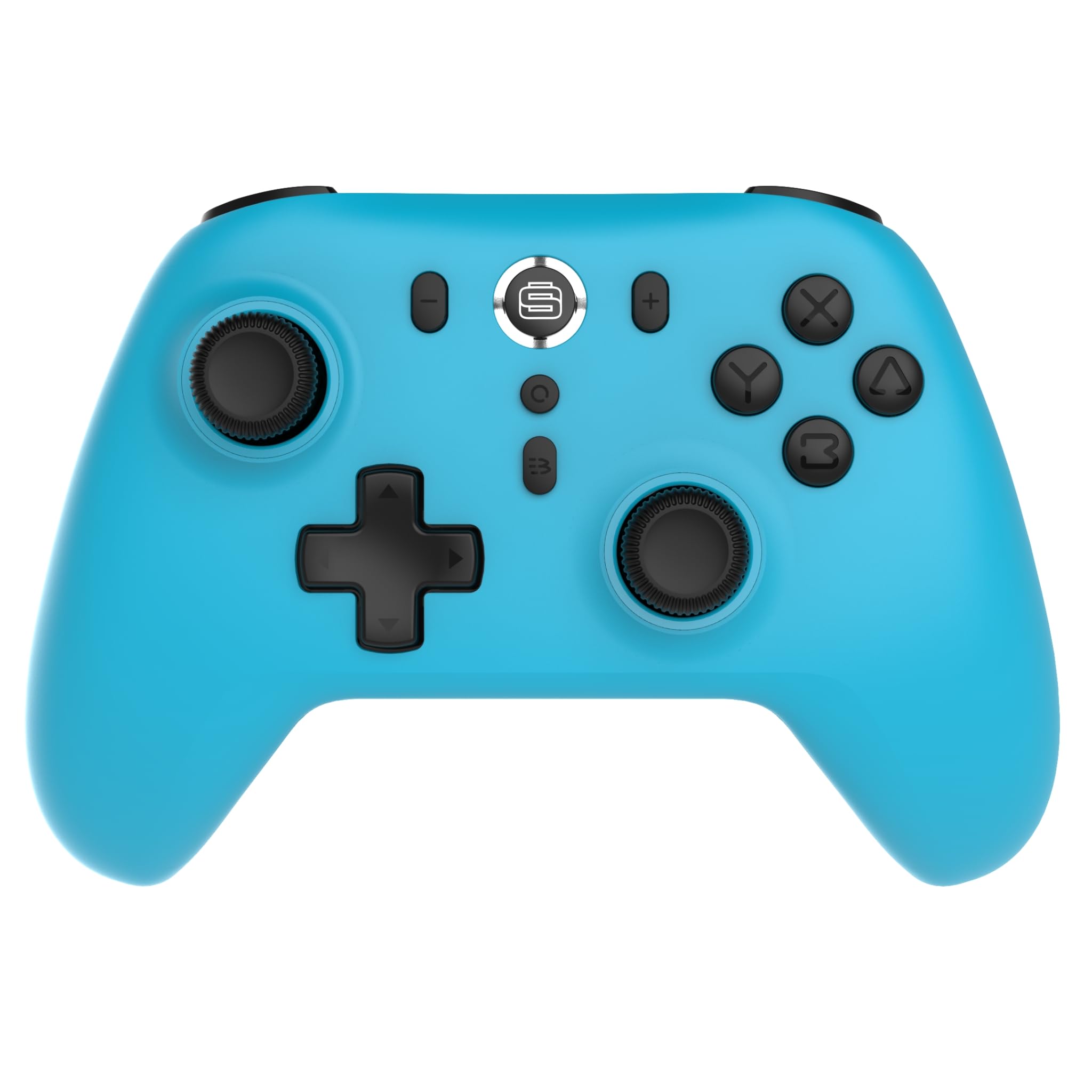
Фронт view of the Surge Wireless Pro Controller, showing the D-pad, left and right analog sticks, A/B/X/Y buttons, Home button, Capture button, Plus and Minus buttons, and the Surge logo button.

Назад view of the Surge Wireless Pro Controller, showing the textured grips and the charging port.
4. Подешавање и упаривање
The Surge Wireless Pro Controller supports multiple connection methods depending on your device.

This image displays the various platforms compatible with the Surge Wireless Pro Controller, including Nintendo Switch, Nintendo Switch 2, Windows PC, Android, and iOS.
4.1. Pairing with Nintendo Switch / Switch 2
- У менију ХОМЕ одаберите Контролори > Промените Грип/Ред.
- На контролеру притисните и држите Дугме за почетак for 3-5 seconds until the indicator lights begin to flash rapidly.
- Once paired, the indicator light(s) on the controller will remain solid.
- To wake the console from sleep mode, press the Дугме за почетак на контролору.
4.2. Pairing with Windows PC
- Уверите се да је на вашем рачунару омогућен Bluetooth.
- Иди на Bluetooth & other devices settings на вашем рачунару.
- Изаберите Додајте Блуетоотх или други уређај > Блуетоотх.
- На контролеру притисните и држите Дугме за почетак for 3-5 seconds until the indicator lights begin to flash rapidly.
- Select the controller from the list of available devices on your PC.
- Once paired, the indicator light(s) on the controller will remain solid.
4.3. Pairing with Android / iOS Devices
- Омогућите Блуетоотх на свом Андроид или иОС уређају.
- Go to the Bluetooth settings menu on your device.
- На контролеру притисните и држите Дугме за почетак for 3-5 seconds until the indicator lights begin to flash rapidly.
- Select the controller from the list of available devices.
- Once paired, the indicator light(s) on the controller will remain solid.
5. Оперативне карактеристике
5.1. Hall Effect Thumb Sticks & Triggers
The controller is equipped with Hall Effect technology for its thumb sticks and triggers. This technology uses magnets and electrical conductors to detect position, providing enhanced precision and significantly reducing the risk of stick drift over time compared to traditional potentiometers.

This image highlights the Hall Effect thumbsticks and triggers, emphasizing their role in providing precise inputs and preventing stick drift.
5.2. Турбо функција
The Turbo function allows for rapid, repeated input of a button press. This controller features 3 adjustable turbo levels.
- Да бисте активирали Турбо: Притисните и држите Турбо дугме, then press the desired action button (A/B/X/Y, L1/R1, L2/R2, D-pad directions). The button will now rapidly repeat its input when held.
- Да бисте подесили Турбо брзину: With Turbo active on a button, press and hold the Турбо дугме и померите Right Analog Stick Up or Down to cycle through the 3 speed levels.
- To deactivate Turbo: Притисните и држите Турбо дугме, then press the same action button again.
5.3. Повратне информације о вибрацијама
The controller provides haptic feedback through vibration. You can choose from 4 vibration levels.
- To adjust Vibration level: Притисните и држите Дугме за вибрацију (if present, or a designated button combination, refer to specific button mapping if available) and move the Left Analog Stick Up or Down to cycle through the 4 levels (Off, Low, Medium, High).
5.4. Motion Controls
The controller supports motion controls for compatible games, particularly on Nintendo Switch/Switch 2. This allows for intuitive gameplay where physical movement of the controller translates into in-game actions.

This image visually represents the controller's advanced features, including Turbo Function, Motion Controls, and Rumble Vibration, enhancing the gaming experience.
6. Пуњење
The controller is equipped with a built-in 600mAh Li-polymer battery, providing up to 10 hours of gameplay on a single charge.

This image shows the controller being held, emphasizing its internal rechargeable battery for extended play sessions.
- Connect the included USB-C charging cable to the controller's USB-C port.
- Connect the other end of the cable to a USB power source (e.g., console, PC, USB wall adapter).
- The indicator lights on the controller will show charging status (e.g., blinking while charging, solid when fully charged).
- Потпуно пуњење обично траје отприлике 2-3 сата.
7. Одржавање
Да бисте осигурали дуготрајност и оптималне перформансе вашег контролера, пратите ова упутства за одржавање:
- Чишћење: Користите меку, суву крпу за брисање контролера. За тврдокорну прљавштину, благо дampИсперите крпу водом. Избегавајте употребу јаких хемикалија или абразивних средстава за чишћење.
- Складиштење: Чувајте контролер на хладном и сувом месту, даље од директне сунчеве светлости и екстремних температура.
- Избегавајте капи: Заштитите контролер од падова и удараца, који могу оштетити унутрашње компоненте.
- Изложеност течности: Не излажите контролер води или другим течностима.
КСНУМКС. Решавање проблема
If you encounter issues with your Surge Wireless Pro Controller, please refer to the following common solutions:
| Проблем | Решење |
|---|---|
| Контролер се не укључује. | Уверите се да је контролер напуњен. Повежите га са извором напајања помоћу USB-C кабла. |
| Controller does not pair. | Ensure the controller is in pairing mode (indicator lights flashing rapidly). Check that Bluetooth is enabled on your device. Try restarting both the controller and the device. |
| Кашњење или прекид везе на улазу. | Ensure the controller is within range of the device. Reduce interference from other wireless devices. Ensure the controller is fully charged. |
| Дугмад или палице не реагују. | Try resetting the controller (if a reset button is available, typically a small pinhole on the back). Ensure no debris is obstructing the buttons. |
| Вибрација не ради. | Check the vibration settings on the controller and in the game. Ensure the vibration level is not set to 'Off'. |
9. Спецификације
| Феатуре | Детаљ |
|---|---|
| Број модела | СГ60095 |
| Тип батерије | 1 Nonstandard Battery (Li-polymer, 600mAh) |
| Трајање батерије | До 10 сати (приближно) |
| Порт за пуњење | УСБ-Ц |
| Димензије | 20.5 к 14 к 6.6 цм |
| Тежина | 320 г |
| Земља порекла | Кина |
10. Гаранција и подршка
For warranty information and customer support, please refer to the documentation included with your purchase or visit the official Surge webсајт. Сачувајте доказ о куповини за потребе гаранције.


