
1. Увод
Welcome to your new Tibuta Smartpad A10_M 10.1-inch Android 15 Tablet. This manual provides essential information for setting up, operating, maintaining, and troubleshooting your device. Please read this guide thoroughly to ensure optimal performance and a satisfying user experience.

Image 1.1: Tibuta Smartpad A10_M Tablet showcasing its multitasking features with 8GB RAM, 64GB ROM, and 1TB expandable storage.
2. Шта је у кутији
Upon unpacking your Tibuta Smartpad A10_M, please verify that all the following items are included:
- Tibuta Smartpad A10_M Tablet
- Протецтиве Цасе
- УСБ-Ц кабл за пуњење
- Повер Адаптер
- Кориснички приручник (овај документ)

Image 2.1: The Tibuta Smartpad A10_M Tablet, charger, USB cable, and manual, as typically found in the product box.
3. Производ је готовview
The Tibuta Smartpad A10_M is designed for versatile use, offering a balance of performance and portability. Key features include:
- Приказ: 10.1-inch IPS HD (1280x800 pixels) with eye protection technology.
- Оперативни систем: Android 15 for optimized performance and user experience.
- Перформансе: Quad-Core processor with 8GB RAM (3GB + 5GB expandable) for smooth multitasking.
- Складиштење: 64GB internal storage, expandable up to 1TB via Micro SD card.
- камере: Задња камера од 5 МП и предња камера од 8 МП за фотографије и видео позиве.
- Повезивање: Dual-band Wi-Fi (2.4G+5G) and Bluetooth 5.4 for fast and stable wireless connections.
- батерија: 5000mAh high-capacity battery for extended use.
- аудио: Dual speakers and a 3.5mm headphone jack.
3.1 Карактеристике екрана
Experience clear and vibrant visuals on the 10.1-inch IPS HD screen. The display incorporates low blue light technology to reduce eye strain during prolonged use.

Image 3.1: The tablet's HD Eyes Protection Display, featuring 1280x800 resolution, IPS technology, and a 16:10 aspect ratio.
3.2 Перформансе и складиштење
Powered by Android 15 and a Quad-Core processor, the tablet offers smooth performance for various applications. With 64GB of internal storage and support for up to 1TB via a Micro SD card, you have ampоставите простор за ваше files.

Image 3.2: The tablet displaying multiple applications, illustrating its large storage capacity and expandability for media and documents.
3.3 Повезивање
Stay connected with dual-band Wi-Fi (2.4G+5G) and Bluetooth 5.4. The USB-C port allows for quick charging and data transfer.

Image 3.3: The tablet highlighting its 5G/2.4G Wi-Fi and Bluetooth 5.0 capabilities, demonstrating compatibility with various peripherals like game controllers, headphones, and keyboards.
3.4 Трајање батерије
The 5000mAh battery provides up to 8 hours of average use, ensuring you can enjoy your content for longer periods.

Image 3.4: The tablet emphasizing its 5000mAh battery, USB-C interface, and estimated usage times for gaming, video watching, and standby.
3.5 Физичке димензије
The tablet's compact design makes it easy to handle and carry.
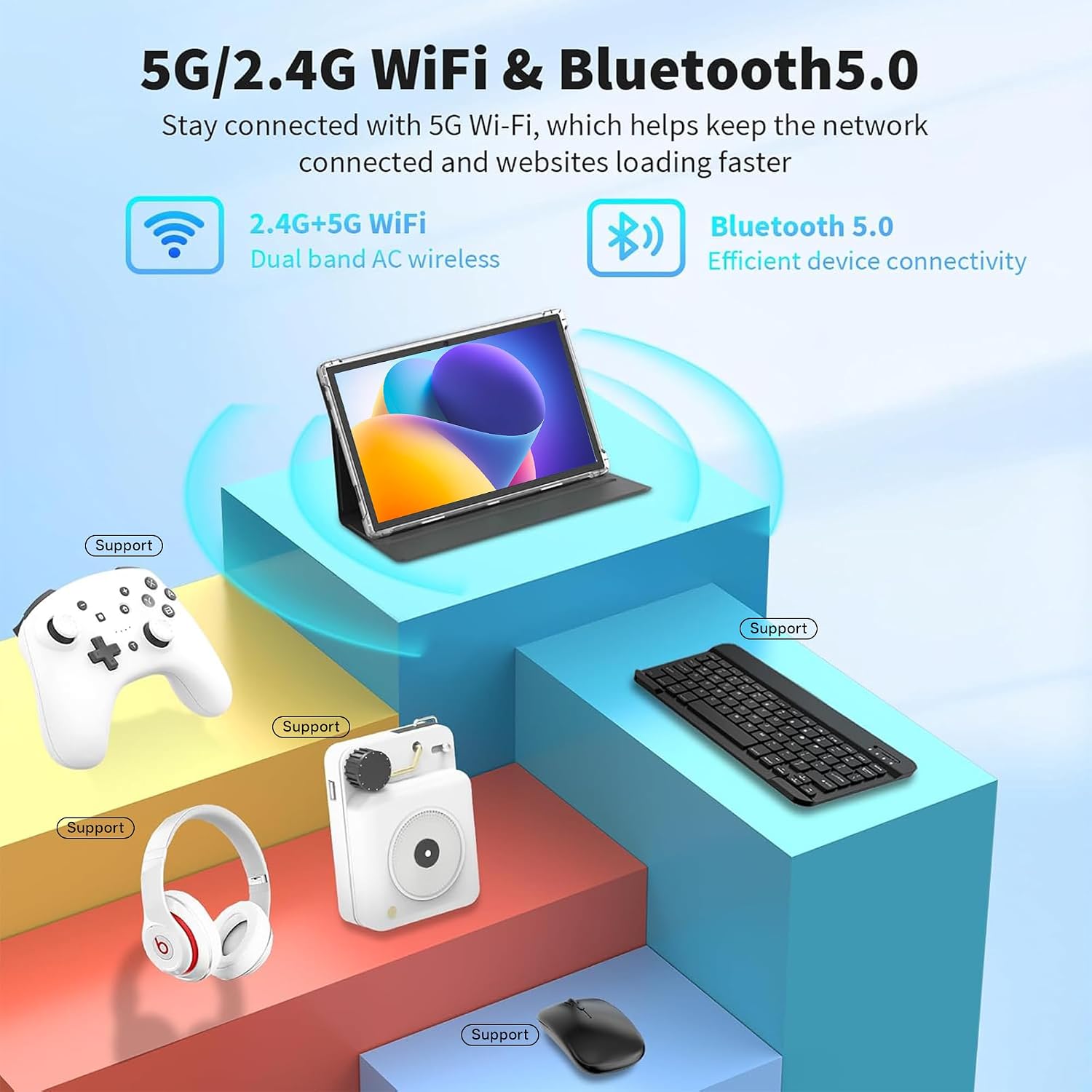
Image 3.5: Detailed diagram illustrating the length (24.39cm/9.60inch), width (16.25cm/6.39inch), and thickness (0.82cm/0.32inch) of the tablet.
4. Подешавање
4.1 Почетно пуњење
Before first use, fully charge your tablet. Connect the USB-C cable to the tablet's charging port and the power adapter to a wall outlet. The charging indicator will show the charging status.
4.2 Укључивање/искључивање
- За укључивање: Press and hold the Power button (usually located on the side or top edge) until the Tibuta logo appears on the screen.
- За искључивање: Притисните и држите дугме за напајање док се не појави мени за напајање. Изаберите „Искључивање“ из опција.
- Рестартовати: Из менија за напајање изаберите „Поново покрени“.
4.3 Чаробњак за почетно подешавање
The first time you power on the tablet, you will be guided through an initial setup process. This includes selecting your language, connecting to a Wi-Fi network, setting up your Google account, and configuring basic security settings. Follow the on-screen prompts to complete the setup.
5. Упутство за употребу
5.1 Basic Touchscreen Gestures
- Додирните: Додирните екран једном да бисте отворили апликацију, изабрали ставку или притиснули дугме.
- Додирните и држите: Press and hold an item to access contextual menus or drag items.
- Превуците: Превлачите прстом преко екрана да бисте се кретали кроз странице, листе или пребацивали између почетних екрана.
- Зумирање штипкањем прстију: Поставите два прста на екран и раздвојите их да бисте увећали приказ или их спојите да бисте га умањили.
5.2 Повезивање на Ви-Фи
- Иди на Подешавања > Мрежа и интернет > Ви-Фи.
- Укључи/искључи Wi-Fi On.
- Изаберите жељену Wi-Fi мрежу са листе.
- Унесите лозинку за мрежу ако се то од вас затражи, а затим додирните Повежите се.
5.3 Упаривање Bluetooth уређаја
- Иди на Подешавања > Повезани уређаји > Блуетоотх.
- Укључите Блуетоотх On.
- Уверите се да је ваш Bluetooth уређај у режиму упаривања.
- Изаберите уређај са листе доступних уређаја и пратите упутства на екрану да бисте завршили упаривање.
5.4 Installing and Managing Applications
- Инсталирајте апликације: Отворите Гоогле Плаи продавница апликацију, потражите жељену апликацију и додирните Инсталирај.
- Деинсталирајте апликације: Touch and hold the app icon on the home screen or app drawer, then drag it to "Uninstall" or select "App info" and choose "Uninstall". Alternatively, go to Подешавања > Аппс > Погледајте све апликације, изаберите апликацију и додирните Деинсталирај.
5.5 Коришћење камера
The tablet features a 5MP rear camera and an 8MP front camera. Open the Камера app to take photos or record videos. You can switch between front and rear cameras within the app interface.
5.6 Проширивање складишног простора
To expand storage, insert a Micro SD card (up to 1TB, not included) into the designated slot on the tablet. The tablet will prompt you to format the card for use as portable or internal storage.

Image 5.1: The tablet being used for various activities including work, entertainment, and creative tasks.
6. Одржавање
- Чишћење: Користите меку крпу која не оставља влакна да бисте очистили екран и кућиште таблета. Избегавајте употребу јаких хемикалија или абразивних материјала.
- Ажурирања софтвера: Regularly check for and install system updates to ensure your tablet has the latest features and security patches. Go to Подешавања > Систем > Ажурирање система.
- Управљање складиштем: Периодично чистите непотребне files and uninstall unused apps to free up storage space and maintain optimal performance.
- Одржавање батерије: Avoid extreme temperatures and do not let the battery fully discharge frequently. For long-term storage, charge the battery to about 50%.
КСНУМКС. Решавање проблема
| Проблем | Решење |
|---|---|
| Таблет се не укључује. | Уверите се да је батерија напуњена. Прикључите пуњач и сачекајте неколико минута пре него што поново покушате да га укључите. Ако не реагује, притисните и држите дугме за напајање 10-15 секунди да бисте поново покренули уређај. |
| Проблеми са Wi-Fi везом. | Проверите да ли је Wi-Fi омогућен у подешавањима. Рестартујте Wi-Fi рутер. Заборавите мрежу и поново се повежите. Уверите се да сте у домету Wi-Fi сигнала. |
| Споре перформансе или падови апликација. | Close unused apps. Clear app caches (Settings > Apps > [App Name] > Storage & cache > Clear cache). Restart the tablet. Ensure sufficient free storage space. |
| Батерија се брзо празни. | Смањите осветљеност екрана. Искључите Wi-Fi, Bluetooth и GPS када се не користе. Затворите апликације у позадини. Проверите потрошњу батерије у Подешавањима да бисте идентификовали апликације које троше много енергије. |
If you encounter issues not listed here or require further assistance, please contact Tibuta customer support.
8. Спецификације
| Феатуре | Детаљ |
|---|---|
| Бранд | Тибута |
| Назив модела | A10_M-EU |
| Оперативни систем | Андроид 15 |
| Величина екрана | 10.1 инча |
| Резолуција екрана | 1280 x 800 Pixels (IPS HD) |
| Процесор | Quad-Core (Intel Integrated) |
| РАМ | 8 GB (3GB + 5GB expandable) |
| Интерна меморија | 64 ГБ |
| Екпандабле Стораге | Up to 1 TB via Micro SD card |
| Задња камера | 5 МП |
| Предња камера | 8 МП |
| Капацитет батерије | 5000 mAh (литијум-јонска) |
| Просечно трајање батерије | 8 сата |
| Повезивање | Wi-Fi (802.11n, 2.4G+5G), Bluetooth 5.4 |
| Портс | USB-C, 3.5 mm прикључак за слушалице |
| Димензије (Д к Ш к В) | 33L x 26W x 5H cm (Package) |
| Тежина артикла | 1.01 килограма (паковање) |
| Боја | Греи |
| Модел Иеар | 2025 |
9. Гаранција и подршка
Tibuta Android tablets come with a 2 година гаранције. We also provide Корисничка подршка 24/7 to assist you with any technical issues or questions regarding the installation and use of your device.
For warranty claims, technical assistance, or general inquiries, please refer to the contact information provided on the Tibuta official webсајт или гарантни лист који је испоручен уз ваш производ.
Note: Video content for this product was not available or did not meet embedding criteria.