
Увод
This manual provides essential instructions for the setup, operation, and maintenance of your Subsonic Superdrive 270 GT-5 Racing Wheel. Designed for a realistic racing experience, this wheel is compatible with PlayStation 5 (PS5) and PC. Please read this manual thoroughly before use to ensure optimal performance and longevity of your device.
Садржај пакета
Проверите да ли су све ставке присутне у вашем пакету:
- Superdrive 270 GT-5 Racing Wheel
- Pedal Set (Brake and Accelerator)
- Подесива монтажа Цлamp
- Removable Suction Cups (5 units)
- УСБ прикључни кабл
Упутства за подешавање
Follow these steps to connect your racing wheel to your console or PC.
Физичка инсталација
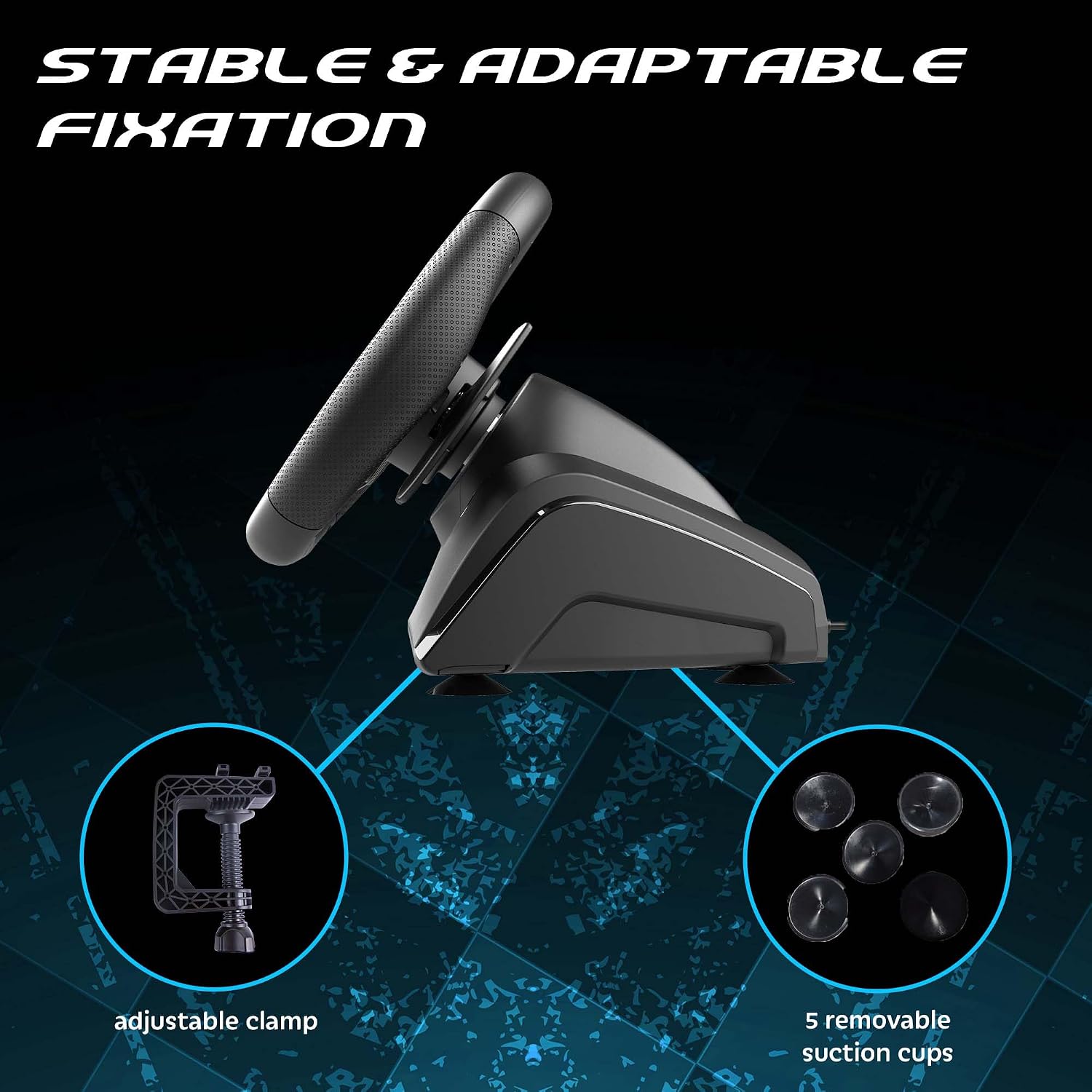
1. Монтажа точка: Place the racing wheel on a stable surface such as a desk or table. Use the adjustable clamp to secure it firmly. Alternatively, attach the five removable suction cups to the bottom of the wheel for additional stability on smooth surfaces.

Подесиви цлamp and suction cups provide stable fixation for the racing wheel.
2. Connecting the Pedals: Connect the pedal set cable to the designated port on the rear of the racing wheel base.
3. Connecting to Console/PC: Plug the USB connection cable from the racing wheel into an available USB port on your PlayStation 5 or PC.

The Superdrive 270 GT-5 Racing Wheel is designed for use with PS5 and PC.
PS5 Specific Setup
For optimal performance on PlayStation 5, ensure your console settings are configured correctly:
- Подешавања приступа: From the PS5 home screen, navigate to the Подешавања икона (икона зупчаника).
- Navigate to Accessories: In the Settings menu, select Прибор.
- Select Controller (General): Under Accessories, choose Controller (General).
- Choose Communication Method: Изаберите Цоммуницатион Метход.
- Select Use USB Cable: From the Communication Method options, select Користите УСБ кабл.
- Activate Wheel: After connecting the USB cable, press the ХОМЕ button on the racing wheel to activate it.

Navigate to the Settings menu on your PS5 console.

Follow the menu path to 'Communication Method'.

Ensure 'Use USB Cable' is selected for controller communication.

Connect the USB cable and press the HOME button on the wheel.
Упутство за употребу
The Superdrive 270 GT-5 Racing Wheel offers various features for an immersive gaming experience.
Steering and Pedals
- Ротација за 270 степени: The steering wheel provides a 270-degree rotation for precise control in racing games.
- Analog Pedals: The included pedal set features analog brake and accelerator pedals for responsive input.
- Ручице мењача: Use the integrated paddle shifters on the wheel for quick and intuitive gear changes.

The racing wheel offers a 270-degree rotation for enhanced control.
Dual Joysticks and Programmable LEDs
The racing wheel includes dual joysticks, replicating full controller functionality, and programmable RGB LEDs.
- Dual Joysticks: The right and left joysticks provide access to all standard controller functions, conveniently located on the wheel.
- Programmable RGB LEDs: The LEDs around the joysticks can be customized to fix colors, display a rainbow effect, or show breathing colors. Refer to the programming section for detailed instructions on customization.

The dual joysticks feature programmable RGB LEDs with various display options.
Progressive LEDs
LEDs located on the top of the steering wheel provide visual feedback for acceleration and braking, enhancing immersion.

Progressive LEDs on the wheel indicate acceleration and braking.
Programmable Keys and Sensitivity Levels
The wheel features programmable buttons and adjustable sensitivity to suit different racing styles and game types.
- Програмабилна дугмад: Specific buttons on the wheel can be programmed for custom functions. Refer to the dedicated programming section in the full manual for detailed instructions.
- Нивои осетљивости: Choose from three sensitivity levels:
- Ниска осетљивост: Suitable for most racing games, offering stable control.
- Средња осетљивост: Ideal for games with many curves, providing a balance of responsiveness and control.
- Висока осетљивост: Best for linking tight turns, offering maximum responsiveness.
Adjustable sensitivity levels allow customization for various racing scenarios.
Одржавање
To ensure the longevity and proper functioning of your racing wheel:
- Чишћење: Use a soft, dry cloth to clean the surfaces of the wheel and pedals. Avoid abrasive cleaners or solvents.
- Складиштење: Уређај чувајте на хладном и сувом месту, даље од директне сунчеве светлости и екстремних температура.
- Нега каблова: Avoid bending or twisting cables excessively. Disconnect cables by pulling the plug, not the cable itself.
Решавање проблема
If you encounter issues with your Superdrive 270 GT-5 Racing Wheel, refer to the following common solutions:
- Wheel Not Responding:
- Ensure all cables are securely connected to the wheel, pedals, and console/PC.
- For PS5, verify that the console's communication method is set to 'Use USB Cable' as described in the setup section.
- Try connecting the wheel to a different USB port on your console or PC.
- Поново покрените конзолу или рачунар.
- Disconnections During Gameplay (PS5):
- This issue may occur if the PS5 perceives the wheel as a DualShock 4 controller and disconnects it. Ensure the 'Use USB Cable' setting is correctly applied and remains active.
- Ensure your PS5 system software is up to date.
- Avoid using USB hubs; connect the wheel directly to the console.
- Педале не реагују:
- Check the connection cable between the pedals and the wheel base.
- Test the wheel and pedals with a different game or on a different platform (if available) to isolate the issue.
- LEDs Not Functioning:
- Ensure the wheel is powered on and properly connected.
- Refer to the programming section (in the full manual) for LED customization and ensure settings are correct.
If problems persist after attempting these solutions, please contact Subsonic customer support.
Спецификације
| Феатуре | Детаљ |
|---|---|
| Број модела | СА5721-2 |
| Компатибилност | ПлаиСтатион 5, ПЦ |
| Ротација управљача | 270 степени |
| Пречник точка | 270 мм |
| Грип Материал | Micro-perforated synthetic leather |
| Повратне информације о вибрацијама | Двоструки вибрациони мотори |
| Контроле | Dual joysticks, paddle shifters, programmable buttons |
| ЛЕД диоде | Programmable RGB LEDs (joysticks), progressive LEDs (acceleration/braking) |
| Нивои осетљивости | 3 (низак, средњи, висок) |
| Монтажа | Подесиви цлamp, removable suction cups |
| Педале | Analog brake and accelerator with footrest |
| Димензије (пакет) | 32 к 29.21 к 27.94 цм |
| Тежина (пакет) | 2.5 килограма |
| Порекло | Кина |
Гаранција и подршка
The Subsonic Superdrive 270 GT-5 Racing Wheel comes with a Двогодишња гаранција произвођачаОва гаранција покрива недостатке у материјалу и изради при нормалној употреби.
For technical support, warranty claims, or further assistance, please visit the official Subsonic webсајт или контактирајте њихову службу за кориснике. Сачувајте доказ о куповини ради потврде гаранције.