
Увод
This manual provides instructions for the Brydge 10.9 MAX+ Wireless Keyboard Case. This product is designed to enhance your iPad experience by providing a physical keyboard with a multi-touch trackpad and a protective case. Please read this manual thoroughly before use to ensure proper operation and care.
Компатибилност
The Brydge 10.9 MAX+ Wireless Keyboard Case is compatible with the following iPad models:
- iPad 10th Generation (Model Numbers: A2696, A2757, A2777)
- iPad A16 (11th Generation) (Model Numbers: A3354, A3355, A3356)
Важно: This keyboard case is not designed for use with iPad Air, iPad Pro, iPad 9th Gen, or older iPad models.
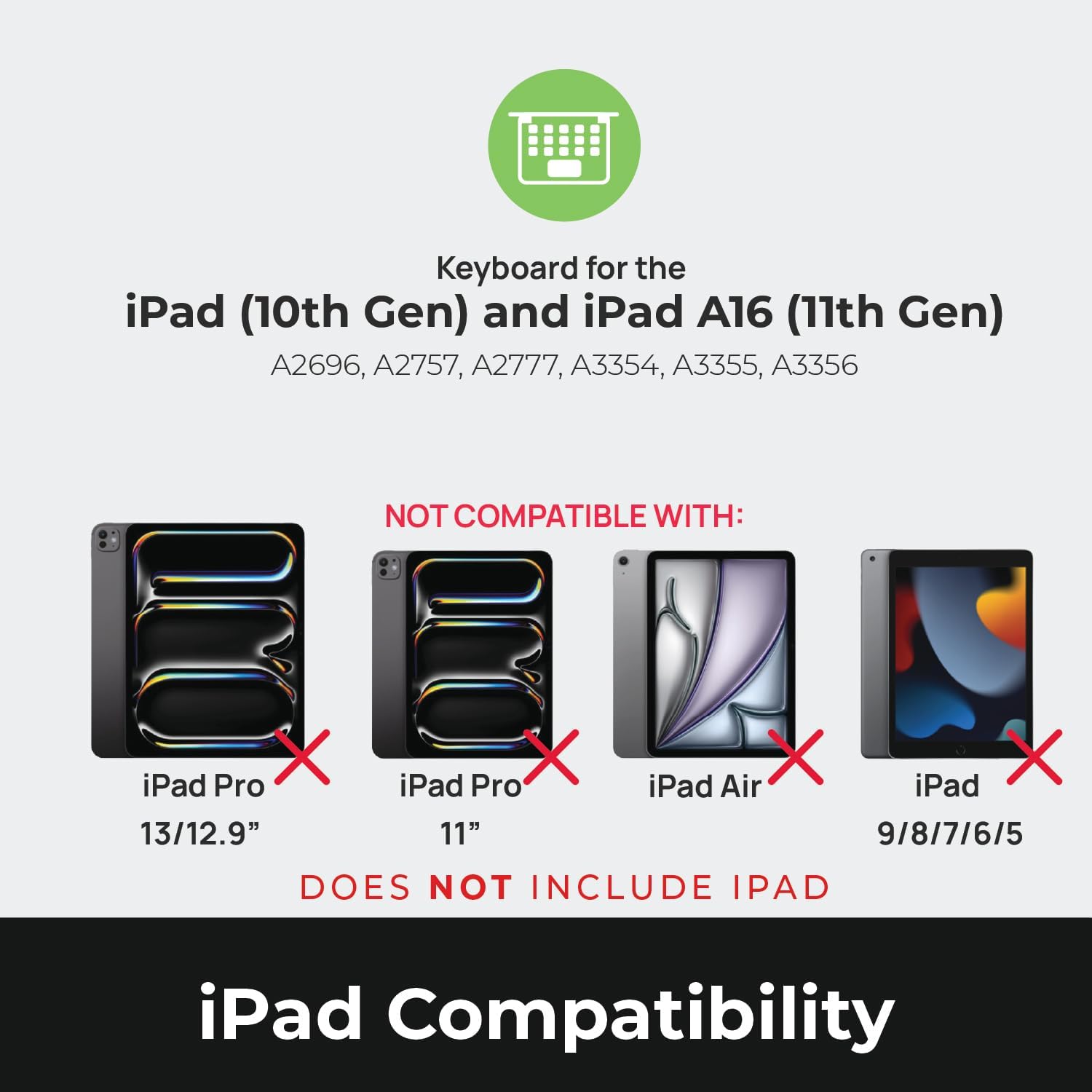
Image: Compatibility chart showing supported iPad models (10th Gen, A16 11th Gen) and incompatible models (iPad Pro 13/12.9", iPad Pro 11", iPad Air, iPad 9/8/7/6/5).
Шта је у кутији
Upon unpacking, ensure all items are present:
- 1 x Brydge 10.9 MAX+ Wireless Keyboard
- 1 x Detachable Magnetic SnapFit Case
- 1 x Упутство за употребу (овај документ)
Note: An iPad and USB-C charging cable are not included. The USB-C cable typically comes with your iPad.

Image: Depiction of the box contents, including the keyboard, case, and user manual.
Упутства за подешавање
1. Attaching Your iPad to the SnapFit Case
- Carefully align your iPad with the SnapFit Case.
- Gently press the iPad into the case until it is securely seated. The case is designed for a snug fit to provide protection.
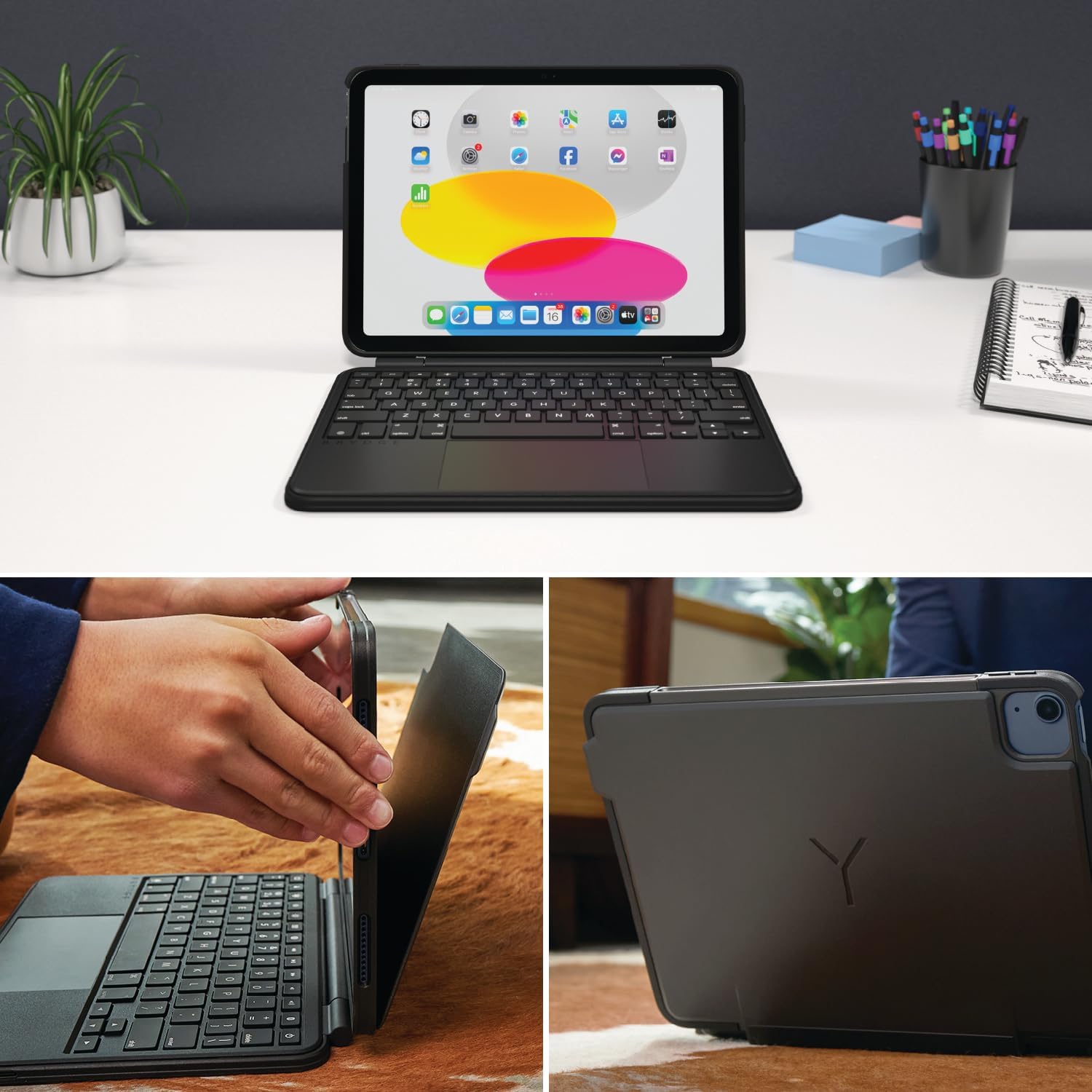
Image: Shows the process of attaching the iPad to the SnapFit case and the case attached to the keyboard.
2. Connecting the Case to the Keyboard
The SnapFit Case features a magnetic back cover that securely attaches to the Brydge keyboard. Simply align the back of the cased iPad with the magnetic area on the keyboard base until it snaps into place.
3. Пуњење тастатуре
Before first use, it is recommended to fully charge the keyboard. Use a USB-C cable (not included) to connect the keyboard's charging port to a power source. The charging port is typically located on the side or back of the keyboard.
4. Блуетоотх упаривање
- Уверите се да је тастатура напуњена и укључена.
- На вашем iPad-у идите на Подешавања > Блуетоотх.
- Укључите Блуетоотх.
- The Brydge keyboard should appear in the "Other Devices" list. Tap on its name to connect.
- If prompted, enter the pairing code displayed on your iPad using the Brydge keyboard, then press Ентер.
The keyboard features Instant-On™ Connectivity via Bluetooth 5.0, providing a quick and stable connection once paired.

Image: Illustrates the keyboard's Bluetooth 5.0 and Instant-On connectivity features.
Упутство за употребу
Функције тастатуре
- Тастери са позадинским осветљењем: The keyboard features adjustable backlit keys with 3 brightness levels. Use the dedicated function keys (usually located in the top row) to cycle through brightness settings or turn the backlight off.
- Функцијски тастери: The top row of keys provides quick access to iPadOS functions such as Home, Search, Brightness, Media Controls, and Volume.
Мулти-тач тракпед
The integrated multi-touch trackpad supports various iPadOS gestures for navigation and interaction. Refer to your iPad's settings for a full list of supported gestures.
- Кликом на: Press down on the trackpad to perform a click.
- Померање: Користите два прста за померање нагоре или надоле.
- Зумирање: Стисните са два прста да бисте увећали или умањили приказ.
- Пребацивач апликација: Swipe up with three fingers to open the App Switcher.
- Почетни екран: Swipe up with one finger from the bottom edge to return to the Home Screen.

Image: Highlights the detachable magnetic SnapFit case and the native multi-touch trackpad.
Подешавање Viewинг Англес
The keyboard allows for a screen rotation of up to 135 degrees, enabling various viewуглове за куцање, цртање или конзумирање медија.

Image: Displays key features including up to 3-month battery life, 3 levels of backlit keys, and 0-130° viewинг углова.
Трајање батерије
The keyboard offers up to 3 months of battery life on a single charge, depending on usage and backlight settings. To conserve battery, the keyboard will enter sleep mode after a period of inactivity.
Одржавање
- Чишћење: Користите меку, дamp, lint-free cloth to clean the keyboard and case. Avoid abrasive cleaners or solvents.
- Складиштење: When not in use for extended periods, ensure the keyboard is fully charged and stored in a cool, dry place.
- Одржавање батерије: To prolong battery life, avoid fully discharging the keyboard frequently. Charge it when the battery indicator is low.
Решавање проблема
Тастатура се не повезује преко Блутут-а
- Уверите се да је тастатура напуњена.
- Проверите да ли је Bluetooth омогућен на вашем iPad-у.
- Заборавите уређај у Блутут подешавањима вашег iPad-а и покушајте поново да га упарите.
- Поново покрените и iPad и тастатуру.
Trackpad Not Responding or Moving Erratically
- Ensure the keyboard is fully charged. Low battery can affect trackpad performance.
- Clean the trackpad surface with a soft, dry cloth to remove any debris or smudges.
- Прекините везу и поново повежите Блуетоотх везу.
- Check for any firmware updates for the Brydge keyboard via the Brydge Connect App (if available).
Тастери не реагују
- Confirm the keyboard is powered on and connected via Bluetooth.
- Проверите да ли има физичких препрека испод тастера.
- If specific keys are not working, try restarting the keyboard and iPad.
Спецификације
| Број модела | БРИ8042 |
| Димензије производа | 10 cm Д x 7.65 cm Ш x 0.8 cm В (10 x 7.65 x 0.8 cm) |
| Тежина артикла | 1.85 фунти |
| Технологија повезивања | Блуетоотх 5.0 |
| Опис тастатуре | Бежични |
| Посебне карактеристике | Backlit, Rechargeable, Multi-Touch Trackpad, Detachable Magnetic SnapFit Case |
| Боја | Црно |
| Материјал | Polycarbonate, Thermoplastic Polyurethane (TPU) |
| Батерија | 1 Nonstandard Battery (included), up to 3 months battery life |
| Viewинг Англе | До 135 степени |
Гаранција и подршка
This product is subject to a standard return policy, typically 30 days from the date of purchase for refunds or replacements. For specific warranty details, please refer to the documentation provided with your purchase or contact Brydge customer support.
For technical assistance, troubleshooting, or warranty claims, please visit the official Brydge support website or contact their customer service department. Contact information can usually be found on the Brydge webсајту или у материјалима за паковање.
Note: Protection plans may be available for purchase separately.