
Увод
This manual provides detailed instructions for the installation, operation, and maintenance of your Hieasy X24 4MP 2.5K Window Security Camera. Please read this manual thoroughly before using the product to ensure proper functionality and safety. The Hieasy X24 camera offers 2.5K Ultra HD resolution, color night vision, motion detection, and 24/7 recording without subscription fees, utilizing both 2.4G and 5G Wi-Fi connectivity for seamless integration into your home security system.
Шта је у кутији
Проверите да ли су све компоненте присутне у вашем пакету:
- Тело камере
- Кабл за пуњење од 6.6 м
- Упутство за употребу
- Повер Адаптер
- Микро СД картица од 32 ГБ (унапред инсталирана или укључена засебно)
- Velcro adhesive pads (2)
- Wire holders (2)

Подешавање и инсталација
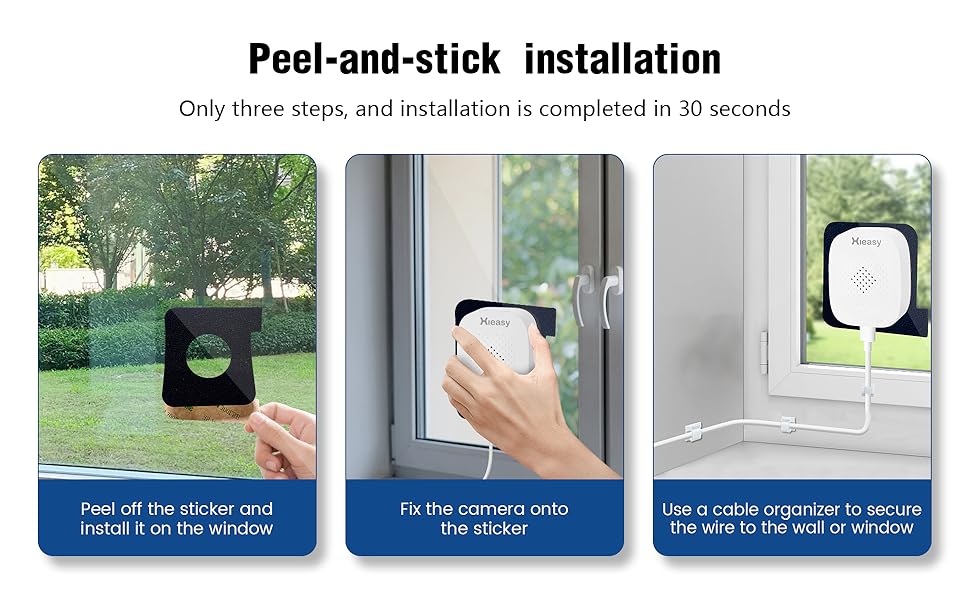
The Hieasy X24 camera features a 3M adhesive mounting design for quick and easy installation without drilling. It supports both Bluetooth and Wi-Fi connectivity for seamless pairing with your mobile phone.
Инсталација корак по корак
- Clean the Window Surface: Ensure both sides of the window glass where the camera will be mounted are clean and dry. Use a soft cloth to wipe away any dust or smudges.
- Attach Adhesive Pad to Camera: Peel off the protective backing from one of the Velcro adhesive pads. Carefully align and attach the adhesive side to the front of the camera, ensuring the camera lens is centered within the pad's opening.
- Mount Camera to Window: Peel off the remaining protective paper from the adhesive pad attached to the camera. Press the camera firmly onto the desired spot on the window glass from the inside, ensuring a secure bond.
- Прикључите напајање: Plug the charging cable into the camera's power port and connect the other end to the power adapter. Plug the power adapter into a wall socket.
- Сигурни каблови: Use the provided cable fixers to neatly secure the charging cable along the window frame or wall, preventing it from dangling or interfering with window operation.

Initial Setup and App Connection
Once powered on, the camera's blue indicator light will illuminate, signifying that the product has started. You will hear an audible prompt stating "Waiting for connection." At this point, you can proceed to link the camera with your smartphone via the dedicated Hieasy app.
Управљање камером
Уживо View и Снимање
Access the live monitoring feed anytime, anywhere via your smartphone. The camera provides 2.5K (2560×1440) ultra-high-definition resolution for clear video performance. It supports 24/7 continuous recording to capture all moments.
Нигхт Висион
Equipped with a 4-megapixel lens and advanced low-light algorithms, the camera delivers full-color images even in low-light environments, ensuring critical details are not missed during nighttime surveillance.


Детекција покрета и упозорења
The camera supports customizable motion detection zones. Upon detecting movement, the device will send push notifications to your phone, sound an alarm, and automatically record video to deter intruders effectively.


Складиштење
The device supports local storage via an SD card up to 512GB. A 32GB memory card is included to allow immediate use. Your data's security and privacy are protected.

Remote Access and Sharing
The Hieasy X24 camera allows you to easily access the live monitoring feed from your smartphone, no matter your location. The device supports sharing with up to 16 users, enabling family and friends to view the camera feed for enhanced peace of mind.


Решавање проблема
If you encounter issues with your Hieasy X24 camera, please refer to the following common problems and solutions:
- Не могу да се повежем на Ви-Фи:
- Ensure your Wi-Fi network is 2.4G or 5G compatible.
- Verify that the camera is within range of your Wi-Fi router.
- Проверите тачност лозинке за Wi-Fi.
- Restart your router and the camera, then attempt to reconnect.
- Без живота View or Recording:
- Confirm the camera is powered on and the blue indicator light is active.
- Проверите интернет везу на свом паметном телефону.
- Ensure the Micro SD card is properly inserted and not full.
- If the SD card is full, consider formatting it (this will erase all data).
- Лош квалитет слике:
- Clean the camera lens and the window surface.
- Уверите се да нема препрека у видном пољу камере view.
- Check your app settings for resolution options.
- No Audio Recording:
- Verify that audio recording is enabled in the camera's app settings.
- Уверите се да микрофон није блокиран.
Спецификације
| Назив модела | 4MP 2.5K Window Camera |
| Број модела ставке | Кс24 |
| Ефективна резолуција мировања | 4 МП |
| Резолуција снимања видео записа | 1440п (2.5К) |
| Технологија повезивања | Жично (напајање), Wi-Fi (пренос података) |
| Бежична комуникациона технологија | 2.4G & 5G Wi-Fi (Dual-Band) |
| Извор напајања | Електрични са каблом (5 волти) |
| Тип монтаже | Window Mount (Self Adhesive) |
| Унутрашња/спољна употреба | У затвореном, на отвореном |
| Ноћни вид | 33 стопа |
| Лов Лигхт Тецхнологи | Нигхт Цолор |
| Viewинг Англе | 120 степени |
| Фраме Рате | 25 кадрова у секунди |
| Величина инсталиране флеш меморије | 32 GB (Micro SD) |
| Максимална подржана величина флеш меморије | 512 ГБ |
| Audio Visual Recording Capabilities | Аудио |
| Тип упозорења | Аудио и покрет |
| Контролни метод | Апп |
| Димензије производа | 3.2 к 2 к 1.2 инча |
| Тежина артикла | 5.9 унци (0.17 килограма) |