
1. Увод
Thank you for choosing the FINOTI L200 PRO MAX GPS Drone. This advanced quadcopter features a 4K HD camera with a 2-axis gimbal, GPS intelligent flight modes, and optional 360° obstacle avoidance. This manual provides essential information for safe operation, setup, and maintenance to ensure you get the most out of your drone.

Image 1.1: The FINOTI L200 PRO MAX GPS Drone, showcasing its sleek design and integrated camera system.
2. Безбедносне информације
Please read all safety warnings and precautions carefully before operating the drone. Failure to follow these instructions may result in injury, damage to the drone, or property damage.
- Локални прописи: Always comply with local aviation regulations and restrictions.
- Провера пре лета: Ensure the drone, remote controller, and batteries are fully charged and in good working condition before each flight.
- Услови животне средине: Do not fly in strong winds, rain, snow, or fog. Avoid flying near crowds, buildings, or high-voltagе линије.
- Линија вида: Одржавајте визуелну линију вида са дроном у сваком тренутку.
- Безбедност пропелера: Држите руке, лице и широку одећу даље од ротирајућих пропелера.
- Руковање батеријом: Use only approved chargers and batteries. Do not overcharge or puncture batteries.
- старосно ограничење: Овај производ није погодан за децу млађу од 14 године.
3. Садржај пакета
Проверите да ли су све ставке наведене у наставку укључене у ваш пакет. Ако неке ставке недостају или су оштећене, обратите се корисничкој подршци.
- 1 x L200 PRO MAX Drone (with or without obstacle avoidance device, optional)
- 1 x Obstacle Avoidor (optional)
- 1 к даљински управљач
- 1 x Battery (one battery included in the drone, this package is for Dual Battery variant, so 2 batteries total)
- 1 к УСБ кабл за пуњење
- 8 к резервне лопатице пропелера
- 1 к Упутство за употребу
- 4 к завртњи
- 1 к одвијач
- 1 к торба за складиштење
4. Цомпонент Оверview
4.1 Компоненте дрона
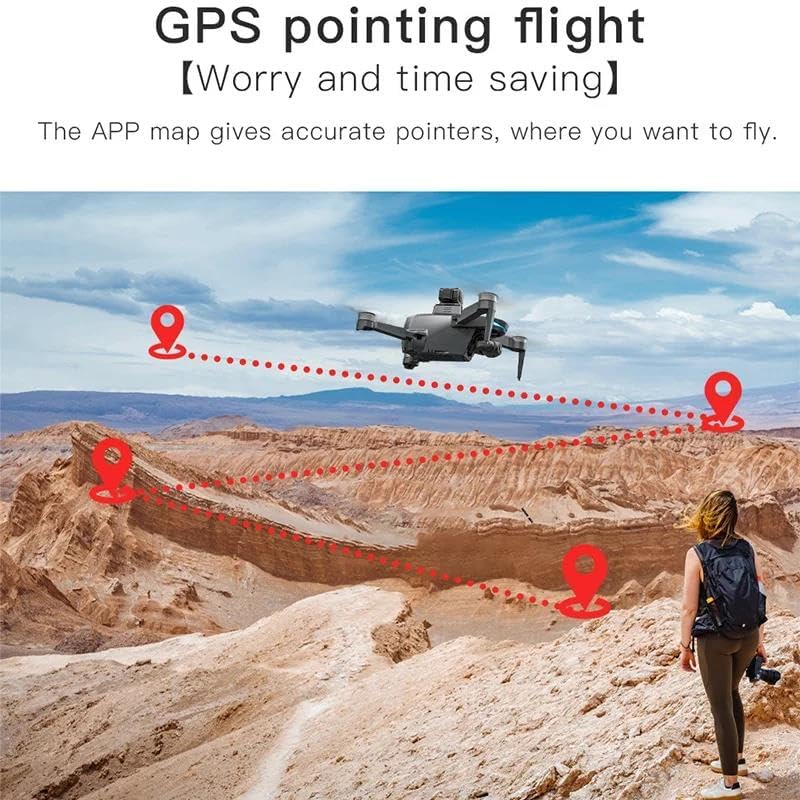
Image 4.1: Detailed diagram highlighting key components of the L200 PRO MAX drone, including the 360° laser obstacle avoidor, GPS module, 4K HD camera, and 2-axis mechanical gimbal.
- Пропелери: For lift and propulsion.
- Мотори: Brushless motors for stable flight.
- 4К ХД камера: Front-facing camera with 80° adjustable angle and 100° wide-angle lens.
- 2-axis Gimbal: Stabilizes the camera for smooth footage.
- ГПС модул: Enables intelligent flight features.
- 360° Laser Obstacle Avoidor (Optional): Detects obstacles up to 25 meters away.
- Одељак за батерије: Смешта батерију за летење.
- Bottom Camera (1280*720P): For optical flow positioning and additional views.
4.2 Даљински управљач прекоview
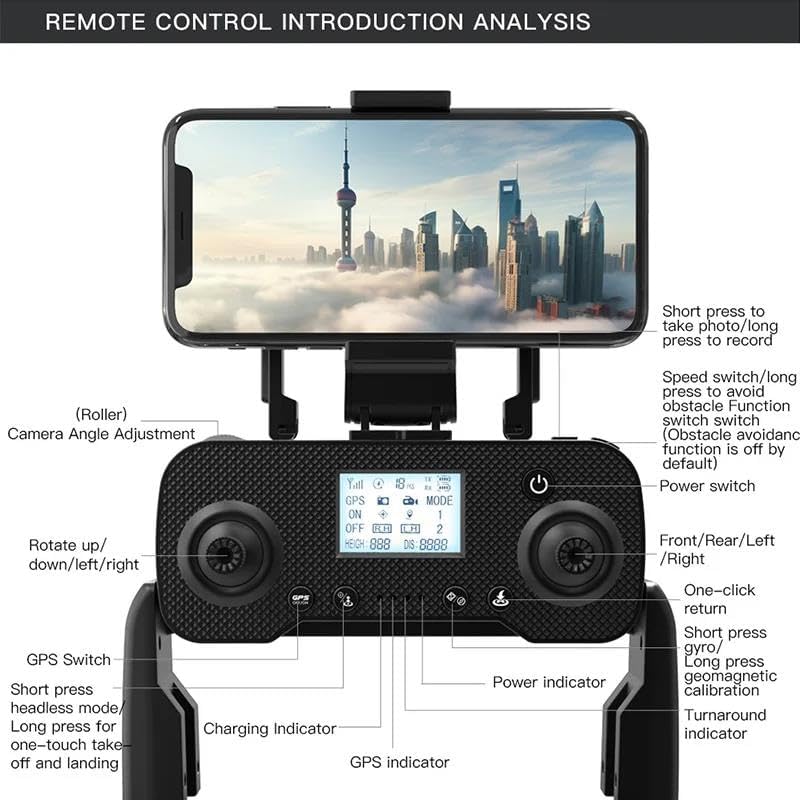
Image 4.2: Detailed diagram of the remote controller, labeling buttons and functions such as speed switch, camera angle adjustment, GPS switch, and power indicators.
- Прекидач: Укључује/искључује даљински управљач.
- Џојстици: Control drone movement (left for throttle/yaw, right for pitch/roll).
- ГПС прекидач: Укључује/искључује GPS режим.
- Прекидач брзине: Adjusts flight speed (long press for obstacle avoidance function toggle).
- Camera Angle Adjustment (Roller): Adjusts the vertical angle of the 4K camera.
- Фото/Видео дугме: Short press for photo, long press for video recording.
- One-Click Return: Покреће аутоматски повратак кући.
- Полетање/слетање једним додиром: For simplified flight initiation and termination.
- Mobile Phone Clip: Обезбеђује ваш паметни телефон за FPV viewинг.
5. Подешавање
5.1 Пуњење и инсталација батерије
- Пуњење батерија: Use the provided USB charging cable to fully charge both drone batteries. The charging indicator will change when charging is complete.
- Инсталирајте батерију дрона: Insert a fully charged battery into the drone's battery compartment until it clicks securely into place.
- Инсталирајте батерије даљинског управљача: Open the battery cover on the back of the remote controller and insert 3 AA batteries (not included), ensuring correct polarity.
5.2 Инсталација пропелера
The drone comes with propellers pre-installed. If replacement is needed:
- Идентификујте пропелере означене са „А“ и „Б“.
- Match 'A' propellers to 'A' motor shafts and 'B' propellers to 'B' motor shafts.
- Причврстите сваки пропелер приложеним завртњима помоћу одвијача. Уверите се да су чврсто причвршћени, али не и превише затегнути.
5.3 Obstacle Avoidor Installation (Optional)
If your package includes the optional obstacle avoidor:
- Locate the designated slot on top of the drone.
- Gently slide the obstacle avoidor into the slot until it is securely seated.
5.4 Преузимање апликације и повезивање
- Scan the QR code in the manual or search for the official FINOTI drone app in your smartphone's app store.
- Инсталирајте апликацију.
- Укључите дрон и даљински управљач.
- On your smartphone, connect to the drone's Wi-Fi network (usually named "FINOTI-L200PROMAX-XXXX").
- Отворите апликацију да бисте успоставили везу и view FPV фид.
6. Упутство за употребу
6.1 Укључивање/искључивање
- Дрон: Press and hold the power button on the drone for 2 seconds until the indicator lights turn on.
- Даљински управљач: Press the power button on the remote controller. It will beep, and the indicator lights will turn on.
- Искључивање: Reverse the power-on steps.
6.2 Упаривање и калибрација
- Поставите дрон на равну, равну површину.
- Укључите дрон и даљински управљач.
- Push the left joystick up then down to pair the remote with the drone.
- Калибрација жироскопа: Push both joysticks down and to the left simultaneously until the drone lights flash rapidly, then become solid.
- Калибрација компаса: Push both joysticks down and to the right simultaneously. The drone lights will flash slowly. Pick up the drone and rotate it horizontally 360° until the lights flash quickly. Then rotate it vertically 360° with the nose pointing down until the lights become solid.
6.3 Полетање и слетање
- Ручно полетање: Push both joysticks outwards and downwards to start the motors. Slowly push the left joystick up to ascend.
- One-Touch Takeoff: Press the one-touch takeoff/landing button on the remote controller. The drone will automatically ascend to a safe height.
- Ручно слетање: Slowly pull the left joystick down to descend. Once on the ground, hold the left joystick down for 3 seconds to stop the motors.
- One-Touch Landing: Press the one-touch takeoff/landing button. The drone will automatically descend and land.
6.4 Основне контроле лета
- Леви џојстик (гас/скретање): Горе/доле за висину, лево/десно за ротацију (скретање).
- Десни џојстик (нагиб/рот): Горе/доле за кретање напред/назад (нагиб), лево/десно за кретање лево/десно (котрљање).
- Прекидач брзине: Short press to cycle through speed modes (low, medium, high).
7. Напредне функције
7.1 GPS Intelligent Flight Modes
Ensure GPS signal is strong before activating these modes (indicated by solid GPS light on drone/remote).
- One-Click Return Home (RTH): Press the RTH button. The drone will automatically return to its takeoff point. It also activates automatically on low battery or signal loss.
- Прати ме режим: In the app, select Follow Me. The drone will follow the remote controller or smartphone.
- Waypoint Flight (Multi-point Route Planning): In the app, draw a path on the map. The drone will fly along the specified route.
- Fixed-Point Surround Flight: Select a point of interest in the app, and the drone will orbit around it.

Image 7.1: Visual representation of the GPS pointing flight feature, showing the drone following a pre-defined route on a map.
7.2 360° Obstacle Avoidance
The optional 360° laser obstacle avoidor enhances flight safety by detecting obstacles up to 25 meters away.
- Активација: Long press the speed switch button on the remote controller to toggle the obstacle avoidance function on/off.
- Операција: When active, the drone will automatically adjust its flight path to avoid detected obstacles.

Image 7.2: Illustrations of the drone's 360° obstacle avoidance system in various environments, including following, glass mirror, night, and corridor navigation.
7.3 Camera and FPV System
The L200 PRO MAX features a 4K ESC front camera and a 1280*720P bottom camera for versatile aerial photography and FPV.
- 4K ESC Camera: Captures 3840*2160P photos and 30fps video. Adjustable 80° angle and 100° wide-angle lens.
- 2-axis Gimbal: Provides anti-shake stabilization for smooth, professional-looking footage.
- ФПВ пренос: Real-time 5G image transmission to your smartphone via the app, with a range of up to 1200M (ideal conditions).
- Снимање фотографија/видеа: Use the dedicated button on the remote or the app interface.
- Контрола покретима: Perform gestures within 1-3 meters of the drone for hands-free photo capture.

Image 7.3: Close-up of the drone's 4K ESC camera with anti-shake lens and field of view индикатори.
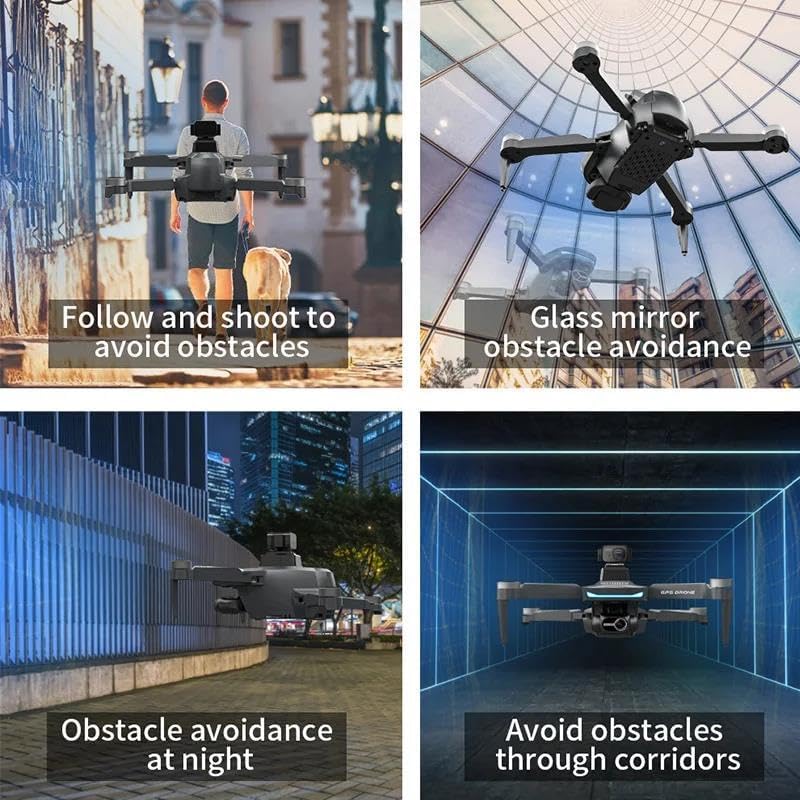
Image 7.4: Remote controller with a smartphone displaying real-time 5G high-definition image transmission from the drone.
8. Одржавање
8.1 Чишћење
- Wipe the drone and remote controller with a soft, dry cloth after each use.
- Не користите јаке хемикалије или раствараче.
- Уверите се да се прашина или остаци не накупљају у моторима или објективу камере.
8.2 Замена пропелера
If propellers are damaged, replace them immediately using the spare blades and screwdriver provided. Ensure correct 'A' and 'B' propeller placement.
8.3 Одржавање батерије
- Чувајте батерије на хладном и сувом месту даље од директне сунчеве светлости.
- Do not store fully charged or completely depleted batteries for extended periods. Charge them to about 50-60% for long-term storage.
- Ако је батерија натечена, цури или оштећена, одмах прекините употребу и одложите је на одговарајући начин.
8.4 Складиштење
When not in use, fold the drone and store it along with the remote controller and accessories in the provided storage bag to protect it from dust and damage.
КСНУМКС. Решавање проблема
| Проблем | Могући узрок | Решење |
|---|---|---|
| Дрон се не укључује | Слаба батерија; Батерија није правилно постављена | Charge battery fully; Reinstall battery securely |
| Remote controller does not power on | Low/dead AA batteries; Batteries installed incorrectly | Replace AA batteries; Check polarity |
| Drone cannot take off/unstable flight | Improper calibration; Damaged propellers; Weak GPS signal | Perform gyroscope and compass calibration; Replace damaged propellers; Fly in an open area with clear sky |
| No FPV feed on smartphone | Not connected to drone's Wi-Fi; App not open/crashed | Connect to drone's Wi-Fi in phone settings; Restart app and drone |
| Избегавање препрека не функционише | Feature disabled; Sensor blocked/damaged | Long press speed switch to enable; Clean sensor; Contact support if damaged |
| Drone flies away/loses control | Weak GPS signal; Interference; Out of range | Fly in open area; Avoid strong electromagnetic interference; Stay within control range; Use One-Click Return Home |
10. Спецификације
- Модел: L200 PRO MAX
- Бренд: FINOTI
- Димензије (склопљено): 130*75*85 мм
- Време лета: Up to 25 minutes (per battery)
- Дроне батерија: 7.4В/1600мАх
- Опсег даљинског управљача: Up to 3000M (ideal conditions)
- FPV Transmission Range: Up to 1200M (ideal conditions)
- Max Flight Height: 120М
- Предња камера: 4K ESC (3840*2160P photos, 30fps video), 80° adjustable angle, 100° wide-angle lens
- Гимбал: 2-axis mechanical anti-shake
- Доња камера: 1280*720П
- Избегавање препрека: Optional 360° laser, detects up to 25M
- Мотор: 1503 Мотор без четкица
- стабилизација: 6-axis gyroscope, height hold via pressure sensor
11. Гаранција и подршка
For warranty information and technical support, please refer to the warranty card included in your package or contact FINOTI customer service through the retailer where the product was purchased. Keep your proof of purchase for warranty claims.
For further assistance, visit the official FINOTI webсајт или директно контактирајте њихов тим за подршку.