
1. Увод
This manual provides essential information for the proper setup, operation, and maintenance of your NIMO 15.6 inch Laptop Computer. Please read this manual thoroughly before using your device to ensure optimal performance and longevity. Keep this manual for future reference.
2. Производ је готовview
2.1. Laptop Components
The NIMO 15.6 inch Laptop features a Full HD display, a backlit keyboard, and an integrated fingerprint reader for secure access. It is powered by an AMD Ryzen 5 3500U processor and runs on Windows 11.

Слика 2.1: Предња страна view of the NIMO 15.6 inch Laptop, showcasinњегов распоред екрана и тастатуре.
2.2. Портови и конектори
Your NIMO laptop is equipped with various ports for comprehensive connectivity, allowing you to connect peripherals and external devices.

Figure 2.2: Expanded Connectivity Options. This image illustrates the location and type of ports available on the laptop, including Type-C (Charge Only), USB 3.0, HDMI, Type-C (Full Function), Charge LED, Micro SD Reader, USB 2.0, USB 3.0, Headphone Combo, and Kensington Lock.
- Type-C (Charge Only): За улазну снагу.
- УСБ 3.0: За пренос података великом брзином.
- ДВИ: За повезивање са екстерним екранима.
- Type-C (Full Function): Supports Power Delivery (PD), DisplayPort (DP), and data transfer.
- ЛЕД за пуњење: Означава статус пуњења.
- Micro SD Reader: For reading Micro SD cards.
- УСБ 2.0: За стандардне УСБ уређаје.
- УСБ 3.0: За пренос података великом брзином.
- Headphone Combo: За аудио излаз и улаз за микрофон.
- Кенсингтонска брава: За физичко обезбеђење.
3. Подешавање
3.1. Почетно пуњење
Before first use, connect the laptop to a power outlet using the provided 65W PD Type-C charger. The Charge LED indicator will illuminate. Allow the battery to charge fully.

Figure 3.1: Type-C 65W PD Charger. This image highlights the versatility of the 65W Power Delivery charger, capable of charging the laptop, tablets, and smartphones, reducing cable clutter.
3.2. Укључивање
Open the laptop lid. Press the power button located on the keyboard deck. The laptop will boot up, and you will be guided through the Windows 11 initial setup process.
3.3. Подешавање система Windows 11
Follow the on-screen instructions to configure your Windows 11 operating system. This includes selecting your region, language, connecting to a Wi-Fi network, and setting up your user account.
4. Упутство за употребу
4.1. Тастатура и унос
The laptop features a backlit keyboard for comfortable typing in various lighting conditions, a responsive touchpad, and a numeric keypad for data entry.

Figure 4.1: Effortless Typing in Any Environment. This image demonstrates the backlit keyboard, touchpad, fingerprint reader, and numeric keypad, enhancing user experience and productivity.
- Тастатура са позадинским осветљењем: Притисните тастер Fn key and the appropriate function key (usually F3 or F4, indicated by a keyboard icon) to adjust the backlight brightness or turn it on/off.
- Тоуцхпад: Use the touchpad for navigation. Supports multi-touch gestures for scrolling, zooming, and other functions.
- Нумеричка тастатура: Provides dedicated number keys for efficient data entry.
4.2. Препознавање отиска прста
The integrated fingerprint reader allows for secure and quick login. Set up your fingerprint in Windows Settings under 'Sign-in options'.
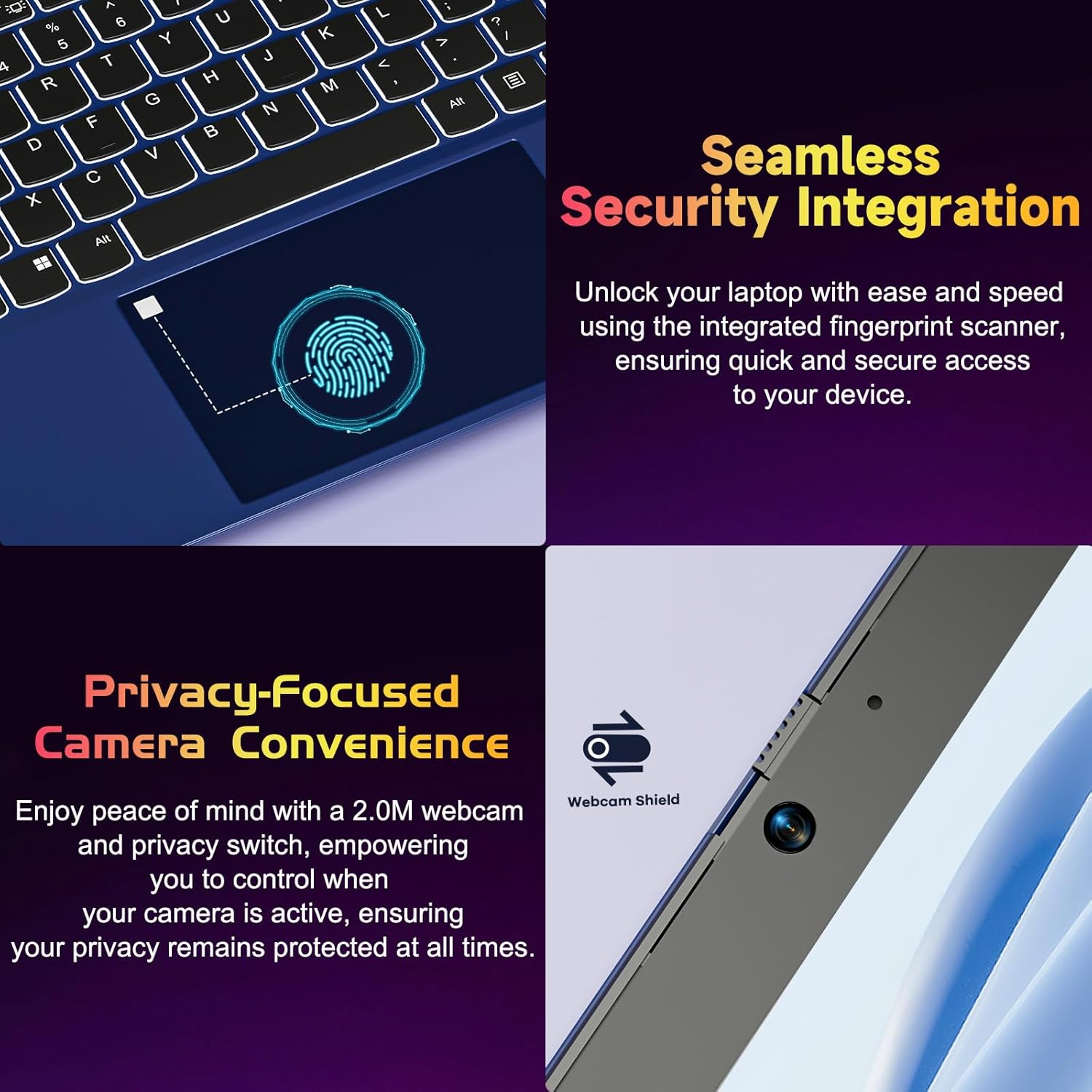
Figure 4.2: Seamless Security Integration and Privacy-Focused Camera. This image highlights the fingerprint scanner for quick and secure access, and the 2.0MP webcam with a physical privacy switch for enhanced user privacy.
4.3. Карактеристике екрана
The 15.6 inch Full HD (1920 x 1080 Pixel) IPS display offers vivid visuals and a wide viewing angle. The 180° lay-flat hinge allows for flexible screen positioning, ideal for sharing content.

Figure 4.3: Vivid Full HD Display. This image emphasizes the laptop's 15.6-inch Full HD (1920x1080) IPS display, offering bright visuals and eye protection.

Figure 4.4: 180° Lay-Flat Hinge. This image illustrates the laptop's ability to lay flat, expanding usage scenarios and facilitating content sharing.
4.4. Webcam Privacy
The laptop includes a 2.0MP webcam with a physical privacy switch (Webcam Shield). Slide the switch to cover the camera lens when not in use to ensure your privacy.
5. Одржавање
- Чишћење: Користите меку крпу која не оставља влакна за чишћење екрана и спољашњости. За тврдокорне мрље, благо обришитеampОбришите крпу водом или средством за чишћење екрана. Избегавајте јаке хемикалије.
- Одржавање батерије: Да бисте продужили век трајања батерије, избегавајте често потпуно пражњење батерије. Чувајте лаптоп на хладном и сувом месту ако га не користите дуже време.
- Ажурирања софтвера: Редовно ажурирајте оперативни систем Windows и управљачке програме како бисте осигурали оптималне перформансе и безбедност.
- Проширење складишног простора: The laptop supports dual DDR4 SO-DIMM slots and M.2 NVMe SSD for memory and storage expansion. Consult a qualified technician for upgrades.
КСНУМКС. Решавање проблема
6.1. Проблеми са напајањем
- Лаптоп се не укључује: Ensure the laptop is charged. Connect the charger and wait a few minutes before attempting to power on again.
- Батерија се не пуни: Verify the charger is properly connected to both the laptop and the power outlet. Try a different outlet.
6.2. Проблеми са приказом
- Екран је празан: Check if the laptop is powered on. Try adjusting screen brightness using the function keys. If an external monitor is connected, ensure it is properly configured.
6.3. Проблеми са перформансама
- Лаптоп је спор: Close unnecessary applications. Check for background processes consuming high resources. Ensure sufficient free storage space. Consider performing a system scan for malware.
6.4. Проблеми са повезивањем
- Ви-Фи се не повезује: Ensure Wi-Fi is enabled. Restart your router and the laptop. Check network settings in Windows.
7. Спецификације
| Феатуре | Детаљ |
|---|---|
| Бранд | NIMO |
| Назив модела | NIMO N152R |
| Величина екрана | 15.6 инча |
| Резолуција екрана | 1920 к 1080 пиксела (Фулл ХД) |
| Процесор | AMD Ryzen 5 3500U (3.7 GHz, 4 Cores, 8 Threads) |
| РАМ | 8 GB DDR4 (Upgradable) |
| Брзина меморије | 3200 МХз |
| Хард Дриве | 256 GB SSD (Upgradable M.2 NVMe) |
| Грапхицс Цопроцессор | AMD Integrated graphics (Vega) |
| Оперативни систем | Виндовс 11 |
| Вирелесс Типе | 802.11abg |
| УСБ портови | 1x USB 2.0, 2x USB 3.0, 2x USB-C (1x Charge Only, 1x Full Function) |
| ХДМИ порт | Да |
| Мицро СД читач | Да |
| Просечно трајање батерије | 5 сата |
| Тежина артикла | 3.8 фунте (1.72 кг) |
| Димензије производа | 14.07 к 8.98 к 0.76 инча |
| Боја | Росе |
| Позади Webцам Ресолутион | 2 МП |
8. Гаранција и подршка
Your NIMO laptop comes with a 2-year warranty, covering manufacturing defects and hardware malfunctions under normal use. Additionally, a 90-day free return policy is provided.

Figure 8.1: After-Sales Support. This image outlines the 2-year warranty, 90-day return policy, and professional customer service available for NIMO products.
8.1. Контактирање подршке
For technical assistance, warranty claims, or product-related questions, please contact the NIMO U.S.-based support team. Contact information can typically be found on the official NIMO webсајт или паковање производа.
9. Безбедносне информације
To prevent injury or damage to your device, observe the following safety precautions:
- Не излажите лаптоп екстремним температурама, директној сунчевој светлости или високој влажности.
- Избегавајте стављање тешких предмета на лаптоп.
- Use only the provided charger or a compatible 65W PD Type-C charger.
- Не покушавајте сами да растављате или поправљате лаптоп. Обратите се квалификованом сервисеру.
- Држите течности даље од лаптопа како бисте спречили струјни удар или оштећења.
- Ensure proper ventilation when using the laptop to prevent overheating.