
Увод
The FEELWORLD FW759PRO is a 7-inch full HD IPS touchscreen camera monitor designed to enhance your video production workflow. It features a 1280x800 resolution, 1000:1 contrast ratio, and a 178° ultra-wide viewing angle, providing a clear and detailed display for precise monitoring. This manual will guide you through the setup, operation, and maintenance of your FW759PRO monitor.
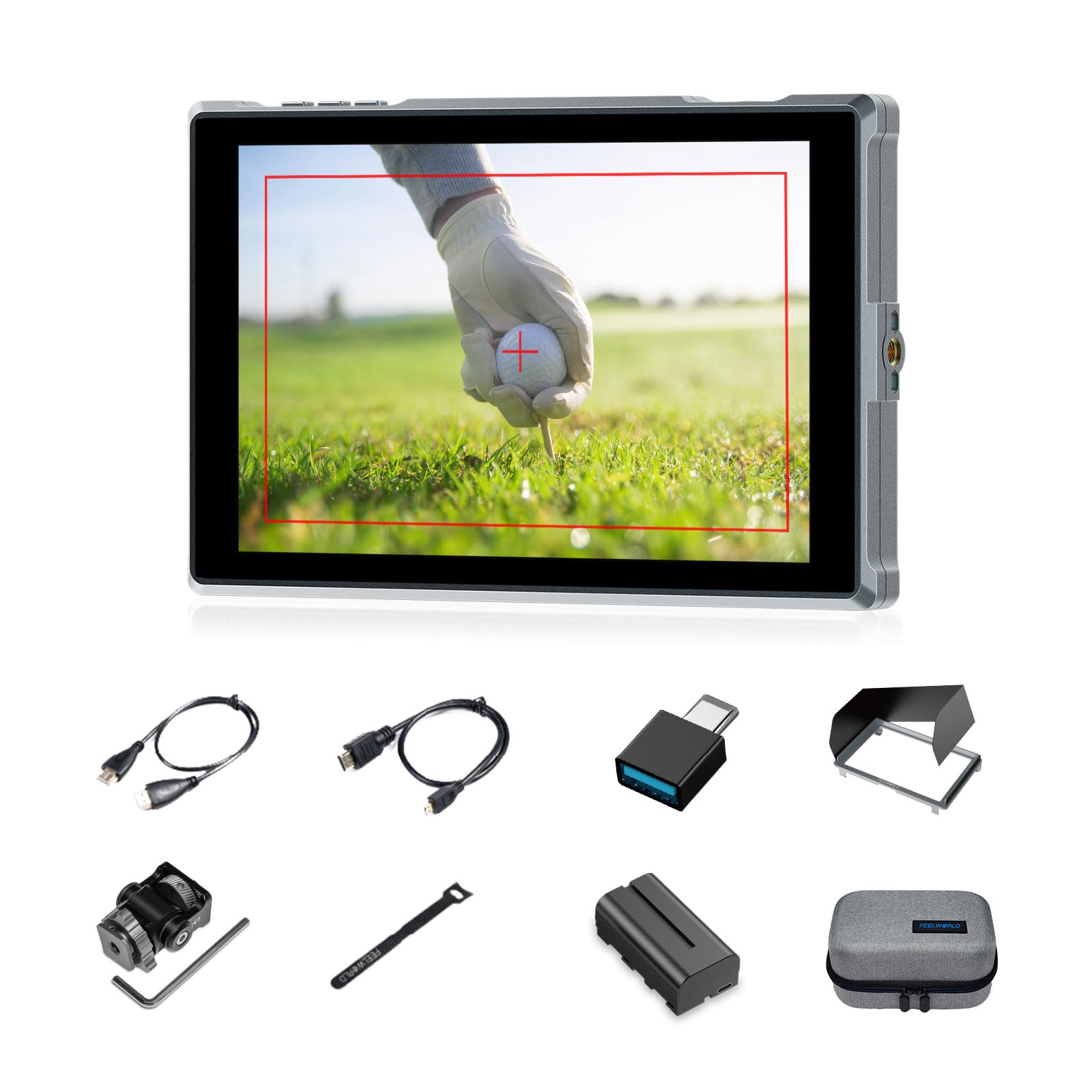
Figure 1: FEELWORLD FW759PRO Monitor Overview
Кључне карактеристике:
- 7-inch Full HD IPS Touchscreen (1280x800 resolution)
- 4K HDMI Input & Output (up to 4K30Hz) and AV Input
- Slim and Lightweight Design (22mm thickness, 300g weight)
- Multiple Power Options: NP-F series battery, 12V DC IN, 5V Type-C
- Advanced Monitoring Functions: Histogram, Embedded Audio, False Colors, Peaking Filter, etc.
- Customizable Features: 4 groups of menu settings, 9:16 vertical screen marker
Сетуп
1. Садржај пакета
Проверите да ли су све ставке присутне у пакету:
- 1 x FW759PRO Monitor
- 1 к ХДМИ кабл
- 1 x Micro HDMI Cable
- 1 x Mini Hot Shoe Mount + Hex Wrench
- 1 к УСБ-А на УСБ-Ц адаптер
- 1 x Sun Shade + Frame
- 1 x Cable Management Tie
- 1 к Водич за брзи почетак
- 1 x F550 Battery
- 1 к торба

Слика 2: Укључена додатна опрема
2. Укључивање монитора
The FW759PRO offers three power options:
- NP-F Series Battery: Attach a compatible NP-F series battery to the battery plate on the rear of the monitor.
- 12В ДЦ ИН: Connect a 12V DC power adapter (not included, suitable for 1A, DC 5.5*2.1mm plug) to the "DC IN 12V" port.
- 5V Type-C: Connect a 5V/2A (or higher) Type-C power source to the "TYPE-C 5V" port.

Figure 3: Power Input Options
3. Монтажа монитора
The monitor features two 1/4"-20 mounting ports on its sides for versatile attachment to camera rigs, arms, or tripods. Use the included mini hot shoe mount to attach it to your camera's hot shoe or cold shoe mount.

Figure 4: 1/4 Inch Mounting Ports
4. Connecting to a Camera/Device
The FW759PRO supports 4K HDMI and AV inputs:
- ХДМИ улаз: Connect your camera or video source using an HDMI cable to the HDMI port. The monitor supports up to 4K30Hz signals.
- АВ улаз: For specialized or legacy devices, use the AV input port.

Слика 5: Портови за повезивање
Упутство за употребу
1. Укључивање/искључивање
Press and hold the power button located on the top edge of the monitor to turn it on or off.
2. Управљање екраном осетљивим на додир
The FW759PRO features an intuitive touchscreen interface for menu navigation and function control.
- Подесите позадинско осветљење: Swipe up/down on the left half of the screen.
- Подесите јачину звука: Swipe up/down on the right half of the screen.
- Access Shortcut Menu: Swipe up/down on the bottom of the screen.

Figure 6: Touchscreen Gestures
3. Menu Navigation and Custom Buttons
Access the main menu by tapping the screen. Navigate through options using touch. The monitor also features customizable function buttons (F1, F2, F3) on the top edge, allowing quick access to frequently used features.

Figure 7: Menu and Custom Buttons
4. Advanced Monitoring Functions
The FW759PRO includes several tools for precise exposure and focus control:
- Хистограм: Displays the tonal distribution of your image.
- Пеакинг филтер: Highlights sharp edges to assist with focus.
- Уграђени аудио: Monitors audio levels.
- False Colors: Helps set exposure by displaying different exposure levels as distinct colors.
- Проверите поље: Assists in calibrating the monitor.
- Nine Grid: Aids in composition.
- Screen Marker: Various aspect ratio markers for framing.
- Централни маркер: Marks the center of the screen.
- Ratio Marker: Provides different aspect ratio guides.
- Оверсцан: Adjusts the display area.
- Anamorphic Mode: De-squeezes anamorphic footage (1.33x, 1.6x, 2.0x, or custom).
- Преокрет слике: Окреће слику хоризонтално или вертикално.
- Замрзавање слике: Freezes the current frame.
- Увеличати: Magnifies a portion of the image for detailed inspection.
- Pixel-to-Pixel: Displays the image at its native resolution without scaling.

Figure 8: Auxiliary Functions Overview

Figure 9: False Color Function

Figure 10: Anamorphic Mode
5. New Feature Upgrades
- 9:16 Vertical Screen Marker: Ideal for content creators producing vertical video for platforms like TikTok and YouTube Shorts.
- 4 Groups Menu Setting Saving: Save up to four custom menu configurations for quick recall. Once settings are adjusted, they save automatically and can be called directly.

Figure 11: 9:16 Vertical Screen Marker
Одржавање
1. Чишћење монитора
- Use a soft, lint-free cloth to gently wipe the screen and body of the monitor.
- За тврдокорне мрље, благо дampобришите крпу водом или средством за чишћење екрана.
- Avoid using harsh chemicals, solvents, or abrasive materials, as these can damage the screen or finish.
2. Брига о батерији
- Чувајте батерије на хладном и сувом месту када нису у употреби.
- Avoid fully discharging lithium-ion batteries frequently to prolong their lifespan.
- Ако складиштите батерије дуже време, напуните их до приближно 50-60% капацитета.
Решавање проблема
Нема приказаног сигнала
- Проверите кабловске везе: Ensure HDMI or AV cables are securely connected to both the monitor and the camera/source.
- Проверите извор уноса: Confirm that the correct input source (HDMI or AV) is selected on the monitor.
- Camera Output Settings: Check your camera's video output settings to ensure it is sending a signal and that the resolution/frame rate is compatible with the monitor (up to 4K30Hz).
- Тестирајте са другим каблом/уређајем: If possible, try a different HDMI/AV cable or connect the monitor to another video source to isolate the issue.
Монитор се не укључује
- Проверите батерију: Ensure the NP-F battery is charged and correctly installed.
- Проверите адаптер за напајање: If using DC IN or Type-C, confirm the power adapter is connected and providing sufficient power (12V DC IN, 5V/2A Type-C).
- Дугме за напајање: Ensure the power button is pressed and held for a few seconds to initiate power-on.
Екран осетљив на додир не реагује
- Restart Monitor: Power off and then power on the monitor.
- Чист екран: Уверите се да је екран чист и без прљавштине или влаге која би могла да омета унос додиром.
Спецификације
| Феатуре | Детаљ |
|---|---|
| Бранд | ФЕЕЛВОРЛД |
| Назив модела | FW759PRO |
| Величина екрана | 7 инча |
| Резолуција | 1280к800 |
| Аспецт Ратио | 16:10 |
| Однос контраста | 1000:1 |
| Дисплаи Типе | ИПС |
| Viewинг Англе | 178 степени |
| Технологија повезивања | Auxiliary, HDMI |
| Повезивање хардвера | ХДМИ |
| Додатне карактеристике | Touchscreen, Portable |
| Време одговора | 2 милисекунди |
| Total Number of HDMI Ports | 2 |
| Произвођач | ЛАИЗЕСКЕ |
Гаранција и подршка
Информације о гаранцији
The FEELWORLD FW759PRO monitor comes with a 1 година гаранције од датума куповине. Ова гаранција покрива производне недостатке и кварове при нормалној употреби. Молимо вас да сачувате доказ о куповини за потребе подношења захтева за гаранцију.
For detailed warranty terms and conditions, please refer to the official FEELWORLD webсајту или контактирајте њихову корисничку подршку.
Корисничка подршка
If you encounter any issues not covered in this manual or require further assistance, please contact FEELWORLD customer support. Contact information can typically be found on the official FEELWORLD webсајту или у Водичу за брзи почетак који је испоручени уз ваш производ.