JONR T5 Pro Gen 2 Robot Vacuum Cleaner and Mop User Manual
Model: T5 Pro Gen2
1. Увод
This manual provides essential instructions for the safe and efficient operation of your JONR T5 Pro Gen 2 Robot Vacuum Cleaner and Mop. Please read this manual thoroughly before using the product and retain it for future reference. The JONR T5 Pro Gen 2 is designed to provide comprehensive floor cleaning with powerful suction, mopping capabilities, automatic dust collection, and hot air mop drying.
2. Безбедносне информације
Before using the JONR T5 Pro Gen 2, please observe the following safety precautions:
Уверите се да је робот потпуно напуњен пре прве употребе.
Не користите робота на влажним површинама или у подручјима са стајаћом водом.
Keep loose cables, curtains, and other objects that could entangle the robot out of its path.
Не дозволите деци или кућним љубимцима да се играју са роботом.
Do not use the robot to pick up large or sharp objects, liquids, or burning materials.
Редовно чистите четке и сензоре како бисте одржали оптималне перформансе.
Only use the original charging base and power adapter.
Ако је кабл за напајање оштећен, мора га заменити произвођач или квалификовани сервисер да би се избегле опасности.
3. Садржај пакета
Проверите да ли су све компоненте присутне у пакету:
JONR T5 Pro Gen 2 Robot Vacuum Cleaner and Mop
All-in-One Base Station
2 Јастучићи за брисање
Ramp Продужна плоча
Бочна четка
Повер Адаптер
Кориснички приручник (овај документ)
Image: JONR T5 Pro Gen 2 Robot Vacuum Cleaner and Mop with its All-in-One Base Station.
4. Производ је готовview
4.1 Компоненте роботског усисивача
Lidar Sensor: За прецизну навигацију и мапирање.
Дугме за напајање/чишћење: To start/pause cleaning or power on/off.
Recharge Button: To send the robot back to the base station.
канта за отпатке: Collects dry debris.
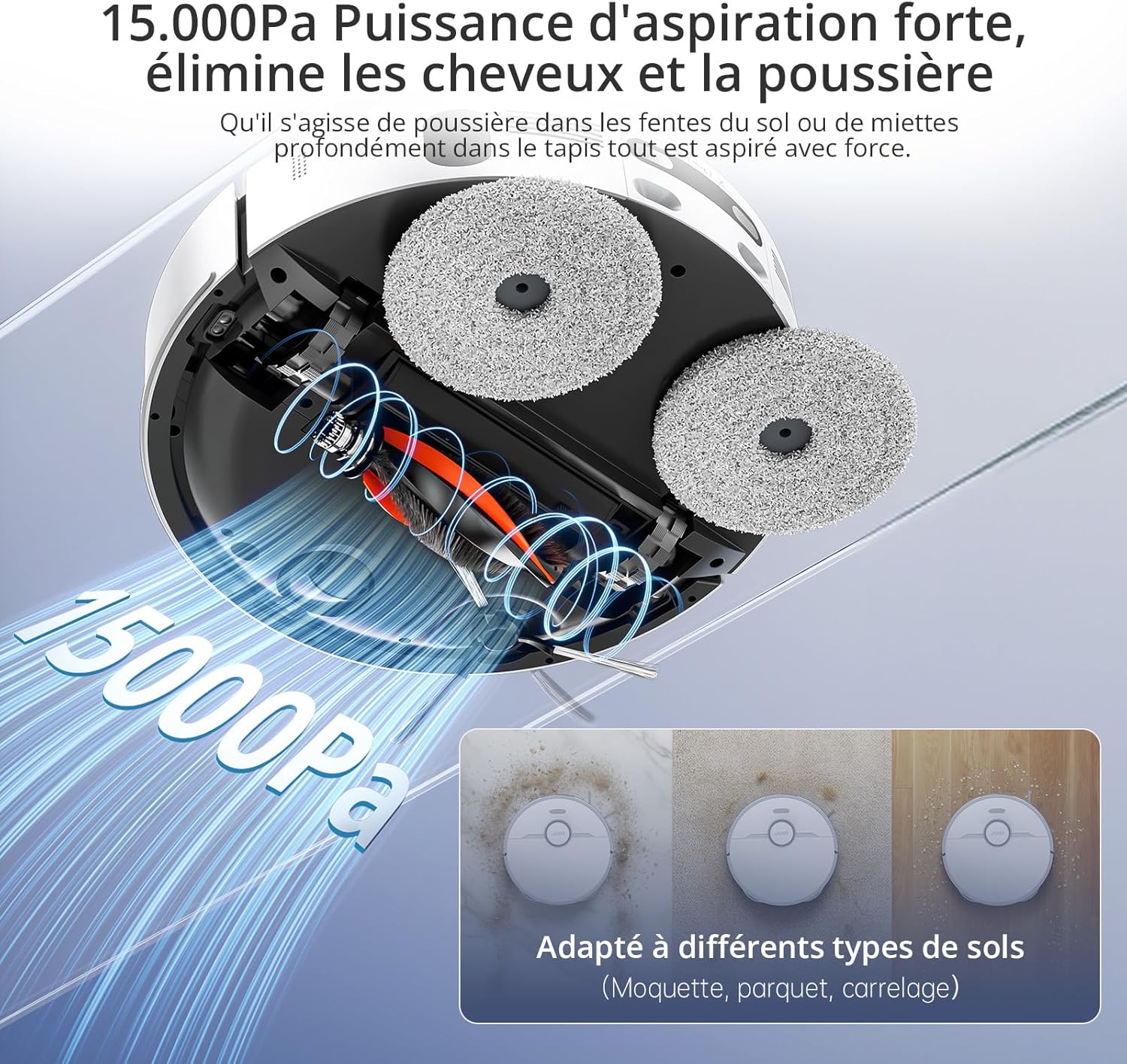
Главна четка: За дубинско чишћење тепиха и тврдих подова.
Слика: Врх view of the JONR T5 Pro Gen 2 robot vacuum, showing the Lidar sensor and control buttons.
4.2 Base Station Components
Резервоар за чисту воду: Holds fresh water for mopping and mop cleaning. (4.0 L capacity)
Резервоар за прљаву воду: Collects used water from mop cleaning. (3.5 L capacity)
Одељак за кесу за прашину: Houses the disposable dust bag for automatic dust collection. (2.5 L capacity)
Контакти за пуњење: For robot charging.
Посуда за прање мопа: Area where mopping pads are cleaned and dried.
Image: The JONR T5 Pro Gen 2 base station with its clean and dirty water tanks visible.
5. Подешавање
Пратите ове кораке за почетно подешавање:
Распакујте компоненте: Пажљиво извадите све предмете из амбалаже.
Position the Base Station: Place the base station against a wall with at least 0.26ft (8cm) clear space on both sides and 3.94ft (1.2m) in front. Ensure it is near a power outlet.
Приложите Рamp Extension Plate: Обезбедите рamp extension plate to the front of the base station.
Инсталирајте резервоаре за воду: Insert the clean and dirty water tanks into their respective slots in the base station.
Инсталирајте бочну четку: Snap the side brush onto the designated post on the underside of the robot.
Attach Mopping Pads: Securely attach the mopping pads to the bottom of the robot.
Напуните резервоар за чисту воду: Open the clean water tank and fill it with clean tap water.
Прикључите напајање: Plug the base station into a power outlet.
Укључивање и пуњење:
Притисните и држите дугме за напајање на роботу 3 секунде да бисте га укључили.
Place the robot onto the base station to begin charging. The robot will automatically power on and start charging when docked.
Веза са апликацијом:
Download the "Xiaomi Home" app by scanning the QR code on the robot's panel or searching in your app store.
Отворите апликацију и додирните икону „+“ да бисте додали уређај.
Select "Scan" to scan the QR code on the robot or search for "JONR T5 Pro Gen2".
To pair, press and hold both the power and recharge buttons on the robot for 3 seconds until you hear a voice prompt.
Изаберите своју Ви-Фи мрежу од 2.4 ГХз и унесите лозинку.
Follow the in-app instructions to complete the connection.
Video: Step-by-step guide on unboxing, assembling, and connecting the JONR T5 Pro Gen 2 robot vacuum to the mobile application.
6. Упутство за употребу
6.1 Покретање циклуса чишћења
Преко апликације: Open the Xiaomi Home app, select your JONR T5 Pro Gen 2, and tap "Clean" to start a cleaning cycle. You can choose between different cleaning modes (e.g., whole home, room, zone).
Преко дугмета робота: Press the Power/Clean button on the robot once to start a full cleaning cycle.
Контрола гласом: The robot supports voice commands via Alexa and Google Home. For example, say "Alexa, start cleaning" (if integrated).
Image: The JONR T5 Pro Gen 2 robot vacuum being controlled via the mobile application, showing mapping and zone selection.
6.2 Паметне карактеристике
ЛиДАР навигација: The robot uses LiDAR to create a precise map of your home, ensuring efficient and thorough cleaning without repetition. It can map up to 4 floors.
Избегавање препрека: Advanced sensors allow the robot to recognize and bypass obstacles like furniture, cables, and pet bowls.
Зоне забрањене за кретање: Use the app to define specific areas the robot should avoid, such as pet feeding areas or delicate zones.
Детекција тепиха: The robot automatically detects carpets and adjusts suction power. During mopping, it intelligently lifts the mop pads by 10mm to avoid wetting carpets.
Чишћење ивица: An extendable side mop ensures thorough cleaning along walls and into corners.
Image: Illustration of the JONR T5 Pro Gen 2 using LiDAR navigation to map a home environment.
Image: The JONR T5 Pro Gen 2 robot vacuum demonstrating its obstacle avoidance capabilities.
7. Одржавање
Редовно одржавање обезбеђује оптималне перформансе и продужава век трајања вашег роботског усисивача.
Чисти резервоар за прљаву воду: Regularly empty and clean the dirty water tank to prevent odors and bacterial growth.
Clean Dustbin and Filter: Remove the robot's dustbin, empty it, and clean the HEPA filter under running water. Allow the filter to dry completely before reinserting.
Clean Side Brush: Remove any tangled hair or debris from the side brush.
Clean Main Brush: Remove the main brush and clear any tangled hair or debris. The anti-tangle design minimizes hair entanglement.
Очистите сензоре: Wipe all sensors (cliff sensors, obstacle avoidance sensors, charging contacts) with a clean, dry cloth.
Replace Dust Bag: When the dust bag in the base station is full (indicated by the app or indicator light), replace it with a new one.
Чисте подлоге за брисање: The base station automatically cleans and hot-air dries the mop pads after each cleaning cycle. Periodically remove and hand-wash the mop pads for deeper cleaning.
Video: Demonstrates routine maintenance tasks including cleaning the dirty water tank, dustbin, filter, side brush, and replacing the dust bag.
КСНУМКС. Решавање проблема
Проблем
Могући узрок
Решење
Робот се не укључује.
Low battery; not properly docked.
Ensure the robot is fully charged on the base station. Press and hold the power button for 3 seconds.
Робот не може да се повеже на Ви-Фи.
Нетачна лозинка за Wi-Fi; мрежа од 5 GHz; робот је предалеко од рутера.
Ensure correct 2.4GHz Wi-Fi password. Move robot closer to router. Reset Wi-Fi on robot (hold power and recharge buttons for 3s).
Слабе перформансе чишћења.
Full dustbin; dirty filters/brushes; clogged sensors.
Empty dustbin, clean/replace filters, clean main/side brushes, wipe all sensors.
Робот се често заглављује.
Obstacles; loose cables; narrow spaces.
Clear obstacles. Use the app to set no-go zones for problematic areas.
Mop pads are not cleaning effectively.
Резервоар за прљаву воду пун; резервоар за чисту воду празан; истрошени подлози за брисање.
Empty dirty water tank, refill clean water tank. Replace worn mop pads.
9. Спецификације
Феатуре
Детаљ
Бранд
ЈОНР
Број модела
T5 Pro Gen2
Снага усисавања
15000 Па
Трајање батерије
До 2.5 сати
Капацитет резервоара за чисту воду
4.0 литара
Капацитет резервоара за прљаву воду
3.5 литара
Капацитет вреће за прашину
2.5 Liters (up to 75 days maintenance-free)
Тип навигације
ЛиДАР
Висина подизања мопа
10 mm (for carpets)
Висина преласка препрека
До 20 мм
Ниво буке
<60 дБ
Тип филтера
ХЕПА
Повезивање
Wi-Fi (2.4GHz), Mobile App (Xiaomi Home), Voice Control (Alexa, Google Home)
Димензије (Робот)
33Д к 33Ш к 10В цм
Dimensions (Base Station)
40L x 34W x 56H cm (approximate, derived from product dimensions)
Тежина
12 Kilograms (total item weight)
10. Гаранција и подршка
JONR provides 365-day support for the T5 Pro Gen 2 Robot Vacuum Cleaner and Mop. For any issues or inquiries, please contact JONR customer service. We aim to resolve all problems within 24 hours.
For spare parts availability, please refer to the product's official website or authorized retailers. Spare parts are generally available for 5 years.
Ask a question about this manual
Ask about setup, troubleshooting, compatibility, parts, safety, or missing instructions. Manuals+ will review the question and use this page’s manual context to help answer it.