
1. Увод
Thank you for choosing the Antec VCX300 ARGB ATX/M-ATX PC Case. This manual provides detailed instructions for the installation, operation, and maintenance of your new computer chassis. Please read this manual thoroughly before installation to ensure proper setup and optimal performance.
2. Безбедносне информације
- Увек искључите напајање пре инсталирања или уклањања било којих компоненти.
- Handle components with care to avoid damage from electrostatic discharge. Use an anti-static wrist strap if available.
- Keep the case away from water, moisture, and direct heat sources.
- Обезбедите одговарајућу вентилацију око кућишта како бисте спречили прегревање.
- Do not attempt to open or repair the power supply unit inside the case. Refer to qualified service personnel.
3. Садржај пакета
Молимо вас да проверите да ли су све ставке присутне у вашем пакету:
- Antec VCX300 ARGB ATX/M-ATX PC Case
- Accessory Box (Screws, standoffs, cable ties)
- Упутство за употребу (овај документ)
4. Производ је готовview
Familiarize yourself with the various parts of your Antec VCX300 ARGB PC Case.
4.1 У/И предње плоче
- Дугме за напајање
- Дугме за ресетовање
- УСБ 3.0 портови
- УСБ 2.0 портови
- Audio Jacks (Headphone/Microphone)
- LED Control Button (for ARGB lighting)
4.2 Унутрашњи распоред
The VCX300ARGB case supports ATX and Micro-ATX motherboards. It features multiple drive bays for storage and ample space for cooling solutions.
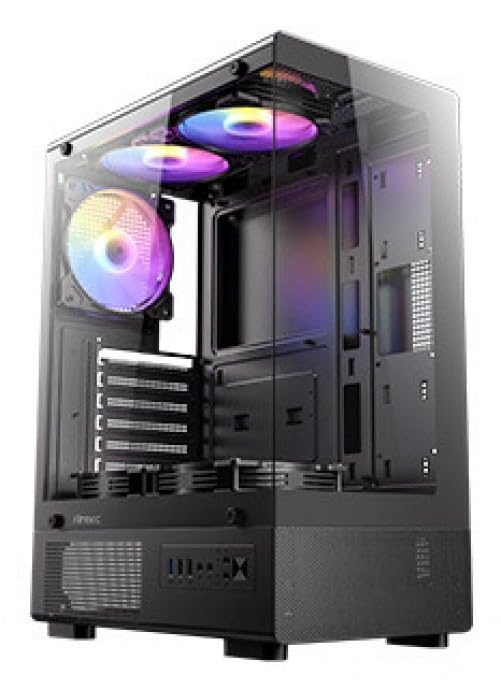
Слика 1: Предња страна view of the Antec VCX300 ARGB PC Case, showcasing the ARGB lighting elements and front panel I/O ports.
5. Подешавање и инсталација
Follow these steps to install your components into the Antec VCX300 ARGB PC Case.
5.1 Припрема случаја
- Поставите кућиште на равну, стабилну површину.
- Remove the side panels by unscrewing the thumbscrews at the rear of the case and sliding the panels backward.
5.2 Инсталација матичне плоче
- Инсталирајте И/О штит у задњи отвор кућишта.
- Align the motherboard with the pre-installed standoffs. Ensure the screw holes on the motherboard match the standoffs.
- Secure the motherboard with the provided screws from the accessory box.
5.3 Инсталација напајања
- Position the power supply unit (PSU) in the designated compartment at the bottom rear of the case.
- Secure the PSU with screws from the outside rear of the case.
5.4 Инсталација уређаја за складиштење података (HDD/SSD)
- Locate the drive bays. The VCX300ARGB typically features dedicated bays for 3.5" HDDs and 2.5" SSDs.
- For 3.5" HDDs, slide the drive into the bay and secure it with screws or tool-less clips if available.
- For 2.5" SSDs, mount the drive onto the designated brackets or trays and secure with screws.
5.5 Expansion Card Installation (GPU, etc.)
- Уклоните потребне поклопце слотова за проширење са задње стране кућишта.
- Insert the expansion card (e.g., graphics card) into the appropriate PCIe slot on the motherboard.
- Причврстите картицу завртњем.
5.6 Управљање кабловима
Користите изрезе за усмеравање каблова и тачке за везивање иза лежишта матичне плоче да бисте управљали кабловима. Ово побољшава проток ваздуха и естетику.
- Connect all power cables from the PSU to the motherboard and components.
- Connect front panel I/O cables (USB, audio, power/reset switches, LED) to the corresponding headers on the motherboard.
- Connect ARGB cables from the case fans/strips to the motherboard's ARGB header or the integrated ARGB controller.
6. Операција
6.1 Укључивање
- Ensure all components are correctly installed and cables are connected.
- Close and secure the side panels.
- Повежите кабл за напајање са напајањем и зидном утичницом.
- Пребаците прекидач за напајање на PSU-у у положај "ON".
- Press the Power Button on the front panel of the case.
6.2 ARGB контрола осветљења
The Antec VCX300 ARGB case features customizable ARGB lighting. You can control the lighting effects in two ways:
- Дугме за контролу ЛЕД диоде: Press the dedicated LED control button on the front panel to cycle through various pre-set ARGB lighting modes and colors. Hold the button for a few seconds to turn off/on the lighting.
- Софтвер матичне плоче: If the ARGB cables are connected to a compatible motherboard ARGB header, you can synchronize and customize lighting effects using your motherboard's proprietary software (e.g., ASUS Aura Sync, MSI Mystic Light Sync, Gigabyte RGB Fusion, ASRock Polychrome Sync). Refer to your motherboard manual for specific instructions.
7. Одржавање
Редовно одржавање помаже у обезбеђивању оптималних перформанси и дугог века трајања компоненти вашег рачунара.
- Филтери за прашину: The VCX300ARGB includes dust filters. Regularly remove and clean these filters to prevent dust buildup inside the case, which can impede airflow and cooling performance. Use compressed air or a soft brush.
- Унутрашње чишћење: Periodically open the case and use compressed air to remove dust from fans, heatsinks, and other components. Ensure the system is powered off and unplugged before cleaning.
- Спољно чишћење: Обришите спољашњост кућишта меком,amp крпа. Избегавајте јаке хемикалије или абразивне материјале.
КСНУМКС. Решавање проблема
| Проблем | Могући узрок | Решење |
|---|---|---|
| Рачунар се не укључује. | Power cable disconnected, PSU switch off, front panel power button not connected, faulty PSU. | Check power cable connections. Ensure PSU switch is ON. Verify front panel power button cable is correctly connected to motherboard. Test PSU if possible. |
| ARGB lighting not working. | ARGB cables disconnected, incompatible motherboard header, LED control button issue. | Ensure ARGB cables are securely connected to the motherboard or controller. Try cycling modes with the LED control button. Verify motherboard ARGB header compatibility. |
| Слаб проток ваздуха/прегревање. | Dust buildup, incorrect fan orientation, obstructed vents. | Clean dust filters and internal components. Ensure fans are oriented correctly for optimal airflow (intake/exhaust). Check for any obstructions. |
9. Спецификације
| Феатуре | Детаљ |
|---|---|
| Назив модела | VCX300ARGB |
| Тип случаја | Мид Товер |
| Подршка матичне плоче | ATX, Micro-ATX |
| Димензије (Д к Ш к В) | 14.57"D x 8.07"W x 17.72"H (370mm x 205mm x 450mm approx.) |
| Тежина артикла | 3.6 килограма |
| Унутрашња лежишта за погон | 5 (combination of 3.5" HDD and 2.5" SSD) |
| Предњи И / О портови | USB 3.0, USB 2.0, Audio In/Out, Power, Reset, LED Control Button |
| Посебне карактеристике | Built-In Fan, Dust Filter, LED Control Button, Noise Reduction Technology, Partition Plate Cooling Technology, ARGB Lighting |
| Боја | Црно |
10. Гаранција и подршка
Antec products come with a limited warranty. Please refer to the official Antec webсајту или код вашег регионалног дистрибутера за специфичне гарантне одредбе и услове који важе за ваш производ.
For technical support, product registration, or further inquiries, please visit the official Antec support page: ввв.антец.цом/суппорт
Importer Contact Information: Ariisto House, 5th Floor, Junction of N.S.Phadke Road, Telli Gali, Andheri (E), Mumbai- 400 069 Maharashtra, India