
Увод
Thank you for choosing the TEEHO TE012W-H WiFi Keypad Fingerprint Smart Door Lock. This manual provides detailed instructions for installation, operation, and maintenance to ensure optimal performance and security. This smart lock offers multiple access methods including fingerprint, keypad codes, physical keys, and remote control via the KK Home app, integrating seamlessly with smart home systems like Google Assistant and Amazon Alexa.
Подешавање и инсталација
Провере пре инсталације
- Ensure your door meets the standard U.S. door specifications: 2-1/8" (54 mm) door holes, 2-3/8" or 2-3/4" backset (60/70 mm), and 1-3/8"–2" (35–50 mm) door thickness.
- Confirm the door frame is drilled at least 1" (25mm) deep to allow enough space for the deadbolt to extend.
- Do not install batteries until the lock is fully installed.
Кораци инсталације
- Adjust the Latch: Measure your door's backset (distance from door edge to center of bore hole). Adjust the latch to either 2-3/8" (60mm) or 2-3/4" (70mm) as needed. Ensure the latch bolt is fully retracted (in the unlocked position) before proceeding.
- Инсталирајте спољни склоп: Route the cable below the latch and insert the torque blade through the slot in the latch. Ensure cable connectors are inserted in the correct orientation until full seated. Keep the thumb turn vertical and the torque blade horizontal.
- Инсталирајте монтажну плочу: Attach the mounting plate to the door, ensuring it is parallel to the door edge. Do not overtighten screws.
- Приложите склоп унутрашњег дела: Connect the cable from the exterior assembly to the interior assembly. Attach the interior assembly to the mounting plate and tighten the three screws. Be sure not to use the wrong screws, or it may lead to short-circuit and other problems.
- Уметните батерије: First, seat the ribbon in the groove, then place the battery over it. Insert 8 AA Alkaline batteries. Please use only new, non-rechargeable alkaline batteries.
- Тестирајте браву: Keep the door opened, retract the latch by pressing knob from outside and pushing the lever from inside of the door to test if the lock works smoothly.
Опис видеа: TEEHO TE012W-H WiFi Smart Door Lock Installation Video. This video provides a step-by-step guide on how to install the smart door lock, including preparing the door, installing the latch, exterior and interior assemblies, and inserting batteries. It highlights key alignment points and screw placements for a successful installation.

Опис слике: A detailed diagram illustrating door compatibility requirements for the TEEHO TE012W-H lock. It shows measurements for backset (2-3/8" or 2-3/4"), hole diameter (1-1/2" or 2-1/8"), bore diameter (1"), and door thickness (1-3/8"–2"). It also indicates correct and incorrect door types (single cylinder is compatible, mortise/integrated is not).
Упутство за употребу
App Setup and Remote Control
- Download the "KK Home" App from Google Play or the App Store.
- Register and log in to your KK Home account.
- Ensure Bluetooth and Location services are enabled on your phone and keep your phone close to the lock (within 6.56ft).
- In the App, tap "Add Device", then select "TE012W" to start pairing.
- When "TE012W" appears, tap "Connect", or scan the QR code/manually enter the ESN (found on the back of the interior assembly).
- Make sure the lock is properly installed and reset before pairing.
- Change the master code (4-10 digits).
- Connect to the device via Bluetooth.
- Изаберите своју Ви-Фи мрежу од 2.4 ГХз и унесите лозинку.
- Once connected, name your lock to finish setup.
Опис видеа: TEEHO TE012W-H APP Operation Instruction video. This video demonstrates how to download the KK Home app, register an account, add the TE012W-H lock, set up Bluetooth and Wi-Fi connections, and configure the master code and device name.
Методе откључавања
- Откључавање отиска прста: Features 99.99% recognition accuracy, unlocking in 1 second. Add or remove fingerprints via the app.
- Keypad Codes: Supports up to 100+ user passcodes. Share one-time, recurring, duration, and permanent codes remotely via the KK Home app.
- Даљински управљач за апликацију: Unlock remotely, manage access permissions, and view activity logs with no distance limits via the built-in 2.4GHz Wi-Fi.
- Контрола гласом: Works with Google & Alexa Assistants for voice commands to lock and check lock status.
- Резервни кључеви: Two physical keys are included for manual entry, even if Wi-Fi fails or batteries die.
- Режим пролаза: Allows the door to remain unlocked for continuous access during specific periods.
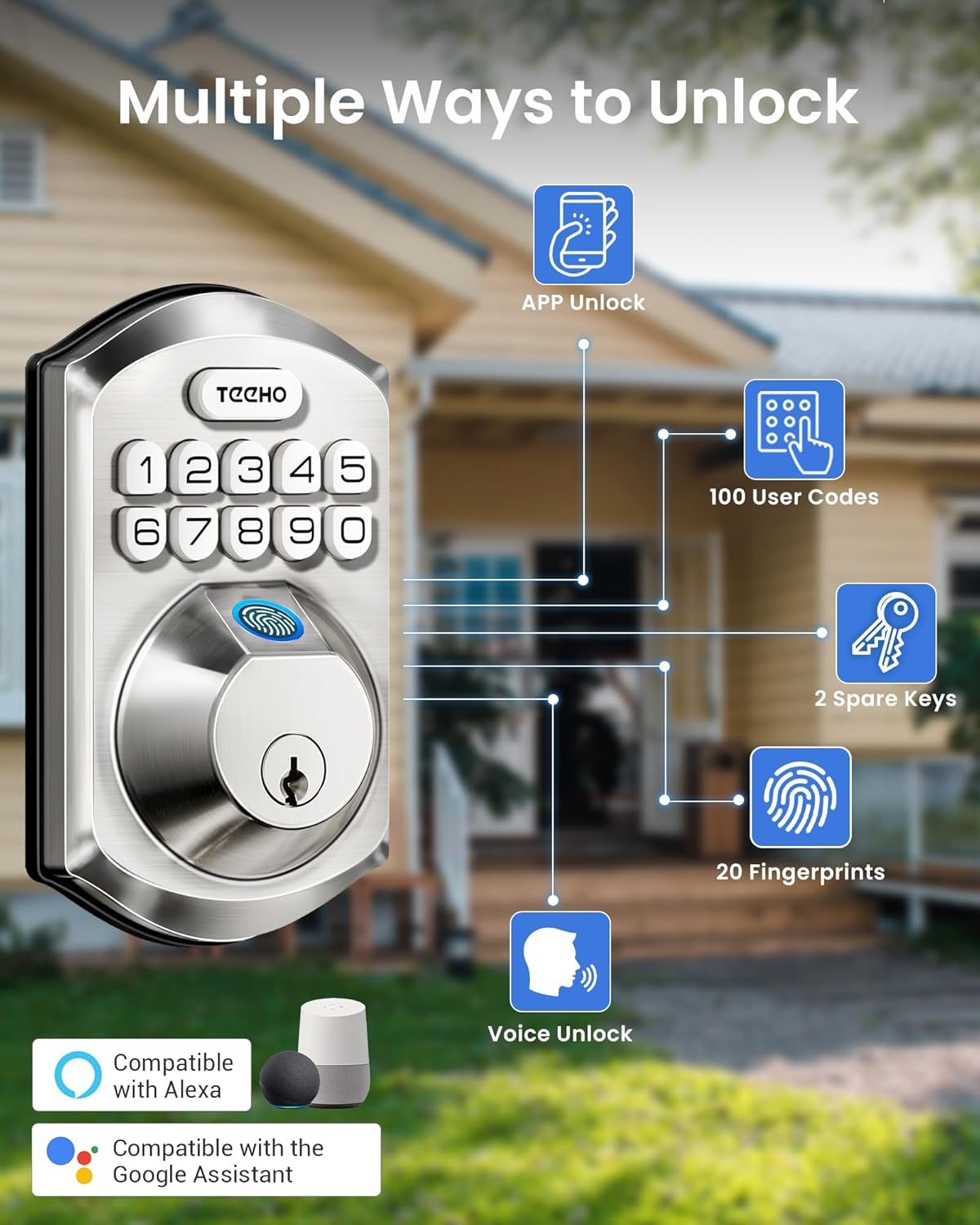
Опис слике: An infographic displaying the various unlocking methods for the TEEHO smart lock. These include app unlock, up to 100 user codes, 2 spare physical keys, up to 20 fingerprints, and voice unlock compatibility with Alexa and Google Assistant.

Опис слике: This image illustrates the flexibility of remote code sharing through the KK Home app. It shows options for Permanent codes (for family), Recurring codes (for weekly services), Duration codes (for guests/short stays), and One-time codes (for deliveries/cleaners), all manageable without distance limits.
Сигурносне карактеристике
- Аутоматско закључавање: Automatically locks within 10–180 seconds after closing to prevent forgotten locks.
- Anti-Peep Code: Add random digits before or after the correct code to prevent prying eyes.
- Одсутан режим: When enabled, only the Master PIN can unlock the door, enhancing security when you are away.
- Локално складиштење података: All access logs, user data, passwords, and fingerprints are encrypted and stored locally on the lock chip, ensuring privacy and security.
- Real-time Notifications & Access Logs: Receive real-time entry notifications and track every unlock and operation log via the app.
Одржавање
Управљање батеријом
- The lock runs on 8 AA batteries, lasting over 8 months under normal use.
- When power drops below 20%, the red light indicators and the KK Home app will send a low-battery alert.
- Always use new, non-rechargeable alkaline batteries for optimal performance.
Трајност и отпорност на временске услове
- Made of durable zinc alloy, the lock is sturdy and anti-pry.
- Works reliably in temperatures from -35°F to 160°F and features IP55 waterproof rating, ensuring stable performance in various weather conditions.
Решавање проблема
Проблеми са Ви-Фи везом
- Уверите се да је ваш Ви-Фи сигнал јак и стабилан.
- Keep the router and lock within 65 ft (20 m), and avoid interference from walls or electronics like microwaves.
- Too many connected devices may reduce performance—try disconnecting a few.
- Make sure both the App and lock firmware are up to date.
- Test if your phone can connect to Wi-Fi in the same location. If your phone works but the lock doesn't, call us at 1 (833) 878-3346 with your lock's ESN for further support (Mon-Fri, 9:00 AM–5:00 PM PST).
Опис видеа: TEEHO TE012W-H WiFi Connection FAQ. This video addresses common questions about Wi-Fi connectivity, explaining why the lock supports 2.4GHz networks, what to do if the 2.4GHz band is hidden, how to change Wi-Fi channels, and steps to connect the lock to Wi-Fi.
Lock Malfunction or Error Messages
- If the app displays abnormal error messages like "Lock abnormal alarm" or "Lock jammed alarm", confirm the installation is correct.
- Ensure the Torque Blade is horizontal and the Thumb Turn is vertical. The latch should be retracted.
- If the issue persists, perform a factory reset.
Опис видеа: TEEHO TE012W-H Fingerprint Door Handle Troubleshooting Video. This video guides users through confirming correct installation, specifically checking the torque blade and thumb turn orientation, and ensuring the latch is retracted to resolve app error messages.
Фацтори Ресет
- Keep the door open and unlocked before resetting.
- Use the reset tool to press and hold the Reset Button for 5 seconds.
- Continue holding the Reset Button until you hear a long "BEEP" and the latch bolt automatically extends, indicating a successful reset.
- After the reset, the lock automatically recognizes the left and right doors.
Опис видеа: TEEHO TE012W-H Reset Video. This short video demonstrates the process of factory resetting the smart lock by pressing and holding the reset button until a beep is heard and the latch extends, ensuring the door is open and unlocked beforehand.
Спецификације производа
| Феатуре | Опис |
|---|---|
| Бранд | ТЕЕХО |
| Број модела | TE012W-H |
| Тип закључавања | Биометријска, комбинацијска брава, засуна, тастатура |
| Цоннецтивити Протоцол | Ви-Фи (2.4ГХз) |
| Контролни метод | App, Push Button, Remote, Voice (Amazon Alexa, Google Assistant) |
| Посебне карактеристике | APP Remote Control, View Unlock Records, Real-time Notification, Biometric Fingerprints, Back-Lit Keypad, Passcode Unlock, Passage Mode, One-Touch Lock, 5 Ways to Unlock, Share Different Code Types, Weather Resistant, Anti-Drill, Auto-Lock, Battery Indicator |
| Материјал | Алуминијум, цинк |
| Боја | Сатин Ницкел |
| Димензије артикла (Д к Ш к В) | 8.6 к 3.7 к 12.9 инча |
| Тежина артикла | 2.13 килограма |
Гаранција и корисничка подршка
TEEHO offers a 2-year warranty and lifetime customer service for the TE012W-H smart door lock. For any questions or assistance, please contact us:
- Toll Free Phone Support: 1 (833) 878-3346 (Available: Monday-Friday 9:00 AM–5:00 PM PST)
- Подршка путем е-поште: support@teeho.com (24/7 email service)

Опис слике: A graphic showing the TEEHO customer support team, emphasizing their commitment to lifetime service, one-year protection plan, and 24/7 fast support via phone and email.