
1. Производ је готовview
The Keychron M6 Silent Wireless Gaming Mouse is designed for optimal comfort and performance across various tasks, from gaming to productivity. It features a lightweight, ergonomic design, versatile connectivity options, and a high-precision optical sensor. This manual provides detailed instructions for setup, operation, and maintenance.

Image: Keychron M6 Silent Wireless Gaming Mouse, showcasing its ergonomic shape and main buttons.
2. Кључне карактеристике
- Ultra-Ergonomic & Lightweight Design: The M6 mouse combines a compact, ergonomic shape with a lightweight 86g body for extended comfort. It includes over ten customizable buttons and an infinite metal scroll wheel.
- Stable Wireless with Ultra-Low Latency: Experience reliable 2.4GHz wireless performance with a 1000Hz polling rate. The M6 also supports Bluetooth 5.3 for multi-device use and flexible switching.
- High-Precision PixArt 3395 Sensor: Equipped with the advanced PixArt 3395 optical sensor, the M6 provides up to 26,000 DPI, 650 IPS tracking speed, and pinpoint accuracy.
- Infinite Scroll & Premium Metal Wheel: Features dual scrolling modes: smooth, infinite scroll for fast navigation and tactile mode for precision. The solid metal wheel offers a quiet, premium feel.
- Fully Programmable via Keychron Engine Software: Customize every button with Keychron Engine software on macOS and Windows. Create shortcuts, set macros, adjust DPI, polling rate, and LOD.
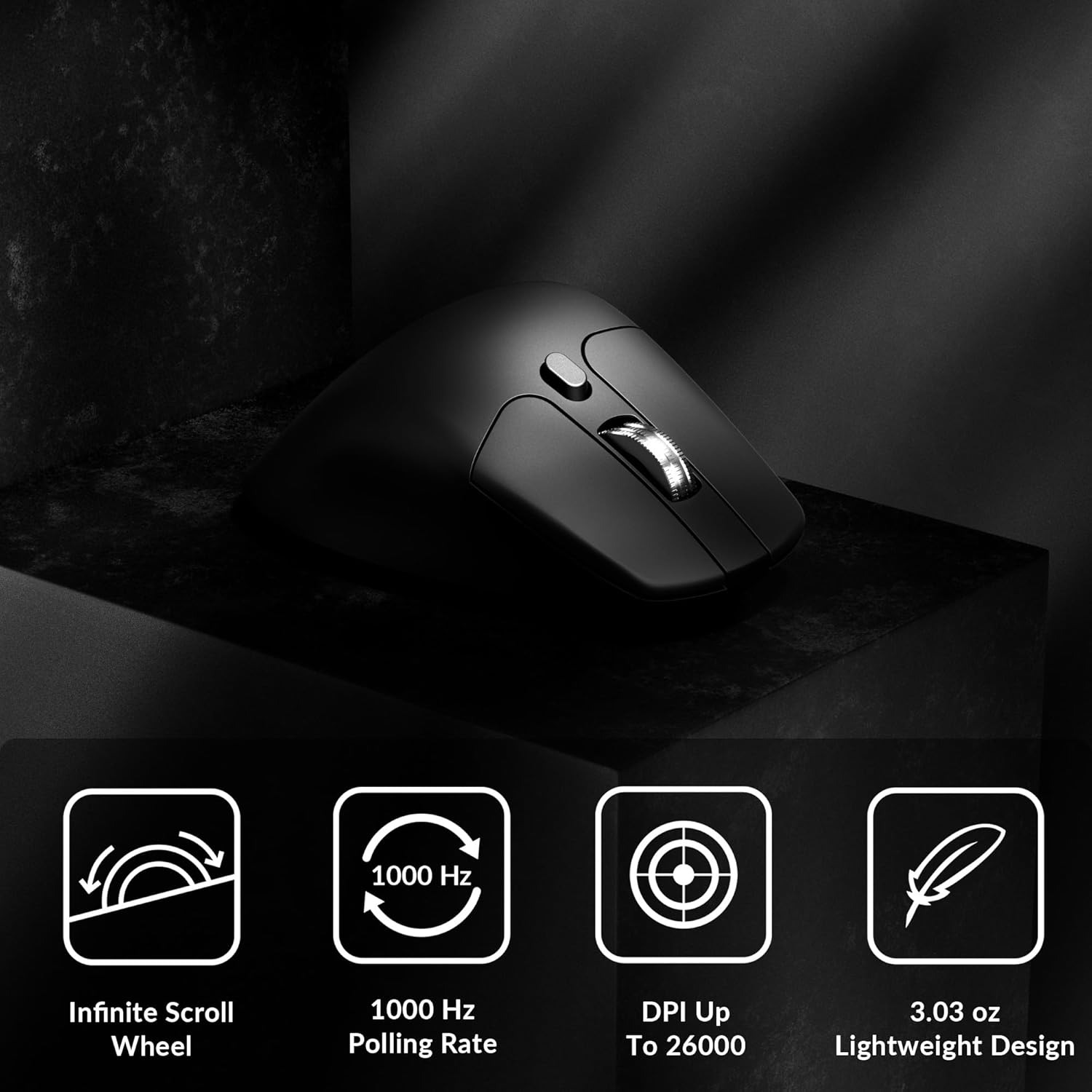
Image: Icons illustrating key features: Infinite Scroll Wheel, 1000 Hz Polling Rate, DPI Up To 26000, and Lightweight Design.
3. Подешавање
3.1 Садржај пакета
Проверите да ли су све ставке присутне у пакету:
- 1x Keychron M6 Mouse
- 1к кабл од типа Ц до типа Ц
- 1к адаптер типа-А на тип-Ц
- 1к адаптер за проширење за пријемник
- 1x Type-C 2.4 GHz Receiver
- 1к пријемник типа А 2.4 ГХз
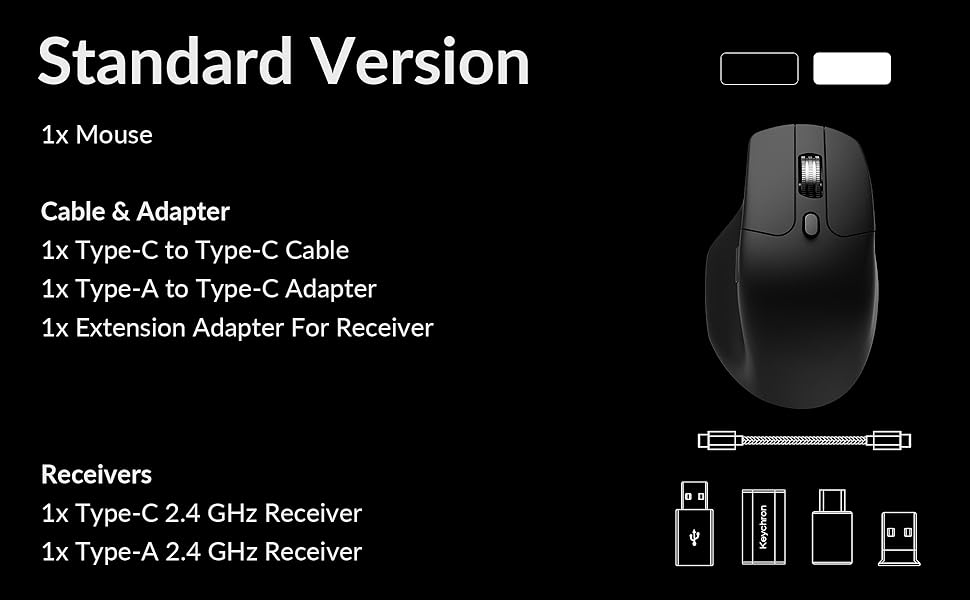
Image: Diagram showing the contents of the Keychron M6 mouse package.
3.2 Почетно пуњење
Before first use, it is recommended to fully charge the mouse. Connect the mouse to your computer using the provided Type-C cable. The LED indicator will show charging status.
3.3 Повезивање миша
The Keychron M6 supports three connection modes: 2.4GHz wireless, Bluetooth 5.3, and wired.
- Бежична веза од 2.4 GHz: Insert the 2.4GHz receiver (Type-A or Type-C) into your computer's USB port. Switch the mode switch on the bottom of the mouse to 'G' (Gaming) mode. The mouse should connect automatically.
- Блуетоотх КСНУМКС: Switch the mode switch on the bottom of the mouse to 'B' (Bluetooth) mode. On your computer, search for Bluetooth devices and select 'Keychron M6' to pair.
- Виред: Connect the mouse directly to your computer using the provided Type-C cable. The mouse will function in wired mode and charge simultaneously.

Image: Keychron M6 mouse connected to a laptop via 2.4GHz receiver, with Bluetooth 5.3 icon.
4. Упутство за употребу
4.1 Основне функције
- Леви/десни клик: Standard mouse button functions.
- Точак за померање: Used for vertical scrolling.
- Бочна дугмад: Default to Forward/Backward navigation. Customizable via software.
- Точак са палицом: Located on the side, used for horizontal scrolling.
4.2 ДПИ подешавање
The DPI (Dots Per Inch) button on the bottom of the mouse allows you to cycle through preset sensitivity levels. Each level is indicated by a specific LED color. You can customize these DPI levels using the Keychron Engine software.
4.3 Подешавање стопе анкетирања
The polling rate button on the bottom of the mouse allows you to switch between different polling rates (125Hz, 500Hz, 1000Hz). A higher polling rate provides more responsive tracking, ideal for gaming. The LED indicator will change color to reflect the current polling rate.

Image: Close-up of the polling rate switch and indicator light on the mouse's underside.
4.4 Infinite Scroll Mode
The M6 features a button near the main scroll wheel to toggle between infinite scroll mode and tactile (notched) scroll mode. Infinite scroll allows for rapid navigation through long documents or web странице.

Image: Diagram showing the infinite scroll button and the horizontal scrolling function of the thumb wheel.
5. Customization with Keychron Engine Software
The Keychron Engine software allows for comprehensive customization of your M6 mouse. It is compatible with macOS and Windows and can be accessed online, eliminating the need for a download.
- Додељивање дугмади: Remap any of the mouse buttons to perform different functions, including keyboard shortcuts, multimedia keys, or macros.
- Креирање макроа: Record and assign complex sequences of commands to a single button.
- DPI/Polling Rate/LOD Adjustment: Fine-tune sensor settings to match your preferences.
Посетите званични Кеицхрон website to access the Keychron Engine software.

Image: Screenshot of the Keychron Engine software interface, showing button customization options for the M6 mouse.
6. Режими повезивања
The M6 mouse offers flexible connectivity to suit various setups:
- Бежична веза од 2.4 GHz: Provides a stable, low-latency connection with a 1000Hz polling rate, ideal for gaming and demanding tasks. Uses a dedicated USB receiver.
- Блуетоотх КСНУМКС: Offers seamless connection to multiple devices, allowing for quick switching between systems. Suitable for general use and productivity.
- Жични (USB-C): Connects directly via the USB-C cable, providing a reliable connection and simultaneously charging the mouse.
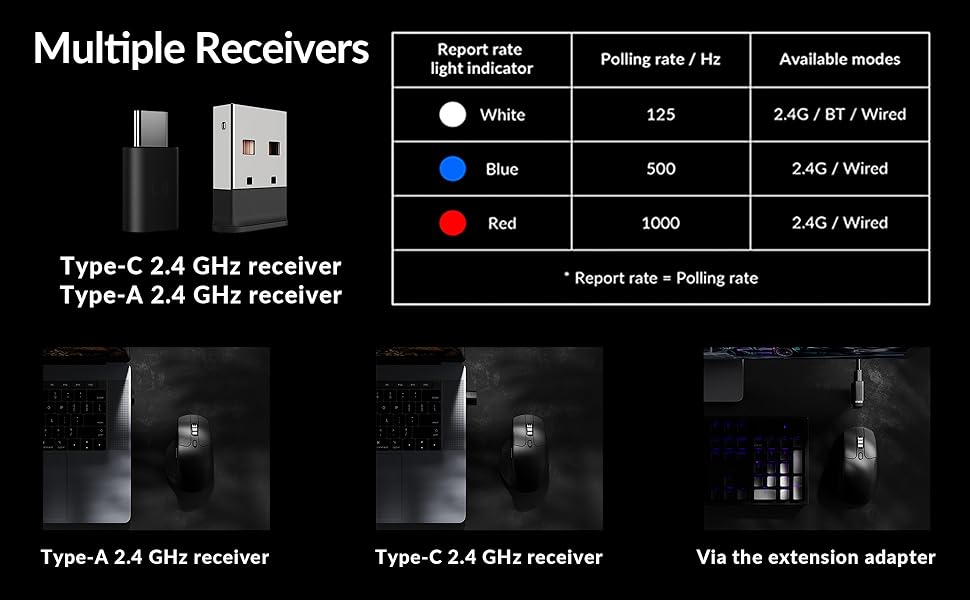
Image: Illustration of the Type-C and Type-A 2.4 GHz receivers, along with a table detailing polling rates and available modes.
7. Спецификације
| Број модела | М6С |
| Сензор | ПикАрт 3395 оптички сензор |
| ДПИ | До 26,000 |
| IPS Tracking Speed | 650 |
| Поллинг Рате | 1000Hz (2.4GHz/Wired), 125Hz (Bluetooth) |
| Повезивање | 2.4 GHz бежична веза, Bluetooth 5.3, USB-C жична веза |
| Тежина | 86 г (3.03 унци) |
| Батерија | 800 mAh (Up to 80 hours) |
| Прекидачи | Huano 20M Silent Micro Switch |
| Компатибилност | Виндовс, мацОС, Линук |
| Димензије | 4.82 к 2.97 к 1.97 инча (122.5 к 75.4 к 50 мм) |
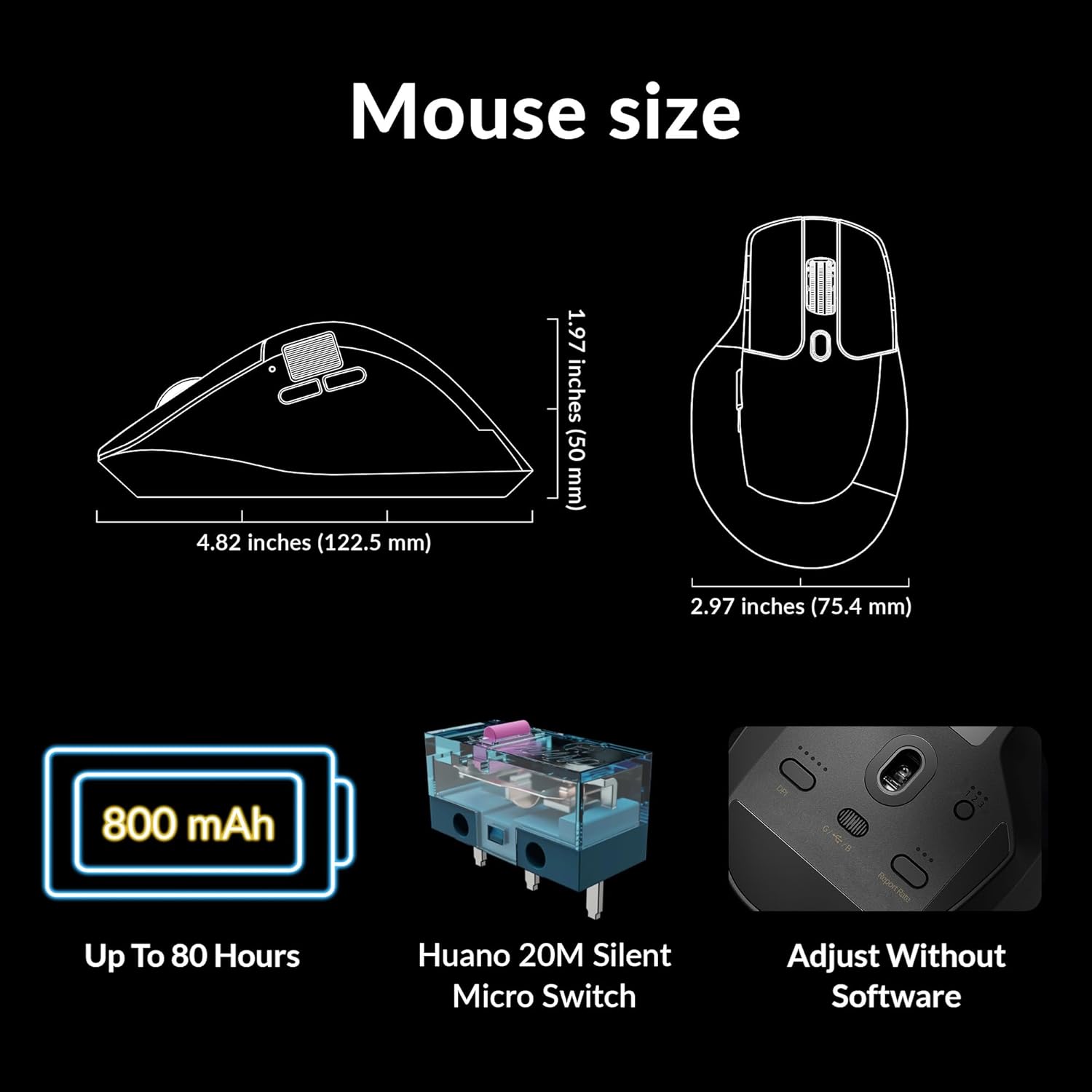
Image: Diagram showing the dimensions of the Keychron M6 mouse, its 800 mAh battery, and Huano 20M Silent Micro Switches.
8. Одржавање
To ensure the longevity and optimal performance of your Keychron M6 mouse, follow these maintenance guidelines:
- Чишћење: Користите меку, суву крпу да обришете површину миша. За тврдокорну прљавштину, благо дampОбришите крпу водом или благим раствором за чишћење. Избегавајте јаке хемикалије.
- Брига о сензорима: Одржавајте оптички сензор на дну миша чистим и без прашине или прљавштине како бисте осигурали прецизно праћење.
- Одржавање батерије: Избегавајте често потпуно пражњење батерије. За дуготрајно складиштење, напуните миш до око 50% и чувајте га на хладном и сувом месту.
- Складиштење: When not in use, store the mouse in a safe place to prevent physical damage.
КСНУМКС. Решавање проблема
If you encounter issues with your Keychron M6 mouse, refer to the following common solutions:
- Миш не реагује:
- Уверите се да је миш напуњен.
- Check the connection mode switch (2.4GHz, Bluetooth, Wired) is set correctly.
- For 2.4GHz, ensure the receiver is properly inserted and try a different USB port.
- For Bluetooth, re-pair the device in your computer's Bluetooth settings.
- Покушајте да се повежете преко USB-C кабла да бисте искључили проблеме са бежичном мрежом.
- Inconsistent Tracking:
- Очистите оптички сензор на дну миша.
- Уверите се да користите миш на одговарајућој површини (нпр. подлога за миш).
- Подесите DPI подешавања на удобан ниво.
- Дугмад не раде:
- Check Keychron Engine software for custom button assignments that might be interfering.
- Ensure the mouse firmware is up to date.
- Проблеми са точкићем за скроловање:
- Toggle the infinite scroll button to ensure it's in the desired mode.
- Clean any debris around the scroll wheel.
10. Званични видео производа
Видео: Званичник прекоview of the Keychron M6 Silent Wireless Optical Gaming Mouse, highlighting its features and design.
11. Гаранција и подршка
Keychron products come with a limited warranty. For detailed warranty information, technical support, and frequently asked questions, please visit the official Keychron webсајт или контактирајте њихову корисничку службу. Сачувајте доказ о куповини за потребе гаранције.