
1. Увод
Thank you for choosing the FINOTI K18 Max GPS Drone. This advanced quadcopter is equipped with an 8K HD camera, 5G WiFi FPV transmission, 360° obstacle avoidance, and a unique one-click airdrop feature. Designed for both enthusiasts and professionals, it offers stable flight, precise control, and stunning aerial photography capabilities. This manual provides essential information for safe operation, setup, and maintenance of your drone.
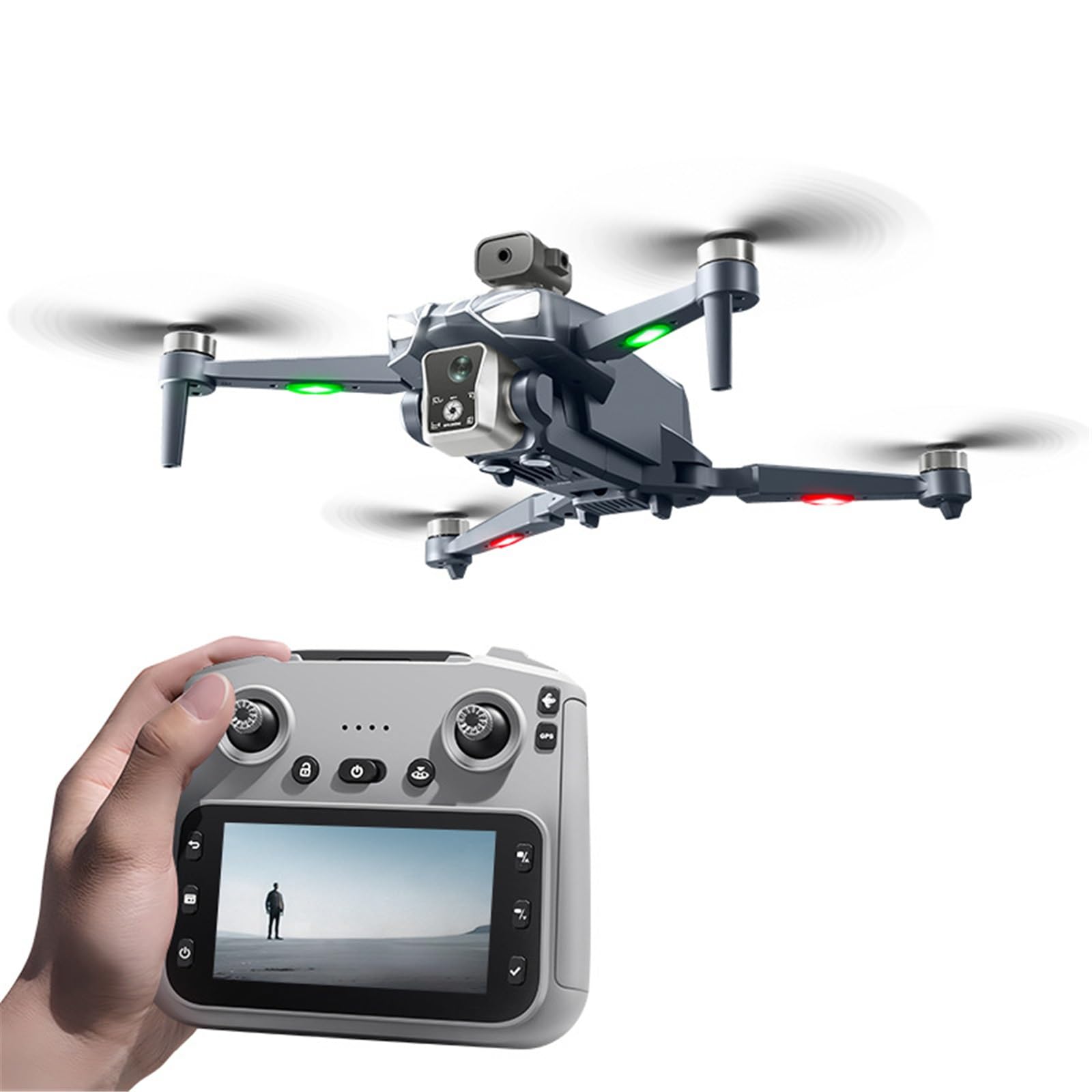
Image 1.1: The FINOTI K18 Max GPS Drone and its remote control, showcasing its sleek design and advanced features.
2. Безбедносне информације
Operating a drone requires responsibility and adherence to safety guidelines. Please read and understand all safety instructions before flying your K18 Max drone.
- Окружење: Fly in open, unobstructed areas, away from people, animals, buildings, and power lines. Avoid flying in strong winds, rain, snow, or fog.
- Удаљеност: Maintain a safe distance from yourself and others during flight. Do not fly directly over people.
- Безбедност батерије: Keep batteries away from naked flames or direct heat sources. Do not overcharge or puncture batteries. Use only the provided charging cable.
- Провера пре лета: Always perform a pre-flight check to ensure all components are securely attached and functioning correctly.
- Избегавање препрека: While the drone features 360° obstacle avoidance, it is not foolproof. Always maintain visual line of sight and be prepared to take manual control.
- Усклађеност са законима: Be aware of and comply with local drone regulations and airspace restrictions.
3. Производ је готовview
3.1 Садржај пакета
Након распакивања, уверите се да су присутне све следеће ставке:
- K18 Max Drone (1)
- 4.5-inch Screen Remote Control (1)
- Infrared Obstacle Avoidance Head (1)
- Body Battery (3.7V 2200mAh) (1)
- Торба за складиштење (1)
- Color Box (1)
- Memory Card (1)
- Читач картица (1)
- Упутство за употребу (2)
- Spare Fan Blades (4)
- УСБ кабл за пуњење (2)
- Одвијач (1)
3.2 Кључне карактеристике
The FINOTI K18 Max drone boasts a range of advanced features for an enhanced flight experience:
- 8К ХД камера: Capture stunning photos (7680x4320) and videos (1920x1280) with a dual camera system.
- 5G WiFi FPV: Real-time high-definition image transmission to the remote control's 4.5-inch screen.
- Избегавање препрека од 360°: Laser obstacle avoidance sensors for safer flight.
- ГПС позиционирање: Provides stable hovering, precise return-to-home functions (one-click, low power, over distance return).
- Позиционирање оптичког тока: Enhances stability for indoor flight or when GPS signal is weak.
- Мотори без четкица: Powerful and efficient motors for stable flight and longer lifespan.
- One-Click Airdrop: Unique feature for delivering small items (max 20g payload).
- Интелигентни режими лета: Includes intelligent tracking, gradually distant mode, and 50x zoom.
- Преклопни дизајн: Компактан и преносив за лак транспорт.

Слика 3.1: Готовоview of the K18 Max drone and its remote, emphasizing key capabilities like 8K resolution, brushless motors, obstacle avoidance, and one-click airdrop.
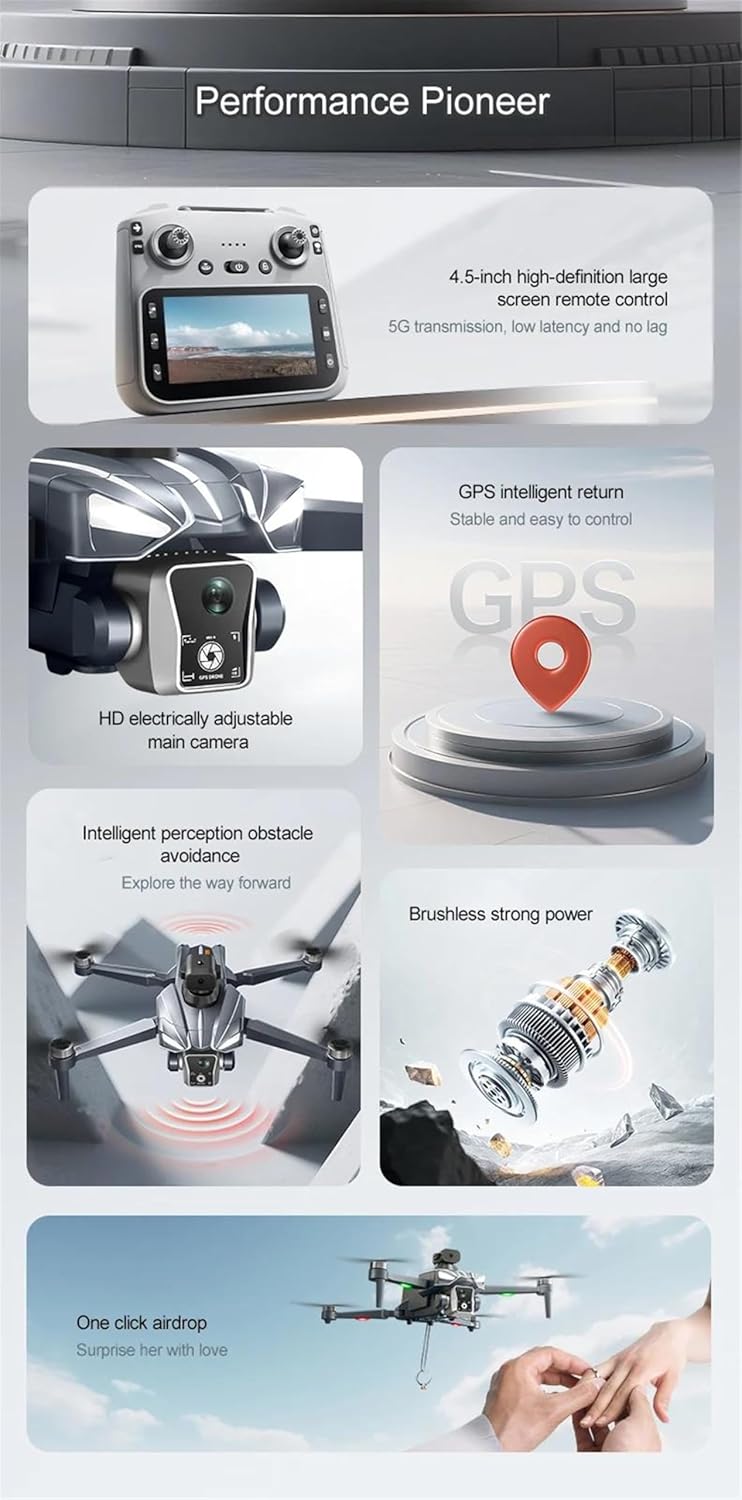
Image 3.2: A detailed graphic illustrating the drone's advanced features, including the remote control's screen, GPS return, adjustable camera, obstacle avoidance, powerful motors, and airdrop function.
4. Подешавање
4.1 Пуњење батерије
The drone's body battery (3.7V 2200mAh) requires charging before first use. Use the provided USB charging cable.
- Повежите батерију са УСБ каблом за пуњење.
- Plug the USB cable into a suitable USB power adapter (e.g., computer USB port, wall adapter).
- The charging indicator will show the charging status. Charging time is approximately 60 minutes.
- Када се батерија потпуно напуни, искључите је.
4.2 Инсталација пропелера
Ensure propellers are correctly installed on the corresponding motor shafts. Match the 'A' and 'B' markings on the propellers with the 'A' and 'B' markings on the drone's motor arms. Use the provided screwdriver to secure them.
4.3 Obstacle Avoidance Head Installation
Attach the infrared obstacle avoidance head to the designated slot on the drone's body. Ensure it is securely fastened.
4.4 Припрема дрона
- Пажљиво расклопите кракове дрона док се не закључају на своје место.
- Insert the charged body battery into the drone's battery compartment until it clicks securely.
4.5 Подешавање даљинског управљача
The remote control features a 4.5-inch screen for direct FPV viewинг.

Image 4.1: The remote control unit, highlighting its integrated 4.5-inch screen for 5G image transmission, eliminating the need for a separate phone.
- Уверите се да је даљински управљач напуњен.
- Press and hold the power button to turn on the remote control.
5. Упутство за употребу
5.1 Контролна листа пре лета
- Drone battery fully charged and securely installed.
- Remote control charged and powered on.
- Propellers correctly installed and undamaged.
- Obstacle avoidance head attached.
- Fly in an open area, free from obstacles and people.
5.2 Упаривање и калибрација
Before first flight, the drone and remote must be paired and calibrated.
- Поставите дрон на равну, равну површину.
- Укључите дрон, а затим укључите даљински управљач.
- Follow the on-screen prompts on the remote for gyroscope and geomagnetic calibration. This ensures stable flight.
- Wait for GPS signal acquisition (if flying outdoors). The GPS indicator on the remote will confirm signal lock.
5.3 Водич за даљински управљач

Image 5.1: A comprehensive guide to the remote control, labeling functions such as speed switching, obstacle avoidance switch, one-click airdrop, throttle, unlock, LCD screen, take pictures, picture recording, main interface, lens adjustment, gyroscope calibration, geomagnetic calibration, GPS switch, direction lever, one-click return, power switch, take photos/choose, record/select, and confirm.
5.4 Основне контроле лета
- Полетање/слетање једним тастером: Press the designated button on the remote for automatic takeoff or landing.
- Гуша: Left joystick (up/down) controls altitude.
- Смер: Right joystick (up/down/left/right) controls forward/backward/sideways movement.
- ротација: Left joystick (left/right) controls drone rotation.
- Пребацивање брзине: Use the speed switch button to adjust flight speed (e.g., beginner, normal, sport).
5.5 ГПС функција
The K18 Max utilizes GPS for enhanced stability and safety features.
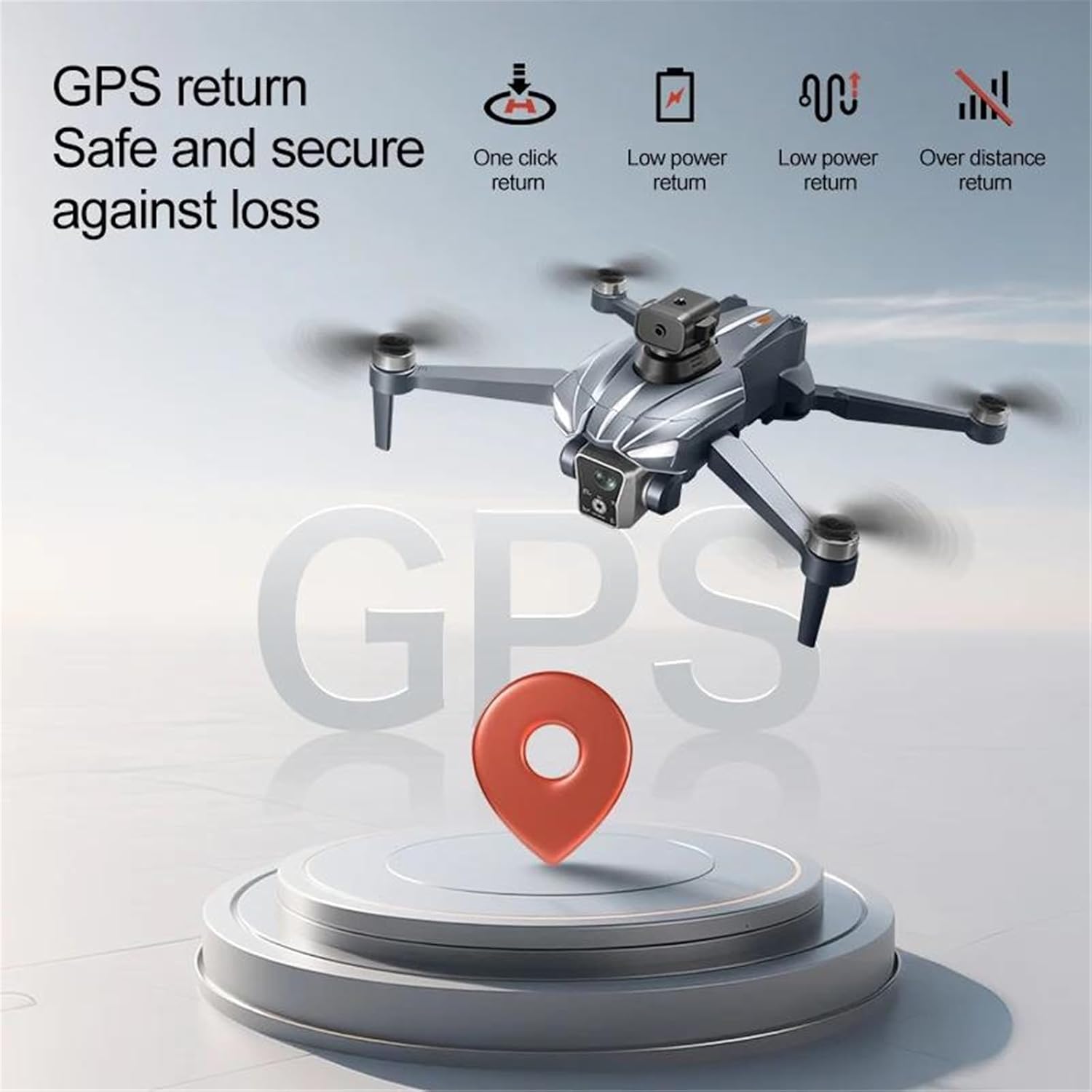
Image 5.2: An illustration of the GPS return features, including one-click return, automatic return on low power, and automatic return if the drone flies beyond the control range.
- ГПС позиционирање: Provides accurate outdoor positioning and stable hovering.
- One-Click Return: Press the 'One-Click Return' button on the remote, and the drone will automatically fly back to its takeoff point.
- Повратак мале снаге: The drone will automatically initiate a return-to-home sequence if the battery level becomes critically low.
- Over Distance Return: If the drone flies beyond the remote control's signal range, it will automatically return to its takeoff point.
5.6 Избегавање препрека
Систем за избегавање препрека са ласером од 360° помаже у спречавању судара.
- Активација: The obstacle avoidance feature can be toggled on/off using the dedicated switch on the remote control (refer to Image 5.1).
- Операција: When active, the drone will detect obstacles in its vicinity and attempt to maneuver around them or stop to prevent a collision.
5.7 Рад камере
The K18 Max features an 8K HD camera with 5G FPV.
- Уживо View: The 4.5-inch screen on the remote control displays a real-time 5G FPV feed from the drone's camera.
- Фотографисати: Press the 'Take Pictures' button on the remote to capture 7680x4320 resolution images.
- Сними видео: Press the 'Picture Recording' button to start/stop recording 1920x1280 resolution video.
- Подешавање сочива: The main camera is electrically adjustable. Use the designated controls on the remote to adjust the camera angle during flight.
- Интелигентни режими: Explore features like intelligent tracking (drone follows a subject), gradually distant mode, and 50x zoom for creative shots.
5.8 Airdrop Function
The drone is equipped with a unique one-click airdrop device.

Image 5.3: The drone demonstrating its one-click airdrop capability, releasing a small ring from its payload mechanism.

Image 5.4: The drone and remote control, illustrating the airdrop function in action, with the remote's screen showing the live feed.
- носивост: The airdrop device can carry a maximum load of 20 grams. Ensure the item is securely attached before flight.
- Операција: Fly the drone to the desired drop location. Press the 'One-Click Airdrop' button on the remote control to release the payload.
6. Одржавање
Proper maintenance ensures the longevity and optimal performance of your drone.
- Чишћење: After each flight, gently wipe the drone body, camera lens, and obstacle avoidance sensors with a soft, dry cloth. Avoid using harsh chemicals.
- Пропелери: Regularly inspect propellers for any cracks, bends, or damage. Replace damaged propellers immediately using the spare fan blades provided.
- Одржавање батерије: Store batteries in a cool, dry place. Do not store fully charged or completely depleted batteries for extended periods. Charge them to about 50-60% for long-term storage.
- Складиштење: When not in use, fold the drone arms and store it in the provided storage bag to protect it from dust and physical damage. The folded size is 17x10x9 CM.
КСНУМКС. Решавање проблема
If you encounter issues with your K18 Max drone, refer to the following common problems and solutions:
| Проблем | Могући узрок | Решење |
|---|---|---|
| Дрон се не укључује | Low or uncharged battery; Battery not properly inserted. | Charge the drone battery fully; Ensure battery is securely inserted. |
| Unable to connect/pair with remote | Incorrect pairing sequence; Remote control battery low. | Ensure both drone and remote are powered on correctly; Follow pairing instructions; Charge remote control. |
| Нестабилан лет/Дрифтовање | Improper calibration; Damaged propellers; Strong winds. | Perform gyroscope and geomagnetic calibration; Replace damaged propellers; Avoid flying in strong winds. |
| Poor image/video quality or no FPV feed | Weak 5G signal; Camera lens dirty; Memory card issues. | Ensure drone is within 5G signal range; Clean camera lens; Check memory card for proper insertion or corruption. |
| GPS not locking or inaccurate | Flying indoors or near tall structures; Poor satellite signal. | Fly in an open outdoor area with a clear view of the sky; Wait for more satellites to connect. |
8. Спецификације
Detailed technical specifications for the FINOTI K18 Max GPS Drone:
- Drone Size (Folded): 17 к 10 к 9 ЦМ
- Drone Size (Expanded): 25 к 20 к 9 ЦМ
- Фреквенција пријема: 5G
- Пријемни канал: 4 channel 6 axis gyroscopes
- Body Battery Capacity: 3.7В 2200мАх
- Време употребе: Отприлике 25 минута
- Време пуњења: Отприлике 60 минута
- Начин пуњења: УСБ кабл за пуњење
- Remote Control Distance (Height): До 500 метара
- Remote Control Distance (Distance): До 5000 метара
- Return Distance: До 2000 метара
- Видео резолуција: 1920Пк1280П
- Резолуција слике: 7680к4320
- Произвођач: FINOTI
9. Гаранција и подршка
9.1 Информације о гаранцији
FINOTI provides a warranty for the K18 Max GPS Drone during the specified warranty period. Please refer to the product description or your purchase documentation for specific warranty terms and conditions.
9.2 Корисничка подршка
For technical assistance, troubleshooting, or any inquiries regarding your FINOTI K18 Max drone, please contact our customer support team:
- Емаил: 92991@кк.цом
- Онлине: Visit the FINOTI store homepage for additional resources and support.


