
Увод
This manual provides essential information for the safe and efficient use of your Google Pixel 9 Pro 5G smartphone. Please read these instructions carefully before operating your device.

Слика 1: Предња страна view of the Google Pixel 9 Pro 5G.
Шта је у кутији
Проверите да ли су сви предмети присутни у паковању:
- Google Pixel 9 Pro Smartphone
- USB-C to USB-C Cable (1m, USB 2.0)
- Алат за избацивање лежишта СИМ картице
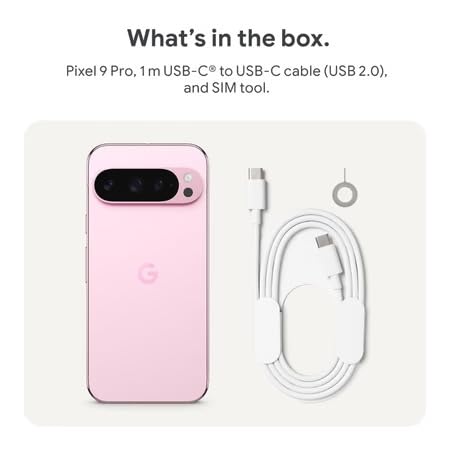
Figure 2: Included items in the Pixel 9 Pro packaging.
Сетуп
1. Уметање СИМ картице
- Locate the SIM tray on the side of your Pixel 9 Pro.
- Insert the provided SIM ejector tool into the small hole on the SIM tray and press gently until the tray pops out.
- Ставите Nano-SIM картицу у лежиште са златним контактима окренутим надоле. Уверите се да је правилно постављена.
- Пажљиво гурните лежиште СИМ картице назад у уређај док се не уклопи у равнину.
2. Почетно пуњење
Пре прве употребе, препоручује се да потпуно напуните уређај.
- Повежите USB-C кабл са портом за пуњење на дну телефона.
- Connect the other end of the cable to a compatible USB power adapter (sold separately) and plug it into a power outlet.
- Икона батерије на екрану ће показати статус пуњења.
3. Укључивање/искључивање
- За укључивање: Press and hold the Power button (located on the right side) until the Google logo appears on the screen.
- За искључивање: Притисните и држите дугме за напајање, а затим додирните „Искључи“ на екрану.
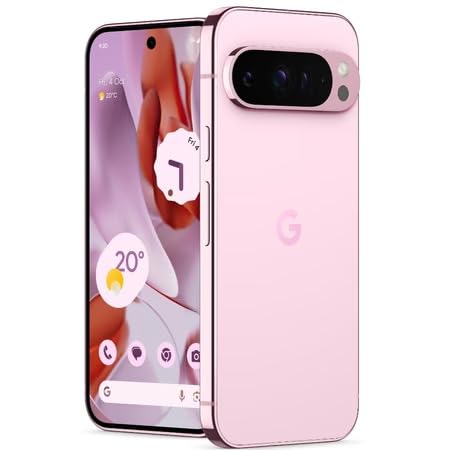
Figure 3: Power and volume buttons on the side of the device.
4. Чаробњак за почетно подешавање
Upon powering on for the first time, follow the on-screen instructions to:
- Изаберите свој језик и регион.
- Повежите се на Ви-Фи мрежу.
- Пријавите се помоћу свог Google налога или креирајте нови.
- Set up security features such as fingerprint unlock, face unlock, PIN, pattern, or password.
- Пренесите податке са старог уређаја (опционо).
Упутство за употребу
Основна навигација
- Гестови на екрану осетљивом на додир: Interact with the device using taps, swipes, pinches (for zoom), and long presses.
- Почетни екран: Access your applications, widgets, and customize your layout.
- Обавештења: Превуците надоле од врха екрана до view обавештења.
- Брза подешавања: Swipe down twice from the top of the screen to access quick settings toggles (Wi-Fi, Bluetooth, etc.).
Рад камере
The Pixel 9 Pro features a powerful triple rear camera system.
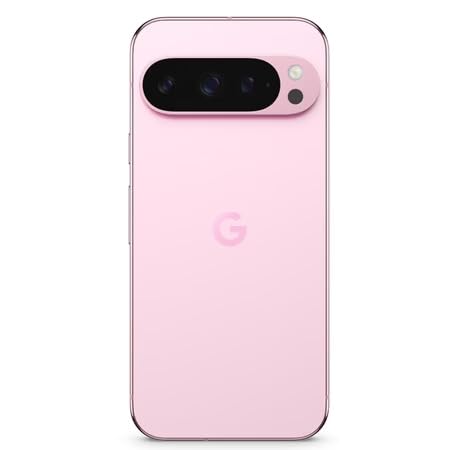
Figure 4: Rear camera system of the Pixel 9 Pro.
- Отварање камере: Tap the Camera app icon on your home screen or lock screen.
- Switching Lenses: Tap the icons on the viewfinder to switch between wide, ultrawide, and 5x telephoto lenses.
- Режими снимања: Select from various modes such as Night Sight for low-light conditions, Астрофотографија for capturing stars, Макро for close-up shots, лонг екпосуре for creative effects, and Портрет for depth-of-field effects.
- Super Res Zoom: Pinch the screen to digitally zoom up to 30x. For video, Super Res Zoom supports up to 20x.
- Pro Controls: Access advanced camera settings like shutter speed and manual focus for greater creative control.
Управљање батеријом
- Провера нивоа батерије: View проценат батеријеtage in the status bar or in Settings > Battery.
- Extreme Battery Saver: Enable this mode in Settings > Battery > Extreme Battery Saver to significantly extend battery life.
- Пуњење: Use the provided USB-C cable and a compatible power adapter for optimal charging speed.
Сигурносне карактеристике
Your Pixel 9 Pro incorporates multiple hardware security layers to protect your data.
- Откључавање отиска прста: Register your fingerprints in Settings > Security & privacy > Device unlock.
- Откључавање лицем: Подесите препознавање лица за практично откључавање.
- ПИН/Шаблон/Лозинка: Always set a strong screen lock method.
- Ажурирања софтвера: Regularly install system updates to ensure your device has the latest security patches.
Температурни сензор
The Pixel 9 Pro includes a thermometer for measuring temperature.
- Open the dedicated Thermometer app.
- Follow the on-screen instructions to measure body temperature or the temperature of objects.
- Temperature data can be saved and tracked within the Fitbit application.
Одржавање
Чишћење уређаја
- Use a soft, lint-free cloth to clean the screen and body of your phone.
- Avoid using abrasive materials, harsh chemicals, or aerosol sprays.
- Do not submerge the device in water, despite its water-resistant rating.
Ажурирања софтвера
Google regularly releases software updates to improve performance, add features, and enhance security.
- To check for updates, go to Settings > System > System update.
- Ensure your device is connected to Wi-Fi and has sufficient battery charge before installing updates.
Физичка њега
The Pixel 9 Pro is built with Corning Gorilla Glass Victus 2 and is water-resistant, offering durability against everyday drops and spills.
- While durable, avoid excessive impacts or drops to prevent damage.
- Consider using a screen protector and a protective case for additional safeguarding.
Решавање проблема
Уређај не реагује
If your phone becomes unresponsive, perform a force restart:
- Притисните и држите дугме за напајање отприлике 10-15 секунди док се уређај поново не покрене.
Рушење или замрзавање апликација
- Затворите проблематичну апликацију и поново је отворите.
- Clear the app's cache: Go to Settings > Apps > See all apps > [App Name] > Storage & cache > Clear cache.
- Уверите се да је апликација ажурирана на најновију верзију из Google Play продавнице.
- Поново покрените телефон.
Network Connectivity Issues (Wi-Fi/Cellular)
- Toggle Wi-Fi or cellular data off and then back on.
- Поново покрените телефон.
- Verify that your SIM card is correctly inserted.
- Reset network settings: Go to Settings > System > Reset options > Reset Wi-Fi, mobile & Bluetooth.
Батерија се брзо празни
- Проверите потрошњу батерије у Подешавањима > Батерија да бисте идентификовали апликације које троше енергију.
- Reduce screen brightness and screen timeout duration.
- Disable unnecessary features like GPS, Bluetooth, and Wi-Fi when not in use.
- Enable Extreme Battery Saver mode.
Фабричко ресетовање (последње средство)
Warning: A factory reset will erase all data from your phone. Back up all important data before proceeding.
- Идите на Подешавања > Систем > Опције ресетовања > Обриши све податке (ресетовање на фабричка подешавања).
- Confirm your decision when prompted.
Спецификације
| Феатуре | Детаљ |
|---|---|
| Бранд | Гоогле |
| Модел | Пикел 9 Про |
| Оперативни систем | Андроид 15 |
| Процесор | Google Tensor G4 (3.1 GHz) |
| РАМ | 16 ГБ |
| Интерна меморија | 256 ГБ |
| Дисплаи | 6.3 Inches LTPO OLED (Actua), 1280 x 2856 Pixels, 120 Hz Refresh Rate |
| Задња камера | 50 MP wide + 48 MP ultrawide (Macro) + 48 MP 5x telephoto |
| Предња камера | 42 МП |
| Капацитет батерије | 4700 Милиamp Hours (up to 24 hours average life) |
| Повезивање | 5G, Wi-Fi 7, Bluetooth 5.3, NFC, UWB, USB-C |
| СИМ картица | Single Nano SIM |
| Отпорност на воду | Отпоран на воду |
| Димензије | 8 x 72 x 153 милиметара |
| Тежина | 198 грама |
Гаранција и подршка
Информације о гаранцији
Your Google Pixel 9 Pro 5G comes with a 1 године гаранције произвођача од датума куповине. Ова гаранција покрива производне недостатке при нормалној употреби. Молимо вас да сачувате доказ о куповини за потребе подношења захтева за гаранцију.
Корисничка подршка
For technical assistance, warranty claims, or other support inquiries, please contact Google customer service:
- Произвођач: Гоогле ЛЛЦ, 1600 Ampхитхеатре Паркваи, Моунтаин View, ЦА 94043, САД
- Phone Support (India): +91 7718892303
- Importer Contact (India): Nexora Axis Private Limited (+91 7718892303)
For the most up-to-date support information, please visit the official Google Pixel support webсајту.