
Увод
Хвала вам на куповиниasing the AFEXOA DY29Z Night Light Bluetooth Speaker Alarm Clock. This versatile device combines a Bluetooth speaker, night light, alarm clock, sound machine, and MP3 player into one compact unit. This manual provides detailed instructions for setup, operation, and maintenance to ensure optimal performance and user satisfaction.

Figure 1: AFEXOA DY29Z device highlighting its 5-in-1 functionality.
Безбедносне информације
- Не излажите уређај води или прекомерној влази.
- Избегавајте екстремне температуре и директну сунчеву светлост.
- Не растављајте или покушавајте сами да поправите уређај. Обратите се корисничкој подршци за помоћ.
- Чувати ван домашаја деце и кућних љубимаца.
- Користите само приложени кабл за пуњење или сертификовани Type-C кабл за пуњење.
Садржај пакета
Молимо вас да проверите пакет за следеће ставке:
- AFEXOA DY29Z Night Light Bluetooth Speaker Alarm Clock
- Tip-C USB kabl za punjenje
- Упутство за употребу
Производ је завршенview
Контроле предњег панела
The front panel features an LED display for time and status, along with several control buttons:
- Дугме тајмера: Short press to pause, long press for standby (turns off sound and light).
- Bluetooth On/Off Button: Activates or deactivates Bluetooth mode.
- Дугме за претходну нумеру / смањивање јачине звука: Кратак притисак за претходну нумеру, дуг притисак за смањење јачине звука.
- Дугме за следећу нумеру / појачавање јачине звука: Кратак притисак за следећу нумеру, дуг притисак за повећање јачине звука.
- Natural Sound & Lullaby Button: Cycles through built-in soothing sounds.
Rear Ports and Switches
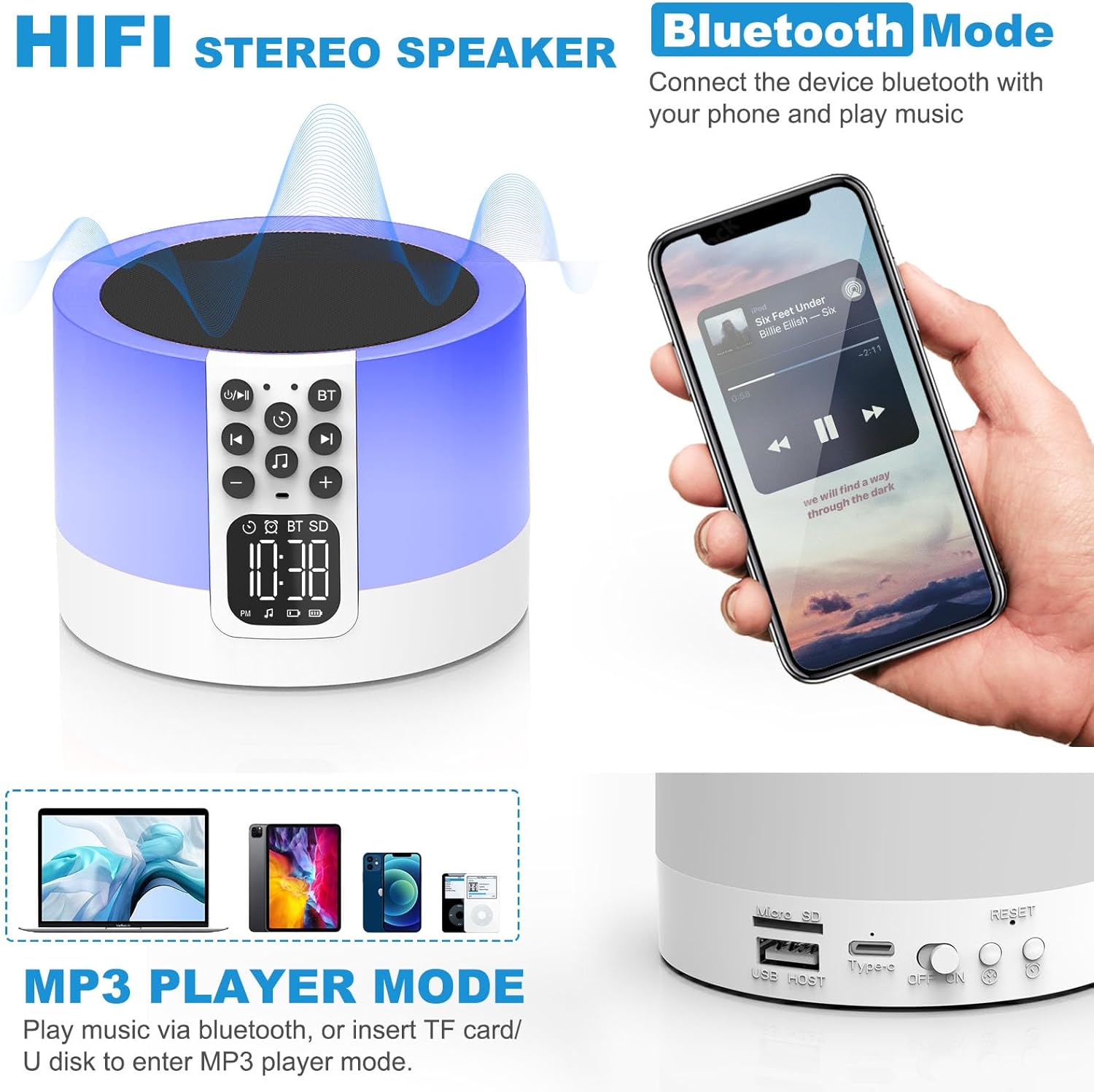
Figure 2: AFEXOA DY29Z showing Bluetooth connectivity and rear ports.
- Слот за микро СД/ТФ картицу: За репродукцију МП3 fileса меморијске картице.
- USB хост порт: За репродукцију МП3 fileс са УСБ флеш диска.
- Тип-C порт за напајање: За пуњење уређаја.
- Прекидач за укључивање/искључивање: Главни прекидач за напајање уређаја.
- Дугме за ресетовање: Мало дугме за ресетовање уређаја (потребан је ПИН).
- Time Setup Button: Short press for 12h/24h mode, long press for time setup.
- Alarm Setup Button: For setting the alarm.
Сетуп
1. Пуњење уређаја
Before first use, fully charge the device. Connect the provided Type-C USB cable to the Type-C power port on the back of the device and plug the other end into a USB power adapter (not included), computer, or power bank.

Figure 3: Charging the device via USB.
2. Подешавање времена
- Turn on the device using the On/Off switch on the back.
- Long press the 'Time Setup' button on the back until the hour digits flash.
- Use the 'Previous Track / Volume Down' and 'Next Track / Volume Up' buttons on the front to adjust the hour.
- Press the 'Time Setup' button again to switch to minute adjustment. Adjust minutes using the volume buttons.
- Press the 'Time Setup' button a third time to confirm and exit time setting.
- Short press the 'Time Setup' button to toggle between 12-hour and 24-hour display formats.
Упутство за употребу
1. Укључивање/искључивање
Slide the 'On/Off' switch on the back of the device to turn it on or off.
2. Режим Блуетоотх звучника
- Укључите уређај.
- Press the 'Bluetooth On/Off' button on the front panel. The device will enter pairing mode, indicated by a flashing Bluetooth icon on the display.
- On your smartphone or other Bluetooth-enabled device, search for 'DY29Z' in the Bluetooth settings and select it to pair.
- Након упаривања, можете репродуковати звук са свог уређаја преко звучника.
- Use the 'Previous Track / Volume Down' and 'Next Track / Volume Up' buttons to control playback and volume.
3. Функција ноћног светла
The device features a sensitive touch top mesh for light control.

Figure 4: Adjusting warm white light brightness via touch control.
- Топло бело светло: Tap the top mesh to cycle through 3 levels of warm white brightness (low, medium, high). Tap again to turn off.
- Multicolor Light: Long press the top mesh and then release to activate the ambient light mode, which cycles through various colors.
- Фиксна боја светла: While in multicolor cycling mode, long press the top mesh again and release to fix the current color. Repeat to cycle through other fixed colors.

Figure 5: Various multicolor night light options.
4. Функција будилника
Set and manage alarms with customizable tones.

Figure 6: Digital alarm clock with wake-up light.
- Подешавање аларма: Long press the 'Alarm Setup' button on the back until the alarm hour digits flash. Adjust the hour using the volume buttons. Press 'Alarm Setup' again to set minutes, then press again to confirm.
- Custom Alarm Tone: Insert a USB Flash Drive or Micro SD Card with your favorite MP3 music. The device will automatically use this as the alarm tone.
- Одгода функција: When the alarm sounds, tap the top mesh to activate snooze. The alarm will sound again after 9 minutes. This can be repeated indefinitely.
- Заустављање аларма: Press any button (except the top mesh for snooze) to stop the alarm for the day.
5. Sound Machine Function
The device offers 30 built-in soothing sounds to aid sleep and relaxation.
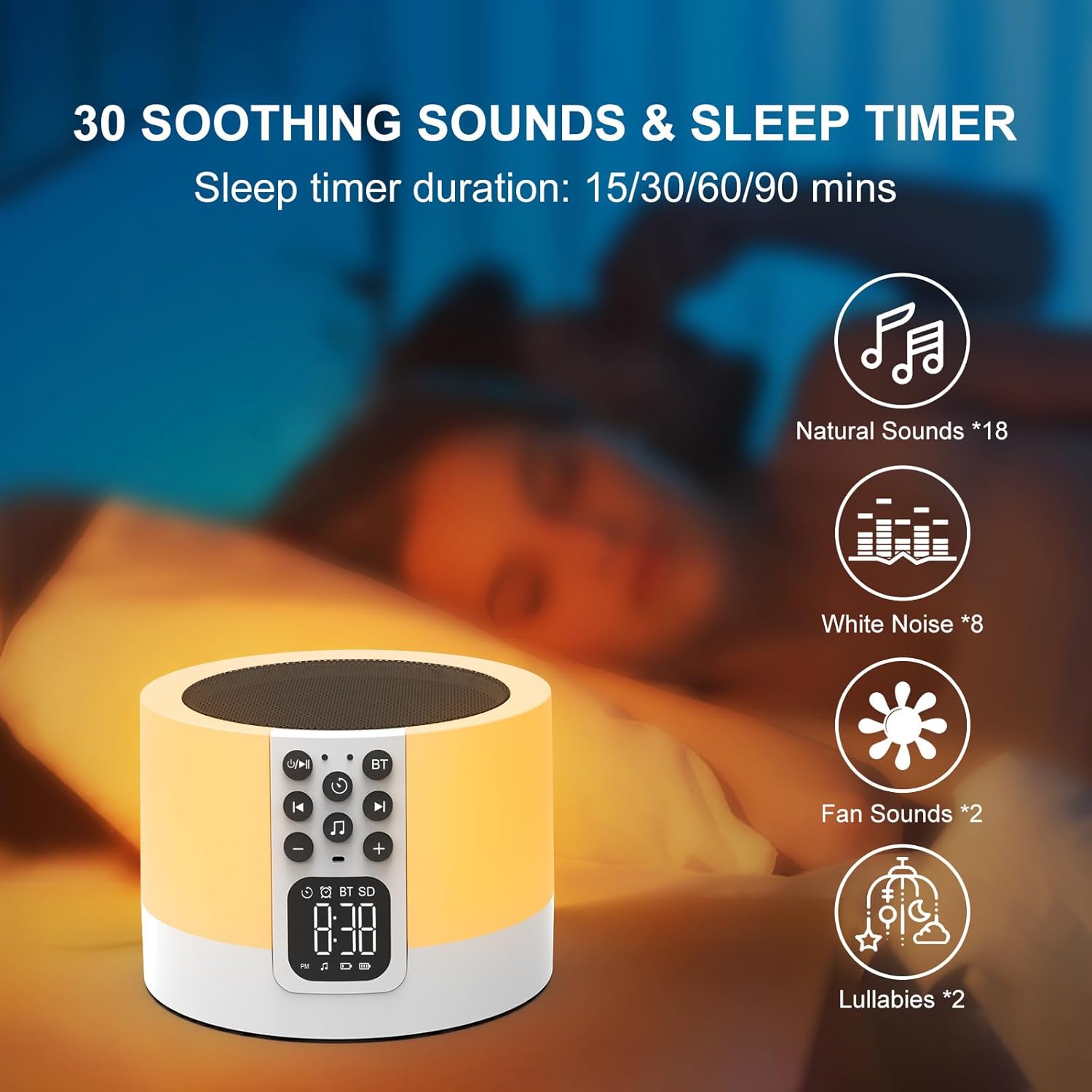
Figure 7: Soothing sounds and sleep timer options.
- Press the 'Natural Sound & Lullaby' button on the front panel to cycle through the 30 available sounds (including white noise, fan noise, pink noise, nature sounds, and lullabies).
- Мерач спавања: To set a sleep timer, short press the 'Timer' button repeatedly to select 15, 30, 60, or 90 minutes. The device will automatically turn off after the selected duration.
6. MP3 Player Mode
Play your own music directly from a USB flash drive or Micro SD card.

Figure 8: Using USB flash drives and Micro SD cards for MP3 playback.
- Insert a USB flash drive into the USB HOST port or a Micro SD card into the Micro SD/TF card slot on the back of the device.
- The device will automatically detect the storage and begin playing MP3 files.
- Use the 'Previous Track / Volume Down' and 'Next Track / Volume Up' buttons to navigate tracks and adjust volume.
7. Хандс-фрее позивање
When connected via Bluetooth to a smartphone, the device can be used for hands-free calls.
- When a call comes in, the device will ring.
- Press the 'Timer' button (which also functions as Play/Pause) to answer an incoming call.
- Press the 'Timer' button again to end the call.
Одржавање
- Очистите уређај меком, сувом крпом. Не користите абразивна средства за чишћење или раствараче.
- Уверите се да су сви портови без прашине и прљавштине.
- Чувајте уређај на хладном и сувом месту када се не користи дуже време.
Решавање проблема
| Проблем | Могући узрок | Решење |
|---|---|---|
| Уређај се не укључује. | Батерија је празна. Прекидач за напајање је искључен. | Charge the device fully. Ensure the On/Off switch is in the 'On' position. |
| Не могу се повезати преко Bluetooth-а. | Bluetooth not enabled on device or phone. Device is already paired with another unit. | Ensure Bluetooth is active on both devices. Disconnect from other devices. Restart pairing process. |
| Нема звука из звучника. | Јачина звука је прениска. Уређај је паузиран. Изабран је погрешан режим. | Increase volume. Press the 'Timer' button to unpause. Ensure correct mode (Bluetooth, MP3, Sound Machine) is active. |
| Ноћно светло не ради. | Device is off or in standby. | Ensure the device is powered on. Tap the top mesh to activate the light. |
| Аларм се не оглашава. | Аларм није правилно подешен. Јачина звука је прениска. | Verify alarm time and activation. Increase device volume. |
Спецификације
| Феатуре | Детаљ |
|---|---|
| Бранд | АФЕКСОА |
| Број модела | ДИ29З |
| Технологија повезивања | Блуетоотх, УСБ |
| Режим аудио излаза | Стерео |
| Материјал | акрилонитрил бутадиен стирен (АБС) |
| Спеакер Типе | Преносиви Блуетоотх звучник |
| Додатне карактеристике | Alarm, Illuminated, Mood Light, Noise Machine, Timer |
| Контролни метод | Додирните |
| Извор напајања | Баттери Поверед |
| Број батерија | 1 литијум јон (укључено) |
| Компатибилни уређаји | Лаптоп, МП3 плејер, паметни телефон, таблет |
Гаранција и подршка
This product comes with a limited warranty. For detailed warranty information or technical support, please refer to the product packaging or contact AFEXOA customer service. Keep your purchase receipt for warranty claims.