
Увод
This manual provides detailed instructions for the ZIUTY T21 Wireless Earbuds. Please read this guide thoroughly before using your earbuds to ensure proper operation and to maximize your listening experience. Keep this manual for future reference.
Шта је у кутији
Проверите да ли се у вашем пакету налазе све ставке наведене у наставку:
- ZIUTY T21 Wireless Earbuds (Left and Right)
- Charging Case with Touch Screen
- Упутство за употребу
- УСБ-А на УСБ-Ц кабл за пуњење
- Eartips (Small, Medium, Large sizes)

Image: Contents of the ZIUTY T21 package.
Производ је завршенview
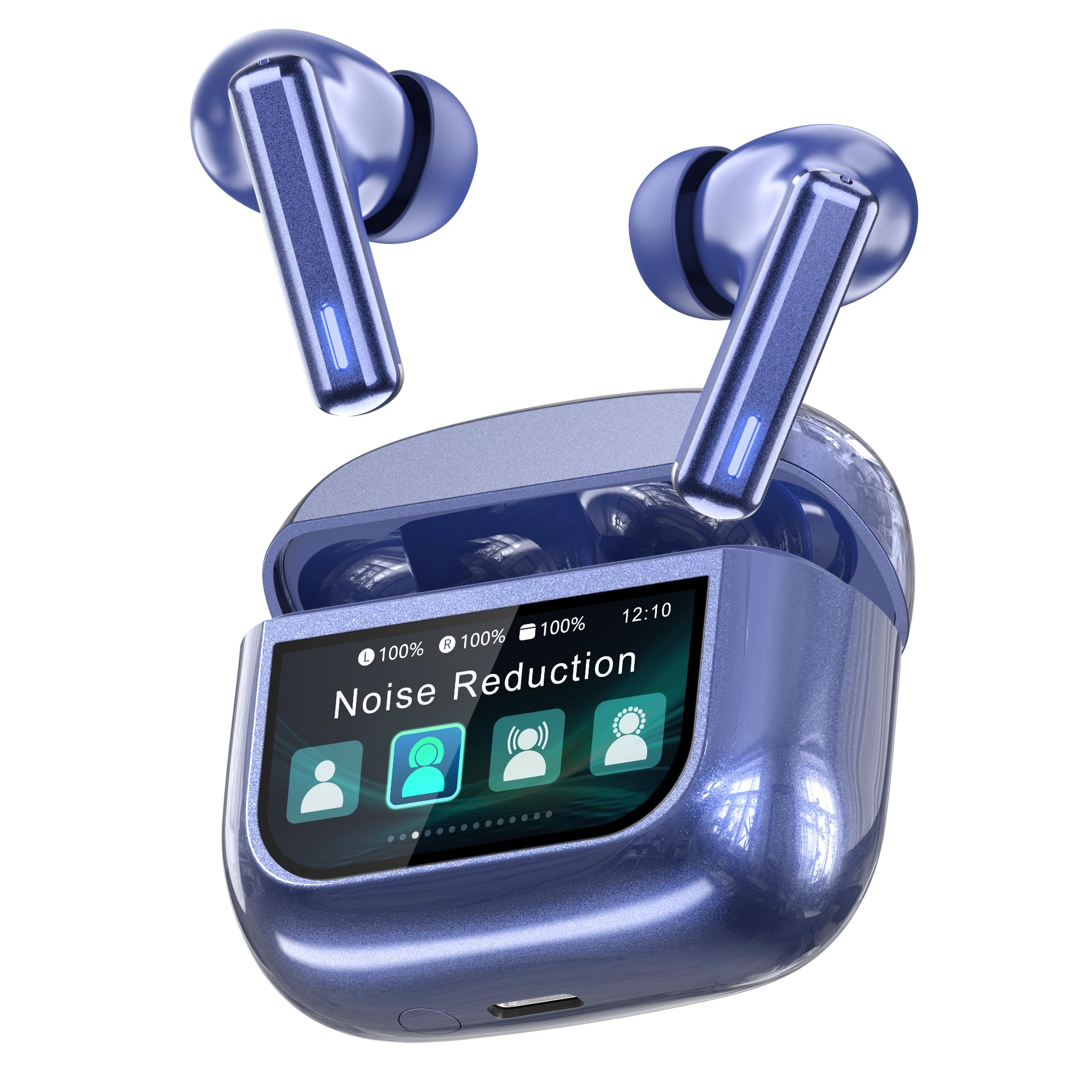
Image: ZIUTY T21 Wireless Earbuds.
Кључне карактеристике
- Контрола екрана на додир: Manage music, calls, and settings directly from the charging case.
- Hybrid Active Noise Cancelling (ANC) + Environmental Noise Cancellation (ENC): Reduces ambient noise by up to 40dB and filters 90% of call background chatter.
- 14.2мм динамички драјвери: Delivers deep bass and clear highs.
- Блуетоотх КСНУМКС: Ensures stable and fast wireless connectivity.
- Продужено време репродукције: Up to 7-8 hours on a single charge, and a total of 40 hours with the charging case.
- ИПКСКСНУМКС Водоотпоран: Resistant to sweat and rain.
- Ергономски дизајн: Lightweight (4.2g per earbud) with three eartip sizes for comfortable fit.
- 5 ЕК режима: Прилагодите свог звучног професионалцаfile (Normal, Rock, Pop, Classic, Jazz).
- "Find My Earbuds" Feature: Locate misplaced earbuds via the charging case.

Image: Key features of the ZIUTY T21 Wireless Earbuds.
Сетуп
1. Пуњење слушалица и футроле
Before first use, fully charge the earbuds and the charging case. Connect the provided USB-A to USB-C charging cable to the charging port on the case and a power source. The touch screen display will indicate the charging status.
- A full charge provides approximately 7-8 hours of listening time for the earbuds.
- The charging case provides an additional 4 full charges, totaling up to 40 hours of playtime.
- A 10-minute quick charge can provide up to 2 hours of playtime.

Image: Battery life and charging indication.
2. Упаривање са вашим уређајем
- Уверите се да су слушалице напуњене и стављене у кућиште за пуњење.
- Отворите поклопац кућишта за пуњење. Слушалице ће аутоматски ући у режим упаривања.
- На свом уређају (паметном телефону, таблету итд.) омогућите Блутут.
- Тражи "T21" in the list of available Bluetooth devices and select it to connect.
- Једном упарене, слушалице ће се аутоматски повезати са последњим упареним уређајем када се изваде из кућишта.

Image: Bluetooth 5.3 pairing process.
3. Selecting Eartips
For optimal sound quality and comfort, choose the eartip size (S, M, L) that best fits your ears. A proper seal is crucial for effective noise cancellation and bass response.

Image: Eartip sizes for comfortable fit.
Упутство за употребу
Touch Screen Controls on Charging Case
The charging case features a multi-function LCD touch screen for direct control of various settings without needing your phone.

Image: Multi-function LCD touch screen interface.
- Превуците: Navigate through different screens (e.g., volume, EQ, ANC modes).
- Додирните: Select options or confirm actions.
- Подешавање јачине звука: Swipe on the screen to adjust playback volume.
- АНЦ режими: Tap to switch between Active Noise Cancelling, Transparency Mode, and Normal Mode.
- ЕК унапред подешавања: Select from 5 equalizer modes: Normal, Rock, Pop, Classic, Jazz.
- Пронађи моје слушалице: Use this feature to locate misplaced earbuds.
- Остале функције: The screen may also offer controls for calls, flashlight, screen lock, language settings, and time display.

Image: Available EQ modes.
Контроле додиром за слушалице
The earbuds themselves also feature touch-sensitive areas for basic controls:
- Пусти/паузирај: Један додир на обе слушалице.
- Следећа нумера: Двапут додирните десну слушалицу.
- Претходни запис: Двапут додирните леву слушалицу.
- Одговори/заврши позив: Један додир на обе слушалице.
- Одбиј позив: Притисните и држите било коју слушалицу.
- Активирање гласовног помоћника: Трипут додирните било коју слушалицу (функционалност може да се разликује у зависности од уређаја).
Active Noise Cancelling (ANC) and Transparency Mode
The ZIUTY T21 earbuds offer three listening modes:
- Активно поништавање буке (АНЦ): Reduces external noise for an immersive audio experience. Ideal for noisy environments.
- Транспарентни режим: Allows you to hear your surroundings while still enjoying your audio, enhancing awareness.
- нормалан режим: Стандардна репродукција звука без поништавања буке или транспарентности.
Switch between these modes using the touch screen on the charging case or by tapping the earbuds (refer to specific earbud touch control instructions if available in the product documentation).

Image: Active Noise Cancelling in action.
Упућивање и примање позива
The earbuds are equipped with AI-enhanced Environmental Noise Cancellation (ENC) microphones for clear calls, even in noisy environments.

Image: Clear call quality with ENC.
- Одговори/заврши позив: Један додир на обе слушалице.
- Одбиј позив: Притисните и држите било коју слушалицу.
"Find My Earbuds" Feature
If you misplace your earbuds, use the "Find My Earbuds" function on the charging case's touch screen. This feature will cause the earbuds to emit a sound, helping you locate them.

Image: Using the "Find My Earbuds" feature.
Одржавање
Чишћење
Regular cleaning helps maintain optimal performance and hygiene. Use a soft, dry, lint-free cloth for the earbuds and charging case. For charging contacts and ear tip mesh, gently clean with an alcohol pad or a dry cotton swab to remove dust or earwax that might affect charging or sound volume.

Image: Cleaning instructions for earbuds.
Отпорност на воду (ИПКС7)
The ZIUTY T21 earbuds are IPX7 waterproof, meaning they can withstand immersion in water up to 1 meter for 30 minutes. This makes them suitable for workouts and use in light rain. However, the charging case is not waterproof. Do not expose the charging case to water.

Image: IPX7 waterproof feature.
Earbud Removal Gesture
To easily remove the earbuds from the charging case, follow these steps:
- Gently push the earbud inwards towards the center of the case.
- Lift the earbud upwards to remove it.

Image: Easy earbud removal gesture.
Решавање проблема
| Проблем | Могући узрок | Решење |
|---|---|---|
| Earbuds not charging or low volume. | Dirty charging contacts or ear tip mesh. | Clean the charging contacts on both earbuds and inside the case, and the ear tip mesh, using an alcohol pad or dry cotton swab. |
| Слушалице се не упарују са уређајем. | Bluetooth not enabled, earbuds not in pairing mode, or previously paired device interference. | Ensure Bluetooth is on. Place earbuds in case, close, then open lid to re-enter pairing mode. Forget "T21" from your device's Bluetooth list and try pairing again. |
| Sound only from one earbud. | One earbud not connected or low battery. | Place both earbuds back in the charging case, close the lid, then open it again. Ensure both earbuds are charged. Re-pair if necessary. |
| Лош квалитет позива. | Бука из околине, ометање микрофона. | Ensure microphones are not covered. Move to a quieter environment if possible. |
| Додирне контроле не реагују. | Earbuds or case screen may be dirty or wet. | Clean the touch surfaces. Ensure hands are dry. Restart earbuds by placing them in the case and taking them out. |
Спецификације
| Феатуре | Детаљ |
|---|---|
| Бранд | ЗИУТИ |
| Број модела | Т21 |
| Технологија повезивања | Блуетоотх 5.3 |
| Контрола буке | Active Noise Cancellation (ANC) + Environmental Noise Cancellation (ENC) |
| Постављање уха | Ин Еар |
| Тип аудио драјвера | 14.2мм динамички драјвер |
| Фреквенцијски опсег | 20 Hz - 20 kHz |
| Трајање батерије (слушалице) | 7-8 сати (једно пуњење) |
| Укупно време репродукције (са футролом) | До 40 сати |
| Оцена водоотпорности | ИПКС7 (само слушалице) |
| Тежина слушалице | 4.2 г (по слушалици) |
| Color (Current Model) | Плава |
Гаранција и подршка
The ZIUTY T21 Wireless Earbuds come with a limited warranty. Please refer to the warranty card included in your package for specific terms and conditions. For technical support, troubleshooting assistance, or warranty claims, please contact ZIUTY customer service through the retailer where you purchased the product or visit the official ZIUTY webсајту.
Произвођач: Huizhou Tuopule Technology Co., LTD
Опис гаранције: 1 year (as per product specifications, specific terms apply)