
1. Увод
Welcome to the user manual for your SGIN Android Tablet 10.1 Inch, Model GE8300. This manual provides essential information for setting up, operating, maintaining, and troubleshooting your new tablet. Designed with children in mind, this tablet features a durable case, parental controls, and pre-installed educational content through Kidoz software. Please read this manual thoroughly to ensure proper use and to maximize your tablet's potential.
2. Производ је готовview
The SGIN Android Tablet 10.1 Inch is equipped with a 10.1-inch HD IPS display, a quad-core processor, 4GB RAM, and 64GB of internal storage. It runs on Android 13 and includes a protective case with an adjustable bracket.
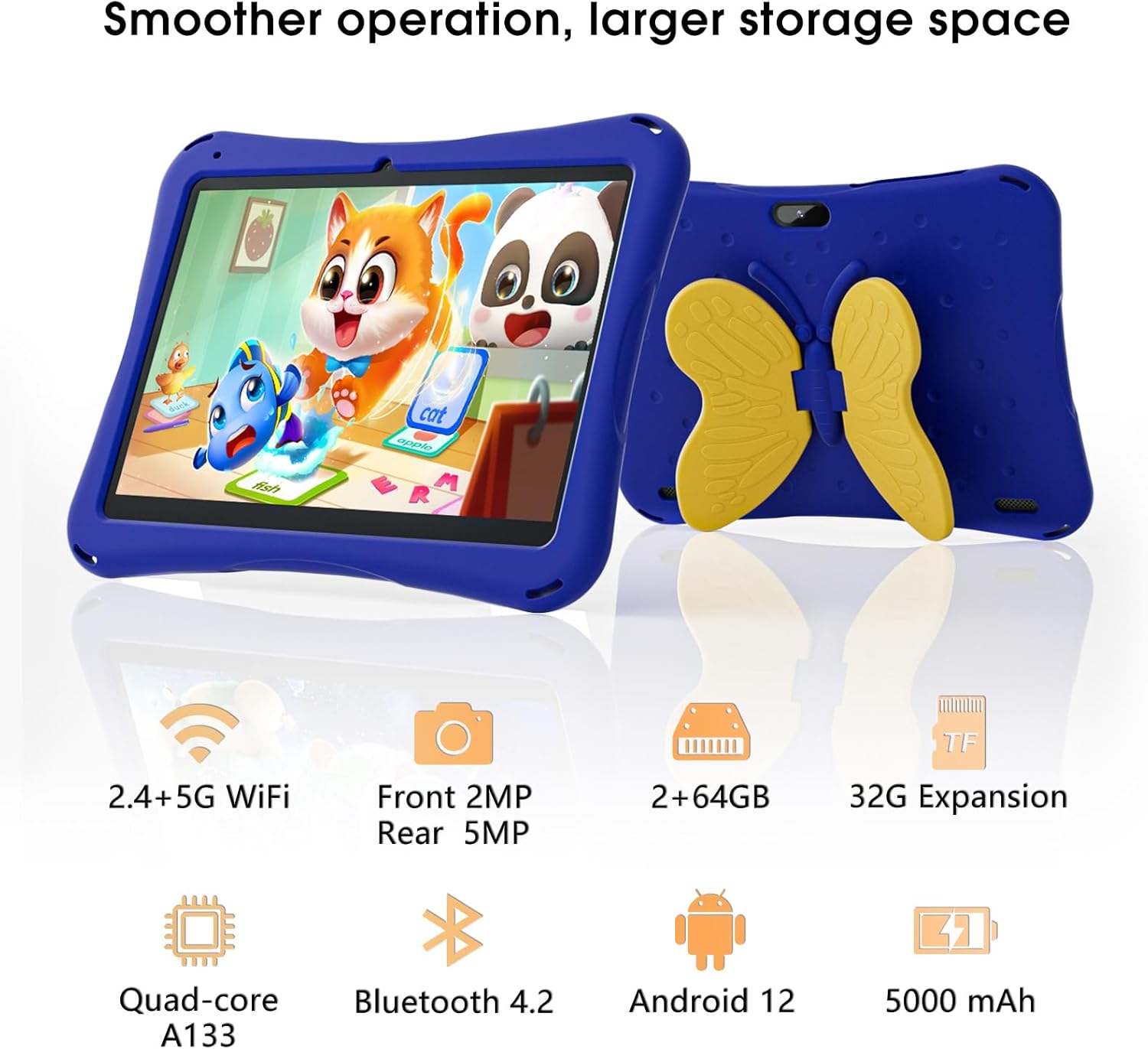
Image: SGIN Android Tablet 10.1 Inch with its protective blue case and yellow butterfly stand.
Таблет Цомпонентс

Image: Detailed diagram illustrating the various components and ports of the SGIN Android Tablet.
- Предња камера: За видео позиве и селфије.
- Задња камера: За снимање фотографија и видео записа.
- говорници: За аудио излаз.
- Порт типа Ц: За пуњење и пренос података.
- Слот за ТФ картицу: За прошириви простор за складиштење.
- Слушалице: За повезивање жичних слушалица.
- Повећајте јачину звука: Button to raise the audio level.
- Смањите јачину звука: Button to lower the audio level.
- заграда: Adjustable stand integrated into the protective case.
3. Подешавање
3.1 Пуњење таблета
Before first use, fully charge the tablet using the provided Type-C cable and power adapter. The 5000mAh battery provides approximately 6-8 hours of usage on a full charge. A charging indicator will typically appear on the screen.
3.2 Укључивање/искључивање
- За укључивање: Press and hold the power button (usually located on the side) until the SGIN logo appears.
- За искључивање: Press and hold the power button, then select 'Power Off' from the options on the screen.
- Рестартовати: Притисните и држите дугме за напајање, а затим изаберите „Рестарт“ из опција.
3.3 Initial Setup and Wi-Fi Connection
Upon first power-on, follow the on-screen prompts to complete the initial Android 13 setup. This includes selecting your language, region, and connecting to a Wi-Fi network. The tablet supports both 2.4G and 5G Wi-Fi for stable internet connectivity.
- Иди на Подешавања > Мрежа и интернет > Ви-Фи.
- Укључи/искључи Wi-Fi On.
- Изаберите жељену мрежу са листе.
- Унесите лозинку ако се то од вас затражи, а затим додирните Повежите се.
4. Упутство за употребу
4.1 Основна навигација
The tablet uses a touch-sensitive screen for navigation. Common gestures include tapping to select, swiping to scroll, pinching to zoom, and long-pressing for additional options.
4.2 Употреба камере
The tablet features a 2MP front-facing camera and a 5MP rear camera. To use the camera:
- Отворите Камера апликација.
- Select between front and rear cameras using the switch icon.
- Додирните дугме затварача да бисте снимили фотографију или покренули/зауставили снимање видеа.
4.3 Управљање складиштем
The tablet comes with 64GB of internal storage. If more space is needed, you can expand it by inserting a TF (microSD) card into the TF card slot. The tablet supports expansion up to 34GB.
4.4 Bluetooth повезивање
The tablet supports Bluetooth 4.2 for connecting to wireless accessories such as headphones or speakers.
- Иди на Подешавања > Повезани уређаји > Поставке везе > Блуетоотх.
- Укључите Блуетоотх On.
- Изаберите свој уређај са листе доступних уређаја за упаривање.
5. Parental Control Features
The SGIN tablet includes a built-in parental control security system to manage your child's usage and content access.
- Подесите лозинке: Create a password to secure parental control settings.
- Screen Time Limits: Define daily usage limits for the tablet.
- Филтрирање садржаја: Eliminate unwanted ads and create specific media files or approved websites for your children.
- Multiple Accounts: Set up individual accounts for each child, allowing personalized settings and content access.
6. Kidoz Kids Software
The tablet comes with the Kidoz Kid's software pre-installed, offering a safe and engaging environment for children.
- Accessing Kidoz: Launch the Kidoz app from the home screen.
- Kids Store: Explore thousands of free games and educational apps available for download within the Kidoz environment.
- Образовни садржај: Kidoz provides content that supports learning in subjects like math, language, music, and painting.
7. Одржавање
7.1 Чишћење
Use a soft, lint-free cloth to clean the screen and the tablet's body. For stubborn smudges, slightly dampНатопите крпу водом. Избегавајте јаке хемикалије или абразивне материјале.
7.2 Одржавање батерије
To prolong battery life, avoid exposing the tablet to extreme temperatures. Charge the tablet regularly and avoid letting the battery completely drain frequently.
7.3 Ажурирања софтвера
Periodically check for system updates to ensure optimal performance and security. Go to Подешавања > Систем > Ажурирање система.
7.4 Заштитна торбица
The included kid-proof case is designed to protect the tablet from dust, bumps, and drops. It also features a hollow design for heat dissipation. Ensure the tablet is properly seated within the case for maximum protection.

Image: The durable anti-drop protective case with its adjustable bracket.
КСНУМКС. Решавање проблема
If you encounter issues with your SGIN tablet, refer to the following common solutions:
- Таблет се не укључује: Уверите се да је таблет напуњен. Прикључите га на пуњач и сачекајте неколико минута пре него што покушате да га поново укључите.
- Екран који не реагује: If the screen becomes unresponsive, try restarting the tablet by holding down the power button for approximately 10-15 seconds until it powers off, then power it on normally.
- Проблеми са Ви-Фи везом: Check if other devices can connect to the Wi-Fi network. Restart your Wi-Fi router. On the tablet, forget the network and reconnect.
- Споре перформансе: Close unused applications running in the background. Clear cache data for apps. Consider performing a factory reset if performance issues persist (back up important data first).
- Рушење апликација: Ensure apps are updated to their latest versions. Clear the app's cache and data via Подешавања > Аппс > [Назив апликације] > Складиште и кеш.
За проблеме које ови кораци нису решили, обратите се корисничкој подршци.
9. Спецификације
Key technical specifications for the SGIN Android Tablet 10.1 Inch Model GE8300:
| Феатуре | Спецификација |
|---|---|
| Број модела | ГЕ8300 |
| Величина екрана | 10.1 инча |
| Резолуција екрана | 1280 x 800 пиксела (HD IPS) |
| Процесор | 1.6 GHz Quad-core (Allwinner A133) |
| РАМ | 4 ГБ (2 ГБ физичке + 2 ГБ прошириве) |
| Интерна меморија | 64ГБ РОМ |
| Екпандабле Стораге | Up to 34GB via TF Card |
| Оперативни систем | Андроид 13 |
| Капацитет батерије | 5000мАх |
| Предња камера | 2МП |
| Задња камера | 5МП |
| Бежично повезивање | 2.4G/5G WiFi, Bluetooth 4.2 |
| Боја | Дееп Блуе |
| Димензије парцеле | 32.2 к 20.4 к 4.7 цм; 1.04 кг |
10. Гаранција и подршка
10.1 Гаранција на производ
The SGIN Android Tablet 10.1 Inch Model GE8300 comes with a 1 година гаранције од датума куповине. Ова гаранција покрива производне недостатке при нормалној употреби. Молимо вас да сачувате доказ о куповини за потребе подношења захтева за гаранцију.
10.2 Корисничка подршка
If you require further assistance or have questions not covered in this manual, please contact SGIN customer support. Refer to the product packaging or the official SGIN webсајт за најновије контакт информације.