
Увод
This manual provides comprehensive instructions for the setup, operation, maintenance, and troubleshooting of your T-Wolf T60 Wired 60% Mechanical Keyboard. Please read this manual carefully before using the product to ensure proper function and longevity.
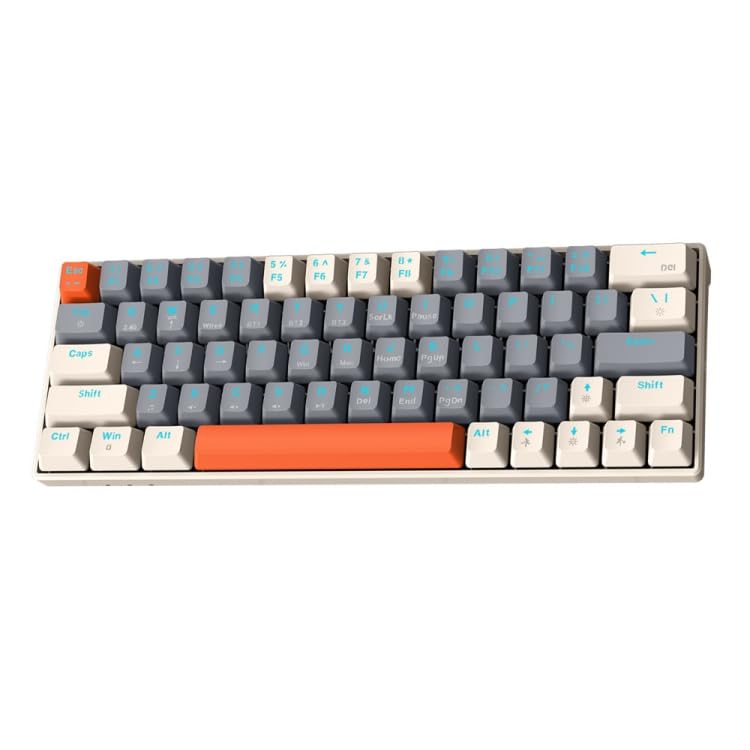
Image: T-Wolf T60 Wired 60% Mechanical Keyboard. This image displays the compact design of the keyboard, highlighting its 63-key layout and wired connectivity.
Сетуп
- Распакивање: Carefully remove the keyboard and all included accessories from the packaging. Verify that all components are present: T-Wolf T60 keyboard and USB-C to USB cable.
- Повезивање тастатуре:
- Пронађите USB-C порт на тастатури.
- Insert the USB-C end of the provided cable into the keyboard's USB-C port.
- Insert the USB-A end of the cable into an available USB 2.0 port on your computer (PC, desktop, or laptop).
- Инсталација драјвера: The T-Wolf T60 keyboard is plug-and-play. Your operating system should automatically detect and install the necessary drivers. No manual driver installation is typically required.
- Почетни тест: Open a text editor or word processor and type to confirm the keyboard is functioning correctly.
Операција
The T-Wolf T60 is a 60% mechanical keyboard with 63 keys, designed for efficient typing and gaming. It features RGB backlighting and multi-key anti-ghosting.
- Основне функције тастера: All standard alphanumeric and symbol keys function as expected. Due to the compact 60% layout, some functions (like F-keys, arrow keys, and navigation keys) are accessed via a Function (Fn) key combination. Refer to the keyboard's keycap legends for specific Fn key combinations.
- RGB позадинско осветљење: Тастатура има прилагодљиво RGB позадинско осветљење.
- To cycle through different lighting modes, use the designated Fn key combination (e.g., Fn + \ or Fn + P).
- To adjust brightness, use the designated Fn key combination (e.g., Fn + Up/Down arrow keys, if available via Fn layer).
- To change lighting speed, use the designated Fn key combination (e.g., Fn + Left/Right arrow keys, if available via Fn layer).
- Multi-Key Anti-Ghosting: This feature ensures that multiple simultaneous key presses are registered accurately, which is beneficial for fast-paced gaming and complex commands.
Одржавање
Proper maintenance helps extend the lifespan of your keyboard.
- Чишћење:
- Искључите тастатуру из рачунара пре чишћења.
- Користите бочицу компримованог ваздуха да бисте уклонили прашину и остатке између тастера.
- Обришите тастере и површину тастатуре меком, благо длакомamp, крпа која не оставља влакна. Избегавајте прекомерну влагу.
- Do not use harsh chemicals, abrasive cleaners, or solvents, as these can damage the keyboard's finish and keycap legends.
- Складиштење: Када се тастатура не користи дуже време, чувајте је на чистом и сувом месту, даље од директне сунчеве светлости и екстремних температура.
- Нега каблова: Avoid bending or twisting the USB-C cable excessively to prevent internal damage.
Решавање проблема
If you encounter issues with your T-Wolf T60 keyboard, refer to the following common solutions:
- Тастатура не реагује:
- Уверите се да је USB-C кабл безбедно повезан и са тастатуром и са рачунаром.
- Покушајте да повежете тастатуру са другим УСБ портом на рачунару.
- Тестирајте тастатуру на другом рачунару да бисте утврдили да ли је проблем у тастатури или у подешавањима оригиналног рачунара.
- Поново покрените рачунар.
- RGB Backlighting Not Working or Incorrect:
- Уверите се да је тастатура правилно повезана и да прима напајање.
- Try cycling through the RGB modes using the Fn key combinations mentioned in the Operation section.
- Check if the brightness is set to maximum.
- Тастери се не региструју или се куцају двапут:
- Clean the keyboard thoroughly, especially around the affected keys, using compressed air.
- Уверите се да испод тастера нема остатака.
- Ако проблем и даље постоји, то може указивати на квар хардвера.
Спецификације
| Феатуре | Детаљ |
|---|---|
| Бранд | Т-ВОЛФ |
| Модел | Т60 |
| Технологија повезивања | USB-C (жичани) |
| Компатибилни уређаји | PC, desktop, laptop |
| Опис тастатуре | Гејминг, Механички |
| Број кључева | 63 |
| Посебне карактеристике | RGB Backlighting, Multi-Key Anti-Ghosting |
| Материјал | Пластика |
| Распоред тастатуре | КВЕРТИ |
Гаранција и подршка
За информације о гаранцији и техничку подршку, погледајте документацију коју сте добили уз куповину или се директно обратите продавцу/произвођачу. Сачувајте доказ о куповини за потребе подношења захтева за гаранцију.
Произвођач: Т-Вулф