
1. Увод
This manual provides essential instructions for the installation, operation, and maintenance of your Aninerel 3000W Hybrid Solar Inverter, model ANJ-3KW-LV-WIFI. This device is designed to convert 24V DC power to 110V AC pure sine wave power, suitable for various off-grid and backup power applications. Please read this manual thoroughly before installation and use to ensure safe and efficient operation.
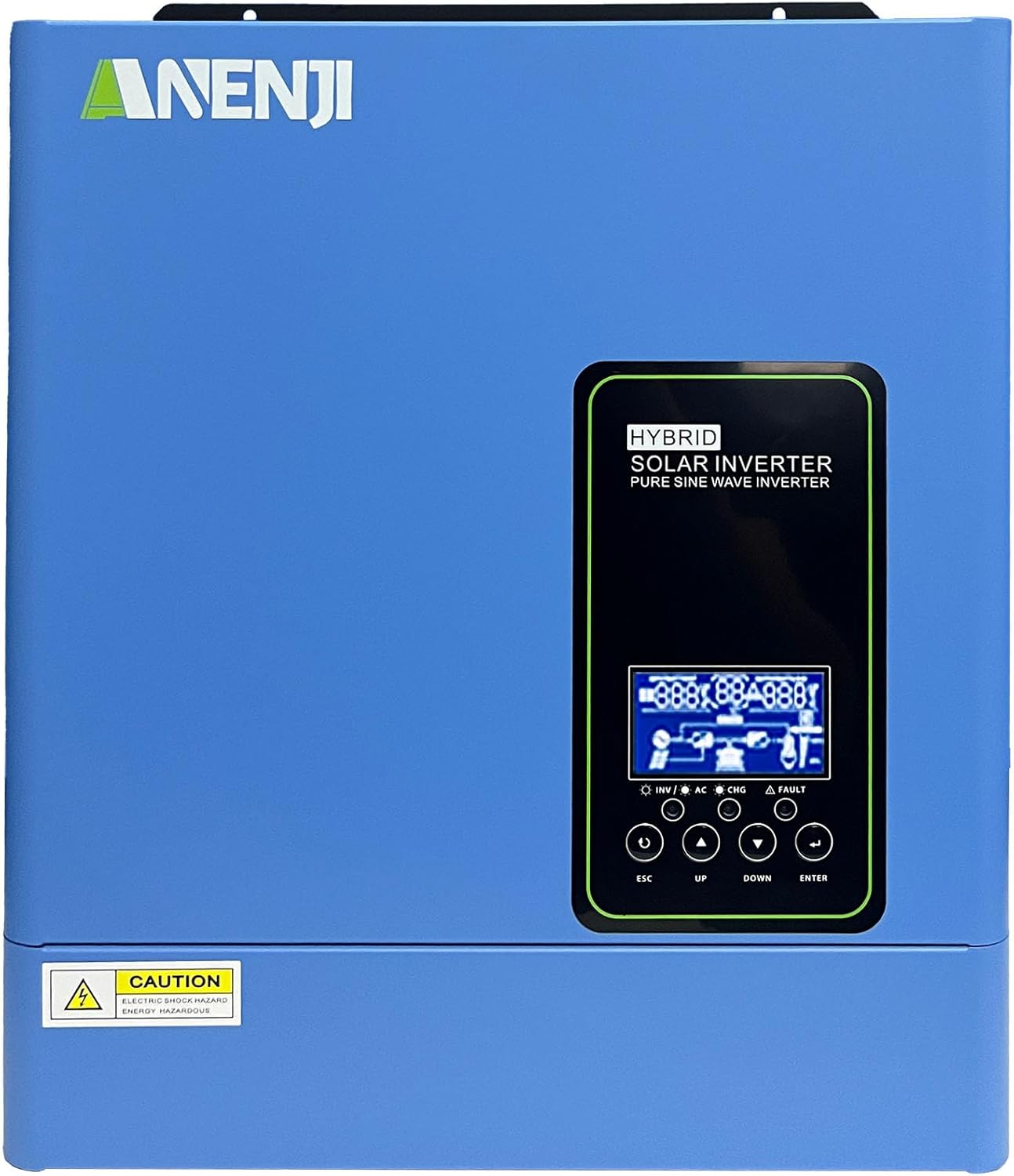
Слика 1.1: Предња страна view of the Aninerel 3000W Hybrid Solar Inverter. The inverter features a blue casing with the Aninerel logo and a central LCD display panel with control buttons.
2. Безбедносна упутства
Увек се придржавајте следећих мера предострожности како бисте смањили ризик од струјног удара, пожара или повреда:
- Read all instructions and cautionary markings on the unit and in this manual before installation or operation.
- Do not disassemble the inverter. Refer servicing to qualified personnel. Incorrect reassembly may result in electric shock or fire.
- Да бисте смањили ризик од струјног удара, искључите све ожичење пре него што покушате било какво одржавање или чишћење.
- This inverter is designed for indoor or semi-outdoor use with an IP65 rating. Avoid direct exposure to rain or snow.
- Ensure proper ventilation around the inverter to prevent overheating. Do not block ventilation openings.
- Користите одговарајући алат и личну заштитну опрему током инсталације.
- Ensure all wiring connections are tight and secure to prevent loose connections that can cause overheating.
- Do not connect the inverter to a public utility grid without proper authorization and safety measures.
3. Производ је готовview
The Aninerel 3000W Hybrid Solar Inverter integrates a pure sine wave inverter, an MPPT solar charge controller, and a battery charger into one compact unit. It is designed to provide uninterrupted power support.
3.1 Кључне карактеристике
- Излаз чистог синусног таласа од 3000 W: Converts 24V DC to 110V AC, providing stable power for sensitive electronics.
- Integrated 100A MPPT Solar Charge Controller: Maximizes solar energy harvesting with up to 500VDC PV input.
- Flexible Charging and Output Modes: Offers multiple modes (Solar Only, AC Priority, Hybrid Charging; Mains Priority, PV Priority, Hybrid Output) for diverse power management.
- Широка компатибилност са батеријама: Supports AGM, GEL, Lead-acid, Li-ion, and LiFePO4 24V batteries.
- Паметни ЛЦД екран: Provides real-time monitoring and allows for easy configuration of system settings.
- Уграђени Ви-Фи: Enables remote monitoring of the inverter status (registration required).
- Робустан дизајн: IP65-rated enclosure for durability in various environments, with intelligent cooling.
- Свеобухватна заштита: Укључује оверволtagе, ундерволtage, reverse polarity, and short circuit protection.

Слика 3.1: Предњи и задњи панел изнадview. This diagram labels the LCD display, indicators, function buttons, RS485 communication port, grounding terminal, battery input, dry contact port, built-in Wi-Fi, AC input, AC output, PV input, and power on/off switch.
3.2 Предња плоча и индикатори
- ЛЦД екран: Shows system status, operational data, and configuration settings.
- Индикатор пуњења: Illuminates to indicate battery charging status.
- Индикатор статуса: Provides general operational status of the inverter.
- Индикатор грешке: Lights up to signal system errors or warnings.
- Function Buttons (ESC, UP, DOWN, ENTER): Used for navigating menus and adjusting settings on the LCD.
3.3 Прикључци задње плоче
- РС485 комуникациони порт: For external communication and monitoring.
- Терминал за уземљење: Essential for safety grounding.
- Улаз батерије: Connects to the 24V battery bank.
- Суви контакт порт: For external control or signaling.
- Built-in Wi-Fi Module: For wireless monitoring.
- АЦ улаз: Connects to grid utility or generator AC power.
- АЦ излаз: Connects to household loads.
- ПВ улаз: Connects to solar panel arrays.
- Прекидач за укључивање/искључивање: Контролише главно напајање инвертора.
4. Инсталација и подешавање
Proper installation is crucial for the safe and efficient operation of your hybrid solar inverter. Ensure all connections are made by a qualified electrician and adhere to local electrical codes.
4.1 Монтажа претварача
- Choose a suitable location that is dry, well-ventilated, and protected from direct sunlight and moisture.
- Ensure sufficient clearance around the inverter for proper airflow and cooling.
- Mount the inverter vertically on a sturdy surface using appropriate fasteners.
4.2 Ожичење
Follow the wiring diagram carefully. All wiring should be performed with the inverter and all power sources disconnected.
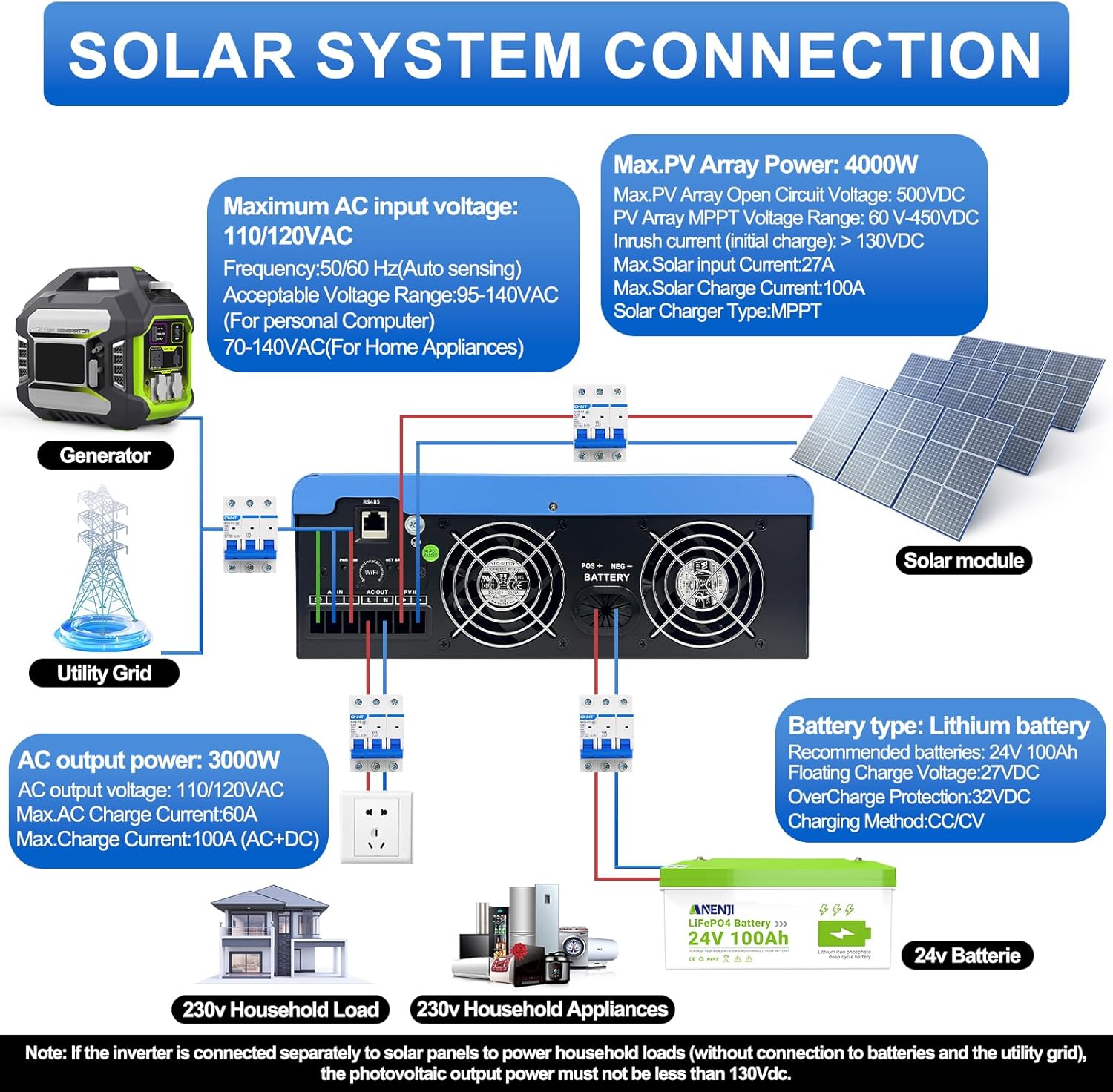
Figure 4.1: Solar System Connection Diagram. This diagram illustrates the connections for solar panels, generator, utility grid, 24V battery, and household loads to the inverter. It shows the PV input, battery input, AC input, and AC output terminals.
4.2.1 Повезивање батерије
- Connect the 24V battery bank to the battery input terminals on the inverter. Ensure correct polarity (+ to + and - to -).
- Use appropriate cable gauges for the battery connections to handle the expected current.
- The ANJ-3KW-LV-WIFI model supports a 24-volt DC system and is recommended for use with batteries of at least 100 ampere-hours capacity.

Figure 4.2: Inverter Battery Connection. This diagram shows wiring configurations for both 12-volt and 24-volt battery systems, emphasizing correct series/parallel connections for the desired voltage.
4.2.2 PV (Solar Panel) Connection
- Connect the solar panel array to the PV input terminals. Observe correct polarity.
- Ensure the total open circuit voltage of the PV array does not exceed 500VDC.
- The MPPT voltage range is 60-450VDC. Ensure your PV array voltage falls within this range for optimal charging.
4.2.3 Улаз наизменичне струје
- Connect the utility grid or generator AC power to the AC input terminals.
- The inverter supports 110/120VAC input with auto-sensing frequency (50/60Hz).
4.2.4 АЦ излазна веза
- Connect your household loads or appliances to the AC output terminals.
- The inverter provides 3000W continuous AC output at 110/120VAC.
4.3 Почетно укључивање
- After all connections are secure, switch on the battery breaker first.
- Then, switch on the PV array breaker (if applicable).
- Finally, switch on the AC input breaker (if applicable) and the inverter's main power switch.
- Observe the LCD display for initial boot-up and status indicators.
5. Операција
The inverter offers various configurable settings to optimize power management based on your specific needs.
5.1 LCD екран и подешавања
The LCD display provides real-time information and allows you to configure operational parameters using the function buttons.
- Користите UP и ДОВН дугмад за навигацију кроз опције менија.
- Притисните ЕНТЕР да бисте изабрали опцију или потврдили подешавање.
- Притисните ЕСЦ да бисте изашли из менија или отказали радњу.
5.2 Charging Priority Modes
These settings determine how the battery bank is charged from available power sources.

Figure 5.1: Charger Source Priority. This diagram illustrates three charging priority options: Solar First (solar panels charge first, AC input only if solar is unavailable), Solar and AC Input Simultaneously (both solar and utility charge at the same time), and Solar Only (solar energy is the exclusive charging source).
- Solar First: Prioritizes solar power for charging. AC input will only charge the battery when solar power is insufficient or unavailable.
- AC Priority (Utility Priority): Prioritizes AC input (utility or generator) for charging. Solar power will supplement or take over if AC input is unavailable.
- Само соларно: The inverter will only charge the battery bank from solar power. AC input will not be used for charging.
5.3 Output Priority Modes
These settings determine the power source for your connected loads.

Figure 5.2: Output Source Priority. This diagram shows three output priority options: Solar First (power from solar first, AC input supplements if solar is insufficient), AC First (redirects AC input to power loads, uses solar/batteries when AC is unavailable), and DC Priority (prioritizes solar first, then battery, then AC input only when voltage drops to a programmable value).
- Solar First (PV Priority): Prioritizes solar power to supply loads. If solar power is insufficient, the battery bank will supplement, and then AC input will be used.
- AC First (Mains Priority): Prioritizes AC input (utility or generator) to power loads. If AC input is unavailable, the inverter will switch to battery power.
- DC Priority (Battery Priority): Prioritizes solar power first, then battery power. AC input will only engage when the battery voltage drops below a programmable threshold.
5.4 Надгледање Wi-Fi мреже
The built-in Wi-Fi module allows for remote monitoring of your inverter's performance and status via a dedicated application. Registration may be required to access this feature.

Figure 5.3: Wi-Fi Monitoring. This image depicts a user monitoring the hybrid inverter's status wirelessly via a smartphone application, highlighting the convenience of the built-in Wi-Fi feature.
6. Одржавање
Regular maintenance helps ensure the longevity and optimal performance of your Aninerel Hybrid Solar Inverter.
- Чишћење: Периодично чистите спољашњост инвертора сувом крпом. Уверите се да су вентилациони отвори без прашине и остатака.
- Везе: Annually check all electrical connections (battery, PV, AC input/output) for tightness and corrosion. Tighten any loose connections.
- Окружење: Ensure the installation environment remains within the specified temperature and humidity ranges.
- Фирмвер: Проверите произвођача webсајт за сва доступна ажурирања фирмвера за побољшане перформансе или нове функције.
КСНУМКС. Решавање проблема
This section provides solutions to common issues you might encounter. If the problem persists, contact customer support.
| Проблем | Могући узрок | Решење |
|---|---|---|
| Инвертор се не укључује | Нема везе са батеријом или је батерија нискаtage; Power switch off; Loose wiring. | Проверите прикључке батерије и волtage; Ensure power switch is ON; Verify all wiring is secure. |
| Нема излаза наизменичне струје | Overload; Short circuit on output; Inverter in fault mode; Output priority setting. | Reduce load; Check for short circuits; Refer to LCD fault codes; Adjust output priority settings. |
| Battery not charging from solar | Low PV voltage; Incorrect PV connection; Solar charging disabled; Faulty solar panels. | Check PV array voltage (must be >60VDC); Verify PV polarity; Check charging priority settings; Inspect solar panels. |
| Упозорење о прегревању | Insufficient ventilation; Excessive ambient temperature; Overload. | Ensure clear airflow around inverter; Relocate to cooler area; Reduce connected load. |
| Wi-Fi monitoring not working | No Wi-Fi signal; Incorrect app configuration; Registration issue. | Check Wi-Fi signal strength; Reconfigure app settings; Contact support for registration issues. |
8. Спецификације
Technical specifications for the Aninerel 3000W Hybrid Solar Inverter ANJ-3KW-LV-WIFI:
| Феатуре | Спецификација |
|---|---|
| Број модела | ANJ-3KW-LV-WIFI |
| Континуирана излазна снага | 3000В |
| Вршна излазна снага | 6000В |
| ДЦ Инпут Волtage | 24В |
| АЦ Оутпут Волtage | 110В АЦ |
| Оутпут Вавеформ | Чисти синусни талас |
| Макс. ПВ улазна снага | 4000В |
| MPPT Controller Current | 100А |
| Макс. ПВ Опен Цирцуит Волtage | 500ВДЦ |
| ПВ Арраи МППТ Волtagе Распон | 60-450ВДЦ |
| Макс. АЦ улазна струја | 60А |
| Излазна фреквенција | 50/60Хз (аутоматско откривање) |
| Компатибилност батерија | AGM, GEL, Lead-acid, Li-ion, LiFePO4 (24V) |
| Оцена заштите | ИП65 |
| Димензије производа | 15 к 6.98 к 18 инча |
| Тежина артикла | 16.5 фунти |
9. Гаранција и подршка
For warranty information, please refer to the warranty card included with your product or visit the official Aninerel website. For technical support, troubleshooting assistance, or service inquiries, please contact Aninerel customer service through their official channels.
Manufacturer: Shenzhen Anenji Energy Technology Co.,Ltd