
Увод
This manual provides detailed instructions for the setup, operation, and maintenance of your LIGE EF19-A Smartwatch. This device features a 1.85-inch HD display, Bluetooth calling capabilities, extensive health monitoring, and over 100 sports modes. It is designed for durability with IP68 waterproofing and a robust build. Please read this manual thoroughly to ensure proper use and to maximize the functionality of your smartwatch.
1. Подешавање
1.1 Садржај пакета
- 1 x LIGE EF19-A Smartwatch
- 2 x Watch Straps (1 steel, 1 silicone)
- 1 к УСБ кабл за пуњење
- 1 к Типе-Ц кабл за пуњење
- 1 x Strap Adjuster (Regulator)
- 1 к Упутство за употребу
1.2 Пуњење паметног сата
Before initial use, fully charge your smartwatch.
- Повежите магнетни кабл за пуњење са контактима за пуњење на задњој страни паметног сата.
- Connect the other end of the charging cable (USB or Type-C) to a compatible power source (e.g., USB wall adapter, computer USB port, power bank, car charger).
- Екран сата ће приказивати статус пуњења. Потпуно пуњење обично траје око 2 сата.

Image: The smartwatch connected to a charging cable, illustrating its 1000 mAh battery capacity and charging process.
A fully charged battery provides up to 7-15 days of normal use and up to 50 days in standby mode.
1.3 Инсталација и упаривање апликације
To access all features, download the companion app on your smartphone. The smartwatch is compatible with Android 5.1 and higher, and iOS 9.0 and higher.
- Scan the QR code provided in the manual or on the watch packaging, or search for the app name (usually specified in the quick start guide) in your phone's app store (Google Play Store for Android, Apple App Store for iOS).
- Install the app and create an account if prompted.
- Уверите се да је Блуетоотх омогућен на вашем паметном телефону.
- Open the app and follow the on-screen instructions to add your device. The app will search for your smartwatch.
- Select your smartwatch (e.g., "EF19-A" or similar Bluetooth name) from the list of available devices to pair.
- Confirm the pairing request on both your smartphone and smartwatch if a prompt appears.
1.4 Strap Installation/Adjustment
The smartwatch comes with two interchangeable straps: a steel strap and a silicone strap.
- Да бисте причврстили каиш: Align the spring bar with the lug holes on the watch body and slide the pin into place.
- Да бисте уклонили каиш: Locate the small lever on the spring bar, pull it inwards, and gently detach the strap from the watch body.
- For the steel strap: Use the provided strap adjuster (regulator) to remove or add links for a comfortable fit. Refer to the specific instructions for the strap adjuster if needed.
2. Упутство за употребу
2.1 Основна навигација
- екран осетљив на додир: Превуците прстом лево/десно, горе/доле да бисте се кретали кроз меније и функције. Додирните да бисте изабрали.
- Бочно дугме(а): Typically, one button serves as a power on/off, back, or home button. Long press for power options, short press to return to the watch face or previous screen.
2.2 Bluetooth позиви и обавештења
Once paired with your smartphone, the smartwatch allows you to manage calls and receive notifications.
- Упућивање/примање позива: When a call comes in, the watch will display the caller ID. You can answer or reject calls directly from the watch. You can also dial numbers or select contacts from the watch interface.
- Обавештења о порукама: Receive notifications for SMS, Facebook, WhatsApp, Twitter, TikTok, and other apps directly on your watch. Swipe down from the watch face to view недавна обавештења.

Image: The smartwatch showing an incoming call, message notifications, and the voice assistant interface.
2.3 Мониторинг здравља
Паметни сат континуирано прати разне здравствене показатеље.
- Откуцаји срца: Access the heart rate monitoring function to view ваш тренутни откуцај срца и историјски подаци.
- Кисеоник у крви (SpO2): Измерите ниво кисеоника у крви.
- Квалитет сна: The watch automatically tracks your sleep patterns, including deep sleep, light sleep, and wake times. View detailed sleep reports in the companion app.
- Ниво стреса: Пратите ниво стреса током дана.
- Тренинг дисања: Engage in guided breathing exercises to help manage stress.

Image: A user wearing the smartwatch, with the display showing real-time heart rate, blood oxygen saturation, and breathing exercise prompts.
Напомена: This device is not a medical device. Health monitoring data is for reference only and should not be used for medical diagnosis or treatment.
2.4 спортских режима
The smartwatch supports over 100 sports modes for tracking your physical activity.
- Navigate to the "Workout" or "Sports" menu on your watch.
- Select your desired activity (e.g., running, cycling, swimming, hiking, yoga, badminton, basketball, golf).
- The watch will begin tracking metrics such as steps, distance, calories burned, and heart rate.
- End the workout by following the on-screen prompts. Detailed summaries are available on the watch and in the companion app.

Image: A person cycling while wearing the smartwatch, with the display showing steps, distance, calories, and heart rate for different sports activities.
2.5 Torch Function
The smartwatch includes a built-in torch function for instant illumination.
- Access the torch function from the quick settings menu or app list.
- It offers different modes such as constant light, warning mode, and SOS mode.
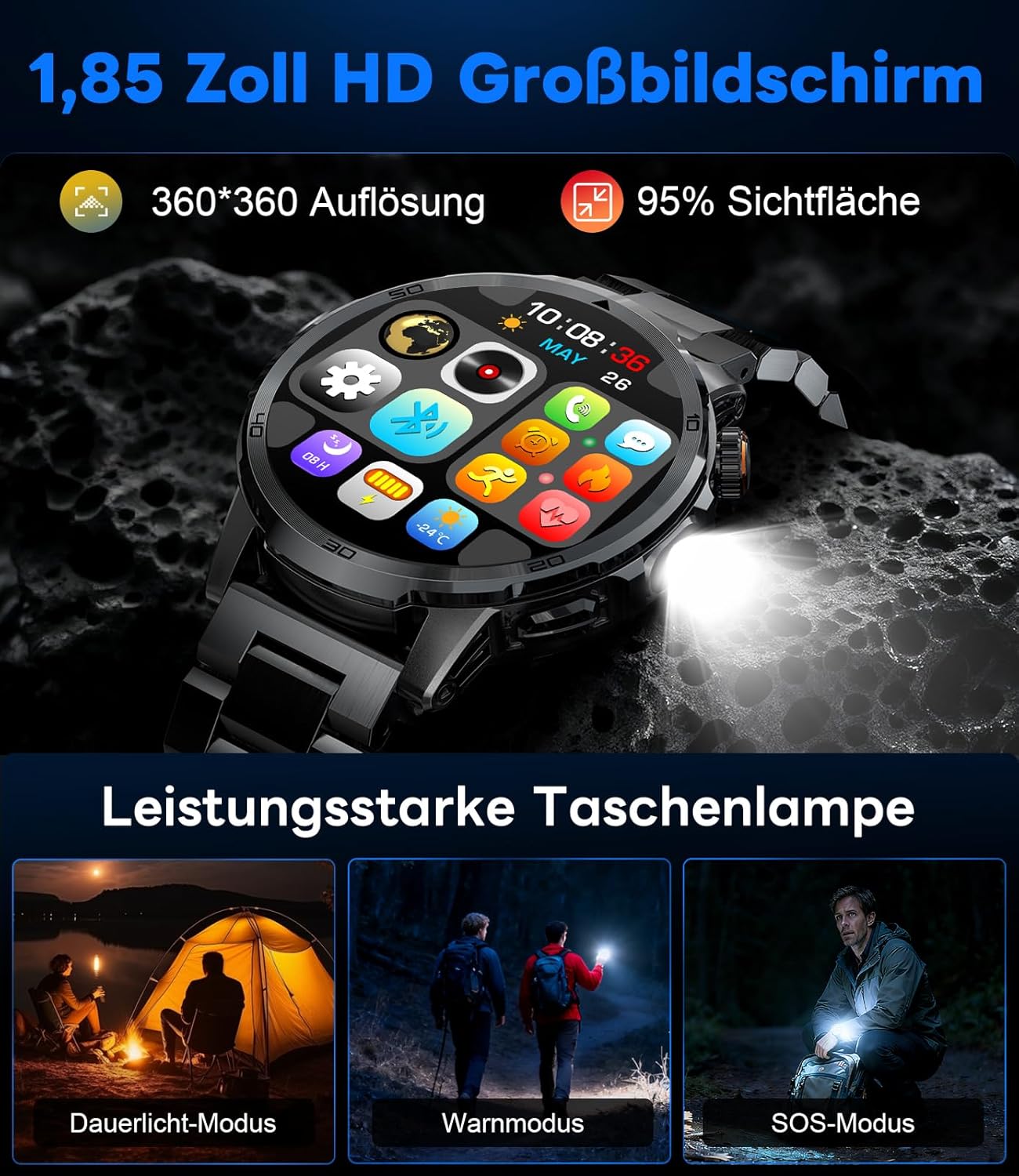
Image: The smartwatch displaying its 1.85-inch HD screen and demonstrating its powerful flashlight feature with different modes.
2.6 Остале функције
- Гласовни асистент: Activate the voice assistant to control your phone or get information (e.g., "What's the weather?").
- Контрола музике: Control music playback on your smartphone (play, pause, skip tracks, adjust volume) directly from your watch.
- Контрола камере: Користите свој сат као даљински управљач за камеру свог паметног телефона.
- Временска прогноза: View тренутне временске прилике и прогнозе.
- Аларми и тајмери: Подесите аларме и користите функције штоперице/тајмера.
- Подсетник за пиће: Поставите подсетнике за пијење воде.
- Лица за гледање: Customize your watch face from over 100 options or upload your own photos via the app.

Image: The smartwatch interface displaying icons for music control, flashlight, camera control, weather, alarm, and drink reminders.

Image: A selection of diverse watch faces available for customization on the LIGE EF19-A Smartwatch.
3. Одржавање
3.1 Чишћење
- Regularly clean your smartwatch and straps with a soft, dry, lint-free cloth.
- Ако је потребно, користите мало дamp крпу са благим сапуном, а затим обришите на суво.
- Избегавајте употребу јаких хемикалија, абразивних средстава за чишћење или растварача, јер они могу оштетити завршну обраду и заптивке сата.
- Уверите се да су контакти за пуњење чисти и суви пре пуњења.
3.2 Отпорност на воду (IP68)
The LIGE EF19-A Smartwatch is IP68 waterproof, meaning it is resistant to dust and can withstand immersion in water up to 1.5 meters for up to 30 minutes.
- It is suitable for daily use, such as hand washing, rain, and shallow water swimming.
- Avoid using the watch in hot water, saunas, or steam rooms, as steam can penetrate the seals and cause damage.
- Не притискајте дугмад под водом.
- After exposure to water, wipe the watch dry before charging or using.

Image: The smartwatch highlighting its robust military-grade design, including resistance to temperature extremes, shock, dust, and IP68 water resistance.
КСНУМКС. Решавање проблема
4.1 Сат се не укључује
- Уверите се да је сат потпуно напуњен. Повежите га са пуњачем најмање 30 минута.
- Try long-pressing the side button for 10-15 seconds to force a restart.
4.2 Није могуће упаривање са паметним телефоном
- Уверите се да је Блуетоотх омогућен на вашем паметном телефону.
- Ensure the smartwatch is within Bluetooth range (typically 10 meters).
- Поново покрените и паметни телефон и паметни сат.
- Check if the app has the necessary permissions (location, Bluetooth, etc.).
- If previously paired, try "forgetting" the device in your phone's Bluetooth settings and re-pairing through the app.
4.3 Нетачни здравствени подаци
- Уверите се да сат чврсто приања на зглоб, отприлике ширину једног прста изнад кости зглоба.
- Избегавајте прекомерно кретање током мерења.
- Очистите сензор на задњој страни сата.
- Фактори околине и индивидуална физиологија могу утицати на очитавања.
4.4 Обавештења се не појављују
- Verify that the watch is successfully paired with your smartphone.
- Check notification settings within the companion app to ensure desired apps are enabled for notifications.
- Ensure your phone's notification settings allow the companion app to display notifications.
- Make sure your phone is not in "Do Not Disturb" mode.
5. Спецификације
| Феатуре | Спецификација |
|---|---|
| Број модела | ЕФ19-А |
| Дисплаи | 1.85-inch IPS HD Touch Screen, 360x360 pixels |
| Капацитет батерије | 1000 мАх литијум полимер |
| Трајање батерије (нормална употреба) | 7-15 дана |
| Трајање батерије (приправност) | До 50 дана |
| Време пуњења | Прибл. 2 сата |
| Повезивање | Блуетоотх 5.2 |
| Отпорност на воду | ИПКСНУМКС (водоотпоран) |
| Капацитет меморије | 128 МБ |
| Компатибилни уређаји | Android 5.1+ / iOS 9.0+ Smartphones |
| Мониторинг здравља | Heart Rate, Blood Oxygen, Sleep Quality, Stress Level |
| Спортски режими | 100+ (e.g., Running, Cycling, Swimming, Hiking, Yoga) |
| Додатне карактеристике | Bluetooth Calls, Message Notifications, Torch, Voice Assistant, Music Control, Camera Control, Weather, Alarms, Timers, Drink Reminder, Customizable Watch Faces |
| ГПС | Преко паметног телефона |
| Циљна публика | Мушкарци |
6. Информације о гаранцији
The LIGE EF19-A Smartwatch comes with a 2 година гаранције од датума куповине. Ова гаранција покрива производне недостатке и кварове при нормалној употреби.
Гаранција не покрива:
- Damage caused by improper use, accident, abuse, neglect, or unauthorized modification.
- Normal wear and tear, including scratches, dents, or cosmetic damage.
- Damage caused by exposure to extreme temperatures, liquids (beyond IP68 rating), or corrosive environments.
- Damage to accessories (straps, charging cables) unless defective upon receipt.
To claim warranty service, please retain your proof of purchase and contact customer support.
7. Корисничка подршка
If you encounter any issues or have questions regarding your LIGE EF19-A Smartwatch that are not covered in this manual, please contact our customer support team.
- Погледајте контакт информације наведене на паковању производа или званичне контакт информације LIGE-а. webсајту.
- When contacting support, please provide your product model number (EF19-A) and a detailed description of the issue.