
1. Увод
Thank you for choosing the OMOTON WK209 Wireless Keyboard and Mouse Set. This manual provides detailed instructions for setting up, operating, and maintaining your new wireless peripheral set. Please read this manual carefully before use to ensure optimal performance and longevity of your product.
2. Садржај пакета
The OMOTON WK209 Wireless Keyboard and Mouse Set package includes the following items:
- 1 x OMOTON WK209 Wireless Keyboard
- 1 x OMOTON Wireless Mouse
- 1 x USB 2.4 GHz Receiver
Note: AAA batteries are required for operation but are not included in the package.
3. Водич за подешавање
3.1. Инсталирање батерија
Before using the keyboard and mouse, you need to install batteries.
- Пронађите одељак за батерију на доњој страни тастатуре и миша.
- Отворите поклопце батерија.
- Insert two AAA batteries into the keyboard and one AAA battery into the mouse, ensuring correct polarity (+/-).
- Чврсто затворите поклопце батерија.

This image displays the battery compartments for the OMOTON WK209 keyboard and mouse. The keyboard requires two AAA batteries, and the mouse requires one AAA battery. Please note that batteries are not included with the product.
3.2. Повезивање USB пријемника
The OMOTON WK209 set uses a single USB receiver for both the keyboard and mouse.
- Locate the USB 2.4 GHz receiver, usually stored in the mouse's battery compartment or packaging.
- Plug the USB receiver into an available USB port on your computer (laptop or desktop PC).
- The system will automatically detect and install the necessary drivers. This is a Plug & Play process and typically requires no manual installation.
- Turn on the mouse using the ON/OFF switch located on its underside. The keyboard does not have a separate power switch; it activates when keys are pressed.

This image illustrates the 2.4 GHz wireless connection of the OMOTON WK209 keyboard and mouse set. It highlights features such as Plug & Play functionality, a stable 2.4G connection, and a wireless range of up to 10 meters (33 feet).
3.3. Компатибилност
The OMOTON WK209 set is compatible with a wide range of Windows operating systems.
- Оперативни системи: Windows 11, Windows 10, Windows 8, Windows 7, Windows XP.
- Уређаји: Laptop, Desktop PC.

This image demonstrates the broad compatibility of the OMOTON WK209 set with different Windows operating systems, including Windows 7, 8, 10, and 11, across desktop PCs and laptops.
4. Упутство за употребу
4.1. Употреба тастатуре
The WK209 keyboard features a full-size QWERTZ layout with multimedia keys for enhanced productivity. Simply begin typing after successful connection.
- Мултимедијални тастери: Access functions like volume control, play/pause, and more directly from the keyboard.
- QWERTZ распоред: Standard German keyboard layout for familiar typing experience.
- Нагиб од 8°: The keyboard is designed with a natural 8-degree tilt for ergonomic comfort during extended use.

This image provides the physical dimensions of the OMOTON WK209 full-size QWERTZ keyboard (43.8 cm x 12.4 cm) and mouse (10.3 cm x 6.6 cm x 3.6 cm). It also notes the keyboard's natural 8-degree tilt for comfortable typing.
4.2. Употреба миша
The WK209 mouse offers precise control and several functional buttons.
- Леви клик: Стандардни избор и активација.
- Десни клик: Accesses context menus.
- Точак за померање: За вертикално скроловање и функционалност клика средњим тастером миша.
- Дугме за назад: Navigates back in web претраживачи или file истраживачи.
- Дугме за напред: Навигација напред у web претраживачи или file истраживачи.
- Desktop Show/Hide Button: Quickly minimizes all open windows to show the desktop, and restores them with another press.

This image highlights the features of the OMOTON WK209 wireless mouse, including the scroll wheel, left-click button, right-click button, back button, forward button, and a button for showing/hiding the desktop. It also emphasizes its ergonomic design and quiet click functionality.
5. Карактеристике
- 2.4 GHz Wireless Connection: Provides a stable and reliable connection with a range of up to 10 meters (33 feet).
- Плуг & Плаи: Easy setup without the need for additional software or drivers.
- Full-size QWERTZ Layout: Comfortable and familiar typing experience.
- Мултимедијални тастери: Convenient access to media controls.
- Ергономски дизајн: The mouse is shaped for comfortable use, and the keyboard features a natural 8-degree tilt.
- Тих рад: Both the keyboard and mouse are designed for silent clicks and keystrokes, ideal for quiet environments.
- Индикатор слабе батерије: The keyboard features an indicator light to alert you when batteries are running low.

This image illustrates the quiet operation of the OMOTON WK209 keyboard and mouse, highlighting its silent keys and noiseless mouse clicks, suitable for quiet environments.
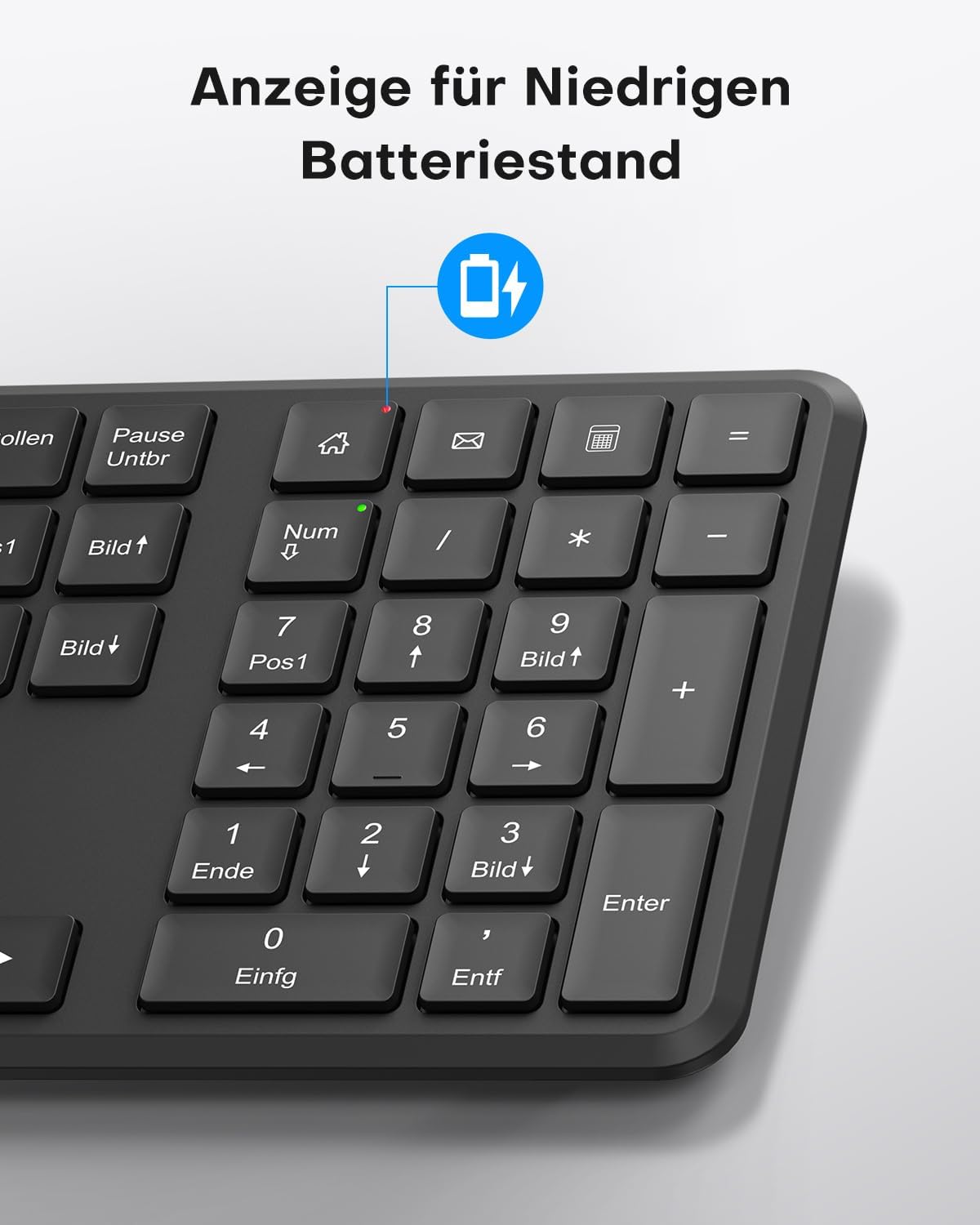
This image points out the low battery indicator on the OMOTON WK209 keyboard, which illuminates to alert the user when batteries need to be replaced.
6. Одржавање
To ensure the longevity and optimal performance of your OMOTON WK209 set, follow these maintenance guidelines:
- Чишћење: Користите меку, суву крпу за чишћење површина тастатуре и миша. За тврдокорну прљавштину, благо дamp Може се користити тканина, али водите рачуна да влага не уђе у уређаје.
- Замена батерије: Replace batteries promptly when the low battery indicator appears or when performance degrades. Always use fresh, high-quality AAA batteries.
- Складиштење: When not in use for extended periods, remove the batteries to prevent leakage. Store the devices in a cool, dry place.
- Избегавајте течности: Keep the keyboard and mouse away from liquids to prevent damage.
КСНУМКС. Решавање проблема
If you encounter issues with your OMOTON WK209 set, try the following troubleshooting steps:
- Нема одговора од тастатуре/миша:
- Ensure batteries are correctly installed and not depleted. Replace them if necessary.
- Make sure the mouse's ON/OFF switch is in the 'ON' position.
- Проверите да ли је USB пријемник безбедно прикључен на исправан USB порт на рачунару. Покушајте са другим USB портом.
- Поново покрените рачунар.
- Кашњење или повремена веза:
- Приближите тастатуру и миш УСБ пријемнику.
- Ensure there are no large metal objects or other wireless devices (e.g., Wi-Fi routers, cordless phones) interfering with the 2.4 GHz signal.
- Try plugging the USB receiver into a front USB port or using a USB extension cable to bring it closer to the devices.
- Keys Not Working Correctly:
- Проверите да ли има остатака испод тастера.
- Ensure the keyboard layout setting on your computer matches the QWERTZ layout.
- Курсор миша скаче или је нетачан:
- Очистите оптички сензор на доњој страни миша.
- Користите миш на чистој, нерефлектујућој површини или подлози за миш.
8. Спецификације
| Феатуре | Детаљ |
|---|---|
| Бранд | ОМОТОН |
| Модел | ВК209 |
| Боја | Црно |
| Технологија повезивања | 2.4 ГХз бежично |
| Распоред тастатуре | Full-size QWERTZ (German Layout) |
| Посебне карактеристике | 2.4 GHz, Full-size, QWERTZ-layout, Battery-operated, Multimedia keys |
| Компатибилни уређаји | Лаптоп, ПЦ |
| Компатибилни оперативни системи | Виндовс 11/10/8/7/КСП |
| Извор напајања | Battery-Powered (2x AAA for keyboard, 1x AAA for mouse - not included) |
| Тежина ставке (приближно) | 514 Grams (total set, including packaging) |
| Димензије пакета | 44.79 к 13.9 к 5.3 цм |
| ASIN | B0FQNS3FFB |
9. Гаранција и подршка
OMOTON products are designed for reliability and performance. For warranty information and customer support, please refer to the warranty card included with your purchase or visit the official OMOTON website. If you experience any issues that cannot be resolved using the troubleshooting guide, please contact OMOTON customer service for assistance.