
OHAYO X10 Max
OHAYO X10 Max Bluetooth Speaker Instruction Manual
Welcome to your new OHAYO X10 Max Portable Bluetooth Speaker.
1. Важне информације о безбедности
- Не излажите звучник екстремним температурама или директној сунчевој светлости током дужег периода.
- Држите звучник даље од извора топлоте, оштрих предмета и корозивних материјала.
- Do not disassemble, repair, or modify the speaker yourself. Contact qualified service personnel if needed.
- Ensure the charging port cover is securely closed when using the speaker near water to maintain its IPX7 waterproof rating.
- Користите само приложени кабл за пуњење или сертификовани USB-C кабл за пуњење.
2. Садржај пакета
- 1 x OHAYO X10 Max Bluetooth Speaker (White)
- 1 x USB-C Charging Cable (charging plug not contained)
- 1 к 3.5 мм АУКС кабл
- 1 к Упутство за употребу
- 1 к Ланиард
3. Производ је готовview
The OHAYO X10 Max is a versatile portable Bluetooth speaker designed for high-quality audio and durability. It features a powerful 25W sound output with active bass, IPX7 waterproofing, and a long-lasting 24-hour battery. Enjoy dynamic sound with colorful RGB lighting effects, dual pairing for stereo sound, and multiple input modes.
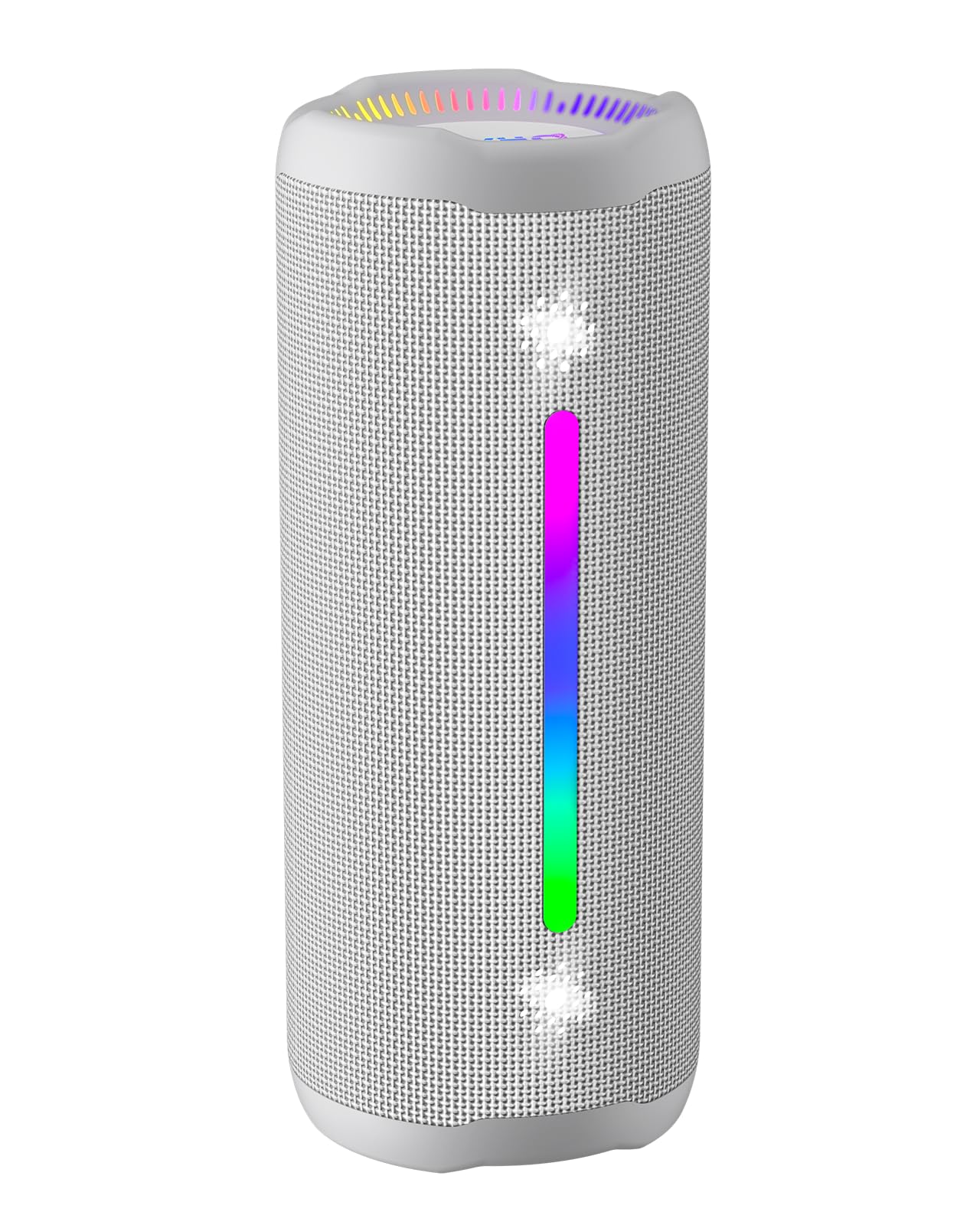
Figure 3.1: OHAYO X10 Max Bluetooth Speaker (White)

Figure 3.2: OHAYO X10 Max Bluetooth Speaker - Fully upgraded from appearance to performance.

Figure 3.3: 25W Deep Bass Sound - Independent channel design for accurate audio performance.

Figure 3.4: 6 Dazzling RGB Light Effects - Syncs with music for an immersive experience.

Figure 3.5: IPX7 Waterproof - Highly sealed design for use in various environments.

Figure 3.6: 24H Ultra-Long Battery Life - 6600mAh battery for extended playback.
4. Контроле и индикатори
The OHAYO X10 Max features intuitive controls for easy operation.

Figure 4.1: Control Panel and Ports
- Дугме за напајање: Press and hold to power on/off. Short press to switch between input modes (Bluetooth, AUX, TF Card, USB-Audio).
- Volume Up (>): Кратко притисните за повећање јачине звука. Дуго притисните за следећу нумеру.
- Volume Down (<): Кратко притисните за смањење јачине звука. Дуго притисните за претходну нумеру.
- Дугме за бас: Press to activate/deactivate Bass Boost mode.
- Дугме за репродукцију/паузирање/позивање: Short press to play/pause music. Short press to answer/end calls. Long press to reject calls. Double press to activate voice assistant.
- Индикаторска светла батерије: Four LED lights indicate battery level.
- RGB Light Strip: Displays various colorful lighting effects.
- Порт за пуњење (УСБ-Ц): За пуњење звучника.
- AUX-in порт: За жично повезивање звука.
- Слот за ТФ картицу: For playing music directly from a MicroSD card.
5. Подешавање
5.1 Пуњење звучника
Before first use, fully charge the speaker. Connect the provided USB-C charging cable to the speaker's charging port and the other end to a 5V/2A USB power adapter (not included). The battery indicator lights will blink during charging and remain steady when fully charged.
5.2 Укључивање/искључивање
Press and hold the Power button for approximately 3 seconds to turn the speaker on or off. A voice prompt will confirm the action.
5.3 Блуетоотх упаривање
- Turn on the speaker. It will automatically enter Bluetooth pairing mode, indicated by a blinking blue LED.
- Омогућите Блутут на свом уређају (паметном телефону, таблету итд.).
- Тражи "X10 Max" in your device's Bluetooth list and select it to connect.
- Када се једном повеже, гласовна порука ће потврдити успешно упаривање.
5.4 Упаривање са правим бежичним стерео (TWS) системом
To achieve a true wireless stereo experience, you can pair two OHAYO X10 Max speakers together.

Figure 5.1: True Wireless Stereo Pairing
- Ensure both X10 Max speakers are powered on and not connected to any other Bluetooth device.
- На једном звучнику (ово ће бити примарни звучник), двапут притисните дугме за напајање. Ући ће у TWS режим упаривања.
- The two speakers will automatically connect to each other. A voice prompt will confirm successful TWS pairing.
- Сада повежите свој уређај са примарним звучником путем Блутута као што је описано у одељку 5.3.
5.5 Повезивање преко AUX-а
Use the provided 3.5mm AUX cable to connect the speaker to devices without Bluetooth capability.
Figure 5.2: 4 Input Modes - Including AUX, TF, and USB-Audio.
- Connect one end of the AUX cable to the speaker's AUX-in port.
- Повежите други крај са аудио излазом вашег уређаја.
- The speaker will automatically switch to AUX mode. If not, short press the Power button to cycle through modes until AUX mode is activated.
5.6 Using TF Card
Insert a MicroSD (TF) card with MP3/WAV/FLAC/WMA audio files into the TF card slot. The speaker will automatically switch to TF card mode and begin playback. Short press the Power button to cycle through modes if needed.
5.7 Using USB-Audio
Connect the speaker to a computer using the USB-C cable. The speaker can function as an external audio output device for your computer. Short press the Power button to cycle through modes if needed.
6. Упутство за употребу
6.1 Пуштање музике
- Пусти/паузирај: Short press the Play/Pause/Call button.
- Контрола јачине звука: Short press the Volume Up (>) or Volume Down (<) buttons.
- Следећа нумера: Long press the Volume Up (>) button.
- Претходни запис: Long press the Volume Down (<) button.
6.2 Bass Boost Function
Press the 'BASS' button to activate or deactivate the enhanced bass mode. This feature provides deeper and richer low frequencies for a more impactful audio experience.
6.3 РГБ светлосних режима
The speaker features dynamic RGB lighting. The lights will automatically sync with the music beat. To turn the lights on/off, refer to the specific control instructions in your quick start guide or experiment with the mode button if available.
6.4 Позивање без употребе руку
Када се повеже са паметним телефоном путем Блутута, звучник се може користити за позиве без употребе руку.

Слика 6.1: Функција позивање без употребе руку
- Одговори/заврши позив: Short press the Play/Pause/Call button.
- Одбиј позив: Long press the Play/Pause/Call button.
- Активирање гласовног помоћника: Double press the Play/Pause/Call button.
7. Одржавање
- Чишћење: Обришите звучник меком, дamp тканина. Немојте користити јаке хемикалије или абразивна средства за чишћење.
- Складиштење: Чувајте звучник на хладном и сувом месту, даље од директне сунчеве светлости и екстремних температура када се не користи дуже време.
- Одржавање батерије: To prolong battery life, charge the speaker at least once every three months if not used regularly.
КСНУМКС. Решавање проблема
| Проблем | Могући узрок | Решење |
|---|---|---|
| Звучник се не укључује. | Ниска батерија. | Потпуно напуните звучник. |
| Није могуће упаривање преко Bluetooth-а. | Звучник није у режиму упаривања; Bluetooth уређаја је искључен; превише је удаљен од уређаја. | Ensure speaker is in pairing mode (blinking blue LED). Turn on device Bluetooth. Move device closer to speaker (within 10 meters). |
| Нема звука или је јачина звука ниска. | Volume too low on speaker or device; incorrect input mode. | Increase volume on both speaker and device. Check if the correct input mode (Bluetooth, AUX, TF) is selected. |
| Упаривање TWS-а није успело. | Speakers too far apart; one speaker already connected to another device. | Ensure speakers are close to each other. Disconnect any existing Bluetooth connections before TWS pairing. |
| Изобличење звука. | Volume too high; low battery. | Reduce volume. Charge the speaker. |
9. Спецификације
| Феатуре | Спецификација |
|---|---|
| Назив модела | Кс10 Мак |
| Блуетоотх верзија | 5.3 |
| Бежична комуникациона технологија | Блуетоотх |
| Максимална излазна снага звучника | 35 Watts (25W effective) |
| Капацитет батерије | 6600 мАх |
| Плаитиме | Up to 24 hours (varies with volume and light use) |
| Ниво отпорности на воду | ИПКС7 (водоотпоран) |
| Улазни волtage | 5 волти (ДЦ) |
| Фреквенцијски одзив | 20 КХз |
| Однос сигнала и шума | 80 дБ |
| Тип аудио драјвера | Динамички возач |
| Пречник вуфера | 75 милиметара |
| Пречник високотонца | 26 милиметара |
| Димензије производа | 2.95"Д к 2.95"Ш к 7.28"В |
| Тежина артикла | 450 грама (15.9 унци) |
| Материјал | Акрилонитрил бутадиен стирен (ABS), алуминијум |
| Контролни метод | Притисните дугме |
| Посебне карактеристике | Bass Boost, AUX, Hi-Res Audio, 24-Hour Playtime, IPX7 Waterproof, TF Card Port, Dual Passive Radiators, Hands-free, True Wireless Stereo Pairing, Shockproof |
10. Гаранција и подршка
The OHAYO X10 Max Bluetooth Speaker comes with an extended warranty. For specific warranty details and to register your product, please refer to the information provided in your quick start guide or contact OHAYO customer support.
For technical support or customer service inquiries, please contact OHAYO Direct. Contact information may be found in your product packaging or on the official OHAYO webсајту.
11. Званични видео производа
Video 11.1: Official OHAYO Portable Bluetooth Speaker overview by OHAYO Direct. This video highlights key features and design elements of the speaker.