
Увод
Thank you for choosing the RecorCam HC801PRO 4G Trail Camera. This manual provides detailed instructions to help you set up, operate, and maintain your camera effectively. Please read this manual thoroughly before use to ensure optimal performance and longevity of your device.
Кључне карактеристике
- 4Г повезивање: Equipped with a 4G module and an upgraded 360° antenna for stable mobile data transfer, compatible with major French carriers (Telecom France, Orange, SFR, BOUYGUES).
- Праћење у реалном времену: Access real-time photos and videos via the free "SuntekCam" mobile application (iOS and Android compatible).
- Двоструки режими рада:
- ТЕСТ режим: Allows real-time surveillance and manual capture of videos or photos through the app.
- ОН режим: Automatically detects motion and captures images/videos. The app's "Cloud" page can be refreshed to view the latest media.
- Висококвалитетна слика: Captures ultra-clear 120 MP photos and 4K videos with clear audio, utilizing H.265 video format for 80% storage efficiency.
- Напредни ноћни вид: Features 850 nm infrared technology and adaptive lighting for superior night vision up to 20 meters, preventing over or under-exposure.
- Издржљив дизајн: IP65 waterproof rating, suitable for various outdoor environments.
- Снага: Requires 8 AA 1.5V alkaline dry batteries (not included).
Садржај пакета
Молимо вас да проверите пакет како бисте били сигурни да су сви састојци присутни:
- RecorCam HC801PRO 4G Trail Camera
- каиш (к1)
- Монтажни носач (к1)
- Вијци (к3)
- USB Cable (x1) - for connecting the camera to a computer to view фотографије и видео записи
- Упутство за употребу (к1)
Упутства за подешавање
- Insert SD Card and SIM Card:
Open the camera housing. Carefully insert a compatible SD card and a prepaid SIM card into their respective slots. Ensure the SIM card does not have a PIN lock enabled. The camera supports prepaid SIM cards only.

Image: A person inserting a SIM card and an SD card into the RecorCam HC801PRO trail camera. The camera is open, revealing the battery compartment and card slots.
- Инсталирајте батерије:
Insert 8 AA 1.5V alkaline dry batteries into the battery compartment. Ensure correct polarity.
- Укључено:
Turn on the camera. Wait approximately 30 seconds for the signal bar and cloud icon on the camera's display to turn green, indicating successful network connection.
Video: Demonstrates inserting the SIM card and batteries, then powering on the camera. The signal and cloud icons turn green, indicating network readiness.
- Download the SuntekCam App:
Download the "SuntekCam" application on your mobile phone. It is available for both iOS and Android devices.
You can scan the QR code displayed on the camera screen or use the following link: http://app.appurl.me/79814428341

Image: A smartphone displaying the SuntekCam app download page and a QR code, positioned next to the RecorCam HC801PRO camera.
- Повежите камеру са апликацијом:
- On the camera, navigate to "Network" and select "iOS APP" or "Android APP".
- Then select "Device ID" to display the QR code on the camera screen.
- Open the SuntekCam app on your phone, press the "+" icon, and use the app to scan the QR code displayed on the camera.
- Enter the default password "123456" to connect successfully.
Video: Shows the process of scanning the QR code from the camera with the SuntekCam app and entering the default password to establish a connection.
Операција
ТЕСТ Моде
In TEST mode, real-time surveillance is possible. You must manually send instructions via the SuntekCam application to capture photos or videos. This mode is useful for checking the camera's field of view and ensuring proper setup before deployment.
ОН режим
When set to ON mode, the camera automatically detects movement and captures images or videos. The camera screen will turn off after 10 seconds to conserve battery. To view the latest captured media, refresh the "Cloud" page within the SuntekCam app. Remember to check the battery level regularly and adjust camera settings as needed.
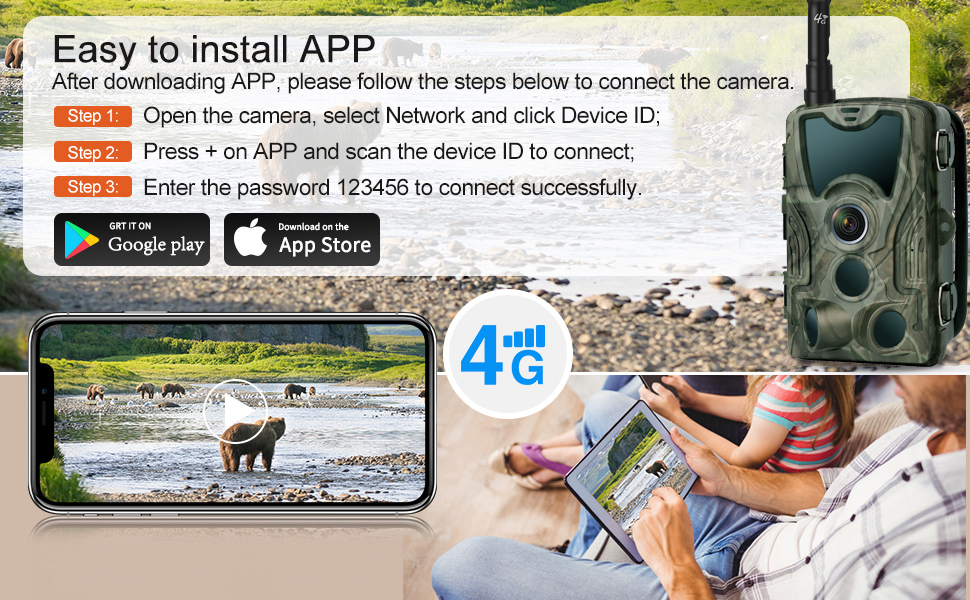
Image: A visual comparison of the TEST and ON modes, showing how the app interface changes for real-time control versus automatic motion detection and cloud updates.
Video: Demonstrates switching between TEST and ON modes, showing how to manually trigger captures in TEST mode and how the app automatically receives media in ON mode.
Image and Video Quality
The HC801PRO captures high-resolution images at 120 MP and records videos in 4K with clear audio. The H.265 video compression format optimizes storage space, allowing for more media to be stored on your SD card.

Image: A split image demonstrating the superior clarity of 120MP 4K capture from the HC801PRO compared to other cameras, highlighting fine details in wildlife.
Нигхт Висион
The camera is equipped with 36 pieces of 850nm infrared LEDs, providing excellent night vision capabilities up to 20 meters. The adaptive lighting technology ensures balanced exposure, preventing images from being too bright or too dark in low-light conditions.

Image: A night scene captured by the camera, featuring a fox in a forest, demonstrating the effectiveness of the 850nm infrared night vision.
Издржљивост и отпорност на утицаје животне средине
The RecorCam HC801PRO features an IP65 waterproof rating, making it resistant to rain, dust, and fog. It is designed to operate reliably in outdoor environments with an operating temperature range of -20°C to 75°C.

Image: The trail camera mounted on a tree in a forest during rainfall, illustrating its IP65 waterproof rating and suitability for outdoor use.
Спецификације
| Феатуре | Детаљ |
|---|---|
| Бранд | РецорЦам |
| Назив модела | ХЦ801ПРО |
| Технологија повезивања | бежични (4Г) |
| Посебна карактеристика | Тиме Лапсе |
| Употреба | Outdoor (Game & Trail) |
| Тип монтаже | Трее Моунт |
| Резолуција снимања видео записа | 4K |
| Резолуција слике | 120 МП |
| Ноћни вид | Up to 20 meters (850nm IR LED) |
| Водоотпорна оцена | ИП65 |
| Радна температура | -20°Ц до 75°Ц |
| Извор напајања | 8 x AA алкалне батерије од 1.5 V (нису укључене) |
| Формат видео снимања | AVI (H.265 compression) |
| Материјал | акрилонитрил бутадиен стирен (АБС) |
| Димензије | 13.5 к 8.5 к 7.5 цм |
Решавање проблема
- Камера се не укључује: Ensure batteries are inserted correctly with proper polarity and are fully charged. Check if the power switch is in the ON position.
- No network connection (signal/cloud icon not green):
- Verify the SIM card is correctly inserted and is a prepaid card without a PIN lock.
- Check for network coverage in the camera's location.
- Поново покрените камеру.
- Проблеми са повезивањем апликације:
- Ensure the camera is powered on and has network connectivity.
- Verify you have scanned the correct QR code and entered the default password "123456".
- Проверите интернет везу вашег телефона.
- Update the SuntekCam app to the latest version.
- No photos/videos captured in ON mode:
- Ensure the camera is in ON mode and not TEST mode.
- Check the SD card for sufficient storage space and proper insertion.
- Verify motion detection settings are configured correctly (sensitivity, detection interval).
- Уверите се да су батерије довољно напуњене.
- Лош квалитет слике/видеа:
- Очистите сочиво камере.
- Уверите се да је камера безбедно постављена како бисте спречили померање.
- Проверите да ли постоје препреке у видном пољу камере view.
If you encounter persistent issues, please contact RecorCam customer support for assistance.
Одржавање
- Чишћење: Regularly clean the camera lens and housing with a soft, dry cloth. Avoid using abrasive cleaners or solvents.
- Замена батерије: Replace all 8 AA batteries when the battery level is low to ensure continuous operation. Do not mix old and new batteries or different types of batteries.
- Управљање СД картицама: Periodically format the SD card to maintain optimal performance and prevent data corruption. Back up important media before formatting.
- Ажурирања фирмвера: Check the SuntekCam app or RecorCam's official website for any available firmware updates to improve camera performance and features.
- Складиштење: When not in use for extended periods, remove the batteries and store the camera in a cool, dry place.
Гаранција и подршка
RecorCam products come with a standard manufacturer's warranty. For specific warranty details, please refer to the warranty card included in your package or visit the official RecorCam website. For technical support or any inquiries, please contact RecorCam customer service. Contact information can typically be found on the product packaging or the brand's official webсајту.