
Увод
The Rapoo M308 is a versatile multi-mode wireless mouse designed for efficiency and comfort. It features an ambidextrous design, allowing comfortable use for both right-handed and left-handed individuals. With its dual connectivity options, Bluetooth 5.0 and 2.4 GHz wireless, you can seamlessly connect to up to three devices and switch between them with ease. The mouse is engineered for long-lasting performance, offering a battery life of up to 12 months.
Садржај пакета
- Rapoo M308 Multi-mode Wireless Mouse
- УСБ пријемник (чува се унутар миша)
- 2 АА батерије
- Водич за брзи почетак (ово упутство)
Производ је завршенview
Familiarize yourself with the components of your Rapoo M308 mouse.
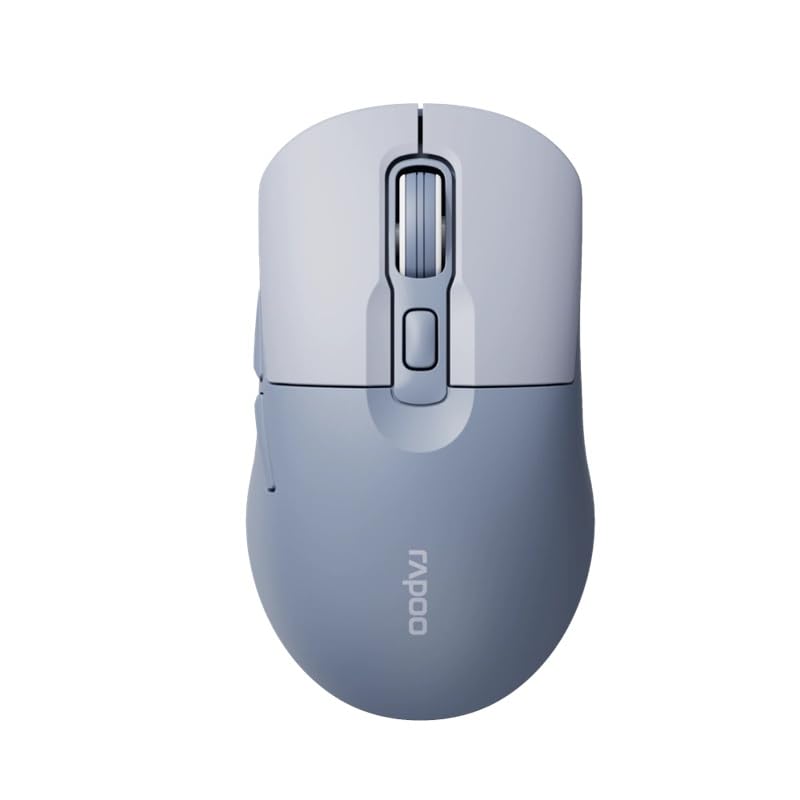
Image: The Rapoo M308 Multi-mode Wireless Mouse in blue, showcasing its ergonomic, ambidextrous design with a scroll wheel and multiple buttons.
- Лево дугме: Стандардна функција левог клика.
- Десно дугме: Стандардна функција десног клика.
- Точак за померање: За скроловање и функцију клика средњим тастером миша.
- Дугме ДПИ: Подешава осетљивост курсора (DPI).
- Mode Switch Button/Indicator: Switches between connected devices (2.4G, Bluetooth 1, Bluetooth 2) and indicates current mode.
- Бочна дугмад: Forward/Backward navigation (programmable).
- Одељак за батерије: Located on the underside, holds 2 AA batteries.
- Слот за USB пријемник: Located inside the battery compartment for storage.
Сетуп
1. Инсталација батерије
- Отворите поклопац одељка за батерију на доњој страни миша.
- Уметните две АА батерије, водећи рачуна о исправном поларитету (+/-).
- Затворите поклопац одељка за батерије.
2. Connecting via 2.4 GHz Wireless
- Remove the USB receiver from its storage slot inside the battery compartment.
- Укључите УСБ пријемник у слободан УСБ порт на рачунару.
- Turn on the mouse. The mouse should automatically connect to your computer. The mode indicator light will show a steady green light for a few seconds.
3. Повезивање преко Блуетоотх-а
The M308 mouse supports two Bluetooth connections (BT1 and BT2).
- Укључите миша.
- Press the mode switch button to select either Bluetooth 1 (blue light flashes slowly) or Bluetooth 2 (blue light flashes slowly).
- Press and hold the mode switch button for 3 seconds until the blue light starts flashing rapidly. This indicates the mouse is in pairing mode.
- На рачунару или уређају идите у подешавања Bluetooth-а и потражите нове уређаје.
- Select "Rapoo M308" from the list of available devices to pair.
- Once paired, the blue light will become steady for a few seconds and then turn off.
Упутство за употребу
Пребацивање између уређаја
The Rapoo M308 allows you to connect to up to three devices (one 2.4G wireless and two Bluetooth devices) and switch between them.
- Briefly press the mode switch button to cycle through the connected devices: 2.4G (green light), Bluetooth 1 (blue light), Bluetooth 2 (blue light).
- The indicator light will briefly illuminate in the corresponding color to confirm the selected mode.
ДПИ Адјустмент
Press the DPI button (usually located behind the scroll wheel) to cycle through different DPI settings. This changes the cursor speed and sensitivity. The indicator light may flash to show the current DPI level (e.g., one flash for low DPI, two for medium, etc.).
Одржавање
- Чишћење: Користите меку, суву крпу за чишћење миша. За тврдокорну прљавштину, благо дamp Може се користити крпа, али водите рачуна да влага не уђе у уређај.
- Замена батерије: When the mouse performance degrades or the indicator light signals low battery, replace the two AA batteries following the installation steps.
- Складиштење: When not in use for extended periods, turn off the mouse to conserve battery life. Store the USB receiver inside the mouse to prevent loss.
Решавање проблема
- Миш не реагује:
- Проверите да ли је миш укључен.
- Уверите се да су батерије правилно инсталиране и да нису истрошене. Замените их ако је потребно.
- For 2.4G connection, ensure the USB receiver is securely plugged into a working USB port. Try a different USB port.
- For Bluetooth connection, ensure the mouse is in the correct Bluetooth mode (BT1 or BT2) and successfully paired with your device. Re-pair if needed.
- Покрет курсора је неправилан или спор:
- Очистите оптички сензор на доњој страни миша.
- Уверите се да користите миш на одговарајућој површини (нерефлектујућој, непрозирној).
- Подесите DPI подешавање помоћу дугмета DPI.
- Не могу да прелазим између уређаја:
- Ensure all devices are properly connected (2.4G receiver plugged in, Bluetooth devices paired).
- Briefly press the mode switch button to cycle through modes. A long press will initiate Bluetooth pairing mode.
Спецификације
| Бранд Наме | Рапоо |
| Модел | М308 |
| Технологија повезивања | Bluetooth 5.0, 2.4 GHz Radio Frequency |
| Посебне карактеристике | Лагана |
| Детекција покрета | Оптицал |
| Количина дугмета | 4 |
| Оријентација руке | Амбидектроус |
| Препоручена употреба | Канцеларија |
| Компатибилни уређаји | Лични рачунар, лаптоп |
| Тежина артикла | 50 грама |
| Оперативни систем | Linux, Mac, Windows |
| Трајање батерије | 12 месеци |
| Број батерија | 2 АА (укључено) |
| Извор напајања | Баттери Поверед |
| Потребан је минималан ОС | Mac OS 14 Sonoma, Windows 11 |
| Материјал | Пластика |
| Земља порекла | Кина |
| Укључене компоненте | Миш |
Гаранција и подршка
The Rapoo M308 Multi-mode Wireless Mouse comes with a 2 година гаранције од датума куповине. Ова гаранција покрива производне недостатке и кварове при нормалној употреби.
For technical support, warranty claims, or further assistance, please refer to the contact information provided on the Rapoo official website or your local distributor's support channels. Please retain your proof of purchase for warranty validation.