
Увод
Thank you for choosing the Digitus DA-70919 USB-C 8K 12-Port Docking Station. This device is designed to expand the connectivity of your USB-C enabled laptop or computer, providing a comprehensive solution for video output, data transfer, network access, and power delivery. Please read this manual carefully to ensure proper installation and operation.
Производ је завршенview
The Digitus DA-70919 docking station offers 12 essential ports to enhance your workspace. It supports high-resolution video output, fast data transfer, and efficient power delivery to your host device.

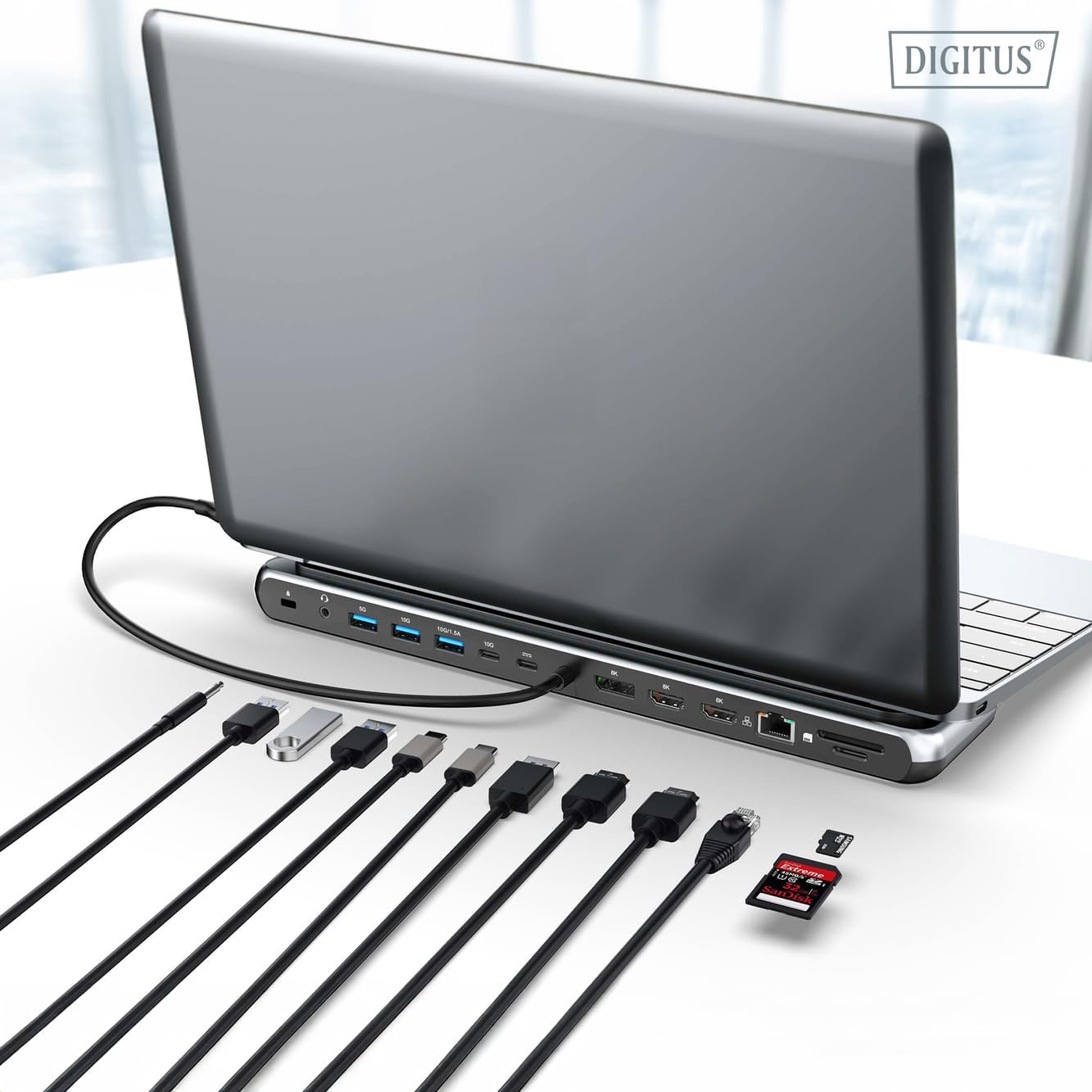
Слика 1: Detailed diagram of the Digitus DA-70919 docking station ports and their functions. This diagram labels each of the 12 ports on the docking station, including Audio Jack, USB-A, USB-C, USB-C PD, DisplayPort, HDMI, RJ45 Gigabit Ethernet, and SD/MicroSD card slots, along with anti-theft protection.

Слика 2: Фронт view of the Digitus DA-70919 docking station showing all accessible ports. A clear view of the docking station's front panel, displaying the various input and output ports including USB-A, USB-C, HDMI, DisplayPort, Ethernet, and card readers.
Кључне карактеристике:
- Видео излаз: 2x HDMI, 1x DisplayPort (DP) supporting up to 8K/30Hz for single display, or multi-display configurations.
- USB портови за пренос података: 2x USB-A 3.2 Gen 2 (10Gbps), 1x USB-A 3.2 Gen 1 (5Gbps), 1x USB-C 3.2 Gen 2 (10Gbps).
- Испорука енергије (ПД): USB-C PD 3.0 port for charging your host laptop (up to 85W output).
- Мрежа: Gigabit Ethernet (RJ45) for stable wired internet connection.
- Читачи картица: SD and MicroSD card slots with 104 MBps transfer speed.
- аудио: 3.5 мм аудио прикључак за слушалице или звучнике.
Упутства за подешавање
Follow these steps to set up your Digitus DA-70919 docking station:
- Check Host USB-C Port Compatibility: Ensure your laptop's USB-C port supports DisplayPort Alternate Mode (DP Alt Mode) for video output and Power Delivery for charging. Without DP Alt Mode, video output will not function.

Слика 3: Guide to USB-C port compatibility for DisplayPort Alternate Mode. This graphic explains which types of USB-C ports on your laptop support the full functionality of the docking station, specifically highlighting the requirement for DisplayPort Alternate Mode (DP Alt Mode) for video output.
- Повежите се са хост уређајем: Connect the integrated USB-C cable from the docking station to the USB-C port on your laptop.
- Повежите адаптер за напајање (опционо, али се препоручује): If you wish to charge your laptop via the docking station or power high-demand peripherals, connect a USB-C Power Delivery adapter (not included, up to 100W recommended) to the USB-C PD input port on the docking station.
- Повежите екстерне екране: Повежите мониторе на HDMI и/или DisplayPort излазе на базној станици користећи одговарајуће каблове.
- Повежите периферне уређаје: Plug in your USB devices (keyboard, mouse, external drives), Ethernet cable, SD/MicroSD cards, and audio devices to the corresponding ports on the docking station.
- Инсталација драјвера: In most cases, the docking station is plug-and-play and does not require additional drivers. If prompted, allow your operating system to install any necessary drivers automatically.
Упутство за употребу
Режими приказа
The docking station supports various display configurations:
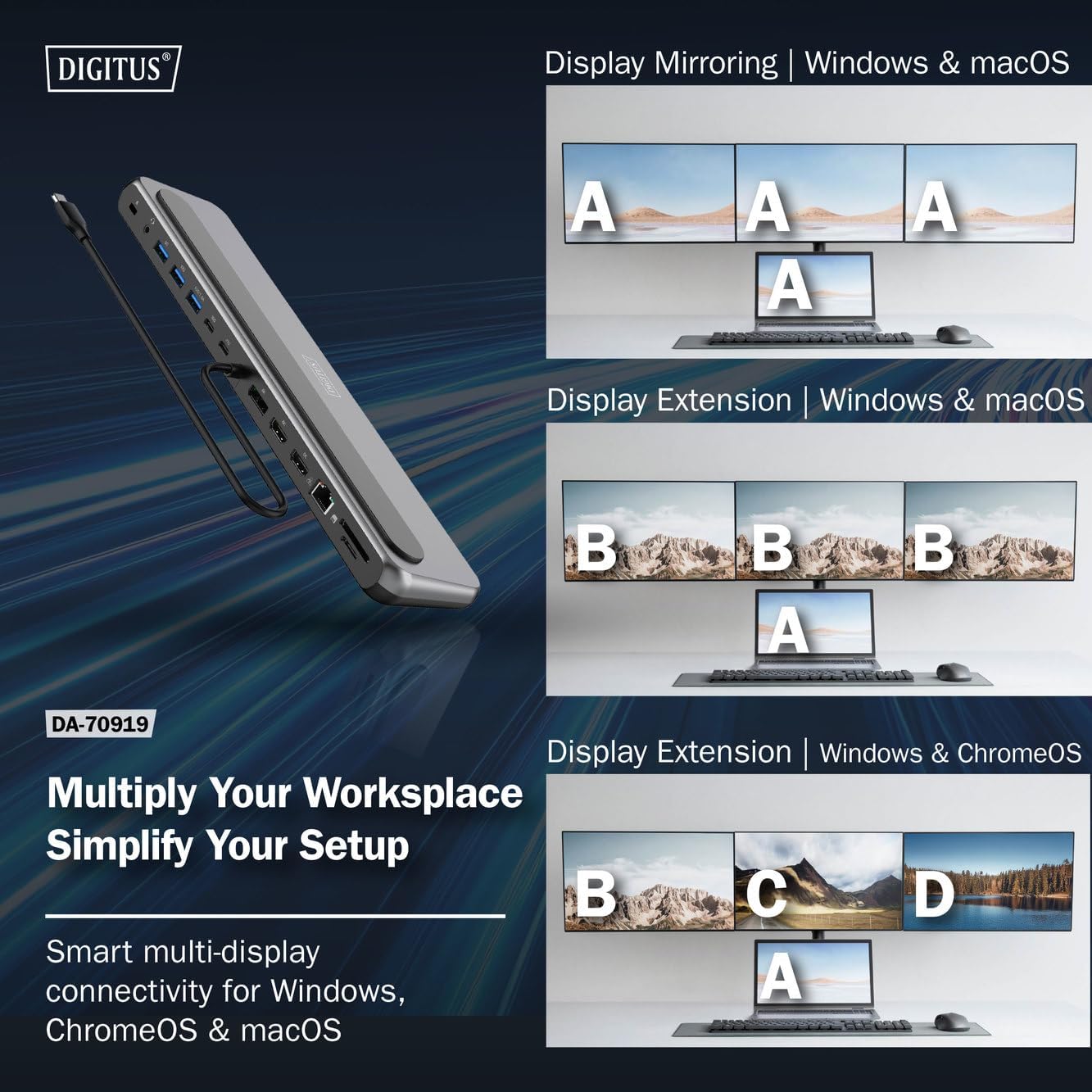
Слика 4: Diagram showing display mirroring and extension modes for Windows, macOS, and ChromeOS. This image illustrates the various display configurations supported by the docking station, including mirroring your screen or extending it across multiple external monitors on Windows, macOS, and ChromeOS.
- Режим огледала: Duplicates your laptop's display onto the external monitors.
- Extend Mode (Windows/ChromeOS): Extends your desktop across multiple external monitors, allowing for a multi-tasking environment. Supports dual monitors (2x 4K/60Hz) and triple monitors (1x 4K/60Hz + 2x 4K/30Hz) in MST (Multi Stream Transport) mode.
- Extend Mode (macOS): macOS typically supports extended desktop to one external monitor, with other external monitors mirroring each other.
To configure display settings, access your operating system's display settings (e.g., Windows Display Settings, macOS System Preferences > Displays).
Пренос података
Utilize the USB-A and USB-C data ports for connecting external storage devices, keyboards, mice, and other USB peripherals. The USB 3.2 Gen 2 ports offer speeds up to 10Gbps, while the USB 3.2 Gen 1 port offers speeds up to 5Gbps.
Повер Деливери
When a compatible USB-C PD power adapter is connected to the docking station's PD input port, the docking station can deliver up to 85W of power to charge your connected laptop. This allows you to power your laptop and peripherals through a single USB-C connection.
Слика 5: Illustration of the docking station's fast charging capability via USB-C Power Delivery. This image demonstrates the Power Delivery function, showing a 100W input to the docking station and an 85W output to charge the connected laptop.
Мрежна веза
Connect an Ethernet cable to the RJ45 port for a stable and high-speed wired network connection (10/100/1000 Mbps Gigabit Ethernet).
Читачи картица
Insert SD or MicroSD cards into the dedicated slots for quick access to photos, videos, and other files. The card readers support transfer speeds up to 104 MBps.
Аудио излаз
Connect your headphones or speakers to the 3.5mm audio jack for audio output.
Одржавање
- Чишћење: Use a soft, dry cloth to clean the surface of the docking station. Avoid using liquid cleaners or solvents.
- Складиштење: Чувајте докинг станицу на хладном и сувом месту, даље од директне сунчеве светлости и екстремних температура.
- Руковање: Avoid dropping or subjecting the device to strong impacts. Do not attempt to disassemble the docking station.
Решавање проблема
Ако наиђете на проблеме са прикључном станицом, погледајте следећа уобичајена решења:
- Нема излаза на екран:
- Уверите се да USB-C порт вашег лаптопа подржава алтернативни режим DisplayPort-а.
- Check all video cables (HDMI/DP) are securely connected to both the docking station and the monitor.
- Проверите да ли је монитор укључен и подешен на исправан улазни извор.
- Покушајте да повежете један монитор истовремено да бисте изоловали проблем.
- Ажурирајте графичке драјвере вашег лаптопа.
- Нема напајања лаптопа:
- Ensure a compatible USB-C PD power adapter (up to 100W) is connected to the docking station's PD input port.
- Проверите да ли USB-C порт вашег лаптопа подржава Power Delivery.
- Проверите да ли су адаптер за напајање и кабл оштећени.
- USB уређаји нису препознати:
- Reconnect the USB device to a different port on the docking station.
- Ensure the docking station is properly connected to the host laptop.
- If using a high-power USB device, ensure the docking station is connected to an external power adapter.
- Проблеми са етернет везом:
- Проверите везу Етернет кабла и са базном станицом и са рутером/модемом.
- Проверите мрежна подешавања на лаптопу.
- Поново покрените рутер/модем и лаптоп.
- Card Reader Not Working:
- Ensure the SD/MicroSD card is inserted correctly and fully.
- Test the card with another device to confirm it is not damaged.
Спецификације
| Феатуре | Спецификација |
|---|---|
| Модел | ДА-70919 |
| Хост Цоннецтион | USB-C (integrated cable) |
| Видео Оутпут | 2x HDMI, 1x DisplayPort (DP) |
| Max. Single Display Resolution | 8K (7680x4320) @ 30Hz |
| Max. Dual Display Resolution (MST) | 2x 4K (3840x2160) @ 60Hz |
| Max. Triple Display Resolution (MST) | 1x 4K@60Hz + 2x 4K@30Hz |
| УСБ-А портови за податке | 2x USB 3.2 Gen 2 (10Gbps), 1x USB 3.2 Gen 1 (5Gbps) |
| УСБ-Ц порт за податке | 1к УСБ 3.2 Ген 2 (10Гбпс) |
| Power Delivery (PD) Input | USB-C PD 3.0 (up to 100W) |
| Power Delivery (PD) Output to Host | До 85В |
| Етхернет | RJ45 Gigabit (10/100/1000 Mbps) |
| Читачи картица | SD, MicroSD (104 MBps) |
| Аудио | 1к 3.5 мм аудио прикључак |
| Компатибилност | Виндовс, мацОС, ЦхромеОС |
| Радна температура | 0°Ц до 45°Ц (32°Ф до 113°Ф) |
| Температура складиштења | -10°Ц до 70°Ц (14°Ф до 158°Ф) |
Гаранција и подршка
The Digitus DA-70919 USB-C 8K 12-Port Docking Station comes with a 2 година гаранције од датума куповине. Ова гаранција покрива производне недостатке и осигурава да производ функционише како је описано при нормалној употреби.
For technical support, warranty claims, or further assistance, please contact your retailer or visit the official Digitus website for contact information. Please have your product model number (DA-70919) and proof of purchase ready when seeking support.