
Увод
This manual provides detailed instructions for the installation, operation, and maintenance of your Reobiux 2K Outdoor WiFi Surveillance Camera, Model K6Q-1P. Please read this manual thoroughly before using the product to ensure proper functionality and safety.
Садржај пакета
Проверите да ли су све ставке наведене у наставку укључене у ваш пакет. Ако неке ставке недостају или су оштећене, обратите се корисничкој подршци.
- 1 x Surveillance Camera
- 1 к адаптер за напајање
- 1 x Сет монтажних шрафова
- 1 x Waterproof Cover Kit
- 1 к Упутство за употребу
Производ је завршенview
The Reobiux 2K Outdoor WiFi Surveillance Camera (Model K6Q-1P) is an advanced security solution featuring a dual-lens design for comprehensive monitoring. It offers 2K resolution, color night vision, motion detection, two-way audio, and compatibility with Amazon Alexa.
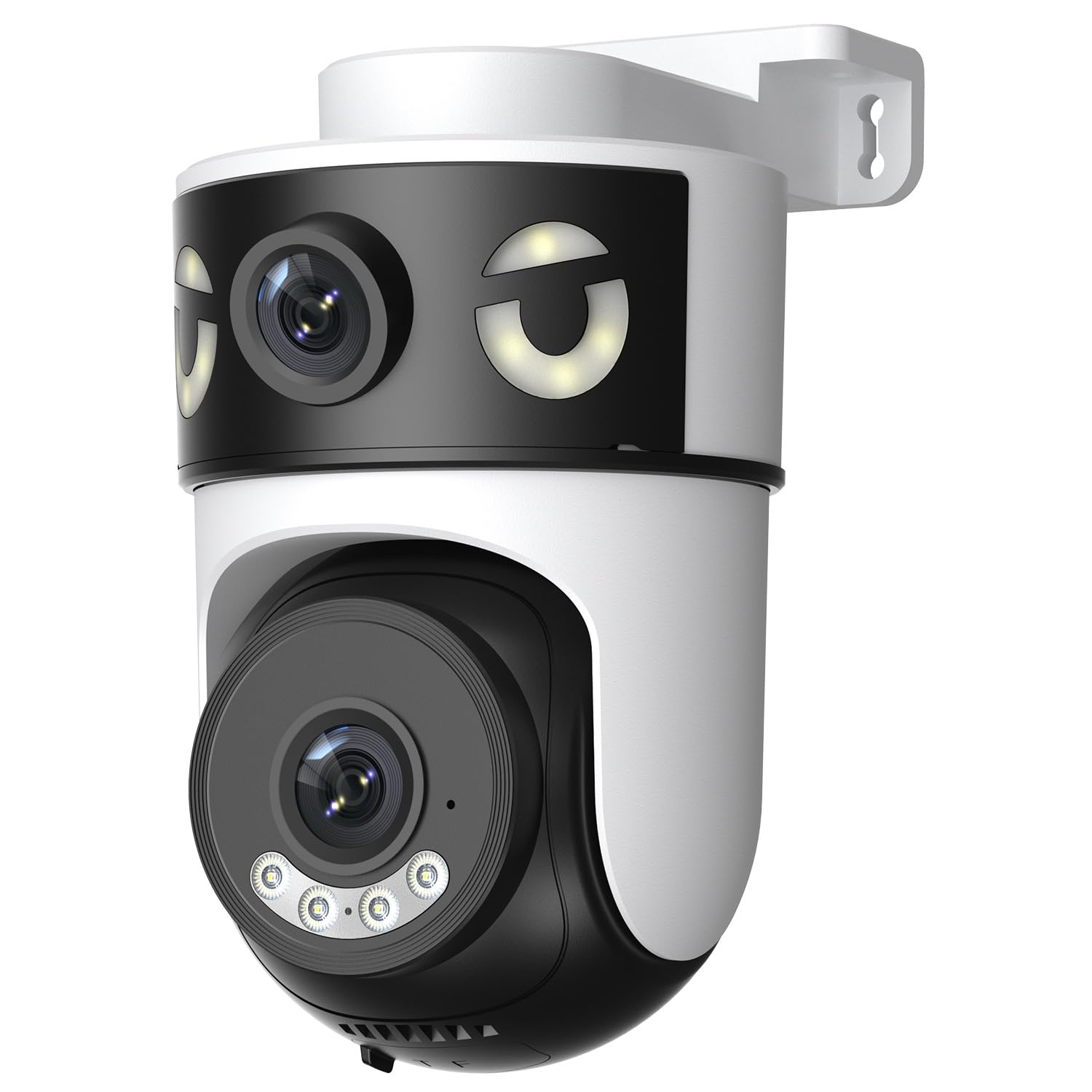
Image: Reobiux 2K Outdoor WiFi Surveillance Camera, Model K6Q-1P. This image shows the camera unit with its dual lenses, two external antennas, and a wall-mount bracket.
Кључне карактеристике
- Dual Lens & 355° View: Unique 2-in-1 design supporting fixed area surveillance and mobile full-view monitoring. Features two high-resolution lenses; one fixed and one rotatable for wide panoramic views.
- 2K Resolution & Color Night Vision: Delivers clear and detailed images and videos. Offers three night vision modes: Infrared, Color, and Smart Night Vision for reliable 24-hour surveillance.
- Motion Detection & Alarm Siren: Advanced motion detection sends real-time alarm notifications to your mobile device upon detecting movement.
- Two-Way Audio & Multi-User Access: Built-in microphone and speaker allow for remote communication. Supports sharing camera access with multiple users.
- SD Card/Cloud Storage & Alexa Compatibility: Supports 24-hour continuous recording to a Micro SD card (max 128GB) or cloud server. Compatible with Amazon Alexa for voice control.
Водич за подешавање
1. Монтажа камере
The camera is designed for wall mounting. Choose a suitable location that provides the desired surveillance coverage and is within range of your Wi-Fi network and a power outlet.
- Mark the drilling points on the wall using the camera's base as a template.
- Избушите рупе и по потреби уметните типлове у зид.
- Secure the camera to the wall using the provided mounting screws.
- Ensure the camera is firmly attached and the waterproof cover kit is properly installed to protect connections.
2. Укључивање
Connect the provided power adapter to the camera's power input and then plug it into a standard electrical outlet. The camera will power on and initiate its startup sequence.
3. Мрежна веза (Wi-Fi)
The camera connects via 2.4GHz Wi-Fi. Follow these steps to connect your camera to your home network:
- Преузмите O-kam Pro application from the App Store (iOS) or Google Play Store (Android) on your smartphone or tablet.
- Региструјте се за нови налог или се пријавите ако га већ имате.
- Пратите упутства у апликацији да бисте додали нову камеру. То обично подразумева скенирање QR кода на камери или ручни унос њеног ИД-а.
- Изаберите своју Wi-Fi мрежу од 2.4 GHz и унесите лозинку када се то од вас затражи.
- Wait for the camera to connect to the network. A voice prompt or indicator light will confirm a successful connection.

Image: Reobiux camera with a smartphone displaying the O-kam Pro app interface, demonstrating remote control and live view способности.
Упутство за употребу
Уживо View и контрола панорамирања/нагиба
Once connected, open the O-kam Pro app to access the live feed from your camera. The dual-lens system provides both a fixed wide view and a movable PTZ (Pan-Tilt-Zoom) view.
- Tap on the camera in the app to view стреам уживо.
- Use the on-screen controls to pan (horizontal rotation up to 355°) and tilt (vertical movement) the movable lens to adjust the viewугао уласка.
- Switch between the fixed and movable lens views within the app interface.
Режими ноћног вида
Камера нуди три режима ноћног вида:
- Инфрацрвени ноћни вид: Provides black and white images in low-light conditions using infrared LEDs.
- Ноћни вид у боји: Utilizes built-in spotlights to provide full-color images at night.
- Смарт Нигхт Висион: Automatically switches between infrared and color night vision based on detected motion or light conditions.
- You can select your preferred night vision mode in the O-kam Pro app settings.
Детекција покрета и упозорења
Configure motion detection settings and receive alerts on your mobile device:
- Navigate to the camera settings in the O-kam Pro app.
- Enable motion detection and adjust sensitivity levels as needed.
- Set up alert notifications to be sent to your smartphone.
- You can also enable the alarm siren to deter intruders.
Двосмерни аудио
Use the two-way audio feature to communicate through the camera:
- У живо view interface of the O-kam Pro app, tap the microphone icon to speak. Your voice will be transmitted through the camera's speaker.
- Додирните икону звучника да бисте слушали звук из околине камере.
Снимање и складиштење видеа
The camera supports continuous 24-hour recording. You have two storage options:
- Мицро СД картица: Insert a Micro SD card (up to 128GB, not included) into the designated slot on the camera. The camera will automatically begin recording to the card.
- Цлоуд Стораге: Subscribe to a cloud storage plan through the O-kam Pro app for secure off-site video storage.
- Приступ снимљен фооtage via the O-kam Pro app.
Амазон Алека интеграција
Integrate your Reobiux camera with Amazon Alexa for voice control:
- Отворите апликацију Амазон Алека на свом мобилном уређају.
- Go to "Skills & Games" and search for the "O-kam Pro" skill.
- Enable the skill and link your O-kam Pro account.
- Discover devices. You can now use voice commands like "Alexa, show me the front door camera" to view the live feed on compatible Alexa devices.
Одржавање
- Чишћење: Редовно бришите објектив и тело камере меком крпомamp крпом да бисте уклонили прашину и прљавштину. Не користите јаке хемикалије или абразивна средства за чишћење.
- Заштита од временских прилика: The camera is waterproof, but ensure all connections are sealed properly, especially the power cable and any SD card slots, to maintain its weather resistance.
- Ажурирања фирмвера: Check the O-kam Pro app periodically for firmware updates to ensure optimal performance and security.
Решавање проблема
- Камера се не укључује:
- Ensure the power adapter is securely connected to both the camera and a working electrical outlet. Verify the outlet has power.
- Не могу да се повежем са Wi-Fi мрежом:
- Ensure your Wi-Fi network is 2.4GHz. Check your Wi-Fi password for accuracy. Move the camera closer to your Wi-Fi router to improve signal strength. Restart your router and the camera.
- Без живота view or recording:
- Check your internet connection. Ensure the camera is connected to Wi-Fi. Verify that the Micro SD card is inserted correctly and not full, or that your cloud storage subscription is active.
- Motion detection alerts not received:
- Check app notification settings on your phone and within the O-kam Pro app. Ensure motion detection is enabled and sensitivity is set appropriately. Verify your phone has an active internet connection.
- Two-way audio not working:
- Ensure your phone's microphone and speaker are enabled for the O-kam Pro app. Check the volume settings on your phone and within the app. Ensure there are no obstructions blocking the camera's microphone or speaker.
Спецификације
| Феатуре | Спецификација |
|---|---|
| Бранд | Реобиук |
| Назив модела | K6Q-1P |
| Број модела | REO-K6Q-1P |
| Тип монтаже | Валл Моунт |
| Резолуција снимања видео записа | 2K |
| Број ставки | 1 |
| Бежична комуникациона технологија | Ви-Фи (2.4ГХз) |
| Viewинг Англе | 355 степени (панорама) |
| Врста инсталације | Причврстити завртњем |
| Материјал | Пластика |
| Волtage | 5 волти (ДЦ) |
| Повер | 5 Ваттс |
| Ниво отпорности на воду | Водоотпоран |
| Посебне карактеристике | Two-Way Audio, Local Recording, HD Resolution, PTZ Technology |
| Препоручена употреба | Оутдоор Сецурити |
| Компатибилни уређаји | Лаптоп, паметни телефон, таблет, телевизор |
| Извор напајања | Електрични кабл |
| Цоннецтивити Протоцол | РТСП |
| Тип контролера | O-kam Pro App |
Гаранција и подршка
For warranty information and technical support, please refer to the official Reobiux website or contact Reobiux customer service directly. Keep your purchase receipt as proof of purchase for warranty claims.
Manufacturer: Reobiux