
1. Увод
The AJAZZ AK029 is a high-performance one-handed mechanical gaming keyboard designed for precision and speed. It features a compact 29-key layout, magnetic switches, an 8000Hz polling rate, and 0.01mm RT precision for an ultra-responsive gaming experience. This manual provides detailed instructions for setup, operation, maintenance, and troubleshooting.

Image: The AJAZZ AK029 one-handed gaming keyboard, showcasing its compact design and dimensions (155mm length, 122mm width, 33mm height).

Слика: Оверview of the AK029 gaming keyboard, highlighting its sleek design and gaming features.

Image: The AK029 keyboard being used in various scenarios, including gaming, video editing, and 3D modeling, demonstrating its versatility.
2. Подешавање
Садржај пакета
- AJAZZ AK029 Keyboard Body
- УСБ-Ц кабл (1.6м)
- Кеицап Пуллер
- Резервни прекидачи
- Detachable Carrying Strap
- Упутство за употребу

Image: The complete package contents of the AJAZZ AK029, including the keyboard, USB-C cable, keycap puller, spare switches, and user manual.
Повезивање тастатуре
- Повежите USB-C крај приложеног кабла са USB-C портом на тастатури.
- Connect the other end of the USB cable to an available USB port on your computer (Windows or Mac).
- Ваш оперативни систем ће аутоматски препознати тастатуру.
3. Упутство за употребу
Кључне функције и распоред
The AK029 features a 29-key layout optimized for gaming and productivity. Many keys have secondary functions accessible via the Fn кључ.
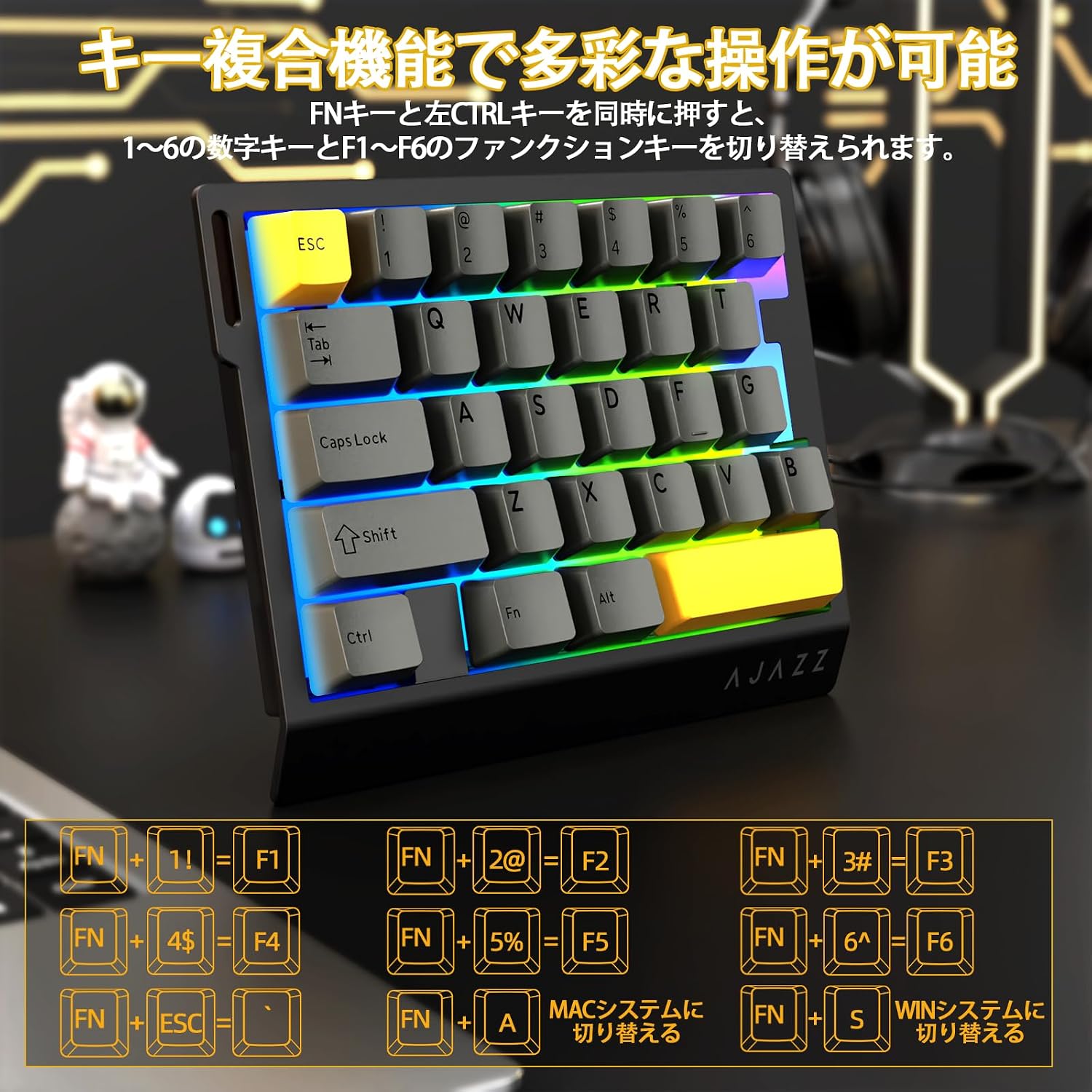
Image: Diagram illustrating the various FN key combinations for accessing secondary functions, such as F1-F6, tilde, and system switching.
- ФН + 1-6: Switches between number keys (1-6) and function keys (F1-F6). Default is number keys.
- ФН + Есц: Tilde (~)
- ФН + А: Switches to Mac mode.
- ФН + С: Switches to Windows mode.
Note: When using Mac mode on a Windows PC, the Windows key and Alt key functions may be reversed.
РГБ режими осветљења
The keyboard features vibrant RGB backlighting with multiple customizable effects.

Image: The keyboard displaying its colorful RGB backlight, which can be customized with various effects.
- ФН + Таб: Cycles through 20 different RGB lighting modes.
- ФН + Г: Increases backlight brightness (5 levels). Backlight flashes 3 times at maximum brightness.
- ФН + Ф: Decreases backlight brightness (5 levels). Backlight flashes 3 times at minimum brightness.
- ФН + В: Changes the direction of the lighting effect.
- ФН + Б: Changes the backlight color.
- ФН + Т: Increases the speed of the lighting effect (5 levels). Backlight flashes 3 times at maximum speed.
- ФН + Р: Decreases the speed of the lighting effect (5 levels). Backlight flashes 3 times at minimum speed.
- ФН + Ц: Toggles side light mode (Streaming RGB constant light - Rainbow Breath - Off). Default is Streaming.
- ФН + Кс: Toggles backlight on/off (side lights remain on).
- FN + Space (long press 3-5 seconds): Resets lighting settings to factory defaults. Keyboard lights flash 3 times.
Показатељ Л.amps
- Цапс Лоцк индикатор: Pressing the Caps Lock key illuminates a white LED (uppercase input ON). Pressing it again turns off the LED (lowercase input).
- Индикатор система: The main key area lights flash 3 times to indicate successful system switching.
Web Driver Customization
The dedicated driver software allows for extensive customization of key functions, macros, and RGB lighting effects. This enables true personalization to match individual playstyles and preferences.

Слика: Снимак екрана web driver interface, showing options for custom keys, lighting effects, macro management, and performance settings.
Возач Webсајт: https://ajazz.driveall.cn/#/
4. Одржавање
Чишћење
- Користите меку, суву крпу да обришете површину тастатуре.
- For dust between keycaps, use compressed air.
- Избегавајте употребу јаких хемикалија или абразивних материјала.
Hot-Swappable Switch Replacement
The AK029 supports hot-swappable magnetic switches, allowing for easy replacement and customization.

Слика: Крупни план view of the hot-swappable magnetic switches, showing the mechanism and keycap removal tool.
- Use the keycap puller to gently remove the desired keycap.
- Use the switch puller to firmly grip the top and bottom tabs of the switch.
- Pull the switch straight upwards to remove it from the keyboard.
- Align the pins of the new switch with the holes on the keyboard.
- Gently push the new switch vertically until it clicks into place.
КСНУМКС. Решавање проблема
Тастатура не реагује
- Уверите се да је USB-C кабл безбедно повезан и са тастатуром и са рачунаром.
- Покушајте да повежете тастатуру са другим УСБ портом на рачунару.
- Тестирајте тастатуру на другом рачунару да бисте искључили проблем специфичан за рачунар.
- Поново покрените рачунар.
RGB Backlight Not Working or Incorrect
- Ensure the backlight is not turned off (FN + X).
- Adjust brightness using FN + G (increase) and FN + F (decrease).
- Cycle through lighting modes using FN + Tab.
- Perform a factory reset for lighting settings by long-pressing FN + Space for 3-5 seconds.
Key Input Issues or Inaccurate Response
- Ensure the correct system mode (Windows/Mac) is selected using FN + A or FN + S.
- If a specific key is not responding, try replacing its switch using the hot-swap procedure.
- Update the keyboard firmware using the dedicated web софтвер драјвера.
- Check for any physical obstructions under the keycap or switch.
6. Спецификације
| Феатуре | Опис |
|---|---|
| Бранд | A.JAZZ |
| Модел | АК029 |
| Повезивање | USB-C жични |
| Распоред тастера | 29 Keys (One-Handed) |
| Тип прекидача | Magnetic Switches (Hot-Swappable) |
| Поллинг Рате | 8000Хз |
| Латенција | 0.125мс ултра-ниска латенција |
| RT Precision | 0.01mm (0.03mm detection increments) |
| Сцан Рате | 130К |
| Позадинско осветљење | RGB (20 lighting modes) |
| Кеи Ролловер | Потпуни Н-Кеи Ролловер |
| Плате Материал | Алуминијумска легура |
| Звук Дampенинг | 5-Layer Structure (PO sandwich cotton, IXPE switch pad, PET sound sheet, EPDM cotton, silicone gel) |
| Ергономија | Ergonomic design with stepped curved keycaps and wrist rest |
| Компатибилан ОС | Виндовс, МАЦ |
| Димензије | 155 мм (Д) к 122 мм (Ш) к 33 мм (В) |
| Тежина | Прибл. 300г |
| Цабле Ленгтх | 1.6м |

Image: Detailed basic specifications of the AK029 keyboard, including brand, model, connectivity, dimensions, and lighting.

Слика: Експлодирана view of the keyboard's internal structure, highlighting the 5-layer sound dampening system and aluminum alloy plate for enhanced stability and acoustics.

Image: Illustration of the ergonomic design of the AK029, featuring stepped keycaps and a wrist rest for comfortable long-term use.
7. Гаранција и подршка
Информације о гаранцији
The AJAZZ AK029 keyboard comes with a 1-year manufacturer's warranty from the date of purchase. This warranty covers defects in materials and workmanship under normal use.
Корисничка подршка
For technical assistance, warranty claims, or any other inquiries, please contact AJAZZ customer support through their official webсајт или продавницу где је производ купљен.
Службено Webсајт: https://ajazz.driveall.cn/#/