
1. Увод
Thank you for choosing the suevery All-in-One PC. This manual provides essential information for setting up, operating, and maintaining your new computer. The suevery All-in-One PC is designed for productivity, entertainment, and various applications, featuring a 21.5-inch Full HD display, Intel Core i5 processor, 16GB RAM, and a 256GB SSD. It comes equipped with a built-in HD webcam, Wi-Fi 6, and includes a keyboard and mouse for a complete out-of-the-box experience.
2. Шта је у кутији
Молимо вас да проверите садржај вашег пакета. Ако неке ставке недостају или су оштећене, контактирајте корисничку подршку.
- suevery 21.5-inch All-in-One PC
- Повер Адаптер
- Тастатура
- Миш
- Кориснички приручник (овај документ)
3. Производ је готовview
3.1 Фронт View и приказивање
The All-in-One PC features a 21.5-inch Full HD (1920x1080) IPS Anti-glare display, providing clear and vibrant visuals. The display is tiltable for ergonomic adjustment.

Слика 3.1: Предња страна view of the suevery All-in-One PC, showcasinњегов екран од 21.5 инча.
3.2 Built-in Audio-Video Components
The PC integrates a high-definition camera, microphone, and speakers, eliminating the need for external peripherals for video communication.

Figure 3.2: Illustration of the integrated speaker, camera, and microphone for video communication.
3.3 Портови и интерфејси
The device provides various ports for connectivity. Refer to the diagram below for port locations and types.
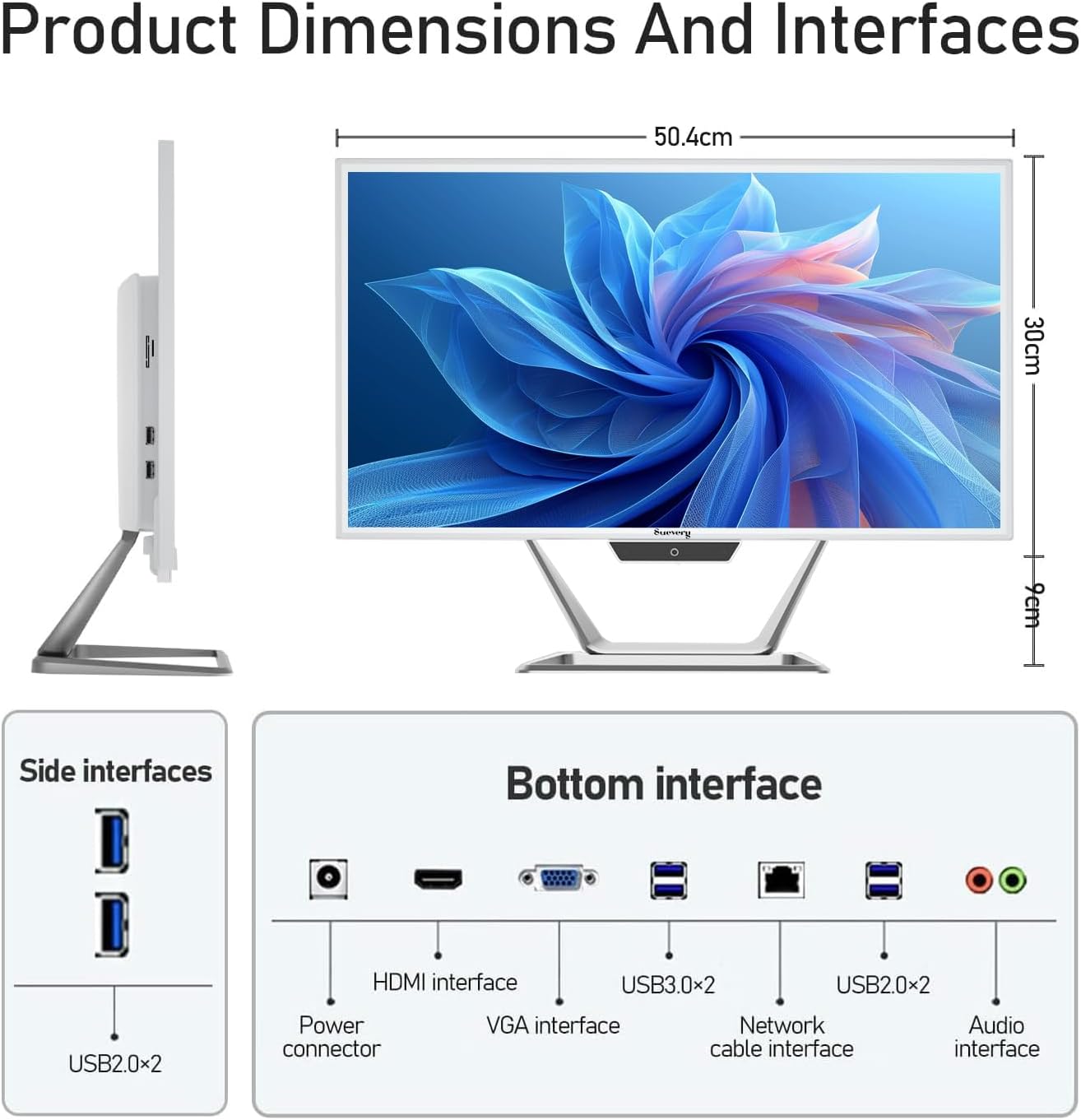
Figure 3.3: Product dimensions and interface layout. Includes USB 2.0, USB 3.0, HDMI, VGA, Network, Audio, and Power ports.
- Конектор за напајање: За повезивање адаптера за напајање.
- ХДМИ интерфејс: За повезивање са екстерним екранима.
- VGA интерфејс: За повезивање са старијим екстерним екранима.
- USB 3.0 x 2: High-speed data transfer ports.
- USB 2.0 x 4: Standard data transfer ports (2 on side, 2 on bottom).
- Network Cable Interface: За жичну Етернет везу.
- Аудио интерфејс: За повезивање екстерних слушалица или звучника.
4. Водич за подешавање
Follow these steps to set up your suevery All-in-One PC.
- Распакујте рачунар: Пажљиво извадите All-in-One рачунар и сву додатну опрему из паковања. Поставите рачунар на стабилну, равну површину.
- Повежите тастатуру и миш: Connect the included keyboard and mouse to the available USB ports on the back or side of the PC.
- Прикључите напајање: Connect the power adapter to the power connector on the PC, then plug the power cord into a wall outlet.
- Укључено: Press the power button, usually located on the bottom bezel or side of the display. The PC will boot up.
- Initial Operating System Setup: Your PC comes with DOS pre-installed. You will need to install your preferred operating system (e.g., Windows, Linux) following its specific installation instructions. This typically involves booting from a USB drive or DVD.
- Повежите се на мрежу: Once the OS is installed, connect to your network via Wi-Fi 6 or an Ethernet cable.
5. Упутство за употребу
5.1 Основни рад
- Укључивање/искључивање: Press the power button to turn the PC on. To turn off, use the operating system's shutdown function. A short press on the power button can put the PC to sleep.
- Подешавање екрана: The display can be tilted from -5 to 25 degrees to achieve an optimal viewing angle. Gently adjust the top or bottom edge of the screen to tilt it.

Figure 5.1: The display supports tilt angle adjustment for ergonomic viewинг.
5.2 Коришћење интегрисаних периферних уређаја
- Webкамера: The built-in 5MP HD webcam is ready for video calls and conferences. Ensure your operating system and applications have permission to access the camera.
- микрофон: The integrated microphone captures audio for calls and voice commands. Adjust microphone levels in your operating system's sound settings.
- говорници: The built-in speakers provide audio output. Adjust volume using your operating system's sound controls or external keyboard media keys.
5.3 Повезивање
- Ви-Фи 6: Connect to wireless networks for internet access. Configure Wi-Fi settings through your operating system.
- Етхернет: For a stable wired connection, plug an Ethernet cable into the network port.
- УСБ портови: Use the USB 2.0 and USB 3.0 ports to connect external devices such as USB drives, printers, or additional peripherals.
- HDMI/VGA: Connect an external monitor or projector using the HDMI or VGA port for extended display options.
6. Одржавање
Proper maintenance ensures the longevity and optimal performance of your PC.
- Чишћење екрана: Користите меку крпу која не оставља длачицеampened with water or a screen cleaner specifically designed for electronics. Do not spray cleaner directly onto the screen.
- Чишћење шасије: Обришите спољашње површине меком, сувом крпом. Избегавајте абразивна средства за чишћење или раствараче.
- вентилација: Ensure the ventilation openings on the back and sides of the PC are not blocked to prevent overheating.
- Ажурирања софтвера: Редовно ажурирајте оперативни систем и управљачке програме како бисте осигурали безбедност и перформансе.
- Резервна копија података: Периодично правите резервне копије важних података на екстерни диск или складиште у облаку.
КСНУМКС. Решавање проблема
Ако наиђете на проблеме, погледајте следеће уобичајене проблеме и решења.
| Проблем | Могуће решење |
|---|---|
| Рачунар се не укључује. | Check if the power adapter is securely connected to both the PC and the wall outlet. Ensure the power outlet is functional. |
| Нема приказа на екрану. | Ensure the PC is powered on. If an external monitor is connected, check its power and cable connection. Try restarting the PC. |
| Тастатура или миш не реагују. | Check USB connections. Try plugging them into different USB ports. If wireless, ensure batteries are charged and dongle is connected. |
| No internet connection (Wi-Fi/Ethernet). | For Wi-Fi, check if Wi-Fi is enabled in your OS settings and if you're connected to the correct network. For Ethernet, ensure the cable is properly connected to both the PC and the router/modem. Restart your router/modem. |
| Webcam or microphone not working. | Check privacy settings in your operating system to ensure applications have permission to access the camera and microphone. Ensure drivers are up to date. |
8. Спецификације
Detailed technical specifications for the suevery All-in-One PC (Model: I22X W1-99).
| Феатуре | Детаљ |
|---|---|
| Бранд | суевери |
| Број модела | I22X W1-99 |
| Оперативни систем | DOS (User-installable OS) |
| ЦПУ модел | Интел Коре и5 7300У |
| Брзина процесора | 2.6 GHz (до 3.5 GHz Turbo) |
| Инсталирана РАМ меморија | 16 ГБ ДДР3 |
| Максимална величина РАМ меморије | 32 ГБ |
| Капацитет меморије | 256 GB SSD (PCIE x 2) |
| Грапхицс Цопроцессор | Intel HD Graphics 620 (интегрисана) |
| Величина екрана | 21.5 инча |
| Максимална резолуција екрана | 1920x1080 Pixels (Full HD) |
| Дисплаи Типе | LED IPS Anti-glare |
| Технологија повезивања | Ethernet, Wi-Fi 6 |
| Видео излазни интерфејс | ХДМИ, ВГА |
| Укупно УСБ портова | 6 (2x USB 3.0, 4x USB 2.0) |
| Уграђени медији | Webcam (5MP), Speakers, Microphone |
| Потрошња енергије | 90 Ваттс |
| Боја | Бела |
9. Информације о гаранцији
The suevery All-in-One PC comes with a 1-годишња ограничена гаранција from the date of purchase. This warranty covers manufacturing defects and workmanship under normal use. It does not cover damage caused by misuse, accidents, unauthorized modifications, or external factors. Please retain your proof of purchase for warranty claims.
10. Корисничка подршка
For technical assistance, troubleshooting beyond this manual, or warranty inquiries, please contact suevery customer support through the retailer where you purchased the product or refer to the official suevery webсајт за контакт информације.
Please have your product model number (I22X W1-99) and proof of purchase ready when contacting support.