
1. Увод
This user manual provides comprehensive instructions for the NICGIGA 10-Port 10Gbps Unmanaged Ethernet Switch, Model S25-0802T. It covers product features, installation, operation, and troubleshooting to ensure optimal performance and longevity of your device. Please read this manual thoroughly before using the switch.
2. Производ је готовview
The NICGIGA S25-0802T is an unmanaged Ethernet switch designed to expand your network capabilities with high-speed connectivity. It features a durable metal casing and a fanless design for quiet operation.
- Конфигурација порта: 8 x 2.5Gb Base-T RJ45 ports and 2 x 10Gb RJ45 uplink ports.
- Speed Compatibility: Ports 1-8 support 2.5G/1G/100Mbps. Ports 9-10 support 10G/5G/2.5G/1G/100Mbps.
- Аутоматски MDI/MDIX: Automatically detects and adjusts for straight-through or crossover cables.
- Плуг анд Плаи: No software configuration required for operation.
- High Switching Capacity: До 60 Гбпс.
- Thermal Design: Fanless for silent operation, with double-sided cooling holes and a metal case for efficient heat dissipation.
- Опције монтаже: Supports desktop placement and wall mounting.

3. Садржај пакета
Проверите да ли су све ставке присутне у пакету:
- NICGIGA 10-Port Unmanaged Ethernet Switch (Model: S25-0802T)
- Адаптер за напајање (DC 12V 1.5A)
- Кориснички приручник (овај документ)
4. Упутства за подешавање
The NICGIGA S25-0802T switch is designed for simple plug-and-play operation. No software installation or complex configuration is required.
- Прикључак за напајање: Connect the included DC 12V 1.5A power adapter to the switch's power input port and then to a power outlet. The Power LED on the switch will illuminate.
- Веза са мрежним уређајем: Connect your network devices (e.g., computers, NAS, routers, access points) to any of the RJ45 ports (1-10) on the switch using standard Ethernet cables.
- Потврдите везу: Once connected, the corresponding Link/Act LEDs for each port will illuminate, indicating an active connection.

5. Упутство за употребу
The switch operates automatically once powered on and devices are connected. It supports auto-negotiation for speed and duplex mode, and auto MDI/MDIX for cable type detection.
- Automatic Speed Detection: The switch ports automatically detect the speed of the connected device (100Mbps, 1Gbps, 2.5Gbps, 5Gbps, or 10Gbps) and adjust accordingly.
- Пуни дуплекс рад: All ports support full-duplex mode for maximum data throughput.
- Non-Blocking Architecture: The switch provides full wire-speed forwarding on all ports, ensuring efficient data transfer without bottlenecks.

6. Инсталација
The NICGIGA S25-0802T switch offers flexible installation options:
- Положај на радној површини: Поставите прекидач на равну, стабилну површину. Обезбедите одговарајућу вентилацију око уређаја.
- Zidni nosač: The switch can be mounted on a wall using appropriate screws (not included) and the mounting slots on the underside of the device. Ensure the mounting surface is sturdy enough to support the switch's weight.


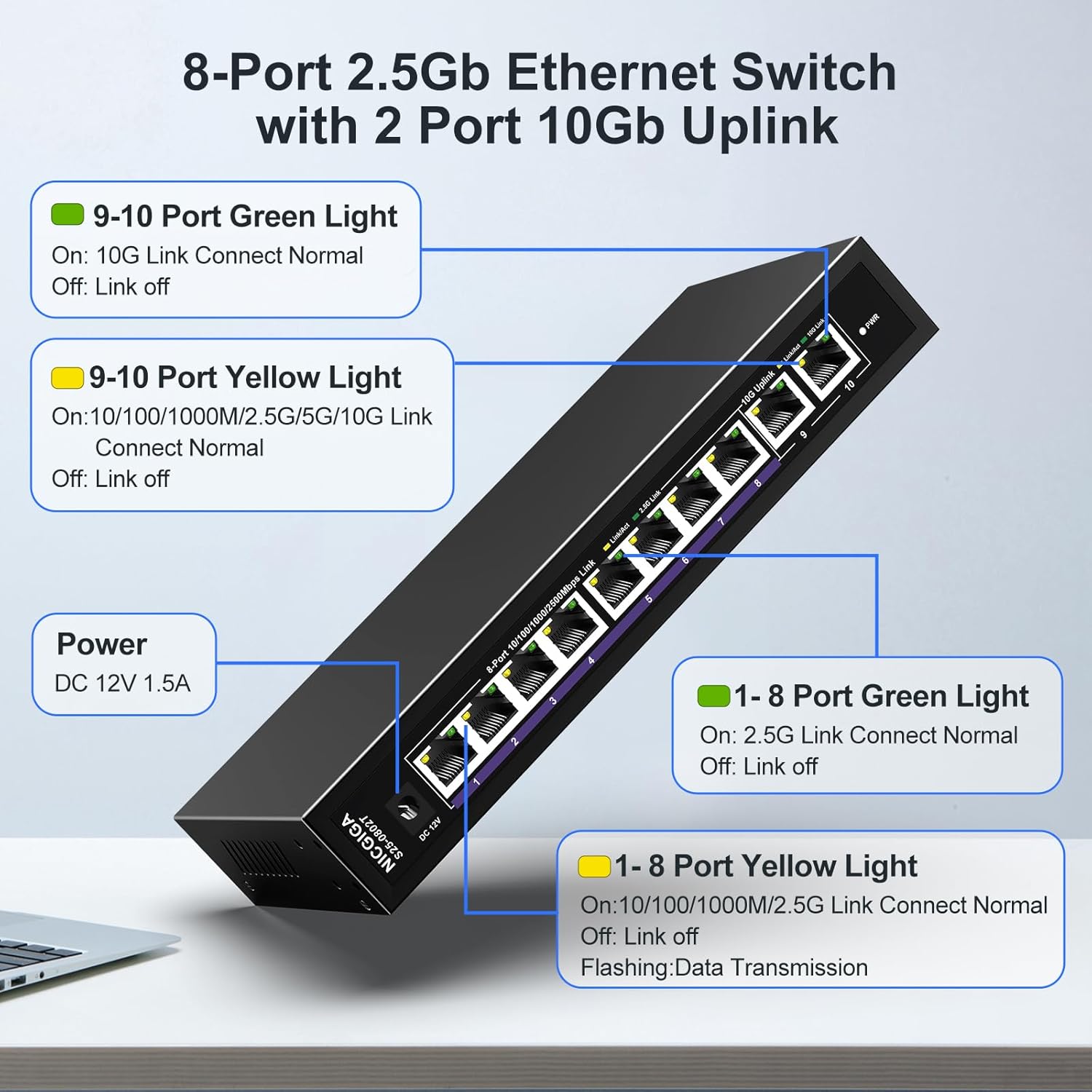
7. ЛЕД индикатори
The switch features LED indicators to provide real-time status information for each port and the device itself.
| Индикатор | Статус | Опис |
|---|---|---|
| Повер | On | Прекидач је укључен. |
| Ports 1-8 Green Light | On | 2.5G Link Connect Normal. |
| Офф | Link off. | |
| Ports 1-8 Yellow Light | On | 10/100/1000M/2.5G Link Connect Normal. |
| Трепери | Data Transmission. | |
| Офф | Link off. | |
| Ports 9-10 Green Light | On | 10G Link Connect Normal. |
| Офф | Link off. | |
| Ports 9-10 Yellow Light | On | 10/100/1000M/2.5G/5G/10G Link Connect Normal. |
| Трепери | Data Transmission. | |
| Офф | Link off. |
8. Network Cable Compatibility
Using appropriate Ethernet cables is crucial for achieving optimal network speeds.
- For 2.5Gbps Ports (1-8):
- CAT5e Cable (≤100m)
- CAT6/6a Cable (≤100m)
- CAT7 Cable (≤100m)
- For 10Gbps Ports (9-10):
- CAT6 Cable (≤55m)
- CAT6a Cable (≤100m)
- CAT7 Cable (≤100m)


9. Спецификације
| Феатуре | Детаљ |
|---|---|
| Број модела | С25-0802Т |
| Број портова | 10 (8 x 2.5Gb RJ45, 2 x 10Gb RJ45) |
| Тип интерфејса | РЈ45 |
| Брзина преноса података | 60 гигабита у секунди (капацитет пребацивања) |
| Горња оцена температуре | 50 степени Целзијуса |
| Тежина артикла | 1.76 фунти |
| Димензије пакета | 9.8 к 9.61 к 2.99 инча |
| Боја | Црно |
| Компатибилни уређаји | Desktop, Gaming Console, Laptop, Printer, Router |
| Произвођач | НИЦГИГА |
КСНУМКС. Решавање проблема
If you encounter issues with your NICGIGA switch, refer to the following common troubleshooting steps:
- Нема напајања:
- Уверите се да је адаптер за напајање безбедно повезан са прекидачем и исправном утичницом.
- Проверите да ли је утичница функционална.
- Без светла везе:
- Проверите да ли је Етернет кабл безбедно повезан и са портом прекидача и са мрежним уређајем.
- Пробајте други Етернет кабл.
- Уверите се да је повезани уређај укључен и да је његов мрежни адаптер омогућен.
- Verify the cable type is appropriate for the desired speed (refer to Section 8).
- Мала брзина мреже:
- Ensure your network cables are rated for the desired speed (e.g., CAT6a or CAT7 for 10Gbps).
- Check the network adapter settings on your connected devices to ensure they are configured for auto-negotiation or the correct speed.
- Confirm that the connected devices themselves support the higher speeds (2.5Gbps or 10Gbps).
- Интермитентна веза:
- Inspect Ethernet cables for damage.
- Ensure the switch is placed in a well-ventilated area to prevent overheating, although its fanless design is optimized for heat dissipation.
- Avoid placing the switch near strong electromagnetic interference sources.
11. Одржавање
To ensure the longevity and optimal performance of your switch, follow these maintenance guidelines:
- Чишћење: Користите меку, суву крпу за чишћење спољашњости прекидача. Не користите течна или аеросолна средства за чишћење.
- вентилација: Ensure that the ventilation holes on the sides of the switch are not obstructed to allow for proper heat dissipation.
- Окружење: Operate the switch within its specified temperature range (-10~50°C) and humidity levels.
- Циклус напајања: If the switch becomes unresponsive, disconnect the power adapter, wait for 10 seconds, and then reconnect it.

12. Гаранција и подршка
NICGIGA provides the following support for this product:
- гаранција: Гаранција од годину дана се даје од датума куповине.
- техничка подршка: Lifetime technical support is available for the product.
For warranty claims or technical assistance, please contact NICGIGA customer support through the retailer where the product was purchased or visit the official NICGIGA webсајту.