
1. Увод
This manual provides detailed instructions for the installation, operation, and maintenance of your darkFlash DS900 Air ATX Mid-Tower PC Gaming Case. Please read this manual thoroughly before beginning assembly to ensure proper setup and safe usage. The DS900 Air is designed to offer a clear view of your components with its 270° full-view tempered glass and provides excellent cooling capabilities for high-performance systems.

Figure 1.1: darkFlash DS900 Air ATX Mid-Tower PC Gaming Case with internal components and RGB lighting.
2. Безбедносне информације
Увек се придржавајте следећих мера безбедности током инсталације и рада:
- Искључите напајање из зидне утичнице пре инсталирања или уклањања било којих компоненти.
- Wear an anti-static wrist strap to prevent electrostatic discharge (ESD) damage to sensitive components.
- Handle tempered glass panels with care. Avoid impacts or dropping them, as they can shatter.
- Држите мале делове и шрафове даље од деце.
- Обезбедите одговарајућу вентилацију око кућишта како бисте спречили прегревање.
- Do not attempt to modify the case structure, as this may void the warranty and pose safety risks.
3. Спецификације
| Феатуре | Спецификација |
|---|---|
| Назив модела | DS900 Air |
| Тип случаја | АТКС Мид-Товер |
| Подршка матичне плоче | АТКС, Мицро-АТКС, Мини-ИТКС |
| Размак дужине ГПУ-а | До 425 мм |
| Висина хладњака процесора | До 170 мм |
| ПСУ Типе | ATX (Bottom-mounted) |
| Дриве Баис | 2x 3.5" HDD or 2x 2.5" SSD, 2x 2.5" SSD |
| Слотови за проширење | 7 ПЦИе слот |
| И/О портови | 1x USB-C, 1x USB 3.0, Audio (HD Audio) |
| Подршка обожаватеља | Bottom: 3x 120mm; Top: 3x 120mm or 2x 140mm; Rear: 1x 120mm; Right Side: 2x 120mm |
| Подршка радијатора | Top: Up to 360mm; Side: Up to 240mm |
| Материјали | Челик, каљено стакло |
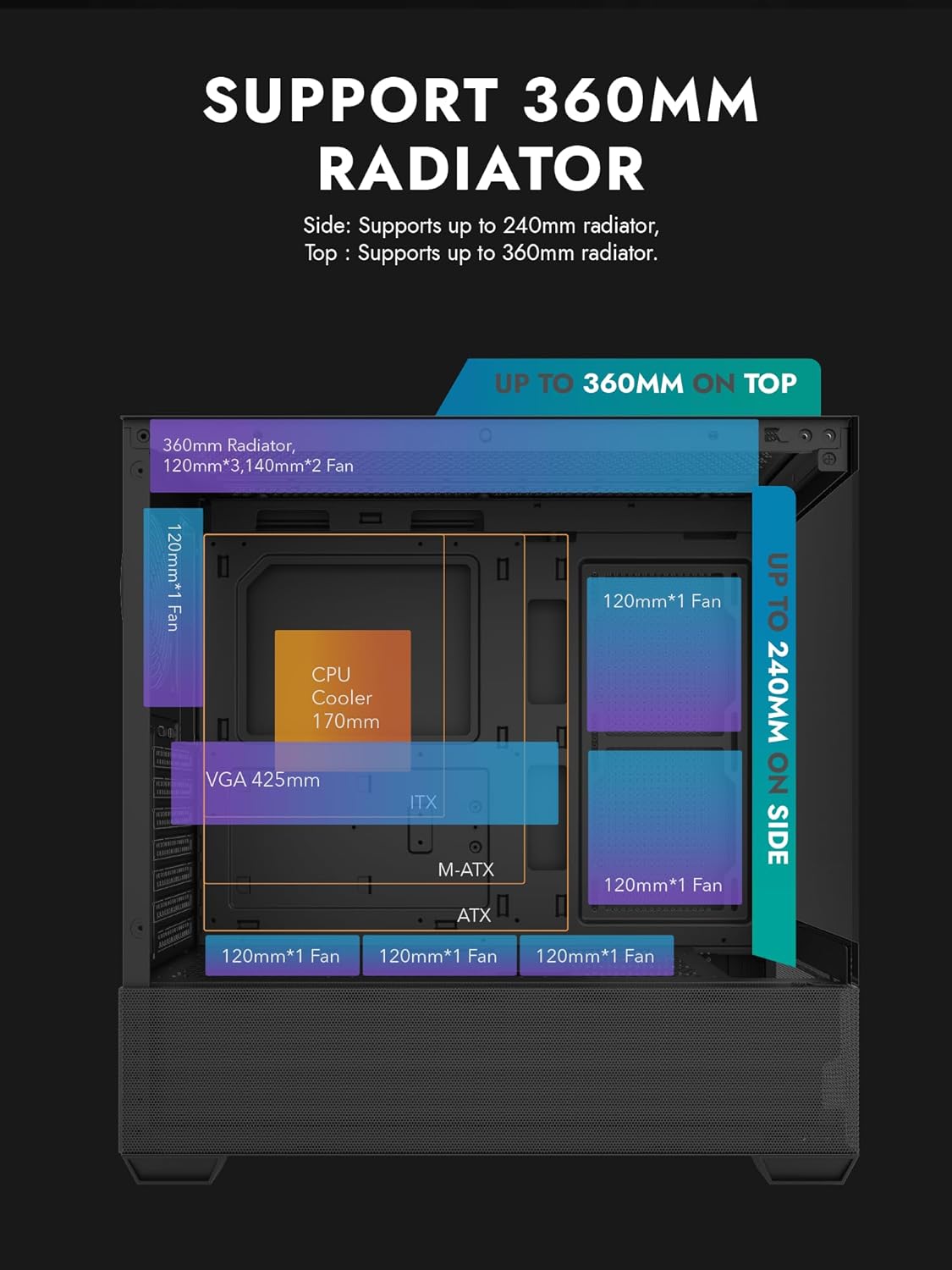
Figure 3.1: Radiator and fan support diagram for the DS900 Air case, illustrating maximum component dimensions.
4. Подешавање и инсталација
Follow these steps to assemble your PC components within the darkFlash DS900 Air case.
4.1. Припрема случаја
- Уклоните бочне панеле: The DS900 Air features a tool-free clamshell side panel. Gently pull the top edge of the tempered glass side panel to unlatch it, then lift it off. Repeat for the other side panel if necessary.
- Кутија за додатну опрему: Locate the accessory box inside the case, which contains screws, cable ties, and other mounting hardware.
4.2. Инсталација матичне плоче
- Инсталирајте И/О штит у задњи отвор кућишта.
- Align your ATX, Micro-ATX, or Mini-ITX motherboard with the standoffs inside the case. Ensure the I/O ports align with the I/O shield.
- Причврстите матичну плочу помоћу приложених вијака.
4.3. Инсталација јединице за напајање (PSU)
- The DS900 Air has a dedicated bottom PSU chamber. Slide your ATX power supply into the chamber from the rear of the case.
- Причврстите напајање завртњима са задње стране кућишта.
- Route necessary power cables through the cutouts into the main compartment.
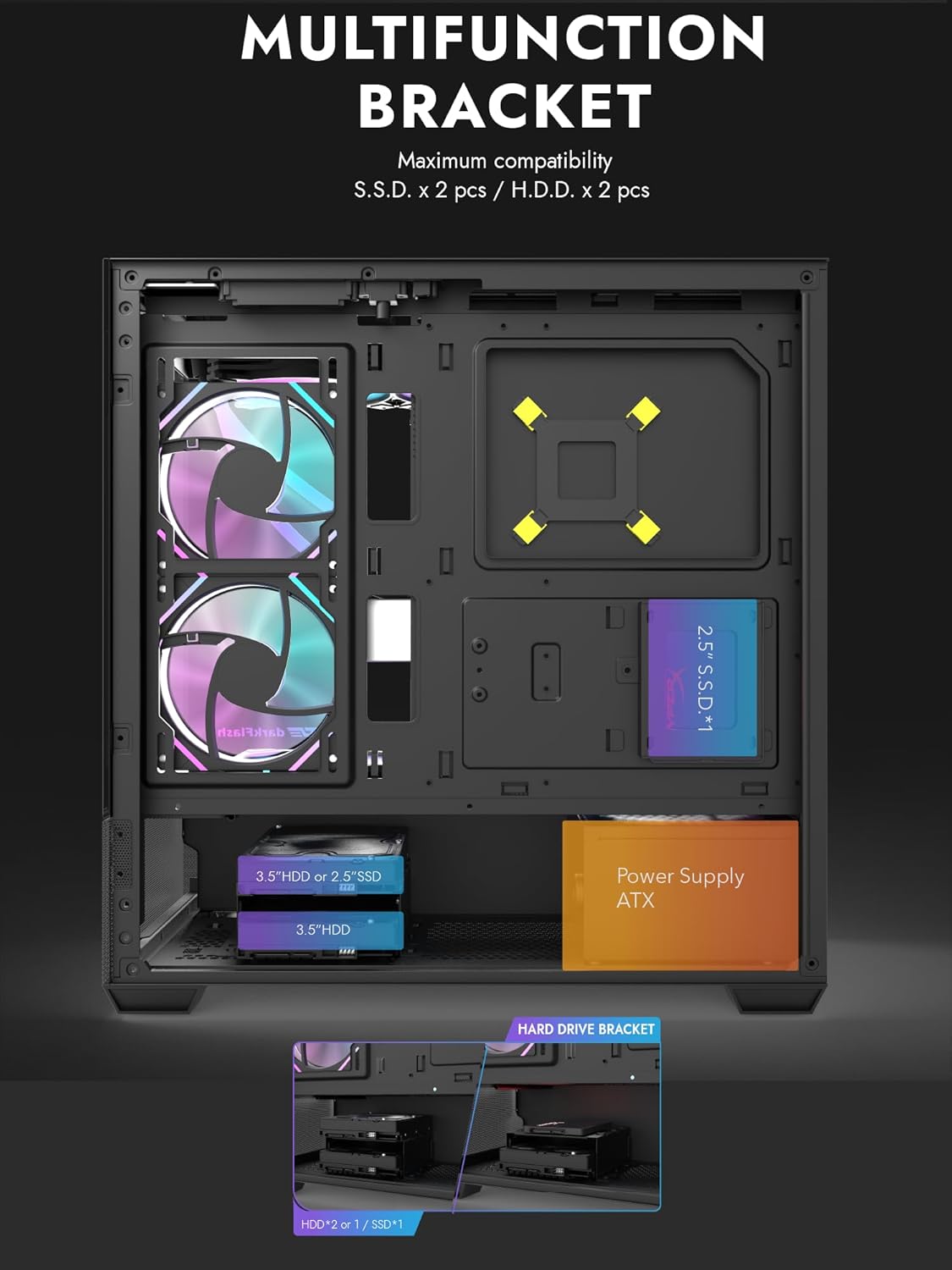
Figure 4.1: Internal layout showing the multifunction drive bracket and the bottom-mounted PSU chamber.
4.4. Инсталација уређаја за складиштење
The case supports up to two 3.5" HDDs or 2.5" SSDs in the hard drive bracket, and two additional 2.5" SSDs on the multifunction bracket.
- 3.5" HDD / 2.5" SSD: Install drives into the removable hard drive bracket located in the PSU chamber. Secure with screws.
- 2.5" SSD: Mount 2.5" SSDs onto the multifunction bracket located on the motherboard tray. Secure with screws.
4.5. Инсталација графичке картице (GPU)
- Уклоните потребне поклопце PCIe слотова са задње стране кућишта.
- Уметните графичку картицу у одговарајући PCIe слот на матичној плочи.
- Причврстите графичку картицу завртњима. Кућиште подржава графичке процесоре дужине до 425 мм.
4.6. Уградња система за хлађење (вентилатори/радијатори)
The DS900 Air offers extensive cooling options:
- Врх: Supports up to 3x 120mm fans or 2x 140mm fans, or a 360mm radiator.
- дно: Supports up to 3x 120mm fans.
- позади: Supports 1x 120mm fan.
- Десна страна: Supports 2x 120mm fans or a 240mm radiator.
Install fans and radiators using the appropriate screws and mounting points. Ensure correct airflow direction for optimal cooling.

Figure 4.2: Fan support locations and quantities within the DS900 Air chassis.

Figure 4.3: Airflow diagram demonstrating optimal cooling paths through the case.
4.7. Повезивање предњих I/O каблова
Connect the front panel cables (USB-C, USB 3.0, HD Audio, Power, Reset, LED) to their corresponding headers on your motherboard. Refer to your motherboard manual for exact header locations.

Figure 4.4: Top-right I/O panel featuring USB-C and USB 3.0 ports.
4.8. Менаџмент каблова
Користите изрезе за усмеравање каблова и тачке за везивање иза лежишта матичне плоче да бисте управљали кабловима. Ово побољшава проток ваздуха и естетику.
5. Управљање рачунаром
Once all components are installed and cables are connected, replace the side panels. Connect your monitor, keyboard, mouse, and power cable. Press the power button on the case to start your system. Ensure all fans are spinning and components are receiving power.
6. Одржавање
Редовно одржавање помаже у обезбеђивању оптималних перформанси и дугог века трајања компоненти вашег рачунара.
- Чишћење прашине: Periodically clean dust filters and internal components using compressed air. The DS900 Air features mesh panels that help filter dust.
- Проток ваздуха: Ensure no obstructions block the intake or exhaust vents of the case.
- Управљање кабловима: Re-evaluate cable routing periodically to ensure no cables are interfering with fan blades or airflow.
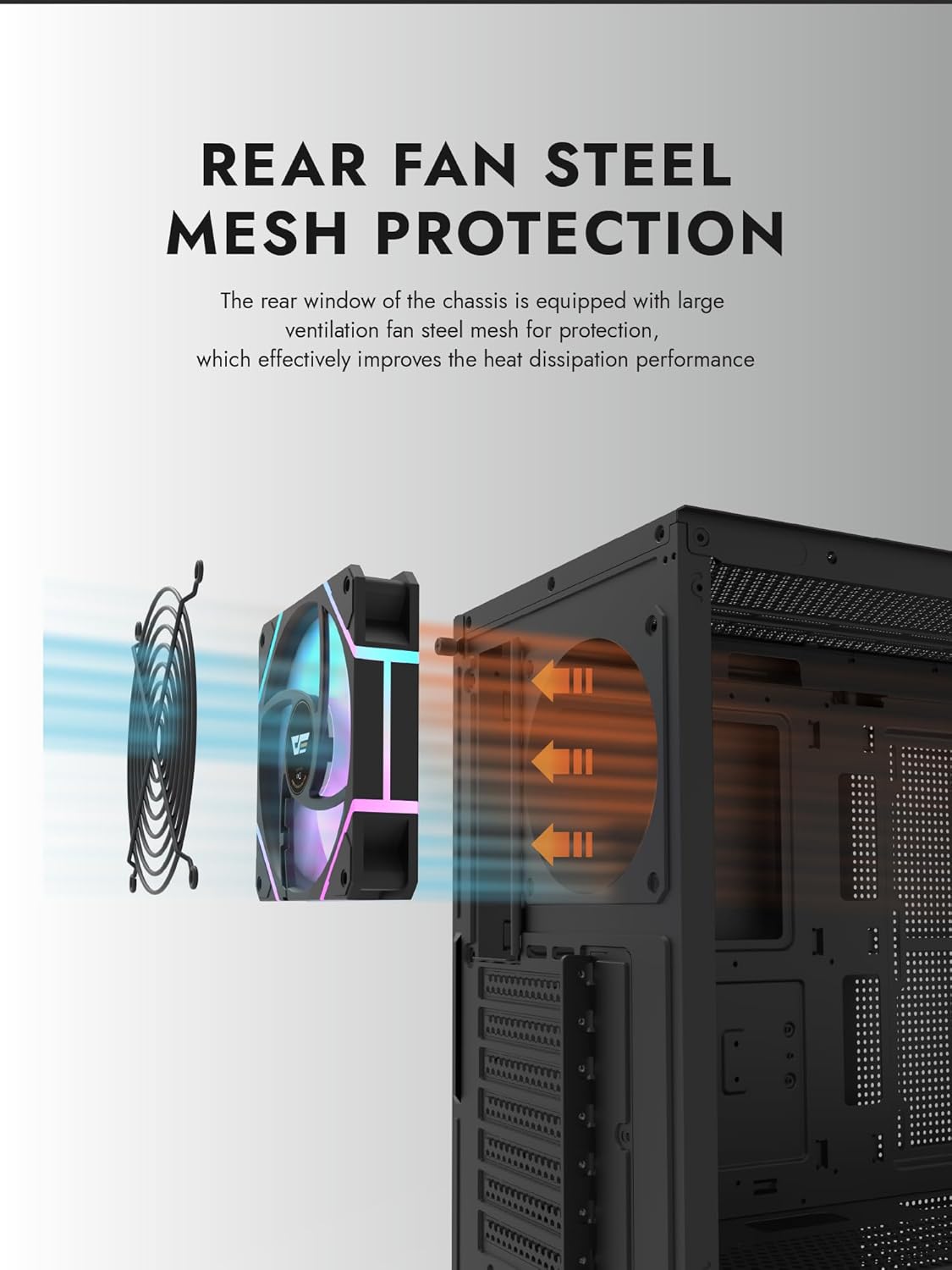
Figure 6.1: Rear fan steel mesh protection, designed to improve heat dissipation.
КСНУМКС. Решавање проблема
If you encounter issues with your PC build, consider the following common troubleshooting steps:
- Нема напајања: Check all power connections, including the PSU to the wall, PSU to motherboard, and front panel power switch cable to the motherboard.
- Без приказа: Ensure your monitor is connected to the graphics card (not the motherboard I/O unless using integrated graphics). Reseat the graphics card and RAM.
- прегревање: Verify all fans are spinning correctly and are oriented for proper airflow. Check CPU cooler installation.
- Компонента није откривена: Reseat the component (e.g., RAM, GPU, storage drive) and check its power and data connections.
8. Гаранција и подршка
darkFlash products are manufactured to high-quality standards. For warranty information or technical support, please refer to the official darkFlash webсајт или контактирајте продавца. Сачувајте доказ о куповини за потребе гаранције.