
1. Увод
Thank you for choosing the Eureka N6 Plus Robot Vacuum Cleaner. This manual provides essential information for the safe operation, maintenance, and troubleshooting of your device. Please read it thoroughly before use and keep it for future reference. The Eureka N6 Plus combines powerful suction, intelligent navigation, and convenient app control to deliver an efficient and effortless cleaning experience for modern homes.
2. Безбедносна упутства
Да бисте смањили ризик од повреда или оштећења, прочитајте и следите све мере предострожности.
- Овај уређај могу да користе деца узраста од 8 година и више и особе са смањеним физичким, сензорним или менталним способностима или недостатком искуства и знања ако су под надзором или инструкције у вези са употребом уређаја на безбедан начин и разумеју опасности које су укључене. .
- Не дозволите деци да се играју уређајем. Чишћење и одржавање не смеју обављати деца без надзора.
- Користите само оригинални адаптер за напајање и базу за пуњење које је обезбедио произвођач.
- Do not use the robot to pick up large objects, sharp debris, liquids, or burning/smoking materials.
- Ensure the robot operates on stable, level surfaces. Avoid operating near stairs or elevated areas without proper barriers.
- Држите косу, широку одећу, прсте и све делове тела даље од отвора и покретних делова.
- Do not immerse the robot or its charging base in water or other liquids.
- Before cleaning or performing maintenance, ensure the robot is turned off and disconnected from the power supply.
- Чувајте робота на сувом и хладном месту када га не користите.
3. Садржај пакета
Проверите да ли су све компоненте присутне и у добром стању приликом распакивања.
- Eureka N6 Plus Robot Vacuum Cleaner
- Self-emptying Charging Base
- Повер Адаптер
- Упутство за употребу
4. Производ је готовview
Familiarize yourself with the main components of your Eureka N6 Plus robot vacuum cleaner and its self-emptying base.
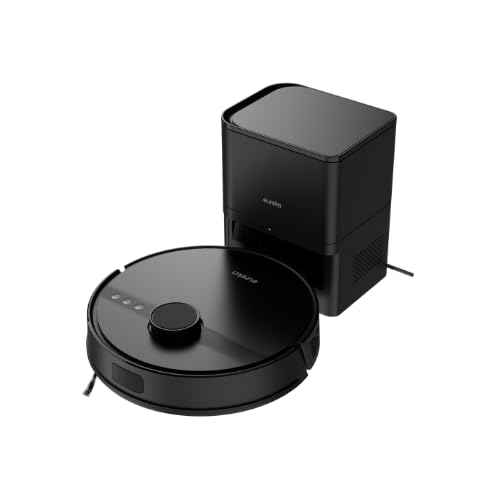
Image 4.1: Eureka N6 Plus Robot Vacuum Cleaner with its self-emptying base and a smartphone displaying the control app interface. The robot is dark grey with a central button, and the base is a matching dark grey tower.

Слика 4.2: Одозго надоле view of the Eureka N6 Plus Robot Vacuum Cleaner, highlighting the integrated water tank for mopping functionality. The robot is black with a central LiDAR sensor and control buttons.
Компоненте робота:
- LiDAR Sensor: За прецизну навигацију и мапирање.
- Контролна дугмад: Power/Start, Home/Recharge.
- Канта за прашину/резервоар за воду: Integrated for vacuuming and mopping.
- Бочне четке: To sweep debris from edges and corners.
- Главна четка: Anti-tangle design for effective cleaning.
- Сензори за литицу: To prevent falls from stairs.
- Контакти за пуњење: For connection to the charging base.
Self-Emptying Charging Base:
- Одељак за кесу за прашину: Houses the 2.5-liter disposable dust bag.
- Доцк за пуњење: Where the robot returns to charge and empty its dustbin.
- Индикатор напајања: Приказује статус пуњења.
5. Подешавање
5.1 Постављање базе за пуњење
- Place the self-emptying charging base against a wall in an open area.
- Ensure there is at least 0.5 meters (1.6 feet) of clear space on both sides and 1.5 meters (4.9 feet) in front of the base.
- Прикључите адаптер за напајање на базу за пуњење и укључите га у зидну утичницу.
- Ensure the power cable is neatly arranged to prevent the robot from tangling.
5.2 Почетно пуњење
- Place the robot onto the charging base. Ensure the charging contacts on the robot align with those on the base.
- The robot will automatically begin charging. Allow it to fully charge before its first use (approximately 4-6 hours). The indicator light on the robot will change to indicate a full charge.
5.3 Повезивање апликације
- Download the "Eureka Robot" app from your smartphone's app store (available for iOS and Android).
- Отворите апликацију и креирајте налог.
- Follow the in-app instructions to add your Eureka N6 Plus robot. This typically involves connecting to the robot's Wi-Fi hotspot temporarily and then connecting it to your home Wi-Fi network.
- Once connected, you can control the robot, schedule cleanings, adjust settings, and view cleaning maps from your smartphone.
6. Упутство за употребу
6.1 Покретање циклуса чишћења
- Ручни старт: Press the Power/Start button on the robot once. The robot will begin cleaning in Auto mode.
- Покретање апликације: Open the "Eureka Robot" app, select your device, and tap the 'Start' or 'Clean' button. You can also select specific cleaning modes or areas.
6.2 Stopping/Pausing a Cleaning Cycle
- Press the Power/Start button on the robot once to pause. Press again to resume.
- Use the 'Pause' or 'Stop' button in the app.
6.3 Повратак на базу за пуњење
- Press the Home/Recharge button on the robot.
- Use the 'Recharge' or 'Dock' button in the app. The robot will automatically return to its charging base.
6.4 Функција брисања
The Eureka N6 Plus features a simultaneous vacuuming and mopping function.
- Fill the integrated water tank with clean water. Do not use detergents or cleaning solutions not approved for robot vacuums.
- Attach the mopping pad securely.
- In the app, you can select the desired water flow level (three adjustable levels) suitable for different hard floor types.
- The robot will vacuum and mop simultaneously.
6.5 Контрола гласовним асистентом
The Eureka N6 Plus supports voice control via Alexa and Google Assistant.
- Enable the "Eureka Robot" skill/action in your Alexa or Google Home app.
- Link your Eureka Robot account.
- Use commands such as "Alexa, tell Eureka Robot to start cleaning" or "Hey Google, ask Eureka Robot to go home."
7. Одржавање
Редовно одржавање обезбеђује оптималне перформансе и продужава век трајања вашег роботског усисивача.
7.1 Self-Emptying Dust Bag (Base)
- The 2.5-liter dust bag in the self-emptying base should be replaced when full. The app will notify you.
- Open the top cover of the charging base, remove the full bag, and insert a new one.
7.2 Роботска канта за прашину и филтер
- Even with the self-emptying feature, it is recommended to periodically check and manually empty the robot's internal dustbin.
- Clean the HEPA filter regularly by tapping it to remove dust. Replace the filter every 3-6 months, depending on usage. Do not wash the HEPA filter with water.
7.3 Главна четка и бочне четке
- Главна четка: Скините поклопац главне четке и извадите четку. Користите алат за чишћење да бисте уклонили длаке и остатке запетљане око четке.
- Бочне четке: Check side brushes for wear or damage. Remove any tangled hair. Replace if bristles are bent or missing.
7.4 Сензори и контакти за пуњење
- Wipe all sensors (cliff sensors, wall sensors, LiDAR sensor window) and charging contacts on both the robot and the base with a clean, dry cloth.
7.5 Water Tank and Mopping Pad
- After each mopping session, empty any remaining water from the tank.
- Clean the mopping pad thoroughly and allow it to air dry before storing.
КСНУМКС. Решавање проблема
If you encounter issues with your Eureka N6 Plus, refer to the following common problems and solutions.
| Проблем | Могући узрок | Решење |
|---|---|---|
| Робот се не укључује | Low battery; Power button not pressed; Robot stuck. | Charge the robot; Press and hold the power button; Clear any obstructions. |
| Robot cannot find charging base | Base obstructed; Base not powered; Robot too far. | Ensure clear space around base; Check power connection; Manually place robot near base. |
| Лоше перформансе чишћења | Пуна канта за прашину/кеса за прашину; Зачепљен филтер; Замршене четке. | Empty dustbin/replace dust bag; Clean/replace filter; Clean main and side brushes. |
| Проблеми са везом апликације | Incorrect Wi-Fi password; Router too far; Robot offline. | Verify Wi-Fi credentials; Move robot closer to router; Restart robot and router. |
| Робот се често заглављује | Obstacles on floor; Dark surfaces triggering cliff sensors. | Clear cables, toys, and small objects; Use no-go zones in app for problematic areas. |
9. Спецификације
Detailed technical specifications for the Eureka N6 Plus Robot Vacuum Cleaner.
| Феатуре | Спецификација |
|---|---|
| Бранд | EUREKA |
| Назив модела | N6 Plus Black |
| Димензије (Д к Ш к В) | 35Д к 35Ш к 41.1В цм |
| Тежина артикла | 5.5 килограма |
| Тип батерије | Литијум-јонски |
| Волtage | 14.4 Волтс |
| Трајање батерије | Up to 120 minutes (continuous cleaning) |
| Снага усисавања | Approximately 5000 Pa |
| Капацитет кесе за прашину (основа) | 2.5 литара |
| Тип филтера | ХЕПА |
| Тип навигације | ЛиДАР сензор |
| Контролни метод | App Control, Voice Control (Alexa, Google Assistant) |
| Посебне карактеристике | Self-emptying base, Simultaneous vacuuming and mopping, Anti-tangle brush, Three adjustable water levels |
| Препоручене површине | Све врсте подова |
10. Гаранција и подршка
10.1 Информације о гаранцији
The Eureka N6 Plus Robot Vacuum Cleaner comes with a manufacturer's warranty. Please refer to the warranty card included in your package for specific terms and conditions. Spare parts availability in the EU is guaranteed for 3 years.
10.2 Корисничка подршка
For technical assistance, warranty claims, or general inquiries, please contact Eureka customer support through the following channels:
- Webсајт: Visit the official Eureka webсајт за често постављана питања и ресурсе за подршку.
- Емаил: Refer to your warranty card or the Eureka website for the appropriate support email address.
- Телефон: Contact numbers for your region can be found on the Eureka webсајту.
Please have your model number (N6 Plus Black) and purchase information ready when contacting support.